The Impact of Page Speed on SEO
Page speed is a critical metric in the realm of Search Engine Optimization (SEO), directly influencing how search engines perceive and rank your website. A website that loads quickly not only enhances the overall user experience, leading to higher engagement and lower bounce rates, but it also signals to search engines like Google that your site is valuable and user-friendly. This, in turn, can have a significant positive impact on your search engine rankings.
This comprehensive article delves into the multifaceted relationship between page speed and SEO. We will explore precisely how a faster loading website contributes to better search engine performance, identify the key indicators and tools for accurately measuring your page speed, and provide actionable, practical tips and techniques to optimize your website for faster loading times. Understanding and improving page speed is no longer an option, but a necessity for any serious SEO strategy.
How Page Speed Impacts SEO:
Search engines take into account the loading time of web pages when ranking them in their results. The faster your website loads the better chance you have of appearing higher up in search engine rankings. Slow loading times can lead to low engagement and fewer conversions which will cause your website’s search engine visibility to suffer. Furthermore, Google has stated that they use site speed as a ranking factor when determining where to place pages in their search engine results.
What to Look Out for When Measuring Page Speed:
When measuring page speed, there are several factors to consider. This includes the size of your webpages, whether or not you’re using a content delivery network (CDN), and the type of server you’re running on. Additionally, you should also be aware of any third-party scripts that may be slowing down your site such as ad networks or analytics services.
Tips for Improving Page Speed:
The best way to improve page speed is to optimize images, minify code and compress files. Additionally, you should look into using a CDN to reduce loading times and switch to a faster server. You can also leverage browser caching which stores static content in the user’s browser so that it doesn’t have to be downloaded when they visit your website again. Lastly, you should consider eliminating or minimizing any third-party scripts that may be slowing down your pages.
Page speed is an important factor for SEO and search engine rankings. It affects the user experience of visitors and can have a significant impact on your website’s visibility in major search engines. To ensure your website performs well, make sure to measure page speed regularly and use the tips provided above to improve it.
Search engine optimization (SEO) is becoming more important than ever. As competition increases, websites must be able to keep up with the trends and ensure that their pages are well-designed for better visibility on the web. One of the most important factors when it comes to SEO success is page speed. Page speed can have a tremendous impact on how search engines view your website and how users interact with it.
In this article, we will discuss what page speed is, how it affects SEO, and best practices for improving your website’s performance.
What Is Page Speed?
Page speed is simply the amount of time it takes for a web page to load from start to finish after a user requests it from a server. A slow page can cause users to abandon your website and search engines to not rank it as highly, resulting in fewer visitors and potential customers.
How Does Page Speed Impact SEO?
Page speed is a major factor when it comes to SEO success. Search engines measure the amount of time it takes for pages to load, and if they are too slow, they will be less likely to show up in the results. Additionally, visitors who experience long load times may leave before having time to engage with content or convert into customers. This can impact your overall organic traffic numbers and lead to decreased rankings in search engine results pages (SERPs).
Best Practices for Improving Page Speed
There are several steps you can take to improve the speed of your website. These include optimizing images, minifying code, caching pages and other resources, reducing redirects, and improving server response times. Additionally, leveraging a content delivery network (CDN) can help reduce page load times by distributing static files across multiple servers instead of hosting them on one.
Conclusion
Page speed is essential for SEO success and should not be overlooked. By following best practices such as optimizing images and minifying code, you can ensure that your website is loading quickly and efficiently for search engines and visitors alike. This will improve user experience, increase organic traffic numbers, and ultimately boost your rankings in SERPs.
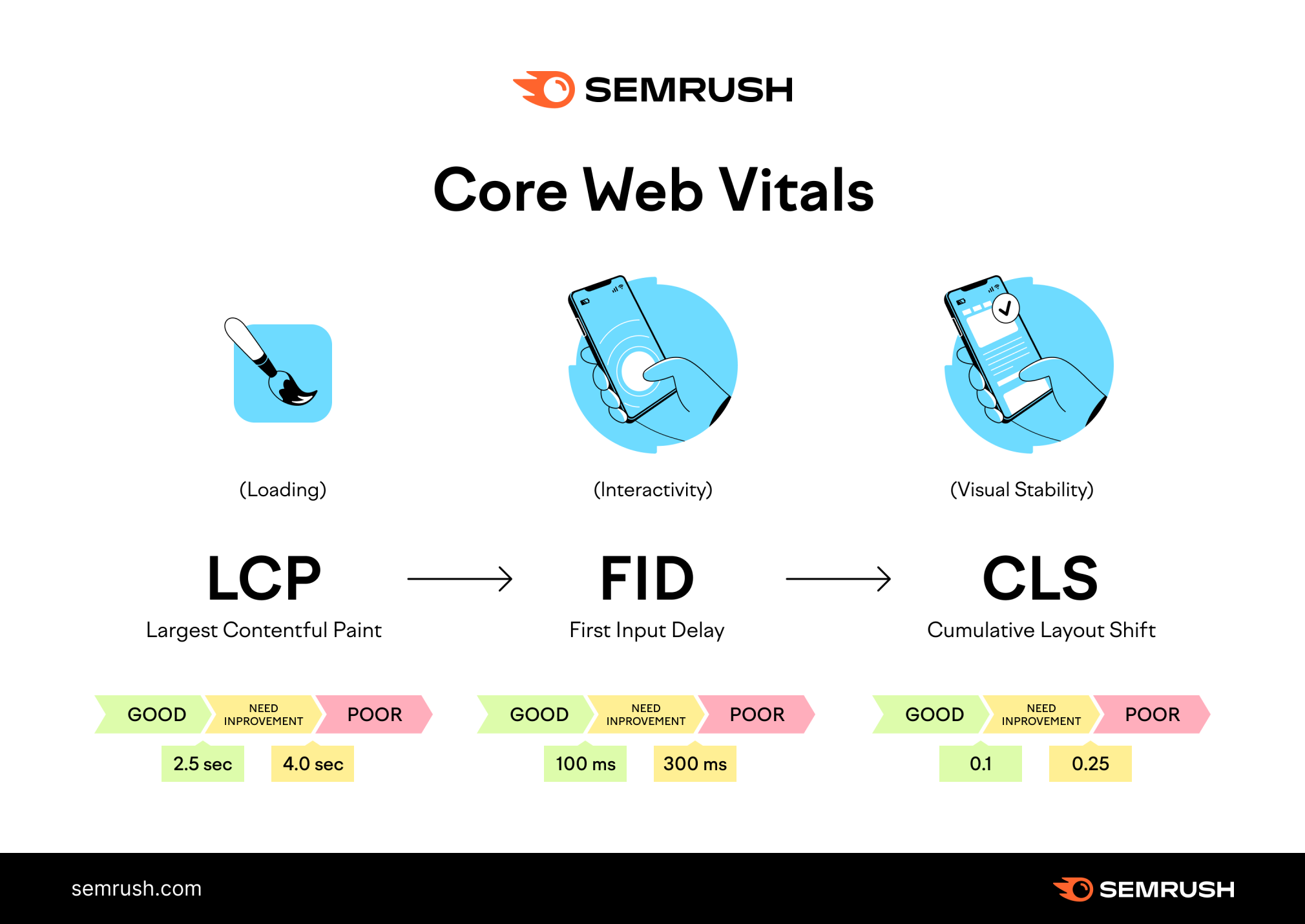
Understanding Core Web Vitals: The Modern Speed Standard
In 2026, page speed is no longer just about raw load time. Google introduced Core Web Vitals to measure real-world user experience. These three metrics are essential for SEO:
- Largest Contentful Paint (LCP): Measures loading performance. It marks the point when the largest content element (image, video, block of text) becomes visible. Aim for ≤ 2.5 seconds.
- First Input Delay (FID): Measures interactivity. It tracks the time from when a user first interacts with your page (clicking a link, tapping a button) to when the browser responds. Aim for ≤ 100 milliseconds.
- Cumulative Layout Shift (CLS): Measures visual stability. It quantifies unexpected layout shifts that annoy users. Aim for ≤ 0.1.
These metrics are collected from real Chrome users and directly affect your ranking in mobile search. Tools like Google PageSpeed Insights and Google Search Console (Core Web Vitals report) provide actionable data.
In‑Depth: How Page Speed Affects Conversions and Revenue
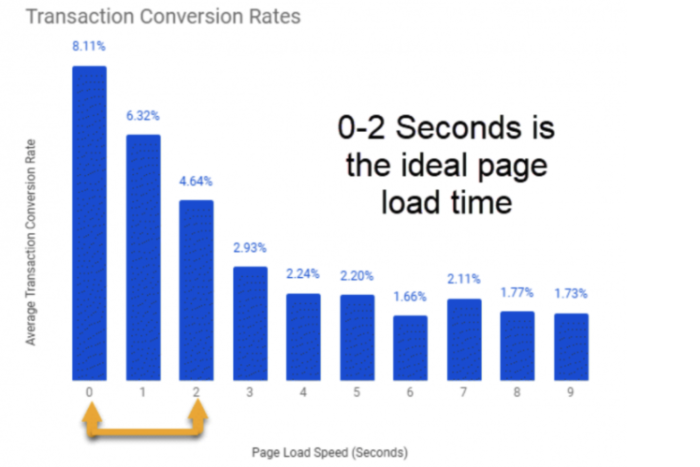
Beyond SEO rankings, speed directly impacts your bottom line. A one‑second delay in mobile load time can reduce conversions by up to 20%, according to industry studies. For e-commerce sites, every extra second of load time can cost millions in lost sales. The Think with Google research shows that as page load time increases from 1 to 3 seconds, bounce rate probability jumps by 32%.
Investing in speed is an investment in user satisfaction and revenue. Amazon found that every 100ms of latency cost them 1% in sales. Walmart reported that improving page load time by 1 second increased conversions by 2%.
Tools to Measure and Monitor Page Speed (Free & Paid)
- Google PageSpeed Insights: Free, provides lab and field data, plus optimization suggestions.
- GTmetrix: Free with paid plans; shows waterfall charts and video comparisons.
- WebPageTest: Advanced testing from multiple locations and devices; free.
- Lighthouse (Chrome DevTools): Built‑in browser tool for in‑depth audits.
- Pingdom Website Speed Test: Quick checks and performance grades.
- Semrush Site Audit: Monitors speed as part of overall SEO health.
Advanced Optimization Techniques Beyond the Basics
To truly excel, you need to go beyond image optimization and caching. Here are advanced strategies that top-performing sites use:
1. Implement HTTP/2 or HTTP/3
HTTP/2 allows multiplexing, where multiple requests are sent simultaneously over a single connection, reducing latency. HTTP/3 (based on QUIC) further improves performance, especially on mobile networks. Ensure your hosting and CDN support the latest protocols.
2. Use Lazy Loading for Images and Videos
Native lazy loading using the loading="lazy" attribute defers off‑screen images until the user scrolls near them. This reduces initial page weight and improves LCP. WordPress 5.5+ includes native lazy loading for images.
3. Optimize Web Fonts
Web fonts can block rendering. Use font-display: swap to show fallback fonts while custom fonts load, and limit the number of font weights and subsets you load. Tools like Google Fonts provide optimized delivery.
4. Implement Preconnect and Preload
Use <link rel="preconnect"> to establish early connections to critical third‑party origins. Preload key resources (like hero images) with <link rel="preload"> to prioritize their fetching.
5. Choose a Fast, Scalable Hosting Solution
Shared hosting often lacks resources. Upgrade to managed WordPress hosting, VPS, or dedicated servers. Providers like Kinsta, WP Engine, and Cloudways offer server‑level caching and CDN integration.
Mobile Page Speed: Why It’s Non‑Negotiable
Over 60% of all searches occur on mobile devices, and Google uses mobile‑first indexing. A slow mobile experience directly impacts rankings. Additionally, mobile networks (3G/4G) often have higher latency. Ensure your design is responsive, and use mobile‑specific testing tools. Avoid pop‑ups that cover content and optimize for touch interactions.
Case Study: How Speed Optimization Boosted Traffic by 30%
A lifestyle blog with 50,000 monthly visitors was suffering from a 7‑second load time on mobile. After implementing a CDN, compressing images with WebP, minifying CSS/JS, and using a caching plugin, the load time dropped to 2.4 seconds. Within three months, organic traffic increased by 30%, and bounce rate decreased by 18%. The site also climbed from page 2 to top 3 positions for several competitive keywords.
Common Page Speed Pitfalls and How to Avoid Them
- Oversized images: Use responsive images (
srcset) and serve WebP/AVIF formats. - Unoptimized plugins: Deactivate and delete unused WordPress plugins; replace heavy ones with lighter alternatives.
- Excessive redirects: Each redirect adds an HTTP request; keep them minimal and direct.
- No caching: Implement browser and server‑side caching.
- Render‑blocking JavaScript: Defer or async non‑critical scripts.
Key Takeaways: Speed as a Cornerstone of SEO
- Page speed is a confirmed Google ranking factor and part of the page experience signal.
- Core Web Vitals (LCP, FID, CLS) measure real‑world user experience and are critical for mobile rankings.
- Slow pages increase bounce rates, reduce conversions, and hurt organic visibility.
- Optimization includes image compression, minification, caching, CDNs, and modern protocols (HTTP/2, HTTP/3).
- Regular monitoring using tools like PageSpeed Insights, GTmetrix, and Search Console is essential.
- Invest in quality hosting and consider technical improvements like preload, preconnect, and lazy loading.
By prioritizing page speed, you not only please search engines but also create a frictionless experience for your visitors, leading to higher engagement, more conversions, and sustainable growth.