

Why Your Business Needs a Windows Screen Recording App in 2026: Stop Corruption, Harassment & Productivity Loss
Corruption, sexual harassment, insider threats, and productivity drain—these aren’t just headlines; they’re daily realities for businesses worldwide. According to ACCA Global, approximately 64% of businesses face corruption issues, ranging from bribery and abuse of power to the sale of confidential information. Meanwhile, ThinkWithGoogle reports that 70% of YouTube viewers turn to video content for problem-solving, and a staggering 38% of women experience workplace harassment—with 94% of those incidents combining workplace and domestic follow-up. Add to that the 45–50% productivity drain caused by social media addiction during work hours, and the picture is clear: employers need better visibility and control. A professional Windows screen recording app provides exactly that—a discreet, powerful tool to monitor activities, protect assets, and foster a safer, more productive workplace. This guide explores why screen recording is no longer optional for modern businesses and how to choose the right solution, backed by insights from TechRadar, PCMag, and cybersecurity experts.
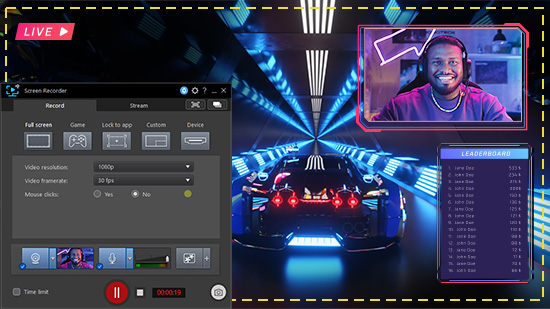
How Does a Windows Screen Recording App Work?
Screen capture software functions by gaining direct access to your computer’s frame buffer, allowing it to capture and record live images and videos. Essentially, these tools tap into the graphical representation of your computer screen and enable you to save or stream the visual content to a chosen destination. One notable aspect is the versatility of these screen-capture applications, as they are generally compatible with various operating systems, including Windows, Mac OS, Linux, and other devices.
For businesses, screen capture software offers more advanced capabilities compared to traditional snipping tools. These tools provide enhanced screen-capture techniques, making them valuable for tasks such as creating tutorials, recording presentations, or capturing dynamic content during online sessions. More importantly for security and compliance, they can run discreetly in the background, logging activities without disrupting workflow.
Why Every Business Needs a Screen Recorder: 6 Core Benefits
1. Create Tutorials and How-To Guides Effortlessly
Screen recording software empowers enterprises to create comprehensive how-to guides and training materials, offering visual demonstrations of processes, software, or techniques. The engaging nature of visuals enhances the retention of step-by-step instructions. These recorded videos can be stored, searched, and shared, eliminating training costs associated with live sessions and reducing onboarding time by up to 40%.
| Use Case | Employee onboarding, software training, process documentation |
|---|---|
| ROI Impact | Reduces trainer hours, accelerates time-to-productivity |
| Best For | Remote teams, high-turnover roles, complex software environments |
2. Capture Webinars and Virtual Events for Reuse
Screen recording enables content creators to capture live webinars, presentations, or streams. Once recorded, this content can be refined and used as a valuable reference when needed, providing flexibility and accessibility. It transforms one-time live events into evergreen assets that generate leads and educate customers long after the event ends.
- Record both presenter video and slides
- Add chapters and captions for accessibility
- Host on your website or YouTube for SEO benefits
- Forgetting to obtain presenter consent
- Poor audio quality ruining the recording
- Not editing out dead air or technical glitches
3. Streamline Internal Communication and Feedback
Organizations leverage screen recording to capture specific parts of processes, aiding in the demonstration of editing techniques, software usage, and more. Instead of writing lengthy emails explaining a bug or workflow, employees can record a 30-second clip showing exactly what they mean. This reduces miscommunication, accelerates project timelines, and is particularly helpful for remote and hybrid teams.
4. Produce Marketing Videos and Product Demos Fast
Companies can efficiently create captivating marketing videos, product demos, and tutorials with screen recording tools. Content creation teams benefit from visually demonstrating concepts and workflows, enhancing the efficiency of their cycles and contributing to smoother success journeys. According to HubSpot, 87% of video marketers say video has increased traffic to their website.
5. Accelerate Troubleshooting and Reduce Support Tickets
Screen recording accelerates IT teams’ ability to diagnose and resolve technical issues by providing a visual record of the problem. Instead of playing “20 questions” with a frustrated user, support staff can watch exactly what happened. This visual reference aids in addressing similar issues in the future, offering quick and effective technical support that improves customer satisfaction and loyalty.
6. Monitor for Data Leaks and Ensure Regulatory Compliance
Screen recording serves as a valuable tool for monitoring employee compliance with data security protocols. It provides a visual record that can be used for additional training and, in the event of a security breach, becomes crucial evidence for investigations and audits. This enhances overall data security and regulatory compliance within the organization, especially for industries like finance, healthcare, and legal services subject to strict data protection laws (GDPR, HIPAA, PCI-DSS).
The Dark Side: How Screen Recording Fights Corruption, Harassment & Insider Threats
Beyond productivity, screen recording apps address some of the most insidious problems plaguing modern workplaces:
🔍 Uncovering Corruption and Data Theft
It has been widely observed that corruption conversations take place on computers. Employees use messengers and social networks to reach out to rival businesses and sell them plans and classified information. One common asset being sold today is digital marketing plans and customer leads. Many employees sell leads to competitive businesses in exchange for lucrative bribes. A Windows screen recording app can capture these illicit communications—whether on WhatsApp Web, Slack, or email—providing irrefutable evidence for legal action or termination.
🛡️ Combating Sexual Harassment
Some diligent female team members quit their jobs because of sexual harassment. The business suffers the loss borne from their departure, and recruiting a replacement is an expensive chore. Predators often use private messaging channels to harass their colleagues. With a screen recording app, employers can record these interactions and take preliminary action before the situation escalates to a lawsuit or valuable talent walks out the door. It’s a proactive measure to foster a safe, respectful workplace.
📉 Reclaiming Lost Productivity
Social network addicts can drain productivity by 45–50%. That means total revenue shrinks and profits collapse. By monitoring screen activity (with transparent policies), managers can identify employees spending excessive time on non-work sites and address the behavior through coaching rather than punishment. Often, the mere awareness of monitoring improves focus.
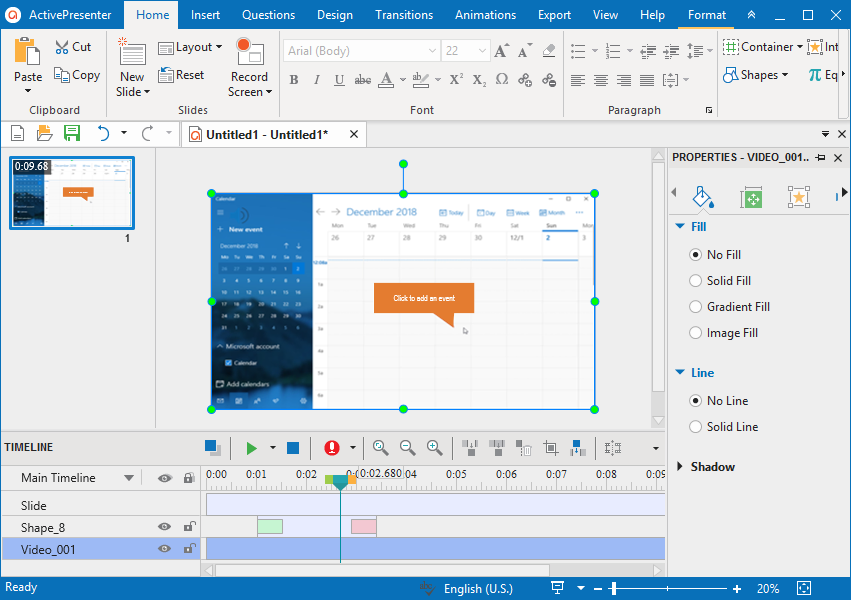
Essential Features to Look for in a Business Screen Recorder
Not all screen recorders are created equal. For business use, you need more than a basic free tool. Here’s what to prioritize:
Spotlight: OgyMogy – A Comprehensive Windows Monitoring Solution
OgyMogy Windows Screen Recording & Monitoring App
OgyMogy is a professional Windows screen recording app designed specifically for business monitoring and employee oversight. It offers a comprehensive suite of features that help employers maintain discipline, protect sensitive information, and sustain productivity without disrupting daily operations. It works seamlessly in the background, and employers can even modify app preferences on target systems remotely.
| Core Features | Screen recording, keystroke logging, social media monitoring, VOIP call recording, application tracking, remote configuration |
|---|---|
| Deployment | Windows 10/11 (discreet installation) |
| Reporting | Cloud-based dashboard with real-time logs |
| Best For | SMBs, remote team management, insider threat detection |
- Comprehensive monitoring beyond just screen recording
- Remote configuration saves IT time
- Stealth operation prevents tampering
- Detailed activity logs for HR and compliance
- Requires physical or remote access for initial installation
- Premium features require paid subscription
- May be overkill for very small teams (1-3 people)
How to Choose the Right Screen Recorder for Your Business
- Define your primary use case: Security monitoring? Training content creation? Technical support? Different tools excel in different areas.
- Consider deployment scale: Do you need to monitor 5 devices or 500? Some solutions charge per seat; others offer flat enterprise pricing.
- Check compliance features: Does the tool offer audit logs, encryption at rest, and role-based access? These are non-negotiable for regulated industries.
- Evaluate stealth vs. transparency: For security investigations, stealth mode is essential. For productivity coaching, visible monitoring with consent may be more appropriate.
- Test the user interface: A clunky dashboard will frustrate managers. Most reputable vendors offer free trials—use them.
- Read independent reviews: Check Trustpilot, G2, and Capterra for real user feedback.
FAQ: Windows Screen Recording for Business
A: Laws vary by jurisdiction. In many regions, you must inform employees and obtain consent before monitoring. For company-owned devices used during work hours, monitoring is generally permitted with proper disclosure. Always consult with legal counsel.
A: Yes. Screen recording combined with keystroke logging can capture conversations on messaging apps, file transfers, and email drafts that indicate data exfiltration. It provides concrete evidence for HR and legal action.
A: Modern, lightweight screen recorders have minimal impact on system performance (typically <2% CPU usage). Avoid bloated free tools that may consume excessive resources.
A: Prices range from $10–$30 per user/month for cloud-based solutions to one-time license fees of $50–$200 per device for on-premise software. Enterprise plans with advanced reporting are custom-quoted.
A: Yes, provided they are obtained legally and the chain of custody is maintained. Features like timestamps and digital signatures enhance admissibility.
A: Screen recording is one component of broader employee monitoring software, which may also include time tracking, application usage analytics, email monitoring, and productivity scoring.
Verdict: Proactive Monitoring Is a Business Imperative
Corruption, harassment, data leaks, and productivity drain are not problems that solve themselves. They require active, informed intervention. A professional Windows screen recording app provides the visibility you need to protect your business, support your employees, and maintain a culture of accountability. Whether you choose a comprehensive solution like OgyMogy or a lighter tool for training content creation, the important step is to implement a system that aligns with your values and legal obligations. The ball is in your court—use it wisely to stay on top by facilitating and safeguarding your teams.






This article is so amazing and informative about screen recording
It is very useful for unique
thanks keep reading and sharing
Hi, Lovely post I would like to share this because its very helpful for me. keep it up & please don’t stop posting. Thanks for share such kind of nice information with us.
Can You make a tutorial article about OBS studio?