How To Start A Podcast For Free – STEP-BY-STEP | 2026 Complete Tutorial
If you’re looking for a guide that walks you through how to start a podcast in 2026, you’re completely in the right place. Starting a podcast isn’t just about recording audio; it’s about building a multi-platform media brand using AI tools, smart distribution, and strategic monetization—often completely free to start.
You can now launch a professional-quality podcast with $0 investment using AI tools for editing, free hosting platforms, and smartphone recording. The barrier to entry has never been lower while the potential audience has never been larger.

From bedroom recording to global charts: Your journey starts with this comprehensive 2026 guide.
Why Podcasting Works as a Content Platform in 2026
Podcasts have become a dominant content platform due to their unique accessibility. Listeners can tune in while driving, at the gym, or working. Additionally, podcasts are device-agnostic, available on everything from smartphones to smart speakers and car dashboards.
Unlike radio, podcasts are on-demand, allowing listeners to access content whenever they want. Compared to short-form video (TikTok/Reels), podcasts provide an opportunity to create a deep, personal connection with your audience. Imagine having your target listener’s undivided attention for 30 minutes or more. This allows you to establish intimacy and trust that is impossible with a 15-second clip.
| Platform | Attention Span | Connection Depth | Production Barrier | 2026 Growth |
|---|---|---|---|---|
| Podcasts | 30-90 minutes | Deep, personal | Low (AI tools) | +28% annually |
| Short-form Video | 15-60 seconds | Surface-level | Medium | +12% annually |
| Blogging | 3-8 minutes | Moderate | Low | +5% annually |
| Live Streaming | Variable | Interactive | High | +18% annually |
Recent data shows that 61% of listeners bought a product after hearing it on a podcast. Advertisers know this, which is why ad spend in the industry has tripled in the last 5 years, reaching $4.2 billion in 2026.
2026 Podcast Advantages:
Phase 1: Strategic Planning (The Foundation)
This is the initial (often missed) stage to make a podcast. You’ll need to spend a good amount of time here before you move on. Feel free to get out a notebook or a whiteboard so you can start planning your podcast like a professional.
Planning Phase Checklist:
1. Choose A Topic (Niche Down with Precision)
You want your podcast to be focused on a specific topic or niche. Try to narrow it down to something you can discuss for many episodes (100+) but that isn’t so broad that you won’t appeal to your potential audience. For example, instead of having an “outdoor” podcast, talk about hiking – or even more specific, like hiking 14ers. You can always expand your topic later as you get more popular.
The most successful 2026 podcasts target “micro-niches” within broader categories. Instead of “business podcast,” try “SaaS founders in Southeast Asia scaling from $10K to $100K MRR.” This specificity attracts dedicated listeners and higher-value advertisers.
2. Pick A Co-host (Optional But Strategic)
Do you have a friend, business partner, or coworker that you want to co-host with? It will be much easier to start podcasting when you have a co-host. You will naturally have a more engaging conversation if you both share your points of view on a topic. It can also be helpful to have someone to keep things on track. Plus, you can split up extra tasks of editing, promoting, and booking guests.
Co-host Decision Matrix:
3. Choose A Name (SEO & Discoverability Matters)
If you look at the top Apple Podcasts charts, you’ll see a variety of different names. I’m actually going to seemingly contradict what I said earlier: You want to choose a name that is broad enough to allow pivots, but specific enough to be found in search.
Using the hiking example earlier, if we choose “The 14er Cast” as our name, what happens when we want to talk about backpacking & ultralight camping too? Instead, choose a name like “Mountain Adventures (Above & Below 14K ft)” – it gives a hint to hiking 14ers but gives you the option to talk about all kinds of mountain activities.
2026 Naming Best Practices:
4. Show Format & Structure
Episode Length Strategy
You’ll find various “experts” claim that certain lengths are perfect for podcasts. The problem is that’s just BS. You don’t need a 28-minute podcast because that’s the average driving time. There are 5-minute podcasts and there are 3-hour podcasts (like Joe Rogan). Find whatever works for you and run with it!

| Format | Ideal Length | Best For | Production Time |
|---|---|---|---|
| News/Daily | 10-20 minutes | Current events, quick updates | 2-4 hours |
| Interview | 45-90 minutes | Expert insights, storytelling | 6-10 hours |
| Solo Commentary | 20-40 minutes | Thought leadership, tutorials | 3-6 hours |
| Panel Discussion | 60-120 minutes | Multiple perspectives, debates | 8-15 hours |
Style & Format Selection
Interview shows are popular, but that doesn’t mean you have to do one. You can do solo shows half the time and interview shows the other half. One big benefit of doing interviews is that they help a ton with getting new listeners – especially if you make it easy for your guest to share with pre-written templates and graphics.
The most successful 2026 podcasts often use a “hybrid format”: 15 minutes of solo teaching followed by 30 minutes of interview/discussion. This provides both depth (your expertise) and breadth (guest perspectives).
Phase 2: Branding & Equipment Setup
Now that you’ve written down your topic, format(s), and secured a domain name, we’ll need to get a few things ready ahead of launch…
Create Professional Cover Art (3000×3000 pixels)
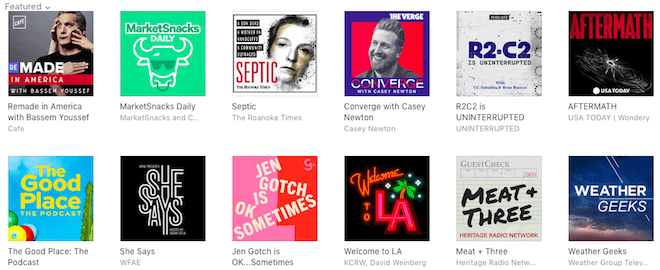
Your cover art is the first impression most people will see as they scroll through Apple Podcasts or Spotify. Ideally, your cover art should be 3000 x 3000 pixels. Use bold fonts and high-contrast colors that work even as a tiny thumbnail.
2026 Cover Art Requirements:
Essential Equipment Guide (2026 Edition)
Audio quality is crucial but it doesn’t have to cost a ton to get a good quality microphone for podcasting. One of the most popular podcasting microphones is the Audio-Technica ATR2100x-USB. It’s both a USB microphone and has an XLR connection which lets you upgrade your recording gear later without needing a brand new mic.
Samson Q2U or Audio-Technica ATR2100x. Plug and play. Perfect for beginners recording in untreated spaces.
Rode PodMic or Shure SM58 with Focusrite Scarlett interface. Better sound quality and upgrade path.
Shure SM7B or Rode Procaster with Cloudlifter. Requires audio interface like Rodecaster Pro or GoXLR.
Start with a USB microphone ($80), then upgrade to an XLR setup when you’ve published 20 episodes and have consistent listeners. The audio quality jump from smartphone to USB mic is huge; from USB to XLR is more subtle.
Complete Starter Kit (Under $150)
Phase 3: AI-Powered Recording & Editing
Option A: AI Editing Platforms (The 2026 Standard)
If you haven’t used editing software before, even simple actions in GarageBand or Audacity can be quite intimidating. If that’s the case, Alitu or Descript is the way to go. These are ‘podcast making’ tools that automate a lot of the complex technical parts.
Descript, in particular, allows you to edit audio by editing the text transcript. You simply delete the text, and the audio is cut automatically. It also features “Studio Sound” which uses AI to remove echo and background noise, making even smartphone recordings sound professional.
| AI Tool | Best Feature | Pricing | Learning Curve |
|---|---|---|---|
| Descript | Text-based editing & Overdub | Free – $24/month | Low (30 minutes) |
| Alitu | Automated cleanup & publishing | $28/month | Very Low (15 minutes) |
| Adobe Podcast | AI audio enhancement | Free (for now) | Low (20 minutes) |
| Riverside.fm | Separate track recording | Free – $24/month | Medium (45 minutes) |
Option B: Traditional Software (The Free/Advanced Route)
I’m going to show you how to use GarageBand for recording and editing. Other audio editing software is similar but most have more advanced features that you don’t need when getting started. Popular options are Adobe Audition & Audacity (both work with Mac & PC).

Pro Tip: Create A Template. Before you get started, it will be much easier if you create a template that you can reuse every time you record a podcast episode. This means having your intro & outro music already placed on separate tracks, your EQ settings saved, and your export settings configured.
Free Editing Software Comparison:
Recording Best Practices (2026 Standards)
Phase 4: Launch & Multi-Platform Distribution
Choosing a Podcast Host (2026 Comparison)
You need a separate host just for your audio files. Even if you already have a web host and a website, you don’t want to host your MP3s on the same server. Media hosts are optimized for large file downloads, provide analytics, and generate your RSS feed. Here are those I use and recommend:
| Host | 2026 Pricing | Free Tier | Best For | AI Features |
|---|---|---|---|---|
| Buzzsprout | $12-24/month | ✅ 2 hours/month | Beginners & ease of use | Magic Mastering, Transcription |
| Transistor | $19-99/month | ❌ Trial only | Brands & Multiple shows | AI Show Notes, Clip Creator |
| Captivate | $17-90/month | ❌ Trial only | Growth & Marketing features | Smart Links, Voice Clips |
| Spotify for Podcasters | Free Forever | ✅ Unlimited | Budget-conscious creators | Video podcasting, Q&A |
| Riverside | $15-24/month | ✅ Limited | Video podcasters | AI transcription, Magic Clips |
Submission to Directories (The Essential 7)
Once you have your media host configured and at least one episode uploaded, you will be provided with an RSS feed by your media host. This feed contains all your episodes and the associated data.
You simply submit this URL to these essential directories:
1. Apple Podcasts
Requires: Apple ID
Status: Essential (largest directory)
Approval: 24-72 hours
2. Spotify
Requires: Spotify account
Status: Essential (fastest growing)
Approval: Instant to 24 hours
3. YouTube Music
Requires: Google account
Status: Essential for discovery
Approval: 24-48 hours
4. Amazon Music
Requires: Amazon account
Status: Highly recommended
Approval: 2-5 days
5. Google Podcasts
Requires: Google account
Status: Automatic via RSS
Approval: 1-2 weeks (crawl)
6. iHeartRadio
Requires: Free account
Status: Recommended
Approval: 3-7 days
7. TuneIn
Requires: Free account
Status: Recommended
Approval: 2-5 days
Submit to Apple Podcasts and Spotify first (they’re most important). Launch with 3-5 episodes ready to publish weekly to give new subscribers immediate content. Use your host’s automatic distribution feature to submit to other directories.
Phase 5: Growth & Monetization Strategies
How to Grow Your Podcast Audience (2026 Tactics)
Growth in 2026 requires more than just publishing episodes. Here are proven strategies:
Growth Tactics That Work:
Monetization: How to Earn a Living with a Podcast
There are different ways to monetize your podcast. Your focus first should be to build your audience and their trust. Then you can think about monetization. In 2026, successful podcasts use multiple revenue streams.
1. Sponsorships & Ads
Advertisers pay CPM (cost per mille/thousand) rates ranging from $18 to $50. You usually need 1,000+ downloads per episode to qualify for premium networks like Midroll or AdvertiseCast.
2. Affiliate Marketing
Promote products you use (like your microphone or software) and earn a commission on sales. This works with any audience size. High-converting categories include podcasting equipment, software tools, books, and courses.
3. Direct Support
Use platforms like Patreon, Buy Me a Coffee, or Supercast to ask loyal listeners for monthly support in exchange for bonus content, ad-free episodes, or community access.
4. Products & Services
Create digital products (courses, ebooks, templates) or offer services (coaching, consulting) related to your podcast topic. This often generates the highest revenue per listener.
Months 1-3: Focus on growth only
Months 4-6: Add affiliate links and direct support
Months 7-12: Seek sponsorships (1000+ downloads/episode)
Year 2+: Launch products/services to your engaged audience
2026 AI Podcasting Tools Comparison
The podcasting landscape has been revolutionized by AI tools that automate previously complex tasks. Here’s your 2026 AI toolkit:
| Tool Category | Best Tools | Key Features | Cost |
|---|---|---|---|
| AI Editing | Descript, Adobe Podcast | Text-based editing, noise removal, filler word removal | Free – $24/month |
| AI Transcription | Otter.ai, Rev, Sonix | Accurate transcription, speaker identification, timecoding | Free – $0.10/minute |
| AI Show Notes | Castmagic, Podium | Automated summaries, blog posts, social media clips | $29-$99/month |
| AI Voice Cloning | ElevenLabs, Play.ht | Voice replication for intros/outros, multilingual versions | $5-$99/month |
| AI Content Ideas | ChatGPT, Jasper | Episode topics, interview questions, segment ideas | Free – $99/month |
| AI Audio Enhancement | Auphonic, Accusonus | Auto-leveling, EQ optimization, loudness normalization | Free – $89/month |
Complete Equipment Buying Guide (2026)
Budget Setup ($100-200)
- Mic: Samson Q2U ($70)
- Interface: Built-in USB
- Headphones: Audio-Technica M20x ($49)
- Accessories: Pop filter ($8), arm stand ($25)
- Software: Audacity (Free)
Perfect for beginners testing the waters
Prosumer Setup ($500-800)
- Mic: Rode PodMic ($99) or Shure SM7B ($399)
- Interface: Focusrite Scarlett 2i2 ($170)
- Headphones: Beyerdynamic DT 770 Pro ($149)
- Accessories: Cloudlifter ($149), shock mount ($40)
- Software: Descript ($24/month)
For serious creators with growing audience
Studio Setup ($1500+)
- Mic: Neumann TLM 103 ($699)
- Interface: Universal Audio Apollo Twin ($899)
- Headphones: Sennheiser HD 600 ($299)
- Mixer: Rodecaster Pro II ($699)
- Acoustics: Professional treatment ($500+)
For professional studios and networks
7 Common Podcasting Mistakes to Avoid (2026 Edition)
How to Start a Podcast FAQ (2026 Edition)
Can you really start a podcast for free in 2026?
Yes, absolutely. You can use free software like Audacity or GarageBand, a free host like Spotify for Podcasters (unlimited hosting), and your phone’s microphone. However, investing $60-80 in a USB microphone is highly recommended for audio quality. The total cost for a professional-sounding podcast can be under $100.
How much do podcasters actually make in 2026?
Top podcasters make millions, but the average hobbyist makes very little directly. However, a podcast can drive thousands of dollars in revenue for a business by building authority and attracting clients. According to 2026 data:
- Top 1%: $50,000+/month (sponsorships, products)
- Top 10%: $1,000-$10,000/month
- Middle 50%: $100-$1,000/month
- Bottom 40%: $0-$100/month (hobbyists)
The key is leveraging the podcast to sell related products/services.
What equipment do I actually need to start?
To start, you need a computer, a USB microphone (like the Samson Q2U for $70), and headphones. As you grow, you can add a mixer, boom arm, and sound treatment. In 2026, many successful podcasts start with just a smartphone and free editing apps, though microphone quality remains the most important upgrade.
How often should I release new episodes in 2026?
Weekly is the gold standard for growth. Consistency matters more than frequency; if you can only do bi-weekly, stick to that schedule religiously. Data shows podcasts that release weekly grow 3-5x faster than monthly shows. Batch recording (recording multiple episodes in one sitting) helps maintain consistency.
Do I need video for my podcast in 2026?
Highly recommended but not required. Video podcasts get 30-50% more downloads and can be repurposed for YouTube. However, audio-only podcasts still succeed. The decision depends on your comfort on camera and target platform (YouTube requires video, Apple Podcasts doesn’t). Many hosts now offer automatic audio-to-video conversion.
How long until I get my first 1,000 listeners?
With consistent weekly publishing, good audio quality, and basic promotion, most podcasts reach 1,000 downloads per episode within 6-12 months. Growth accelerates after reaching this milestone due to network effects and algorithmic promotion. The first 100 listeners are the hardest; after that, word-of-mouth and platform algorithms kick in.
Is it too late to start a podcast in 2026?
Absolutely not. While there are millions of podcasts, most are inactive or low-quality. The barrier to starting has decreased, but the barrier to quality production has increased. If you can provide consistent, valuable content with good audio quality, you can still stand out. New niches and formats emerge constantly.
Ready to Launch Your Podcast in 2026?
Stop overthinking and start creating. Your voice deserves to be heard. Choose one step below to begin your podcasting journey today.