
Cloudflare Error 522 – How To Fix
Error 522, often known as “Connection timed out,” is a server-side issue that frequently affects websites that make use of Cloudflare. In this post, we will discover what factors contribute to the occurrence of error 522 as well as the solution to this problem. Since it is a server problem, check to see whether you still have access as a server administrator. If not, your only other option is to get in touch with the owner of the website.
Continue reading if you have access to the server where this issue originated to learn about the three different solutions to this problem. In addition, we will discuss how to troubleshoot other problems connected to this one in order to prevent you from encountering any other Cloudflare difficulties.
What Causes the Cloudflare Error 522?
The HTTP status code that can be recognized by the message is “Connection timed out” (Error 522).
The network connection between the user’s browser and the server, which is the origin of the website, can be made a lot faster by a content delivery network (CDN) provider like Cloudflare. Unfortunately, there are times when the server doesn’t respond within the specified time.
As a result of this problem, the Transmission Control Protocol (TCP) handshake between the web server and Cloudflare, which was aborted, has not been successful. If a user makes a request, the CDN service has to carry out the TCP handshake in order to establish a connection with the user. So, why is it that the server that originally caused the problem is not responding quickly? Here are the most common reasons for connection timeouts:
- Server overload. An origin server cannot react in time when it receives too many requests.
- The firewall blocks Cloudflare requests. Cloudflare IP addresses are flagged as coming from the CDN, thus some site hosting companies have firewall capabilities that may block them.
- Incorrect IP address. Your domain name system’s (DNS) addresses do not match those on Cloudflare.
- KeepAlive disabled. KeepAlive messages are automatically turned on by Cloudflare. The connection setup is unsuccessful if they are disabled.
The error 522 on your website could appear in any of these scenarios. The same image and message will appear in the majority of browsers, which shows that the web host is to blame for the issue.
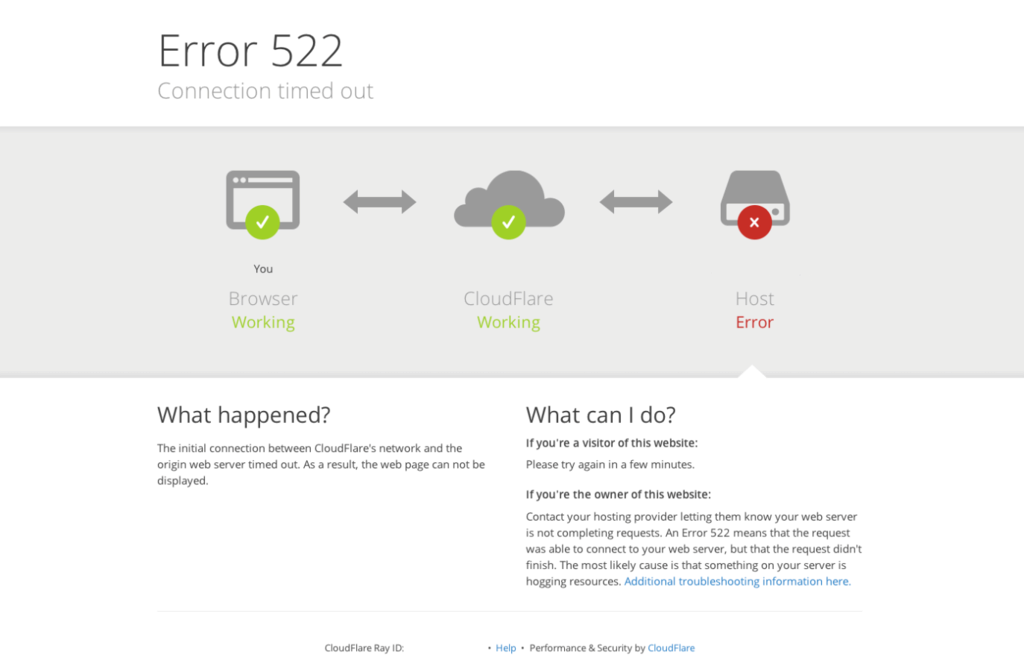
Important! Keep in mind that no Cloudflare issues are to blame for this error. Furthermore, whether you use a paid or free version, this problem may still arise.
3 Different Ways to fix Cloudflare Error 522
Troubleshooting Other Cloudflare Errors
There are other HTTP status messages that Cloudflare users might receive. For example, Error 520: Web server is returning an unknown error. This issue’s common causes are a crash at the origin web server or Cloudflare incompatible response header. The troubleshooting steps for Error 520 include:
- Ensure Cloudflare DNS records are correct.
- Disable your .htaccess file.
- Check headers and cookies.
Another possible issue is Error 521: Web server is down, often due to poor Cloudflare encryption settings or an inaccessible server. Here are some of the ways to troubleshoot Error 521:
- Ensure the origin server is running.
- Test the connection to the server.
- Check encryption settings.
We advise you to contact Cloudflare support services if these issues persist.
Error 522 – ‘Connection timed out’: How to fix the error
Numerous web projects have benefited from the performance and security enhancements provided by the CDN service Cloudflare since 2010. In contrast to traditional content delivery networks, Cloudflare serves as both a reverse proxy server that communicates constantly with the web server and a simple buffer for static material.
The benefit of this is that since only the DNS servers need to be told to use the service, the cache content is not explicitly set by the website operator. Even source code adaptation is not required. The warning “Error 522: Connection timed out” denotes a well-known issue that keeps happening with the robust content delivery network. Although this flaw is also referred to as a “Cloudflare mistake,” the web performance service is not to blame for it.
What does the ‘Error 522’ message mean?
The 522 message is one of the HTTP status messages, like many other error pages on the internet. While the previous “5” denotes a server fault, the subsequent “2” denotes that the server error took place in combination with Cloudflare. When the TCP handshake between the web server and Cloudflare is unsuccessful, code 522—which means “Connection timed out”—occurs.
Every time the CDN service receives a user request that necessitates communication with the server, this handshake—which is crucial for establishing a connection—becomes necessary. The 522 connection timed out problem is one of the most frequent browser error messages because of the widespread use of Cloudflare.
What causes the Cloudflare error?
Contrary to what one might initially believe, a server-side issue rather than Cloudflare fault is to blame for the 522 error. It is not so simple to identify the error’s direct cause, as it is with many other comparable HTTP failures. When establishing a TCP connection between the CDN service and the contacted web server, there are numerous circumstances that could result in a timeout. The following are the most frequent causes of the connection timed-out message:
- Web server is offline: The contacted web server is frequently down, which results in the HTTP error 522 being displayed. There cannot be a transaction since communication between the web server and Cloudflare takes place online.
- Overloading the original server: For the original web server powering the project, Cloudflare performs a lot of effort. The CDN service must still contact the source server for certain requests from browser users (particularly dynamic content). If too many requests need to be handled simultaneously, this can occasionally lead to an overload and a timeout when establishing TCP, much like with a regular server lacking a CDN.
- Firewall is blocking the request:A Cloudflare problem may also result from the original server being linked to its own firewall. Naturally, the performance service’s IP addresses ought to be permitted by default, but occasionally, addresses are unintentionally or arbitrarily prohibited. Connections cannot be made as a result. Additionally, incorrect settings may cause packets to be removed from the original host network.
- Incorrect DNS settings: The IP address of the original server is used by the DNS servers. For the CDN and server to continue collaborating, any changes to this address must be sent. The DNS setup occasionally utilises a wrong address since many web providers periodically issue new web addresses to the managed websites without sent them to Cloudflare.
- Incorrect routing: To ensure that a website’s performance is correctly optimised, Cloudflare must go beyond network boundaries. An essential step in the content delivery process is IP routing, which controls the packets’ transit via the many networks involved. A connection timed out notification is frequently produced if there are differences between the originating server and Cloudflare.
- Keepalive messages are disabled on the server side: To preserve established connections for a longer amount of time and boost performance, Cloudflare uses the ‘keepalive’ header entry. The connection setup fails and a 522 error is returned if the option for the HTTP messages to be shown on the web server is removed. This is a pretty uncommon source of error and nearly always has something to do with a setup issue on the webmaster’s side as the majority of common web servers permit the keepalive entry by default.
Fix error 522: Website operators have the following options
You should start looking into the root cause as soon as possible if you are in charge of a web project that is experiencing error 522 issues. However, you should first confirm that the original web server is operational and accepting HTTP requests before determining whether one of the factors mentioned in the preceding section is the issue. If this is not the case, even with the proper settings, communication between Cloudflare and the server is illogically impossible. If this “quick” check reveals that the CDN service can actually access the server resources as intended, a more thorough investigation is needed to identify the error’s root cause. The most effective fixes for the 522 errors are listed in the sections that follow.
Optimize server capacity
One of the most frequent reasons for error 522 is a web server overload. The number of visitors at any particular time cannot be predicted. You should monitor the traffic growth of your online project using analysis tools since intermittent load peaks signal that the server can’t keep up with processing HTTP requests. Examine the data on a regular basis to detect bottlenecks and update the hosting environment’s hardware arrangement. Flexible cloud hosting options, for instance, let you scale resources precisely so you can respond to changes brought on by the time of day, day of the week, or season.
Check IP filtering
If you want to fix issue 522, first you have to check the firewall settings and the filtration programs that you need very well. This means you should investigate iptables and also see if the webserver has blacklisted Cloudflare’s IP addresses and if they are among the restricted IPs checked against potential filters in the .htaccess file. The CDN service provider gives the list of the addresses they are using on their official website, which can be a great help in solving the problem. To be able to solve this problem, it is necessary to unlock those addresses that are tightly controlled and that are found in these particular tools or related features without delay. Also, it is advised that you be careful if you decide to add Cloudflare’s IP addresses to your whitelist because some applications may restrict certain IPs without your knowledge.
If you are sure that the “Connection timed out” message results from an IP problem and that there are no misconfigured applications, you should understand that hosting companies may be the ones that filter Cloudflare addresses and not your web server. So, it might be necessary to talk with the provider.
Customize DNS/IP settings
It is your responsibility to forward the modified IPs to Cloudflare if your web host requires a regular change in the web server address. By default, the providers only send this information to their own DNS servers. It is important to check your domain’s IP settings if an error 522 appears. Enter the relevant administrative panel for your web project and make a note of the web server’s current IPv4 and IPv6 addresses. After that, navigate to the Cloudflare configuration menu and pick the offending domain. Enter the noted web addresses in the respective DNS entries by clicking on the menu item “DNS” (Record Type AAAA: IPv6, Record Type A: IPv4).
Activate ‘keepalive’ message
In principle, it should be rather simple to resolve the Cloudflare problem if the cause is wrong HTTP header settings. You can fix this in the relevant web server configuration file if “keepalive” is disabled or if too few potential requests are specified (e.g. in httpd.conf for Apache servers). A requirement, though, is that you have the necessary rights, which is sometimes not the case with shared hosting plans. You’re limited to contacting the provider in these situations. You should think about switching the hosting type or provider if this continues with the setting “keepalive” for the chosen package.
Contact Cloudflare-Support
Contact Cloudflare support if the 522 error is a result of a traffic routing issue. Make a ticket outlining the issue and listing the places you’ve already looked for problems. Additionally, the CDN provider advises utilising MTR or traceroute to learn more about the current packet switching going on between your web server and the Cloudflare IPs. To expedite the problem-solving process, you can attach the results to your ticket (in text or image format).
What can a browser user do about the connection timed out message?
HTTP error 522 refers to a problem with the server and from the list of possible reasons for this, it is clear that there is no issue with your internet connection or plug-ins. In case of such an error message during your browsing, it would be a good idea to wait and visit the website at a later time since a direct confrontation with the problem is likely to be unsuccessful. This method will help you to stay away from the inconvenience or if a small portion of it emerges, you will have already known how to handle it.
In any case, the problem with the communication between Cloudflare and the server should have been fixed by that time and the site will be running as usual. Yet, if the site cannot be loaded due to Cloudflare issues, and you keep trying over and over again, it would be best to contact the webmaster in charge. This step may shed some light on the situation or give you a tentative time for future connection. Moreover, it is equally possible that the provider is completely unaware of the situation, so it would certainly be the right decision to get in touch with them directly.
Conclusion – Cloudflare Error 522
When a server responds to requests more slowly than expected, Cloudflare error 522 results. Insufficient RAM or CPU, an IP address being blocked by your firewall, and a deactivated KeepAlive header are a few of the typical causes of this problem. Let’s review the three solutions to this problem:
Examine your memory and relationship.
Check the DNS settings for Cloudflare.
Set up the server settings.
You can also read about Cloudflare 521 error here
Which strategy works the best for you? Let us know in the comments section below.