How Browsers Render Websites: A Simple Technical Overview
You press Enter after typing a URL, and within seconds, a fully designed page appears on your screen.
It feels instant. If you look at it closely, it’s almost magical how quickly it happens. But behind that simple action is a surprisingly complex chain. That too, of many technical events working together at lightning speed.
Your browser doesn’t just “open” a site. It actually requests files and then interprets code. This then allows it to build the structures, apply styles, and paint visuals.
It is not only engineers who are interested in knowing this process because every person who builds or manages a site will be glad to have an idea of what happens behind the scenes.
It aids in understanding the reason some of the pages load immediately when others take longer and why optimization of the performance is more than most people even think.

Why Does Rendering Matter?
Speed directly shapes how people experience a site. Faster pages keep visitors engaged and reduce bounce rates. This even influences the search rankings.
A delay of a second or two can be enough for someone to leave. Rendering connects the code and experience. So, the stronger the connection, the better everything performs.
What Exactly Is a Browser?
A browser is a software that enables you to use and interact with the websites. Examples of such popular ones are Google Chrome, Mozilla Firefox, and Safari. On the one hand, they appear to be plain and simple but on the other, they are highly complex interpreters. This means that they translate raw code into visual pages.
What are the Main Parts of a browser?
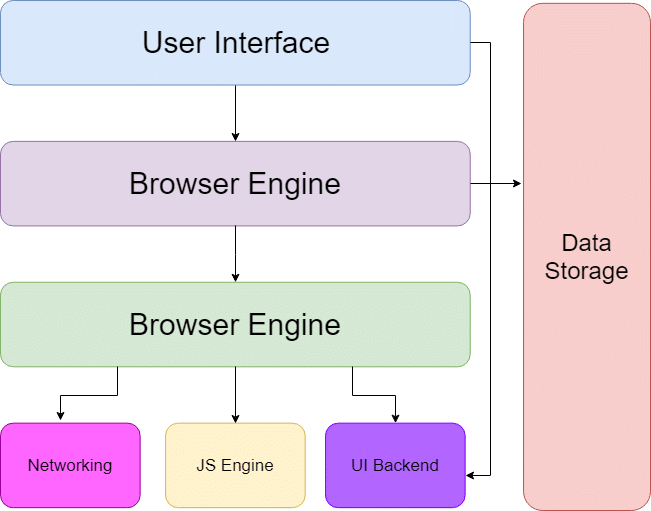
Every browser has several internal components working together:
● User Interface – address bar, tabs, navigation buttons
● Rendering Engine – converts code into visuals
● JavaScript Engine – executes scripts and interactive logic
● Networking Layer – communicates with servers and downloads files
Think of a browser as a translator, artist, and engineer all at once.
So, how does rendering happen?
Here is a step-by-step breakdown of how browsers render a website before it gets to you.
Step 1: Requesting the Website
Your browser must determine where that place is located on the internet when you type a web address. It makes a request to a network known as DNS in order to decode the domain name into an IP address… in other words, the actual location of the site.
Server Response
Once the browser finds the server, it sends a request asking for the page. The server replies with files, usually including:
● HTML (structure)
● CSS (design)
● JavaScript (interactivity)
● Images and fonts
This is like ordering a package and receiving all the parts needed to assemble it.
Step 2: Reading the HTML
A webpage is the backbone of a webpage in HTML. It determines headings, paragraphs, buttons, forms and images. In the absence of it there would be no structure…. only raw data.
Browsers read HTML from top to bottom, interpreting each tag as they go.
Building the Page Structure
The browser constructs the DOM (Document Object Model) as it separates out the HTML. It is a tree-like arrangement where all the elements are nodes that are linked to each other. It is the DOM that the browser actually refers to in order to know how the page is structured.
Step 3: Applying Styles with CSS
HTML and CSS work closely together. It controls the colors, layouts, spacing, typography, and visual hierarchy. Without CSS, websites would look plain and unstyled. In simple words, this means that a website is super boring without HTML and CSS.
Combining Structure and Style
At this stage, the browser merges HTML and CSS information. It matches style rules to elements and prepares a styled version of the page.
Right around this phase is where professionals offering Website Design and Development Services focus heavily, because styling decisions directly influence rendering speed, layout stability, and visual consistency across devices.
Efficient CSS doesn’t just make a site attractive; it makes it faster and more reliable.
Step 4: Laying Out the Page
Now the browser determines exactly where each element should appear on the screen. It calculates:
● Width and height
● Spacing between elements
● Alignment and positioning
This stage, called layout or reflow, is one of the most performance-sensitive parts of rendering.
The Box Model (Basic Idea)
Every element on an existing webpage is typically treated as a rectangular box. It is made up of:
● Content
● Padding
● Border
● Margin
Understanding this box model is very important for developers. It’s because even small spacing changes can shift entire layouts of website designs.
Step 5: Painting the Page
Once layout calculations are complete, the browser begins painting. This means it draws everything visually onto the screen:
● Text characters
● Images
● Background colors
● Borders
● Shadows
Painting transforms abstract instructions into pixels you can actually see.
Step 6: Making It Smooth (Compositing)
There are also layers of some elements, like videos, animations, or fixed headers. This enables the browser to just refresh some part of the screen rather than redraw the entire screen.
Using the GPU
Modern browsers use your device’s graphics processor to handle visual tasks. Offloading work to the GPU makes the scrolling smoother. This is why these days the animations feel much sharper, and the transitions are more fluid.
Frequently Asked Questions (FAQ)
1. What is the critical rendering path?
The critical rendering path is the sequence of steps the browser takes to convert HTML, CSS, and JavaScript into actual pixels on your screen. This includes constructing the DOM and CSSOM, creating the Render Tree, calculating the Layout, and finally Painting the content.
2. How is the DOM different from the CSSOM?
The DOM (Document Object Model) is a tree-like representation of the HTML structure and content. The CSSOM (CSS Object Model) is a separate tree that maps out all the styles associated with those elements. The browser must combine both to understand what the final page should look like.
3. What does “Layout” mean in browser rendering?
Layout (also called Reflow) is the process where the browser calculates the exact geometry of every visible element. It determines the size (width/height) and the exact position of each node relative to the viewport. Any change to an element’s dimensions usually triggers a new Layout calculation.
4. Why does JavaScript often slow down page rendering?
JavaScript is “parser-blocking” by default. When the browser encounters a <script> tag, it must pause the construction of the DOM, fetch the script, and execute it before continuing. Using async or defer attributes helps prevent this by allowing the DOM to continue building while the script loads.
5. What is the difference between Painting and Compositing?
Painting is the process of filling in pixels—drawing colors, images, borders, and text. Compositing is the final step where the browser takes all the different “layers” it has drawn and flattens them into a single image to display on your screen. Using GPU-accelerated properties like transform usually happens at the Compositing stage, which is much faster than re-painting.
Final Thoughts
The act of coding a living interactive web page is referred to as rendering. Every page you can look up is a result of dozens of micro-steps all of which run in milliseconds: file requests, structure building, style use, calculation of layout, and pixel painting.
This is strong leverage on the developers and the owners of the websites due to the knowledge of how it works. Sluggish pages diagnostics, optimization of performance and creation of less complex user experiences becomes simpler. And the best part? One can notice any slight changes.