Why Google Is Not Indexing Your Site? 10+ Common Reasons & Fixes (2026)
🏆 Top 3 Most Common Reasons Google Won’t Index Your Site
- #1 Blocked by robots.txt – Googlebot can’t access your pages
- #2 “Noindex” meta tag – Page explicitly tells Google to stay away
- #3 Orphaned pages – No internal links, so crawlers never find them
Finding (and maintaining) sites indexed by Google can be a challenge for new sites and sites with technical SEO or content quality issues. This article is intended to explain potential reasons why Google might be having trouble indexing your site. Sometimes the problem is solved quickly, but sometimes you have to dig deeper to find the real reason why Google doesn’t index every web page.
How to Check Google’s Index of Your Site
In order to first determine that your page (or entire site) is not indexed within Google, follow these steps:
Use the “site: domain.com” query, as in the following example. site: getsocialguide.com. This will show you most (but not all) URLs that Google has indexed on your domain’s search engine. Google may not display all indexed pages on your site with this query, as it can query in all other Google datacenters that are indexed. A little other item. Using this term on a particular date allows you to have more or less indexed URLs for your site. Tip: If you’re using the basic “www” subdomain version of your site, add “www” before the domain name. This will only show URLs indexed for that subdomain.
How Google Search finds your web page
When you’re looking for something on the internet, you typically perform a search, often using Google. However, the process behind a Google search involves three key stages that play a crucial role in presenting the search results:
- Crawling: Google employs automated programs, known as crawlers, to collect text, images, and videos from various web pages. These crawlers explore the internet, discovering new and updated pages. The process involves “URL discovery” and following links. Google’s algorithmic program, Googlebot, fetches data from web pages, ensuring it doesn’t overwhelm the sites it visits.
- Indexing: The collected textual, visual, and video content undergoes analysis and is stored in Google’s extensive database, creating an index. This index serves as a repository of information, allowing Google to quickly retrieve relevant data when responding to user queries.
- Serving Search Results: When users enter search queries, Google uses its index to provide them with relevant information. Various factors, such as the user’s location and language, impact the accuracy and specificity of the search results. The goal is to present users with the most relevant and useful content based on their search queries.
This process ensures that Google Search delivers accurate and up-to-date information to users, making it a valuable tool for navigating the vast landscape of the internet. If you’re interested, Google has provided a video that simplifies the explanation of how indexing works.
Common Reasons Why Google is Not Indexing Your Site
1. Response Codes Other than 200 (OK)
Needless to say, if your page doesn’t generate a 200 (OK) server response code, don’t expect search engines to index (or index at the same time) them. The URL may be redirected incorrectly and you may get a 400 or 500 error based on a CMS issue, a server issue, or a user error. Quickly check if the URL of the page loads correctly. It will be charged and everything will be fine. However, you can check it by running the URL via HTTPStatus.io.
2. Blocked via Robots.txt
The site’s /robots.txt file gives crawl commands. If a page is absent from the Google index, check robots.txt. If Google has ever used robots.txt to block indexing, you might see a “Description of results not available” message. See our article on how to create a Robots.txt file.
yourdomain.com/robots.txt. Look for Disallow: /folder/ or Disallow: /page-url. Remove or modify the disallow rule for the affected pages.3. “Noindex” Meta Robots Tag
Another common reason: pages may contain a “noindex” meta robots tag. If Google finds this tag, it clearly indicates the page should not be indexed. Google always respects this directive. Variations include:
- noindex,follow
- noindex,nofollow
- noindex,follow,noodp
- noindex,nofollow,noodp
- noindex
4. “Noindex” X-Robots Tag
Similar to a meta robots tag, an X-robots tag controls indexation via HTTP header. It’s often used on non‑HTML files like PDFs. It’s unlikely a “noindex” X-robots tag has been accidentally applied, but you can check using the SEO Site Tools extension for Chrome.

curl -I URL to inspect headers. Look for X-Robots-Tag: noindex. Remove or modify via server config (e.g., .htaccess).5. Internal Duplicates
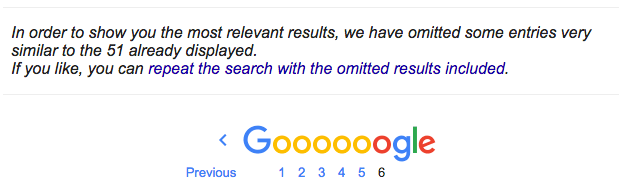
Internal content duplication is a danger to SEO. Large ratios of internal duplicate content may keep pages out of Google’s index or prevent them from ranking well. Use Siteliner to crawl your site. It reports all pages with internal duplicated content.

Google clearly states here that websites should minimize similar content. Pages with exactly the same content may be omitted from search results under a notice like:
6. External Duplicates
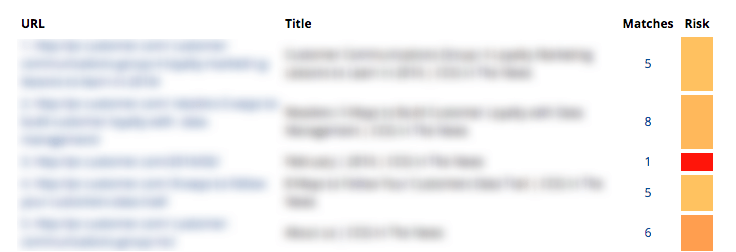
External duplicate content – content duplicated with other websites – is a sign of low quality. Large ratios of duplicate content should be avoided. Use Copyscape to check. Note: high‑authority sites may still rank despite duplicates, but newer sites won’t.
7. Overall Lack of Value to Google’s Index
If your site or page provides little value – e.g., thin affiliate sites with only ads – Google may avoid indexing or ranking it. Focus on unique, helpful content.
8. Your Website is Still New & Unproven
New websites don’t get magically indexed quickly. It takes links and other signals for Google to index and rank visibly. Link building is essential for new sites.
9. Page Load Time
Slow pages may drop rankings over time and could even fall out of the index. Check with Google PageSpeed Insights or GTMetrix.

10. Orphaned Pages
Orphaned pages have no internal links. Google can’t discover them. Use Screaming Frog to crawl your site and identify pages with no incoming internal links.
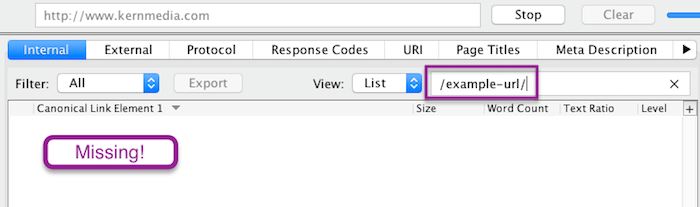
🔧 Fix: Add internal links from relevant pages. Update your sitemap and submit to Google Search Console.
When in Doubt, Ask for Help
For some folks, these things is just too technical and it’s best to hunt session from an web optimization specialist…like me ? If you’re caught, you must decide how invaluable your time is. Spending late nights making an attempt to handle Google indexation and rating will get tiresome. Remember that indexation doesn’t equate to optimum rating. Once Google has listed your web site, your content material high quality, hyperlink profile and different web site and model indicators will decide how well your web site ranks. But, indexation is step one in your web optimization journey.
Different Ways to Get Your Page to Show on Search
After hours of coding, writing, designing, and optimizing, lastly you might be able to live your new web web page. But hey, why is my weblog post not exhibiting on Google?
What have I completed incorrect? Why does Google hate me?

Now, now, we’ve all been there and I’ve discovered to present it no less than a day or two earlier than making an attempt to seek for my new weblog post on Google. Because I’ve long accepted that that’s how long Google wants to really embody newborns, I imply new weblog post on Google Search. Sometimes it takes even longer for brand spanking new web sites. While the method of getting a brand new web page or web site on Google Search is a long and windy one, nevertheless it’s one value studying about.
Let’s begin with the fundamentals.
What is Search? How does it work?
There’s nobody to higher clarify this than Google themselves. So right here’s a video from Google with Matt Cutts explaining about how search works. Have you watched it? If sure, let’s recap and summarize.
For content material to indicate up on Google Search, it has to undergo spiders. No, not actual spiders, however a program known as spider. The spider will begin with a hyperlink, which it’s going to then crawl by way of the content material. If they see one other hyperlink embedded within the content material, they’ll crawl it too, and the method repeats. Crawled contents, or web pages, are then saved in Google’s index.
When a person made a question, solutions are pulled from the index.
So to ensure that your content material to indicate on Google Search, you must first be sure that your web site is crawlable by Google’s crawler known as Googlebot. Then you must be sure that it’s listed appropriately by the indexer which known as Caffeine. Then only will you see your content material or web site showing on Google Search. Here’s the factor, how do you verify from Google for precisely whether or not or not they’ve listed your content material?
Well, you can’t. Like all issues in web optimization, the subsequent best technique you are able to do is analyze and provides it your best guess. Try typing into the Google search bar web site:insertyourdomainhere.com and enter, Google Search gives you a list of all listed web pages out of your area. Or higher but, search your URL straight on Google. But, as Matt Cutts mentioned, web pages that aren’t crawled CAN seem on Google Search as well. Well, that’s one other subject for one more day. Still ? The video is only 4 minutes long. Do have a look to grasp extra. Anyways, let’s get again to the subject. So when do you begin asking:
Why does my web site not present up in Google search?
For me, I’ll give it no less than a few days, at most per week, till I begin freaking out on why my content material remains to be not showing on Google Search. If it has been greater than per week, or perhaps a month and your web site remains to be not there.
Here is a list you must begin checking to see what’s stopping Google from indexing your content material or web site:
Have you checked your robots?
Sometimes a little-overlooked element can have an enormous impact. Robots.txt is the primary place that Googlebot visits on an internet site with a purpose to know which web pages are nofollow or no-index and such. Do you could have this in your HTML head part?

The robots noindex tag is helpful to ensure that a sure web page is not going to be listed, subsequently not listed on Google Search. Commonly used when a web page remains to be under building, the tag should be eliminated when the web web page is able to go live.
However, due to its page-specific nature, it comes as no shock that the tag could also be eliminated in a single web page, however not one other. With the tag nonetheless applies, your web page is not going to be listed, subsequently not showing within the search consequence. Similarly, an X-Robots-Tag HTTP header may be programmed into the HTTP response.
This can then be used as a site-wide particular various for the robots meta tag.

Again, with the tag utilized, your web page is not going to present up in Search. Make positive to repair them. Read extra about meta tags right here:
2. Are you pointing the Googlebot to a redirect chain?
Googlebot is mostly a affected person bot, they might undergo each hyperlink they will come throughout and do their best to learn the HTML then cross it to caffeine for indexing.  However, if you happen to arrange a long winding redirection, or the web page is simply unreachable, Googlebot would cease trying. They will actually cease crawling thus sabotaging any probability of your web page being listed. Not being listed means not being listed on Google Search. I’m completely conscious that 30x is beneficial and essential to be applied.
However, when applied incorrectly, that may break not only your web optimization but in addition the person expertise. Another factor is to not combine 301 and 302.
Is it moved completely or moved briefly? A confused Googlebot shouldn’t be an environment friendly Googlebot. Hear it from Google themselves. So ensure that your whole pages are wholesome and reachable. Fix any inefficient redirect chains to verify they’re accessible by each crawlers and customers alike.
3. Have you applied the canonical hyperlink appropriately?
A canonical tag is used within the HTML header to inform Googlebot which is the popular web page within the case of duplicated content material. For instance, you could have a web page that’s translated into German. In that case, you’d need to canonical the web page again to your default English model. 
Every web page should, by advise, have a canonical tag. Either to hyperlink it again to itself within the case the place it’s a distinctive content material. Or hyperlink it to the popular web page whether it is duplicated. Here comes the query, is the hyperlink you canonical to appropriate? In the case of a canonical web page and its duplicates, only the canonical web page will seem on Google Search. Google makes use of the canonical tag as an output filter for search. Meaning, the canonical model can be given precedence within the rating.
If that isn’t your function, repair your canonical and hyperlink it again to itself. That would do the trick.

SEOPressor Connect allow you to skip the step of manually inputting the canonical tag.
4. Maybe you could have exceeded your Crawl budget
Google has hundreds of machines to run spiders, however there are one million extra web sites on the market ready to be crawled. Therefore, each spider arrives at your web site with a budget, with a restrict of what number of resources they will spend on you. This is the crawl budget.

Here’s the factor, as talked about earlier than, in case your web sites have quite a lot of redirection chains, that can be unnecessarily consuming your crawl budget. Note that our crawl budget may be gone earlier than the crawler even reaches your new web page. How to know the way a lot is your crawl budget? In your Search Console account, there can be a crawl part the place you’ll be able to verify your crawl stats.
Let’s say your web site has 500 pages, and Googlebot is only crawling 10 pages in your web site per day. That crawl budget is not going to be environment friendly sufficient for the brand new pages that you just’re pumping out. In that case, there are a couple of methods to optimize your crawl budget. First of all, authoritative websites are typically given an even bigger and extra frequent crawl budget. So get these backlinks.
The extra high quality and relevant links pointing to your web site imply your web site IS of good high quality and high relevance to your area of interest. We all know building up authority doesn’t occur in sooner or later. So one other factor that you are able to do is to ensure that your web site may be crawled effectively. You have to make good use of your robots.txt file. We all have some pages on our web site that don’t actually have to be up there in Search like duplicate content material, under building pages, dynamic URLs, and many others.
You can specify which crawler the instruction applies and which URL strings should not be crawled. As an instance:  That means, crawlers won’t be spending unnecessarily budget on pages that don’t want crawling. A list of the commonest person brokers contains: Googlebot, Bingbot, Slurp, DuckDuckBot, Baiduspider, YandexBot, facebot, Ia_archiver.
5. Is your web page truly an orphan?
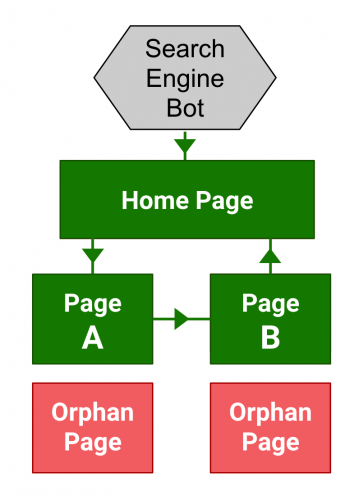
An orphan web page is a web page that has no inside hyperlinks. Perhaps the hyperlink is defective inflicting the web page to be unreachable, or throughout an internet site migration, the hyperlink is by chance eliminated. Remember how the spiders work? They begin from one URL and from there they crawl to different URLs which can be linked. An orphan web page can’t be crawled as a result of there isn’t a method to be crawled.
It shouldn’t be linked out of your web site, thus the time period orphan. That’s why interlinking is so necessary as a result of it acts as a bridge for the crawlers from one web page of your content material to a different. Read extra about interlinking right here: Why Internal Links Matter To Your SEO Effort? How are you able to establish orphan pages? If you’re like us and you’re utilizing the WordPress CMS you’ll be able to export a full list of URLs of each pages and content material in your web site. Use that to check with the distinctive URLs present in a web site crawl.
Or you’ll be able to lookup your server’s log file for the list of distinctive URLs loaded for let’s say the final 3 months. Again, examine that with the list you bought from the positioning crawl. To make your life simpler, you’ll be able to load these information into an excel file and examine them. The URLs which aren’t duplicated are those which can be orphaned. After realizing what are the orphaned pages, fixing them can be a lot simpler. Now what you must do is hyperlink these orphan pages appropriately. Make it so they’re simply discoverable by customers and crawlers alike. Also, don’t overlook to replace your XML sitemap.
Is Everything Okay?
If every little thing is working properly, there are not any error codes returning, the robots tags are superb, however your web page remains to be not exhibiting up. Why? Well, the problem would possibly very well be from Google’s side. Maybe you might be simply not the crawler’s precedence.

Spidey, don’t be sleeping on the job now.
Here are 5 steps you’ll be able to take to induce Google to index your new pages quicker
1. Update your sitemap in Google Search Console
Submitting your sitemap to Google is like telling them “Hey, here! Check out these important URLs from my website and crawl them!” They won’t begin crawling these URLs instantly however no less than you gave them a heads-up. If you run an enormous web site that updates continuously, maintaining together with your robots and a number of sitemaps will most likely drive you nuts. Do it sparsely and needless to say you can’t have no-index, nofollow in your robots after which add them to your sitemap. Because would you like it listed or not? To keep away from issues wish to occur, sustaining a dynamic ASPX sitemap will most likely be your best choice.
2. Submit your URL on to Google for indexing
Update: Submit URL to Google search engine is now not working as a result of Google retired its public URL submission tool. 
Similarly, Google permits you to manually submit your new web page to them. It’s actually easy. Just seek for submit URL to Google and the search consequence will return you with an input bar. Now, copy and paste the URL of your new web page and click on on the submit button. Voila, you could have completed submitting a brand new URL to Google for crawling and indexing. However, identical to the sitemap, this only acts as a heads-up for Google to make them conscious of the existence of your new web page. Just do it in any case when your web web page has been sitting there for a month and nonetheless not being listed. Doing one thing is best than nothing proper?
3. Use the Fetch & Submit tool in Search Console
You can request, on to Google, for a re-crawl and re-index of your web page. That may be completed by logging into your Search Console then carry out a fetch request through fetch as Google. After ensuring that the fetched web page seems appropriately: all the photographs are loaded, there are not any damaged scripts, and many others. You can request for indexing, then select between the choice of crawling only this single URL or every other URLs which can be straight linked. Again, Google warned that the request is not going to be granted instantly. It can nonetheless take as much as days or per week for the request to be accomplished. But hey, taking an initiative is best than sit and wait proper?
Once once more, area authority impacts how frequent and the way a lot your crawl budget can be. If you need your new pages and web site modifications to be listed swiftly, you could have a greater probability in case your web page rank is high sufficient.

High area authority websites like Reuters will get index quicker
This is a matter of gradual and regular win the race although. If you will get one million backlinks primarily based on one single content material in a single day, that’s nice. But one nice content material shouldn’t be sufficient. Your web site must be up to date often and constantly with high quality content material whereas concurrently acquire high quality backlinks in your web page authority to go up.
Start updating your web site no less than twice weekly, attain out to the group to build model consciousness and connections. Keep that effort up, slowly and steadily your authority will go up and your web site can be crawled and listed a lot quicker.
5. Have a Fast Page Loading Speed
Here’s the factor, when you could have an internet site that hundreds quick, Googlebot can, subsequently, crawl it quicker.

In the unlucky case the place the load speed of your web site shouldn’t be satisfying and requests often trip, you’re actually simply losing your crawl budget. If the issue stems out of your hosting service you should most likely change to a greater one. On the opposite hand, if the issue comes out of your web site construction itself, you would possibly want to contemplate cleansing up some codes. Or higher but, be sure that it’s well optimized.
To ensure that your WordPress website is effectively crawled and ranked by search engines, it’s crucial to optimize page indexing. If you’re wondering how to get your WordPress site on Google and achieve the ranking it deserves, here are some best practices to follow:
Quality Content: Create high-quality, relevant, and engaging content that provides value to your audience.
SEO-Friendly URLs: Optimize your URLs to be concise, descriptive, and include relevant keywords.
Sitemap Creation: Generate a sitemap for your website to help search engines understand its structure and content.
Permalink Structure: Use a clean and SEO-friendly permalink structure for your URLs, incorporating keywords when appropriate.
Internal Linking: Implement internal linking strategies to connect related content within your site, enhancing navigation and SEO.
Mobile Responsiveness: Ensure that your website is mobile-friendly, as Google prioritizes mobile-responsive sites in search rankings.
Avoid Duplicate Content: Eliminate or manage duplicate content to prevent confusion for search engines and users.
Robots.txt and Meta Robots Tags: Use the robots.txt file and meta robots tags to guide search engine crawlers on which pages to crawl or avoid.
Structured Data Markup: Implement structured data markup (schema.org) to provide additional information to search engines and enhance rich snippets.
SSL Certificate: Secure your site with an SSL certificate, as Google favors secure websites, and it positively impacts search rankings.
By adhering to these indexing best practices, you can improve your WordPress site’s visibility in search engine results, making it more accessible to your target audience and enhancing the overall user experience.
5 Common Mistakes That Prevent Google Indexing
- Relying only on the “site:” command: It shows a sample, not all indexed pages. Use Search Console for accurate data.
- Blocking CSS/JS in robots.txt: Google needs to render your page fully. Don’t block important resources.
- Using “noindex” on paginated or archive pages by mistake: Many plugins add noindex to non‑canonical pages – review carefully.
- Forgetting to update sitemap after site changes: An outdated sitemap misleads crawlers.
- Ignoring Search Console messages: Google often tells you why it can’t index a page. Check the “Coverage” report.
People Also Search For (Indexing & Crawling Questions)
- How long does Google take to index a new site?
- How to check if Google has indexed my page
- Why are my pages not indexed after weeks?
- What is crawl budget and how to optimize it
- Difference between crawled and indexed
- How to submit URLs to Google for indexing
- Does noindex prevent crawling?
Reality Check: Limitations of Indexing Fixes
- No instant results: Even after fixes, Google may take days or weeks to re‑crawl and update index.
- Quality still matters: Indexing is only step one. Low‑quality content may be indexed but never rank.
- Not all pages need indexing: Internal search results, admin pages, and thin content should stay out of Google.
- Google’s algorithms are secret: No one outside Google knows exactly how index selection works.
- Third‑party tools have limits: Screaming Frog, Sitebulb, etc., are helpful but can’t replace Google Search Console.
🎯 Key Takeaways – Why Google Is Not Indexing Your Site
- First, use
site:yourdomain.comand Google Search Console to confirm indexing status. - Common blockers: robots.txt disallow, noindex meta tag, X‑robots header, redirect chains, orphaned pages.
- Duplicate content (internal or external) and low‑value pages can cause Google to skip indexing.
- New sites and slow pages naturally face longer indexing delays.
- To speed up indexing: submit sitemap, use “Request Indexing” in Search Console, build backlinks, and improve site speed.
- Regularly audit your site with Screaming Frog, Siteliner, and Copyscape to catch issues early.
- When in doubt, hire an SEO specialist – your time is valuable.
🔍 Still Having Indexing Issues?
Get our free “Indexing Audit Checklist” – a step‑by‑step guide to diagnose and fix any indexing problem, plus a custom Google Search Console report template.