What Is Google Trends? Complete Guide to Master Search Trends (2026)
🏆 Top 3 Ways to Use Google Trends
- #1 Keyword Research – Discover rising search terms before they peak
- #2 Seasonal Content Planning – Identify annual patterns (e.g., tax season, holidays)
- #3 Competitor Comparison – Compare brand interest vs. rivals
With Google Trends, you can delve into the trends of search queries across various regions and timeframes. This robust tool works as a comprehensive tracker of search history, granting valuable insights on what people are seeking through topics, terms, and questions searched via Google. See below to learn more about how to optimize your usage with this powerful application:
Monitor search interest: Observe the fluctuations in search volumes associated with a particular term or subject across time. This information can prove valuable for recognizing seasonal patterns, measuring the effects of occurrences, and gauging relative popularity among distinct topics.
Examine terms: Evaluate how the search volume of various terms stack up against each other. This can aid in keyword analysis, comprehending competitor environments, or spotting emerging patterns.
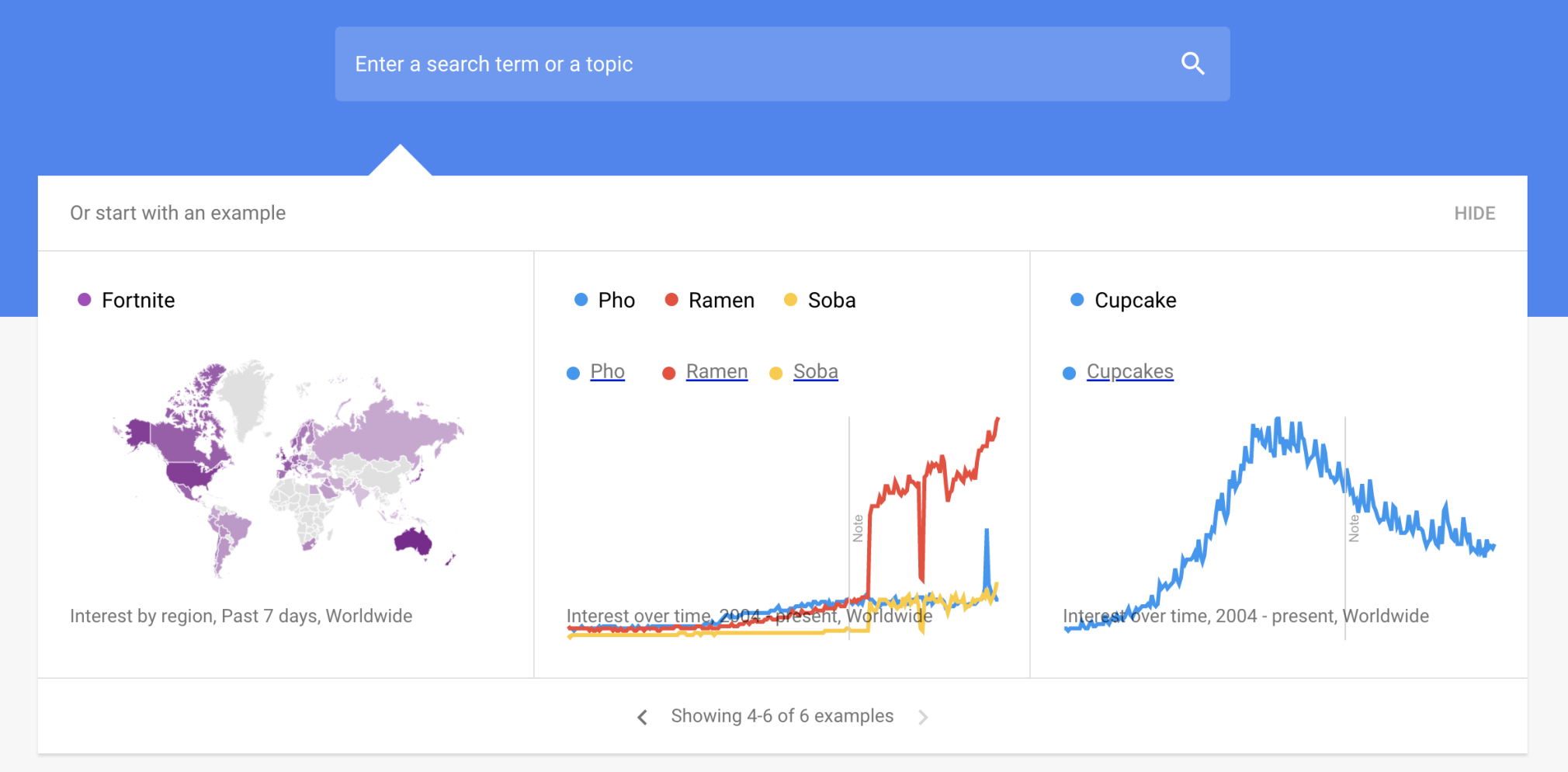
Discover through geographical location: Observe the fluctuations in search volume for a specific keyword across diverse countries, states or cities. This analysis can provide valuable information about regional preferences and how distinct cultural backgrounds may impact online searching patterns.
Explore interconnected themes: Obtain recommendations for related keywords that individuals are seeking. This can prove advantageous in generating ideas for content or broadening your comprehension of a subject.
Keep yourself informed with the latest updates: Browse through carefully selected popular searches and news stories derived from Google Trends data which highlights ongoing events and trending topics of public interest.
Google Trends is a versatile resource that can benefit anyone seeking insight into online search activity. It has numerous applications, including market analysis, content development, SEO enhancement and staying up-to-date with current trends.
Google Trends Explained
Google Trends is a valuable tool that utilizes a sample of Google web searches to determine interest in specific topics over time. The representation of this interest as an overall search proportion shows when there are surges related to certain subjects. Various professionals, such as SEOs, journalists, content marketers and advertisers can benefit from using Google trends by maximizing their link building reach, exploring new niches and creating campaigns for link building or crafting strategic content among other uses.
However, its value may not be fully realized unless one understands how the tool operates meaningfully – you need to read between the lines so you know what data has been presented and interpret it accordingly. You should use your interpretation skills to ascertain who will find this information useful including those able satisfaction searcher intent while gaining traffic backlinks towards your website via enhanced topic/keyword research efforts with balanced results aspiration seems achievable readily accessible yet acutely productive too!
How Does Google Trends Work?
Google Trends uses anonymized searcher data from various Google platforms, including Search, News, Images, Shopping and YouTube. It monitors general topics to determine when there is a spike or decline in interest. However, it should be noted that while Trends focuses on “topics,” it does not work with literal keywords or exact phrases that are used for research purposes. Unlike other keyword tools which measure monthly search volumes and track individual keywords and long-tail phrases specifically, Trends instead tracks the popularity of broader themes in relation to overall searches during a specific period. As a result, the proportionate number of times a specific phrase is searched as compared to the total amount of all searches will be displayed on their scale for popularity which ranges from 0-100.
This can indicate an increase or decrease in virtual real-time interest among search users, but will not predict the actual number who have participated, nor encompass all related terms. In contrast, to provide contextual information about rankings of particular words, yet another keyword researching tool may serve better. Against such perspectives, dimensions like analyzing the popular trend over time (as early back as the year 2004), comparing up to five other similarities in queries, and locate variations in countries are some features available by using Trends. Visibility into real-time trending offers full disclosure in the future-to-come, omitting any mystery behind them left undisclosed. The difference between this approach and those using monthly volume usage suggests an important distinction towards understanding user behavior patterns ultimately used and referred within a given timeframe.
Interpreting Google Trends Data
A graph displays Google Trends’ normalized data, which portrays search proportions on a 0 to 100 scale rather than exact volumes. This accounts for changes in searcher behavior and allows surges in interest to remain evident despite fluctuations. To further normalize the results, infrequently searched terms show as “0,” duplicate searches within a short timeframe are eliminated, and special characters like apostrophes aren’t included. For example, searching “daylight savings time” over five years on Google Trends shows regular spikes in March and October/November.
In comparison, SEMRush projects an average of 246K monthly searches since they consider search volume across the last year evenly; however these averages can appear artificially high because two annual peaks generate extreme variations highlighted by the distinctive trends revealed through Google Trend’s insights that guide online marketing professionals towards advertising related products or content before specific dates it becomes popular during certain times only (March & Oct-Nov).
The fluctuation of popular search terms over time
An upward trend in a search term indicates that its popularity is increasing relative to the total number of searches on Google, while a downward trend does not necessarily imply an overall decrease in the number of searches. Rather, it signifies diminished interest compared to other terms being searched at that time. It’s worth noting that predictive capabilities are not among Google Trends’ features; however, users can analyze trends dating back as far as 2004 and gain insight into when spikes or drops occurred historically. Additionally, related queries and subregional breakdowns for individual phrases may be available through this tool along with information about rising search terms attracting increased attention over time.
Google Trends vs. Other Keyword Tools
| Feature | Google Trends | SEMrush / Ahrefs |
|---|---|---|
| Search volume numbers | No (relative scale 0–100) | Yes (exact monthly volumes) |
| Historical data | Since 2004 | Typically 12–24 months |
| Real-time trends | Yes (last 24 hours) | No |
| Regional breakdown | Yes (city-level) | Yes (country-level typically) |
| Compare multiple terms | Yes (up to 5) | Limited |
| Price | Free | Paid ($99+/month) |
5 Common Mistakes When Using Google Trends
- Treating 100 as “100 searches”: The scale is normalized. A score of 100 is the peak within the selected period, not an absolute number.
- Ignoring geography: National trends can hide regional spikes. Always drill down to city or metro level.
- Using “search term” instead of “topic”: Topics aggregate misspellings and related phrases; search terms are literal. Use topics for broader analysis.
- Comparing unrelated time periods: A term’s popularity in December vs. July may mislead. Compare same months year-over-year.
- Assuming causality: A spike in “flu symptoms” doesn’t mean flu season started – it could be a news story. Verify with other sources.
People Also Search For (Google Trends Questions)
- How to use Google Trends for SEO
- Google Trends vs Google Keyword Planner
- Can Google Trends predict search volume?
- How to find trending topics on Google Trends
- Google Trends real-time vs historical data
- How to export Google Trends data
- Google Trends for YouTube video ideas
Reality Check: Limitations of Google Trends
- No exact search volumes: Use a keyword tool (SEMrush, Ahrefs, Keyword Planner) for volume data.
- Sampled data: Trends uses a sample, not all searches. Very low-volume terms may show as 0.
- No demographic breakdown: Can’t filter by age, gender, or income.
- No predictive algorithm: Historical trends don’t guarantee future performance.
- Limited to Google properties: Doesn’t include Bing, Amazon, TikTok, or other platforms.
🎯 Key Takeaways – Google Trends
- Google Trends shows relative search interest over time (scale 0–100), not absolute volumes.
- Use it for seasonal trend detection, keyword comparison, regional insights, and content ideation.
- Differentiate between “search term” (literal) and “topic” (aggregated). Topics give broader, more accurate data.
- Drill down to city/metro level for localized marketing campaigns.
- Combine Google Trends with a volume-based keyword tool for complete SEO research.
- Real-time trends help create timely, viral-worthy content.
- Available data goes back to 2004 – great for historical analysis.
📈 Master Google Trends for SEO & Content Marketing
Get our free cheat sheet: “10 Google Trends Hacks Every Marketer Should Know”
FAQ
How can I use Google Trends?
To utilize Google Trends, simply enter a search term and explore the resulting heat map, which indicates where the term is most popular. Hovering over a region reveals the percentage of searches containing your term.
What is the #1 searched thing on Google?
According to global data, YouTube tops the list with a staggering search volume of 1,300,000,000, followed by Facebook, Whatsapp Web, and Weather.
How do I find trending products on Google Trends?
Visit the Google Trends homepage to view popular search terms from the past week. Alternatively, search for a product category and filter results by Google Shopping. Utilize the “related queries” section for product-specific data.
Is Google Trends for SEO?
Yes, Google Trends aids in SEO by facilitating keyword research. Utilize the Explore feature to analyze a keyword’s interest over time and by subregion, helping improve search rankings.
Who uses Google Trends?
Marketers find Google Trends data invaluable, especially for seasonal businesses. By monitoring trending search terms relevant to their industry, businesses can optimize marketing efforts during peak interest periods.