

Top 10 Benefits of Cloud Computing for Every Tech Enthusiast
Is it your aim to increase both the effectiveness and efficiency of your company? One of the great ways to achieve that is by using cloud computing. A business can acquire a multitude of advantages from cloud computing. It is almost impossible to overlook the benefits of moving company operations to a cloud-based platform as there are so many. Though cloud solutions may be costly for your company budget, you can still afford them by using my choice software promo codes without breaking the bank. Many businesses are still using old and inefficient methods simply because they do not know the advantages. But you don’t have to fret, as this blog has got you covered. This blog will point out to you the top benefits of cloud computing that will entice you to move to cloud-based solutions.
📌 Key Takeaways: Why Cloud Computing Matters for Every Tech Enthusiast
- Cloud computing is not just for big enterprises – startups, developers, and even solo tech enthusiasts can leverage cloud services for experimentation, hosting, and scaling.
- Top benefits include accessibility, security, cost savings, and eco‑friendliness – but many businesses overlook these advantages due to lack of awareness.
- Security myths debunked: Cloud providers invest more in security than most on‑premises data centers, offering encryption, multi‑factor authentication, and automated backups.
- Performance and availability are superior – cloud platforms guarantee 99.9%+ uptime with geographically distributed data centers.
- Cost‑effectiveness comes from pay‑as‑you‑go models – no upfront hardware purchases, and you only pay for what you use.
- Cloud computing enables rapid innovation – deploy applications in minutes, not months, and iterate quickly.

Top 10 Benefits of Cloud Computing
Here are the amazing advantages of using cloud solutions that you must consider.
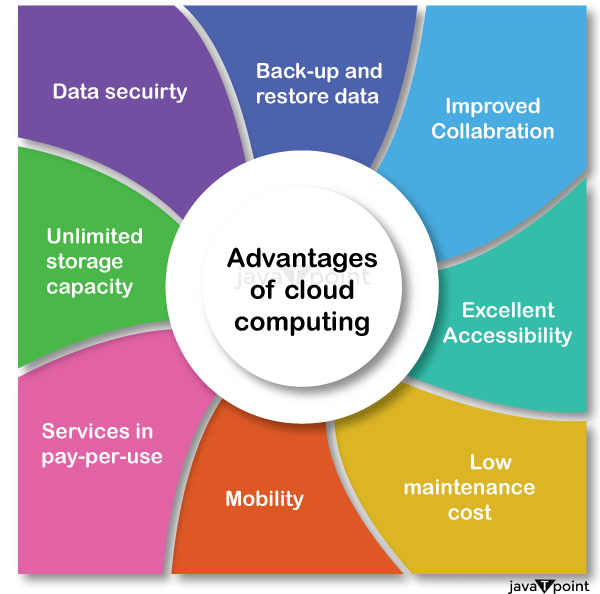
Greater Accessibility
One of the greatest benefits of cloud computing is greater accessibility. It is certain that all multinational companies have different branches and offices across various states or countries. This thing makes it difficult for the employees to access their systems all across the world. However, this is not an issue if you are using cloud solutions. Not only can employees benefit from the increased accessibility, but clients and customers may now access their information by logging into an account. This guarantees that everyone, whether at work or on the go, receives the most recent information.
No Requirement of Hardware and Software
When you use the traditional approach for your regular operations, you will need servers, cables, network switches, backup generators, routers, and other equipment to make the work smooth. This is a lot of hassle. However, when you utilise cloud computing, their need is eliminated. This may all be managed for a monthly price, depending on the cloud company you select. Every cloud-based platform benefit from cost reduction alone, which is a critical component of all business models.
High-End Security
Every firm requires security as a basic condition that should not be compromised even for a moment. With the use of cloud computing, users, and teams are no longer obliged to maintain their own backups locally or remotely since data backups are centrally carried out in the data centers of the cloud providers. The chances of losing data are lower if a disaster wipes out a backup. Cloud providers can fetch a piece of data from a different duplicate that they have in their cloud storage once that data has been added. Instead of relying solely on personal devices or servers at home or at work, employees can better secure their privacy by using cloud security features such as data encryption and two-factor authentication. Oracle is equipped with a security-first cloud architecture that has automatic protection as one of its features.
Better Performance and Availability
One of the most important benefits of cloud computing is the information is available to you all the time which greatly impacts your performance in a positive way. You get more performance improvements by utilising cloud computing services concurrently than by owning dedicated server hardware. Since cloud services are dispersed over several cloud facilities, they also provide high availability with minimal downtime. End users are aware that cloud providers are in charge of patching security flaws and upgrading cloud systems, as well as maintaining cloud software.
Quick Application Deployment
When the business demands come as a surprise, it frequently necessitates quick access to cloud computing resources. By swiftly implementing cloud apps, you may enhance your cloud application development as you won’t have to wait for IT personnel to set up servers or buy extra hardware. Furthermore, a wide array of services supporting various cloud infrastructure technologies are available for you to select from.
Get Quick Insights About Business
In today’s fast-moving world, timing is everything for the success of the business. Platforms that are cloud-based offer a special chance to access data as soon as it is gathered. Based on projections from past data, this helps with improved decision-making and provides insight into what your organisation’s future may bring.
Avoid Any Break
Do you have a reliable backup plan in case of an emergency or other unanticipated circumstance? If not, your company can gain from depending on cloud computing services. Infinite data storage and remotely actuatable systems are two features of cloud computing that help guarantee company continuity.
Cost-Effective
While putting in place a cloud strategy requires an upfront financial outlay, firms save a significant amount over time by not having to maintain costly hardware or local data centers. Additionally, since cloud-based solutions don’t need any upfront fees, companies may experiment with them before making a decision to invest in them at their own speed. Oracle offers flexible sizing and price performance.
Virtualized Computing
As cloud resources can be quickly provisioned to cope with large spikes in demand, cloud computing is the most suitable solution for virtualized environments of the computer to ensure that there is no downtime. With cloud computing, your business can very well increase its power almost in a non-interruption manner to be able to satisfy the growing requirements without staff duplications or capital investments.
Eco-Friendly
Compared to conventional IT solutions, cloud computing is an eco-friendly technology. Businesses may cut their energy use and carbon impact by up to 90% by switching to the cloud. Businesses may utilise cloud-based services to access the same apps and data from any other device instead of relying on internal servers and software. Businesses are no longer required to buy and manage their own IT infrastructure as a result of this.
Wrap UP!
There you have it – some of the top benefits of cloud computing. By shifting to cloud solutions, your business can benefit from all these advantages and get great success.
Author Bio: Sophie Ostar is a content marketer who works for Affiliate Marketing – Discount and Voucher Codes Providing Platform. A writer by day and a reader by night; She is striving to make the most of the new opportunities that comes in his way and excels in everything she does.
The Evolution of Cloud Computing: From On‑Premise to Serverless
Cloud computing didn’t emerge overnight. It evolved from traditional on‑premise data centers to Infrastructure as a Service (IaaS), Platform as a Service (PaaS), and now Serverless and Function‑as‑a‑Service (FaaS). Understanding this evolution helps tech enthusiasts appreciate why cloud solutions have become indispensable.
| Era | Model | Key Characteristics |
|---|---|---|
| 1990s‑2000s | On‑Premise | Dedicated servers, high upfront cost, limited scalability |
| 2006‑2010 | IaaS (AWS EC2) | Virtual machines on demand, pay‑per‑use, elastic scaling |
| 2010‑2015 | PaaS (Heroku, Google App Engine) | Developers focus on code, platform manages runtime |
| 2015‑2020 | Containers & Kubernetes | Portable, microservices, orchestration |
| 2020‑present | Serverless (AWS Lambda, Cloud Functions) | No server management, event‑driven, auto‑scaling to zero |
💡 Pro Tip: Start with Serverless
If you’re a developer building APIs or background jobs, serverless platforms like AWS Lambda or Vercel Functions can drastically reduce costs and complexity. You pay only when your code runs – ideal for side projects or low‑traffic applications.
Real‑World Use Cases: How Companies Leverage Cloud Benefits
The 10 benefits listed above aren’t theoretical. Here are concrete examples of how organizations use cloud computing to gain competitive advantages:
- Netflix: Uses AWS for global streaming, leveraging auto‑scaling to handle peak traffic (e.g., new series releases). Their microservices architecture runs entirely on cloud.
- Spotify: Migrated to Google Cloud for data analytics and machine learning, enabling personalized playlists for 500M+ users.
- Airbnb: Uses cloud for dynamic pricing algorithms, availability checks, and fraud detection – all requiring massive compute power on demand.
- NASA: Deployed the Mars Rover mission data processing on AWS, saving millions compared to building dedicated infrastructure.
Common Myths About Cloud Computing Debunked
⚠️ Myth #1: “Cloud is less secure than on‑premise”
Reality: Cloud providers like AWS, Azure, and Google Cloud invest billions in security certifications (ISO 27001, SOC 2, FedRAMP). Most data breaches occur due to customer misconfigurations, not provider vulnerabilities.
⚠️ Myth #2: “Cloud is always more expensive”
Reality: While cloud can be costlier for predictable, always‑on workloads, its pay‑as‑you‑go model saves money for variable or seasonal traffic. Use reserved instances or savings plans to reduce costs for steady workloads.
⚠️ Myth #3: “Vendor lock‑in is inevitable”
Reality: Open standards (Kubernetes, Terraform) and multi‑cloud strategies reduce lock‑in risk. Many companies use a primary cloud with a secondary for disaster recovery.
How to Choose the Right Cloud Provider (AWS vs. Azure vs. Google Cloud)
Each major cloud provider has strengths. Use this comparison to decide:
| Feature | AWS | Microsoft Azure | Google Cloud |
|---|---|---|---|
| Market share | ~32% | ~23% | ~10% |
| Best for | Mature services, global reach | Windows/.NET integration, hybrid cloud | AI/ML, Big Data, Kubernetes (GKE) |
| Free tier | 12 months limited | 12 months + $200 credit | $300 credit + always free |
| Compute options | EC2, Lambda, Fargate | Virtual Machines, Functions, AKS | Compute Engine, Cloud Run, GKE |
For most startups, AWS offers the widest range of services. If you’re heavily invested in Microsoft tools (Active Directory, C#), Azure is natural. For AI/ML and data analytics, Google Cloud leads.
Step‑by‑Step: Migrating Your First Application to the Cloud
- Assess your workload – Identify which applications are suitable for cloud (stateless, scalable).
- Choose a migration strategy – “Lift & shift” (rehost), refactor, or rebuild.
- Select a provider and region – Consider data residency and latency.
- Set up security and IAM – Use roles, not root accounts, and enable MFA.
- Migrate data – Use tools like AWS DataSync or Azure Migrate.
- Test and validate – Run parallel workloads before cutting over.
- Optimize costs – Use cloud native monitoring (CloudWatch, Azure Monitor) and set budgets.
💡 Pro Tip: Start with a Non‑Critical Workload
Don’t migrate your entire infrastructure at once. Pick a low‑risk application (e.g., internal dev tool, static website) to learn the cloud migration process. This builds confidence before moving production systems.
Future Trends in Cloud Computing (2026‑2030)
Cloud computing continues to evolve. Here’s what tech enthusiasts should watch:
- Edge Computing: Processing data closer to users (e.g., IoT devices, 5G). AWS Wavelength, Azure Edge Zones.
- AI‑Native Cloud: Platforms optimized for training and deploying large language models (LLMs).
- FinOps: Financial operations for cloud cost management – becoming a dedicated role in many companies.
- Confidential Computing: Hardware‑level encryption for data in use, protecting against even cloud provider access.
- Multi‑Cloud and Hybrid Cloud: Avoiding vendor lock‑in by using multiple providers or integrating on‑premise with public cloud.
⚠️ Warning: Avoid Uncontrolled Cloud Sprawl
Without governance, cloud costs can skyrocket. Implement tagging policies, budget alerts, and regularly review unused resources (orphaned volumes, idle load balancers). Tools like AWS Cost Explorer or Azure Cost Management are essential.
📝 Article Summary: Top 10 Benefits of Cloud Computing
- Cloud computing offers greater accessibility, eliminating hardware dependency, and providing secure, centralized data storage.
- Performance and availability are superior with distributed data centers and automated failover.
- Quick application deployment and real‑time business insights accelerate innovation.
- Cost‑effectiveness, virtualized scaling, and eco‑friendly operations make cloud computing the future of IT.
- Real‑world examples (Netflix, Spotify, NASA) demonstrate proven success.
- Choose the right provider based on your workload, and start with a non‑critical migration to learn the ropes.
- Future trends like edge computing, AI‑native clouds, and FinOps will shape the next decade.
FAQ
📚 Further Reading from Trusted Sources
- AWS: What is Cloud Computing? – Official guide from Amazon.
- Microsoft Azure: Cloud Computing Basics – Comprehensive overview.
- Google Cloud: What is Cloud Computing? – Learn from Google.
- NIST Definition of Cloud Computing – The official standard (SP 800‑145).
- Gartner: Cloud Computing Trends – Research and analysis.
- CSO Online: Cloud Security Best Practices – Practical advice.






This is a very informative post and easy to understand, thanks for sharing
Thanks for the comments, be sure to bookmark and share
Nice blog thanks for sharing it content is easy to understand Thanks very much for nice blog
Thanks for nice comments, keep reading and sharing
Nice blog thanks for sharing it content is easy to understand Thanks very much for nice blog
Thanks for nice comments, keep reading and sharing
Nice blog thanks for sharing it content is easy to understand Thanks very much for nice blog
Thanks for nice comments, keep reading and sharing