

SEO Tips For Web Designers: Build Sites That Google Loves (2026 Edition)
You are taking your first steps in the world of web design, your goal is to create sites or blogs with spectacular graphics, right? Mistaken. Or at least it is only partially. The aesthetic side of a web project is not the only aspect you will have to deal with.
On the other hand, the platform you are working on must be easily found by the people who use the main search engines. And this is where SEO comes into play: the set of techniques that aim at optimizing content to make it visible on Google.
What are your thoughts about SEO? “I am a designer, it shouldn’t interest me!” In reality, SEO and web design go hand in hand and there are many factors that you should optimize when designing a website. The days of designing in isolation are over—modern web design demands a holistic approach where aesthetics and technical performance are inseparable.
Would you like to know more? Here are SEO tips you (perhaps) don’t know, expanded with 2026 best practices and insights from industry leaders.
Before diving into the tactics, it’s worth understanding why SEO and design are so deeply connected. Google’s algorithms now evaluate over 200 ranking factors, many of which are directly influenced by design decisions. From page speed to mobile responsiveness, from heading structure to image optimization—every design choice either helps or hinders your client’s search visibility. A beautiful site that no one can find is simply a digital ghost town.
Optimize Images for Search and Speed
A web designer worthy of the name knows that good positioning also depends on the SEO optimization of the images. In addition, searching for images has become a widespread practice, with Google Images processing billions of queries daily.
For this reason, if you want your content to position you must improve the photos and images on the SEO side. Let’s see what the characteristics to be respected are:
- Name of the images: must be contextualized to the page of the website or blog. Writing “sample.jpg” will not help you find yourself. Instead, use descriptive, keyword-rich filenames like “blue-widget-product-shot.jpg” that tell search engines what the image represents.
- Alt attribute: is the description of the photo. This feature is very important for scaling Google SERP. In this space, I suggest (without exaggerating) to insert words or key phrases. However, the alt tag is also decisive for accessibility, it is read by vocal readers for people with visual impairments. Well-written alt text serves both SEO and inclusivity goals simultaneously.
- Optimize the weight of the images: this factor, if neglected, affects the speed of the website and leads to negative results also from the point of view of SEO positioning. The imperative is to use light images and therefore always remember to reduce the size of photos. Tools like TinyPNG or Squoosh can reduce file sizes by 70% without visible quality loss.
- Choose modern formats: Consider using next-generation formats like WebP or AVIF instead of traditional JPGs and PNGs. These formats offer superior compression and quality, significantly improving load times. Google’s PageSpeed Insights actively recommends modern image formats.
The attention to these details increases the relevance of the page and the search by image. As a result, you have a better chance of a person identifying your photo as useful content and becoming loyal to your site.
Pro Tip: Implement Lazy Loading
Add the ‘loading=”lazy”‘ attribute to your images below the fold. This tells browsers to only load images when they’re about to enter the viewport, dramatically improving initial page load speed. It’s a simple HTML addition that pays huge SEO dividends. Most modern CMS platforms like WordPress now include this feature by default, but always verify it’s working.
Keep the Code Clean and Semantic
Here is another of the SEO tips that a web designer must know: The site you are designing must have crystal clear and orderly code.
Do you know why? Clean code is scanned smoothly by Google crawlers. From this situation to benefit not only the Search engine optimization but also the speed of loading. Search engine bots have limited crawl budgets—especially for large sites—and messy code wastes that budget on parsing unnecessary elements.
Beyond just cleanliness, semantic HTML matters. Using the right tags for the right content (like <article>, <nav>, <header>, <footer>) helps search engines understand your content structure. This is often called “machine-readable” design, and it’s becoming increasingly important as Google’s AI tries to understand context and relationships between content elements.
Tools like the W3C Markup Validation Service can help you identify code issues that might be hurting your SEO performance. Make validation part of your quality assurance process before launching any site.
Reduce Flash Elements and Modern Interactive Features
It is not advisable to abuse flash solutions to create navigation menus. The reason is simple: perhaps they are not the best in terms of aesthetics and the search engines have difficulty reading them. Result? You would encounter some SEO indexing problems.
While Flash itself is now obsolete, the principle extends to modern interactive elements. JavaScript-heavy animations, complex carousels, and intricate hover effects can all create indexing challenges if not implemented carefully. Search engines are better at rendering JavaScript than they used to be, but they still prefer content that’s immediately available in the HTML.
A good middle ground, if you really can’t do without it, would be to use only small interactive parts on a platform built with solid HTML foundation. For critical content, ensure it’s present in the initial HTML response, not loaded later by JavaScript. Use tools like Google’s URL Inspection tool to see how Google renders your pages.
Watch Out for the URL Structure
This is another of the SEO tips for web designers, URL optimization. That is the address of a page or internet resource. Why is it so important to optimize this text string?
It is one of the elements used by search engines to position a site or blog. So make sure you don’t leave the URL to chance. Examples like this: “index.php? Lan = it & cat = 8 & id = 45” must not exist, do not refer to useful information for Google and readers. What you need to do is turn the series of numbers and symbols into words.
There are good practices that you can put in place:
- Include the keyword in the URL;
- The URL must be short (ideally under 60 characters);
- Use dashes to divide words (hyphens, not underscores);
- If necessary, delete the stop words: all those superfluous words to the main ones. I’m talking to you about possessive articles or adjectives like “the,” “a,” “and,” “of.”
- Maintain a logical hierarchy (domain.com/category/page-name);
- Avoid changing URLs after launch—if you must, implement proper 301 redirects.
Well-structured URLs also improve user experience. They give visitors a clue about where they are on your site and what content to expect. This transparency builds trust and can improve click-through rates from search results.
Generate and Submit the Sitemap
The sitemap is, in fact, a site map and is used to make its structure understood. It is a file that collects in an orderly way all the pages that must be indexed on search engines.
I leave you with the words of Google: “A sitemap is a file in which you can list the web pages of your site to communicate to Google and other search engines the organization of the contents of the site. So-called web crawlers from search engines like Googlebot read these files to better scan your site.”
CMS have valid tools to create the sitemap to be inserted in the Google Search Console. Once generated, for example with one of the many WordPress plugins like Yoast SEO or Rank Math, you just have to send it to the search engine. But don’t stop at submission—monitor your sitemap in Search Console for errors like blocked resources or 404 pages.
For larger sites, consider creating multiple sitemaps organized by content type (posts, pages, products, images, videos). You can then submit them through a sitemap index file, making it easier for search engines to crawl efficiently.
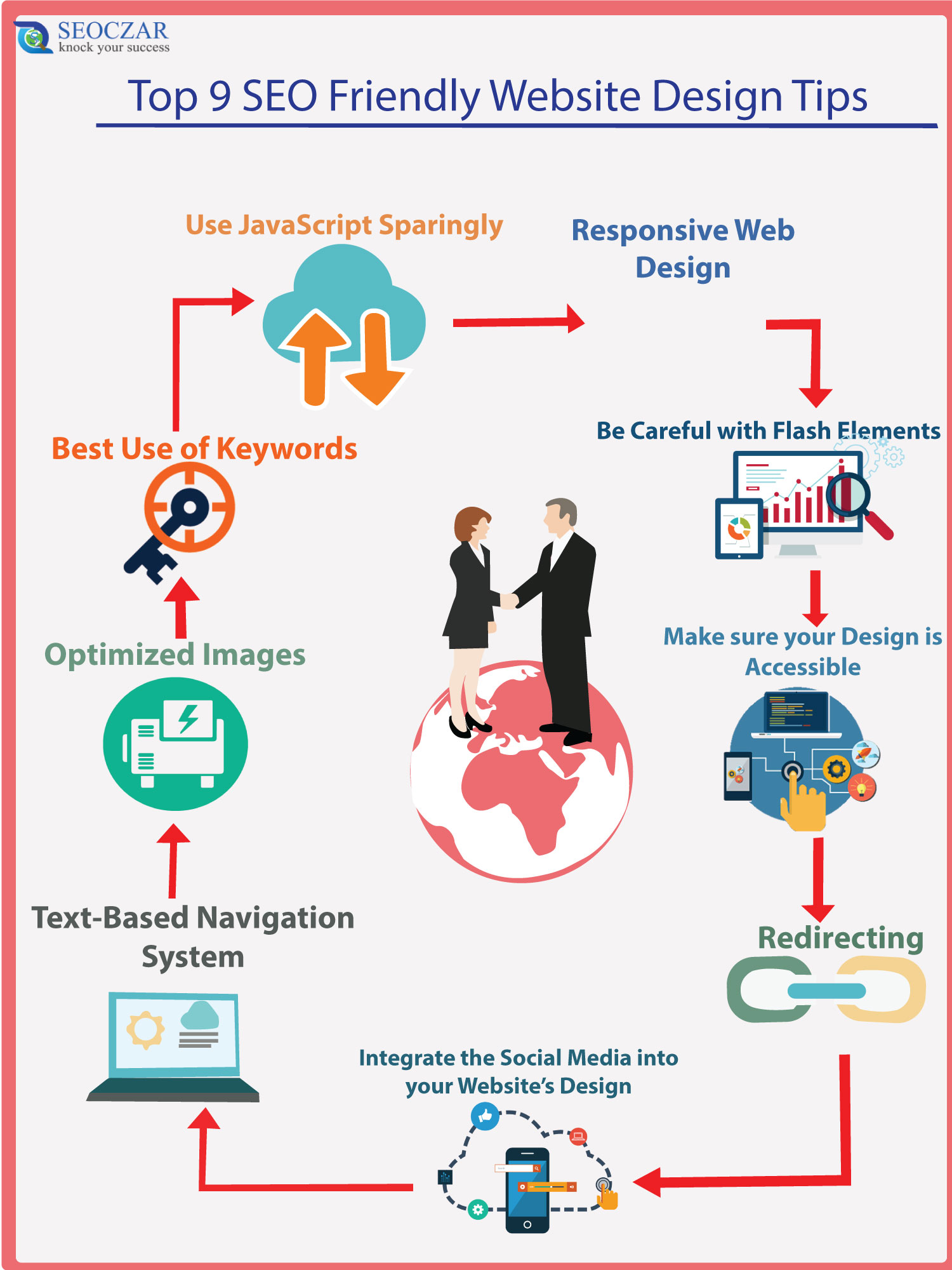
The Structure of the Text: Heading Hierarchy
The last of the SEO tips for web designers? Organize content with hierarchical headers. These elements are used to divide the text into sections. The H2 refers to the title while the H2 is the title of the paragraphs. Then, there are the H3, H4, H5 and H6 which indicate subsections, but are little used. A well-structured text helps the search engine find the most important information on the page.
Proper heading hierarchy follows a logical structure: H1 (page title, used once), H2 (main section headings), H3 (subsections under H2), and so on. This creates a content outline that both users and search engines can follow. Avoid skipping levels—going from H2 directly to H4 confuses the hierarchy and dilutes SEO value.
Headings also improve accessibility for screen reader users, who navigate pages by jumping between heading levels. A clear structure helps everyone understand your content organization, regardless of how they access it.
Opt for Simple Color Schemes
With a plethora of beautiful colors to choose from, it’s tempting to use them all. However, overloading your design with an abundance of colors can create visual chaos. While vibrant color schemes can be appealing, using too many colors in close proximity can overwhelm the overall web design.
Stick to a straightforward color palette and employ neutral background colors. A muted background allows specific elements, such as call-to-action buttons, menu items, or design elements, to stand out and grab the viewer’s attention. Sometimes, a simple white, black, or neutral background is all you need.
Check out Emi Styles’ bridal hair website, designed in Webflow, as an example of how a simple color scheme can convey a sense of calm and order. To enhance your understanding of using color effectively in your web design, delve into color theory to make informed decisions about your color choices.
From an SEO perspective, color schemes affect readability and user engagement. High contrast between text and background improves readability, reducing bounce rates and increasing time on site—both positive signals for search engines. Use tools like WebAIM’s Contrast Checker to ensure your color combinations meet accessibility standards (WCAG 2.1 AA requires contrast ratios of at least 4.5:1 for normal text).
Be Mindful of the Images You Incorporate
The images you include in your web design have a significant impact on the overall look and feel of your website. Poorly shot, unfocused, or badly composed images can detract from even the most brilliant designs. Generic stock photos can render a design uninspiring and bland.
Utilizing high-quality photos is a simple means to enhance your designs. While stock photos offer numerous options, don’t just insert them as they are. Crop and edit them, apply filters, adjust saturation, change warmth, enhance contrast, and employ other photo editing techniques to align the images with the design’s harmony.
Additionally, ensure that the chosen images relate to the content they accompany. If a photo has no relevance to the section it’s placed in, consider finding a more suitable one. Contextual relevance helps search engines understand your content and can improve your image search rankings.
Pay attention to the file types you use as well. Understand the difference between JPG (best for photographs), PNG (best for graphics with transparency), and WebP (best for modern web performance). Selecting the right file types can significantly impact page loading speed and user experience.
Familiarize Yourself with SEO Fundamentals
As a web designer, understanding the basics of search engine optimization (SEO) can greatly influence the effectiveness of your web design. Key aspects of SEO that you should be aware of include:
- Proper use of header tags such as <h1>, <h2>, and <h3>;
- The influence of the slug (the part of a link that identifies a specific page) on organic search rankings;
- Optimizing images to improve loading times and reduce bounce rates (the percentage of visitors who leave after viewing only one page);
- Mobile responsiveness and its impact on Google’s mobile-first indexing;
- Structured data (schema markup) to enhance search result appearance with rich snippets.
While SEO is a complex field, it’s essential to grasp these fundamental concepts. For a comprehensive introduction to SEO, refer to resources like Moz’s Beginner’s Guide to SEO or Google’s own Search Central documentation.
Warning: Avoid These Common SEO Mistakes
1. Hiding text behind images: Search engines can’t read text embedded in images. Always use real HTML text for important content. 2. Ignoring mobile users: With over 60% of searches on mobile, non-responsive designs lose ranking positions. 3. Overusing animations: Heavy JavaScript animations can slow load times and frustrate users. 4. Duplicate content: Ensure your CMS doesn’t create multiple URLs for the same content.
Implement Responsive Design
There is a wide variety of devices with varying screen sizes in use today. Regardless of the device someone uses to access your web design, it should offer a consistent and optimized experience. Instead of investing excessive effort in complex animations and hover effects that may not work on every device, focus on enhancing the user interface (UI) and user experience (UX) for all users.
Adhering to the principles of responsive design ensures that your website is user-friendly and delivers an optimized experience on both desktop and mobile devices. For more guidance, explore resources like Responsive Design Weekly or Google’s mobile-friendly testing tool to verify your implementations.
Google’s mobile-first indexing means the search engine primarily uses the mobile version of your content for ranking and indexing. If your mobile site is missing content that exists on desktop, you’ll lose rankings. Design with mobile as the baseline, then enhance for larger screens—this “mobile-first” approach aligns perfectly with Google’s priorities.
Prioritize Contrast and Readability
Adequate contrast between your text color and background color is vital for readability and website accessibility. While your color scheme should reflect your brand’s colors, it’s crucial to ensure there is sufficient contrast between your design elements. You can use online tools like Contrast Checker to determine the right level of contrast.
Low contrast doesn’t just hurt accessibility—it increases bounce rates as users strain to read your content. Search engines interpret high bounce rates as a sign of poor user experience, which can negatively impact rankings. Aim for WCAG 2.1 AA compliance at minimum, which requires:
- Contrast ratio of at least 4.5:1 for normal text
- Contrast ratio of at least 3:1 for large text (18pt+ or 14pt+ bold)
- Non-text elements like icons and buttons also need sufficient contrast
Opt for Larger Letter Sizes
Most people struggle to read small fonts. As a general guideline in web design, maintain a body text size of at least 16pt. However, the ideal size may vary depending on the fonts you choose for your website. Larger text improves readability, especially on mobile devices where viewport space is limited.
From an SEO perspective, readable text keeps users on your page longer. Time on page is a behavioral signal that search engines may use to assess content quality. When users can comfortably read your content, they’re more likely to engage with it, share it, and return for more.
Choose Appropriate Fonts
Typography offers a range of font options, from serif fonts (featuring small lines on letter ends, like Times New Roman) to sans-serif fonts, which lack these lines. Sans-serif fonts are typically recommended for longer online text, like this one. You can also create engaging font combinations by mixing different types. Additionally, decorative fonts, such as script fonts with a handwritten appearance, can be used sparingly to avoid overwhelming readers.
When selecting fonts, consider web-safe options or use a service like Google Fonts that offers optimized delivery. Custom fonts should be loaded efficiently—use font-display: swap to ensure text remains visible during font loading, preventing invisible text that frustrates users and wastes their time.
Limit Font Variation
Avoid using more than three distinct typefaces within a single website. While certain projects may demand complex font combinations, excessive font variations can create a cluttered and distracting appearance, detracting from your brand identity. Each additional font increases page weight and can slow loading times, indirectly affecting SEO.
Stick to one or two font families and use weights and styles (bold, italic, light) to create hierarchy and emphasis. This approach maintains visual consistency while keeping performance optimized. Google’s font best practices guide offers excellent advice on balancing typography and performance.
Utilize Text Hierarchy
To establish a clear content hierarchy, vary the size and weight of your written content, from large titles to smaller subheadings and even smaller body text. This effective web design technique ensures there is always an element drawing the reader’s attention.
Visual hierarchy guides users through your content, helping them find what they need quickly. Combined with proper HTML heading structure (H1-H6), visual hierarchy creates a powerful one-two punch for both user experience and SEO. Users can scan visually while search engines parse the underlying code structure.
SEO Audit Checklist for Web Designers
Before launching any site, run through this quick SEO checklist to ensure you haven’t missed critical elements:
| Element | What to Check | Status |
|---|---|---|
| Page Titles | Unique, descriptive, under 60 characters, includes primary keyword | ☐ |
| Meta Descriptions | Compelling, under 160 characters, includes call-to-action | ☐ |
| Heading Structure | One H1 per page, logical hierarchy, keyword-rich | ☐ |
| Image Optimization | Descriptive filenames, alt text, compressed, modern formats | ☐ |
| URL Structure | Clean, keyword-rich, uses hyphens, avoids parameters | ☐ |
| Mobile Responsiveness | Test on multiple devices, touch targets adequate, no horizontal scroll | ☐ |
| Page Speed | Test with PageSpeed Insights, optimize Core Web Vitals | ☐ |
| Sitemap | Generated and submitted to Search Console | ☐ |
| Robots.txt | Correctly configured, not blocking important resources | ☐ |
| Schema Markup | Relevant structured data implemented and tested | ☐ |
Pro Tip: Use Free SEO Tools
Several free tools can help you audit your designs for SEO readiness: Google’s PageSpeed Insights for performance, Mobile-Friendly Test, and Schema Markup Validator. Make these part of your regular workflow before handing designs to clients.
The Future of SEO and Web Design
As we move through 2026, the lines between SEO and web design continue to blur. Google’s algorithms increasingly prioritize user experience signals—Core Web Vitals, mobile-friendliness, safe browsing, HTTPS security, and intrusive interstitial guidelines. All of these fall under the designer’s purview.
Emerging trends include:
- AI-powered search: Generative AI experiences (like Google’s SGE) require content to be structured for easy extraction and citation.
- Voice search optimization: Conversational content structure becomes important as voice queries grow.
- Visual search: Google Lens and similar technologies make image optimization even more critical.
- Zero-click searches: Featured snippets and answer boxes require content formatted for quick answers.
Designers who embrace these challenges will be invaluable to their clients and employers. The days of “just making it pretty” are over—modern web designers must be technical partners in search visibility.
Conclusion: SEO tips for web designers
These are just some SEO tips for web designers. Tips that want to meet the needs of Google but also of readers who can enjoy quality content. The intersection of design and SEO is where truly effective websites are born—sites that not only look beautiful but perform beautifully in search results.
Remember that SEO is not a one-time task but an ongoing process. Stay curious, keep learning, and always test your assumptions. The search landscape evolves constantly, and yesterday’s best practices may be today’s penalties. By building SEO awareness into your design workflow, you create sites that serve both your clients and their audiences effectively.
You can also check the SEO Checker tool for quick audits of your designs. For deeper dives into technical SEO, resources like Google Search Central and Semrush’s blog offer regularly updated insights.
Warning: SEO Takes Time
Don’t expect immediate results from your SEO efforts. Search engines need time to crawl, index, and evaluate your changes. Typically, you’ll start seeing movement in 3-6 months, with significant results taking 6-12 months. Stay consistent, document your implementations, and communicate realistic timelines to clients.
Andy Roger belongs to the finance department and he is working with a well-known company where he supports to Get Tech Business Licence in Abu Dhabi. He also writes articles on a different niche to share his experience with the world, combining his business expertise with a passion for clear, actionable content.


This is nice article. You have explained it everthing that is needed for seo website. while making website we need to make sure at least basis SEO requirement should full fill.
thanks for nice comments, keep reading and sharing
Hey, thanks for your awesome sharing and you’ve done a great job the article was up to the mark and appreciating you to be continued with such effort.
Best wishes from:
Thanks keep reading and sharing
I am a web designer and these SEO Tips will help me a lot in my design journey. Thanks!
keep reading and sharing