How to Unblock Websites Blocked by Administrator (Easy Methods)
If you find yourself working in an office or studying at school, you may encounter situations where certain websites are blocked by the administrator. Unfortunately, many people are unaware of how to unblock these restricted sites. In this article, I will share with you some easy steps on how to open blocked websites in office or school environments using proven techniques that respect your privacy and security.
Often, these websites are blocked by the network administrator or internet service provider (ISP). However, with the simple steps I’ve provided below, you can learn how to access these sites using any browser, including Google Chrome. Keep in mind that the administrator may have blocked many sites except for those related to education or work, making it difficult to access them on this network. But don’t worry—there are legitimate ways to regain access when you need it for research, communication, or essential tasks.
Pro Tip: Understand the Block First
Before attempting any fix, try to identify the type of block you’re facing. Is it a DNS error, a firewall restriction, or a geo-block? This will save you time. For instance, if you see a “403 Forbidden” error, the issue is likely with your IP or account permissions, which requires a VPN . If you see “This site can’t be reached,” it’s probably a DNS problem.
How to Unblock a Website Blocked by Administrator
In this comprehensive guide, you will learn simple techniques to unblock a website that has been blocked by an administrator. Typically, if a network administrator has blocked a website, it is not possible to circumvent it because the block is being enforced by the network to which you are connected, not your computer. This is especially true if you are on a school network, as you will not be able to install or connect to a VPN easily. Blocked websites are a common occurrence on the internet, and almost everyone has encountered one at some point.
Fortunately, there are numerous useful tools and methods to get around these blocks and access restricted content. If you are unable to access your favorite website, you are not alone. Over 76% of internet users live in countries where online censorship exists in some form. Additionally, even if you do not live in a censored area, you have likely encountered blocks from work, school, and other locations. It can be frustrating when you want to access your favorite websites for music, social media, YouTube, downloading files, payment gateways, and many more, but they are blocked by your IT department. In these cases, you may feel helpless and have no choice but to close the web browser and continue with your work. Sometimes, administrators also add a search filter to Google Chrome browser that shows filtered results, which are restricted by the administrator.

If you are using Google Chrome, there is no need to worry about adding any third-party VPNs to your computer as there are several proxy websites available on the internet that can help you access blocked websites within a short span of time. However, it is important to note that using proxy IPs to make payments on blocked websites can lead to significant problems. Fortunately, if you have Google Chrome, you can change your proxy settings to access blocked websites from another country. This will essentially work as a VPN for your PC, and you can follow a few simple steps to surf the internet freely.
A proxy server is a network that connects users and computers, acting as an intermediary between your computer and the internet . Essentially, it makes requests on behalf of your actual computer, allowing you to browse the internet anonymously. If you are browsing the internet on your PC, your internet service provider (ISP) can track your location, IP address, and other details about your browsing history. This is why many people use VPNs to protect their internet privacy.
Understanding Proxy Server Types
| Proxy Type | Description | Best Use Case |
|---|---|---|
| Anonymous Proxy | Hides your IP address and location when you make requests to the server, providing basic anonymity. | General browsing where you want to hide your identity but don’t need extreme security. |
| Transparent Proxy | Forwards your requests without hiding any information about your computer. Often used in workplace networks. | Not ideal for unblocking; this is what administrators use to block you. |
| Highly Anonymous Proxy | Conceals your IP, presence, and location so completely that the destination website cannot detect you’re using a proxy. | Accessing strictly blocked content where you need to appear as a regular user. |
| Residential Proxies | IP addresses assigned to real residential locations, providing a natural browsing experience that’s hard to detect . | Tasks requiring human-like presence such as web scraping, social media automation, and market research. |
If you need to learn more about proxy servers, you can explore resources that explain how they function as intermediaries between your device and the internet.
How to Unblock Websites Blocked by Administrator on Google Chrome
Follow the steps below to access blocked websites on Google Chrome. These instructions include screenshots to guide you through each stage of the process.
Step-by-Step Method: Changing Proxy Settings in Chrome
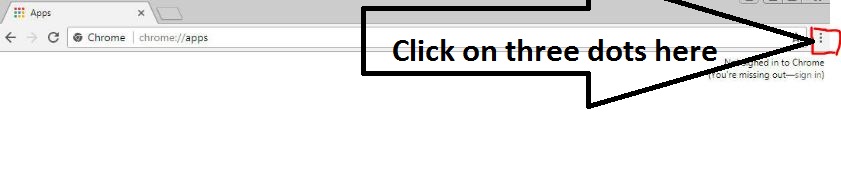
Step 1: Open Google Chrome browser on your PC or Mac and click on the three vertical dots in the upper-right corner.
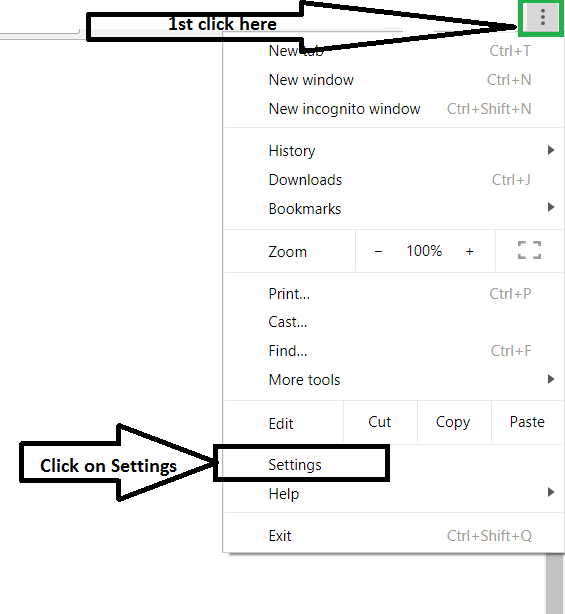
Step 2: From the dropdown menu, click on Settings.
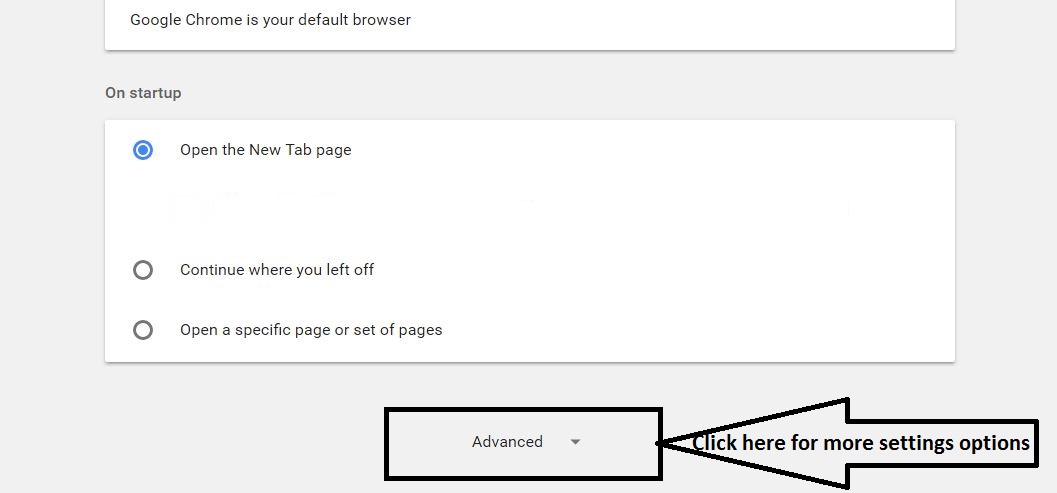
Step 3: Scroll down to the bottom of the Settings page and click on Advanced to expand additional options. Alternatively, you can type chrome://settings/ directly into your address bar to access settings quickly.
Step 4: Under the System section, click on Open your computer’s proxy settings.
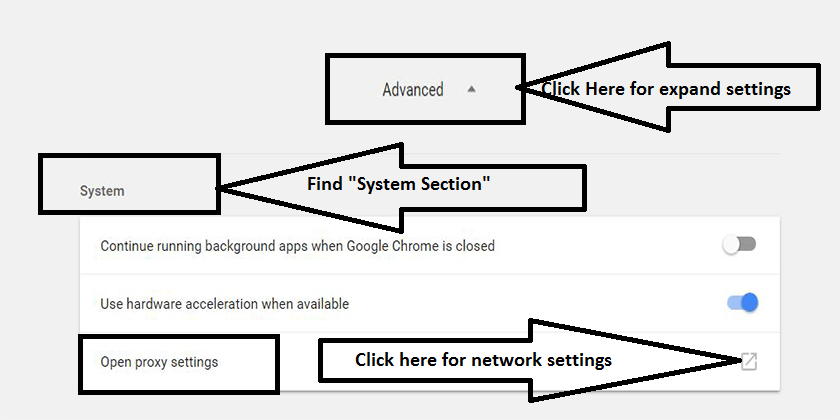
Step 5: This will open the Internet Properties window on Windows. Click on the Connections tab.
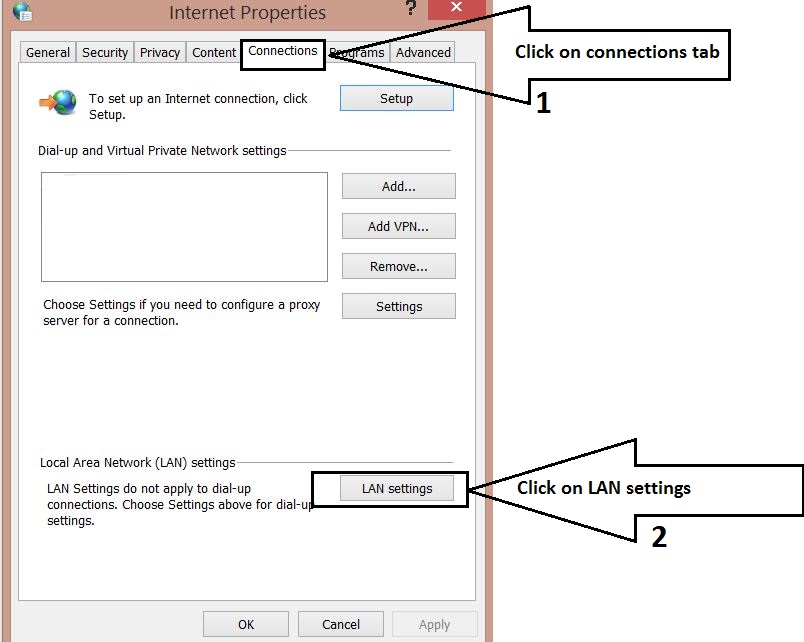
Step 6: Click on the LAN settings button at the bottom.
Step 7: In the Local Area Network (LAN) Settings window, uncheck Automatically detect settings. Then check the box for Use a proxy server for your LAN.
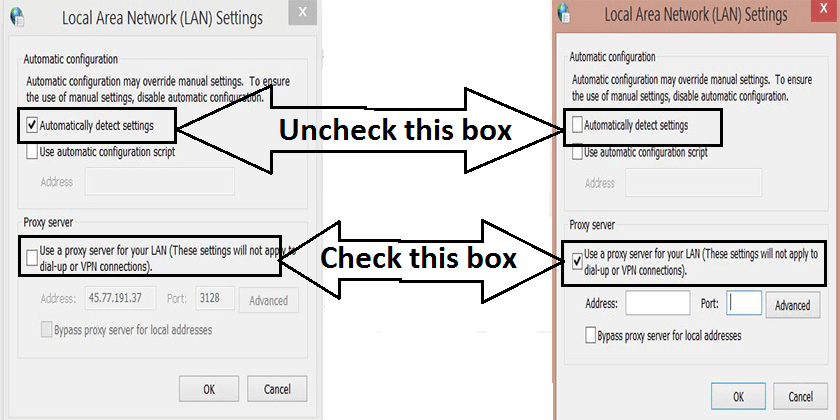
Step 8: Enter the IP address and port number of the proxy server you wish to use. You can find free proxy lists from reliable sources online. For best results, choose HTTPS – Yes IPs from the list.
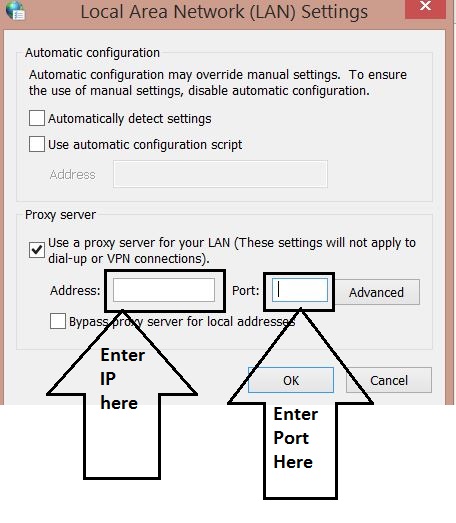

Step 9: Click OK to save your settings. You can now browse the internet, and your traffic will be routed through the proxy server, allowing you to access blocked websites.
Step 10: Where can you find reliable IP addresses and ports? Here are some trusted sources that provide free proxy lists sorted by country:
- spys.one/en/
- www.proxynova.com/proxy-server-list
- www.us-proxy.org
Warning: Proxy Security Risks
Free proxy servers can be insecure. Avoid entering personal information, passwords, or making financial transactions while using them. For sensitive activities, use a reputable VPN service instead.
How to Unblock Websites in Google Chrome Using Extensions
If the manual method seems too technical or you’re using a Chromebook, browser extensions offer a simpler solution. These extensions work like built-in VPNs and require no complex configuration. In fact, many modern browsers like Opera and Brave now include native VPN capabilities, making this process even smoother .

Browsec VPN and Hotspot Shield VPN Free Proxy are two excellent Google Chrome extensions that create a VPN directly in your browser. They allow you to access blocked websites in schools and workplaces without installing additional software. These extensions are user-friendly and easy to install; simply click “Add to Chrome,” and they’ll be integrated into your browser. By using them, you can access any content on the internet, improve your online privacy, and avoid third-party software installations.
If these extensions don’t work for you, try Touch VPN. This plugin lets you choose your preferred country and connect with one click, bypassing blocks without proxy configuration. For users seeking even more robust privacy, extensions like “Hide My IP” offer hundreds of server locations worldwide with no bandwidth limits .
How to Open Blocked Websites on Android Mobile Phones
If you’re having trouble accessing blocked URLs on your Android phone, you can easily access any URL by installing a free mobile VPN app from the Google Play Store. The Super VPN Free app can be downloaded free of charge and is safe to use. Once downloaded and installed, activate the VPN and browse any blocked websites on your mobile device.
This VPN works in offices, schools, or anywhere you need to access restricted content. If you’re using public or office WiFi and want to hide your location from the system administrator, simply activate the mobile VPN and connect to the WiFi network without the administrator’s knowledge. For a more polished experience, mobile-specific solutions like Aloha Browser come with a built-in VPN, providing seamless integration without the need for a separate app .
How to Open Blocked Websites on iPhone iOS
iPhone users often face challenges accessing blocked websites. We’ve found two free VPN options for iPhone iOS users that can be downloaded from the App Store: NordVPN: VPN Fast & Secure and VPN – Super Unlimited Proxy. Both offer free tiers with basic functionality. If you prefer a paid subscription with more features, NordVPN is an excellent choice.
If these options don’t work on your device, you can try the Tor browser, which is also available for iOS, Android, Windows, Mac, and Linux. With Tor browser, you don’t need to sign up for anything. Simply download Tor browser for your platform, and it will act as a VPN to protect your IP and allow you to access any website without paying. Additionally, Tor browser can even improve your internet speed in some cases and provide a smooth browsing experience. For iPhone users specifically, Psiphon is another highly effective tool that combines VPN, SSH, and HTTP Proxy technologies to adapt to different network restrictions .
Quick Unblock: Use Proxy Websites Instantly
If you want to unblock websites without installing any software, extensions, or configuring settings—and you don’t have time for the steps above—you can simply use the websites listed below. This method works on any device: iPhone, Android, PC, laptop, tablet, or any browser.
All you need to do is enter the full URL of the blocked website into these proxy sites. You can access these sites from anywhere: offices, schools, colleges, homes, or WiFi networks with restrictions. If the previous methods don’t work, this method is 100% guaranteed to work. You can also access blocked online game websites that won’t open on your browser.
Pro Tip: Bookmark These Proxy Sites
Create a bookmark folder with these proxy websites so you can access them quickly whenever you encounter a blocked site. Some of these sites may themselves be blocked on certain networks, so having multiple options is essential.
- https://kproxy.com
- https://stopcensoring.me/
- https://www.croxyproxy.com/
- https://freeproxy.win/
- https://www.blockaway.net/
- https://www.hidemyass.com/proxy
- https://www.proxysite.com
- https://unblockwebsites.site
- https://disguise.me/en/proxy
- https://hidester.com/proxy/
- https://whoer.net/webproxy

The steps above work on both Mac and PC platforms for Google Chrome. If certain websites are blocked in your workplace, school, or college, you can follow these steps to unblock them. Once you’re done, you can revert to default settings. In this guide, we’ve explored various tools and techniques for unblocking websites on any device. Before we delve deeper, it’s helpful to understand why and how your favorite websites are being blocked.
Whether it’s your school, workplace, the country you’re visiting, or any other reason preventing you from accessing websites, there are always ways to combat blocked content. You can use our tips to access your favorite sites, or try our recommended VPN methods to bypass content restrictions instantly. Whatever your reason for needing to unblock websites, several options are available.
How to Unblock an App Blocked by Administrator
Method 1: File Properties
Find the blocked application file, right-click it, and select Properties from the contextual menu. In the General tab, look for the Security section at the bottom and check the box next to Unblock. Click Apply to save changes, then restart the installation.
Method 2: Use VPN
Using a VPN is the simplest and most reliable way to circumvent app restrictions. VPNs encrypt your connection and mask your location, allowing you to download and use apps that may be blocked in your region.
How to Fix “An Administrator Has Blocked You from Running This App”
- Turn off Windows SmartScreen temporarily (re-enable after installation).
- Use Command Prompt to run the file with administrative privileges.
- Install the app with the hidden administrator account by enabling it first.
- Disable your antivirus program temporarily during installation.
Understanding How Websites Are Blocked
Do you remember the time you quickly checked social media during a coffee break at work? Or when you accessed a torrent website on a school computer? You may have thought you got away with it, but system administrators see everything! Websites can be blocked at three levels: computer level, network level, or ISP/governmental level. Some DNS services also provide options to block certain types of websites for different users sharing the same computer.
Additionally, there is software available, other than the built-in “Restricted Websites” option in Internet Options, that can block websites. However, it’s important to remember not to hate the person enforcing these restrictions—they’re just doing their job. With that disclaimer aside, let’s learn how to bypass these restrictions while acknowledging that there can be serious consequences for such actions, depending on where you work.
Is The Website Actually Down?
Before attempting any unblocking method, verify that the website isn’t experiencing an outage. Use website monitoring tools to check if the site is down for everyone or just blocked on your network.
Access Methods Depend on Block Type
The method you use depends on how the site is blocked. For example, Open DNS uses category-based blocking. If your parents or administrators have blocked an entire category, you’ll need a different approach than if a single URL is blocked.
Common Restriction Tools Used by Administrators
- Network firewalls – Block incoming and outgoing access to specific websites and IP addresses.
- Installation access restrictions – Prevent you from installing or updating software.
- Process list monitoring – Bar you from viewing or changing running processes.
- Blocked ports – Restrict access to certain TCP/IP ports that services might need.
HTTP vs. HTTPS: A Simple Trick
The first thing to try is adding or removing an “s” from the “http” in the website URL. For example, typing https://www.facebook.com might work if only http://www.facebook.com was blocked. HTTPS represents a secure, encrypted connection, while HTTP is unencrypted.
Advanced Methods to Bypass Network Firewalls
For networks that employ Deep Packet Inspection (DPI), standard VPNs and proxies may not suffice. In such cases, advanced obfuscation techniques are required. Tools like AmneziaWG (a fork of WireGuard) can mask VPN traffic to appear as regular HTTPS or DNS queries, making it nearly impossible for firewalls to detect . Similarly, the Zapret project utilizes local DPI bypass methods that work without external servers .
Using Proxy Websites and Software
Proxy websites are a common method for circumventing firewalls. However, competent system administrators may block well-known proxies. For a more dependable solution, use UltraSurf or JonDo. These portable programs use high-encryption node-proxy anti-jamming systems with security standards comparable to online financial transactions. Both can run from a USB drive without installation.
If USB access is restricted, try remote access to your home PC if you have one on an unrestricted connection. Use it as your private proxy server via Remote Desktop Connection. If your home computer has a static IP address, great; if not, use a dynamic DNS service. Alternatively, use your mobile phone’s cellular data hotspot to bypass all internet restrictions.
Internet Options – Restricted Websites & Content Advisor
If the HTTP/HTTPS trick doesn’t work, check the error message. If it says “Due to Restrictions On This Account,” it’s likely Family Safety Software. If there’s no account-related message, the website may be blocked using Internet Options. To unblock it:
- Go to Control Panel > Internet Options.
- Click the Security tab.
- Select Restricted Websites in the Internet Security Zone.
- Click the Sites button.
- If the URL is listed, select it and click Remove.
Another way to block certain website types is through the Content tab. Click on “Content Advisor” or “Family Safety” (depending on your Windows version). If you know the password, you can change settings; otherwise, request permission from your administrator.
Overcoming Installation Access Restrictions
Working on a project and need a specific tool but can’t install it? Use portable versions of applications on a USB drive. Many applications have portable versions available at portableapps.com. Another method involves extracting installer files using a tool called “Universal Extractor.” This extracts the files an installer would normally place in installation folders, allowing you to run the application without installation.
Using a Portable Proxy Browser
Obtain a portable browser that doubles as a proxy, such as OkProxy. This browser lets you type URLs in a text box on its homepage rather than the main URL bar, routing traffic through its proxy service.
Using a Different DNS
When a website is banned in your area, your ISP blocks traffic to and from that site. Changing DNS settings can help bypass this:
- Right-click the network icon in the taskbar.
- Select Open Network and Sharing.
- Double-click your network connection.
- Click Properties, then select Internet Protocol Version 4 (TCP/IPv4).
- Use Google Public DNS: Preferred DNS 8.8.8.8, Alternate DNS 8.8.4.4 .
Using RSS Feeds
RSS readers can provide access to fresh content from blocked websites. Add the site’s RSS feed to your reader. Some RSS readers can load entire webpages within their interface, potentially bypassing the block. If a site doesn’t have an RSS feed, online services can create one for you.
Using Tor Browser
Tor (The Onion Router) encrypts and hides your web activity by routing through multiple anonymous servers. ISPs and network administrators cannot see your activity within Tor, making it effective for unblocking websites while maintaining anonymity.
Switch Internet Connection
Most ISPs provide dynamic IP addresses that change periodically. If a website owner has blocked your specific IP, restart your Wi-Fi router to force your ISP to assign a new IP address. Alternatively, use your smartphone’s cellular network if your work network blocks certain services.
Use HTML to PDF Converter
SodaPDF and similar services let you download a webpage as a PDF without directly accessing it. Visit the converter site, enter the URL, and download the PDF version of the page.
Use Firefox from a USB Drive
If your school or workplace restricts browser extensions, install Firefox Portable on a USB drive. Pair it with a good proxy service, and you’re set.
URL Recasting Method
For websites hosted without verified SSL certificates, try typing https://www.url.com instead of http://www.url.com. This may display a security warning; click “Proceed Anyway” to access the site.
View Blocked Content with Google Translate
Surprisingly, Google Translate can access blocked websites. Copy and paste the website URL into the translation field, select any language, and click the link in the translated section. This works best for text-based content like articles or forum threads.
| Pros | Cons |
|---|---|
| Easy to use, completely free | No data encryption |
| Works on any device with a browser | May not preserve original layout |
| No installation required | Only works on PCs for full functionality |
How to Unblock YouTube Blocked by Administrator
When YouTube is blocked, using a VPN is the easiest and most secure solution. VPNs provide online security, anonymity, and unblock content blocked by firewalls, censorship, or geoblocking technology. For school networks specifically, VPNs are superior to proxies because they encrypt all traffic, preventing network administrators from seeing your activity .
How to Unblock Websites in School or at Work
Option 1: Install a VPN
VPNs like NordVPN offer extensive server networks that allow access to virtually any platform. Connect to any server, and you’re ready to browse freely.
Option 2: Enable Administrator Account
On Windows, expand Local Users and Groups > Users by right-clicking the Start menu. Select the Administrator account, right-click, choose Properties, and uncheck “Account is disabled.” Click Apply and OK.
How to Prevent Chromebook Apps from Being Blocked
IT professionals can navigate to Device management > Chrome management > User settings. Select the appropriate Org Unit, then configure app and extension policies under “Accept or Block all applications and extensions.”
How to Unblock an App Blocked by Windows Defender
Click Start, type gpedit.msc, and press Enter. Navigate to Computer Settings > Windows Settings > Security Settings > Local Policies > Security Options. Look for “User Account Control: All administrators run in Admin Approval Mode” and adjust as needed.
How to Remove Administrator Block
Return to the Local Users And Groups window, double-click the Administrator account, check the “Account is disabled” box, and click OK.
Other Quick Methods
- Use URL shorteners like Bitly or TinyURL to create shortened links that may not be blacklisted.
- Use your smartphone’s cellular network to bypass workplace restrictions.
- Change DNS server settings to Google Public DNS (8.8.8.8, 8.8.4.4).
- Restart your browser after applying settings.
Use IP Address Instead of URL
Every website’s URL has an IP address. Administrators may block the URL but forget to block the IP. To find a site’s IP address:
- Windows: Open Command Prompt and type
tracert websitename.com - Mac: Open Network Utility > Traceroute tab, enter the website address
- iPhone/Android: Download a Traceroute app from App Store or Play Store
- Linux: Type
dig websitename.comin Terminal
Enter the IP address in your browser’s address bar to access the site.
| Pros | Cons |
|---|---|
| No installation required | Works only with dynamic IP addresses |
| Completely free | Useful only when a specific website blocks your IP |
Make Use of a Dynamic IP Address
If your ISP assigns dynamic IP addresses, simply restart your router to get a new IP. This works if a website has blocked your specific IP. Write down your current IP, restart the router, and check if the new IP allows access.
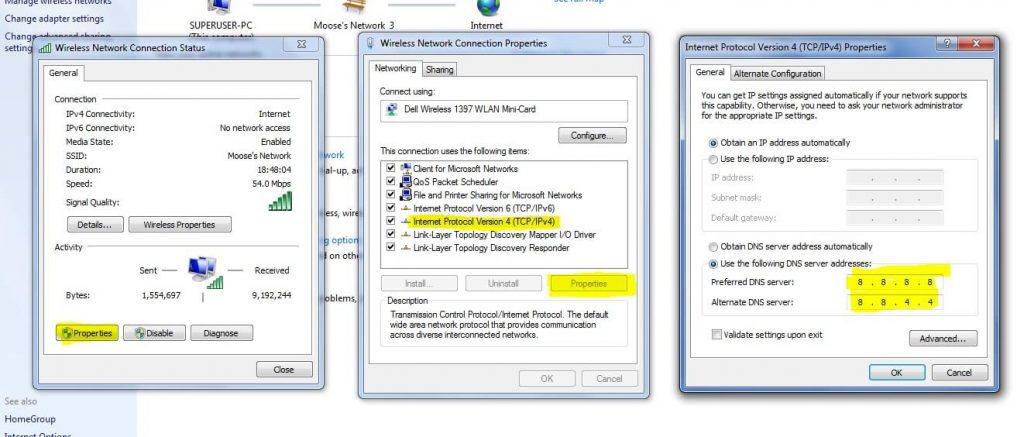
Method 1: Changing DNS Server Settings
- Search ‘ncpa.cpl‘ in Windows.
- Look for Internet Protocol Version 4 (TCP/IPv4).
- Click it, then click Properties.
- Use Google’s public DNS: Preferred DNS 8.8.8.8, Alternate DNS 8.8.4.4.
- Enable “Validate settings upon exit” checkbox.
- Restart your browser and try accessing the blocked site.
Method 2: Use VPN to Change Server Location
VPNs are essential tools for any internet user. They block your ISP from tracking your online activity by encrypting your data and sending it through secure tunnels to other locations. For Chrome, try Hola VPN. For Android, Opera VPN, MasterVPN, or Ultrasurf VPN work well. I personally use Ultrasurf VPN when accessing public WiFi to stay secure.
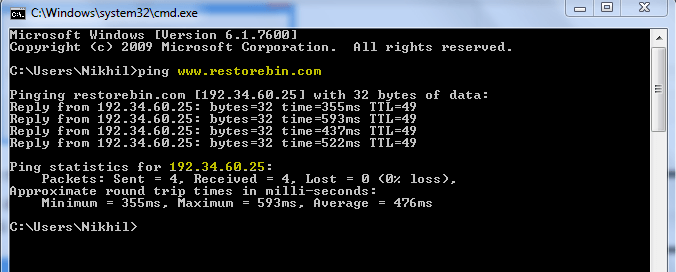
Method 3: Use IP Address Instead of URL
- Go to Start menu > Run (or press Windows + R).
- Type CMD and press Enter.
- Type ping followed by the URL (e.g., ping facebook.com).
- You’ll see the IP address displayed.
- Type this IP address into your browser to access the site.
Method 4: Use Proxy Servers
Numerous online services provide secure encrypted proxy servers, especially useful on public WiFi networks. Privoxy offers advanced privacy features. These services create secure channels that fool ISPs into providing anonymity.
Method 5: Use Shortened URLs
URL shorteners like Bitly or TinyURL can create links that aren’t blacklisted by administrators. Copy and paste the shortened URL into your browser to access restricted sites.
Method 6: Use Tor Browser
Tor Browser encrypts your activity and routes it through multiple anonymous servers, leaving no trace. ISPs and network administrators cannot see your activity within Tor.
Method 7: Use Google Translate
- Go to Google Translate.
- Enter the URL of the blocked site.
- Select any other language.
- The site will open in translation view.
- Select your desired language again to browse.
Method 8: Reset Your Hosts File
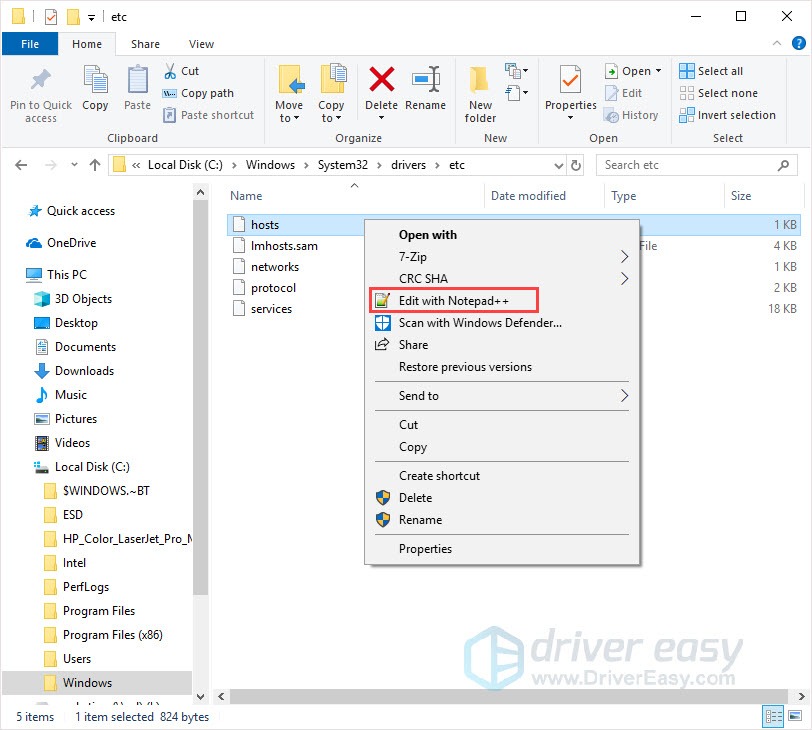
The hosts file at C:WindowsSystem32driversetc contains mappings of IP addresses to hostnames. If modified, it can block websites.
- Navigate to the hosts file location.
- Right-click and open with Notepad.
- If you see the blocked website with 127.0.0.1, delete that line.
- Save changes and restart Chrome.
Method 9: Use Google Chrome Extensions
VPN extensions work like full VPNs but are limited to Chrome. Hundreds of options exist; here’s how to install one:
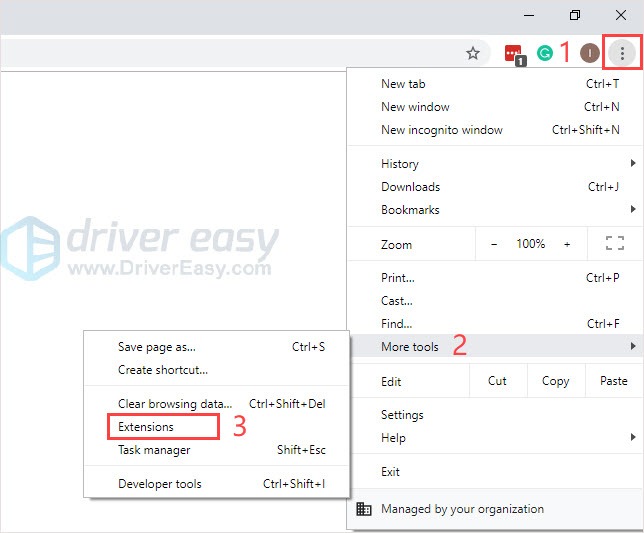
- Click the three dots in Chrome > More tools > Extensions.
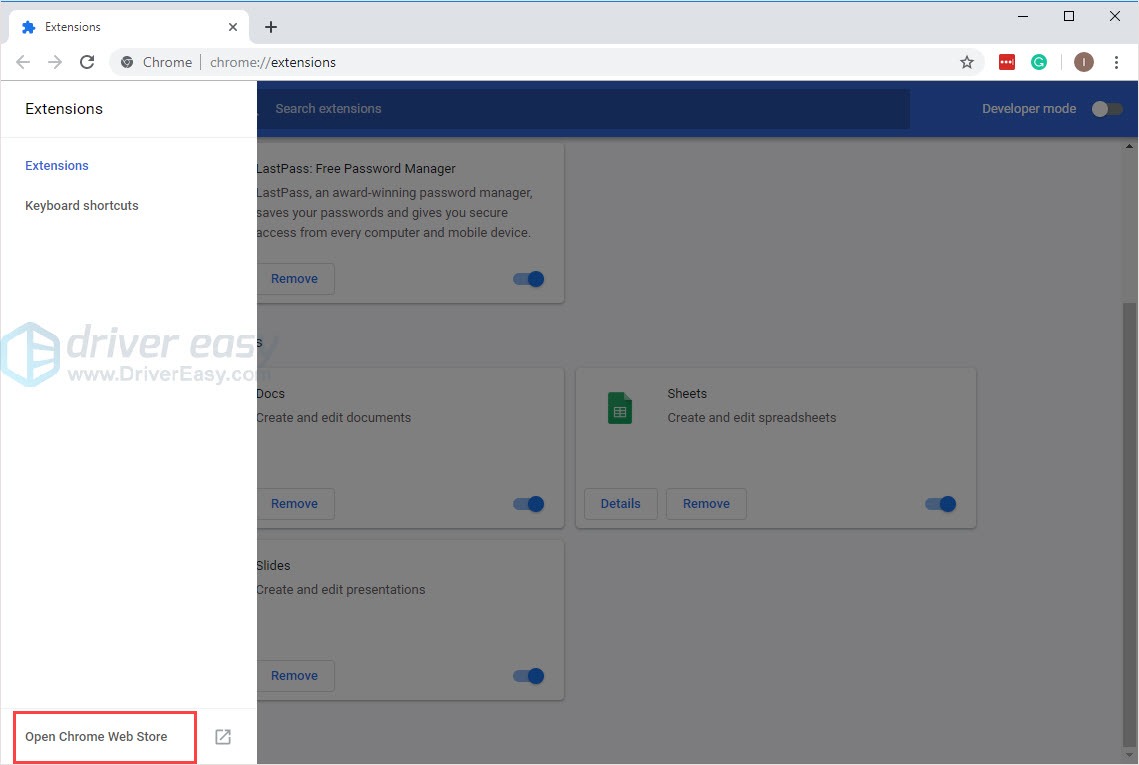
- Click “Open Chrome Web Store” on the left.
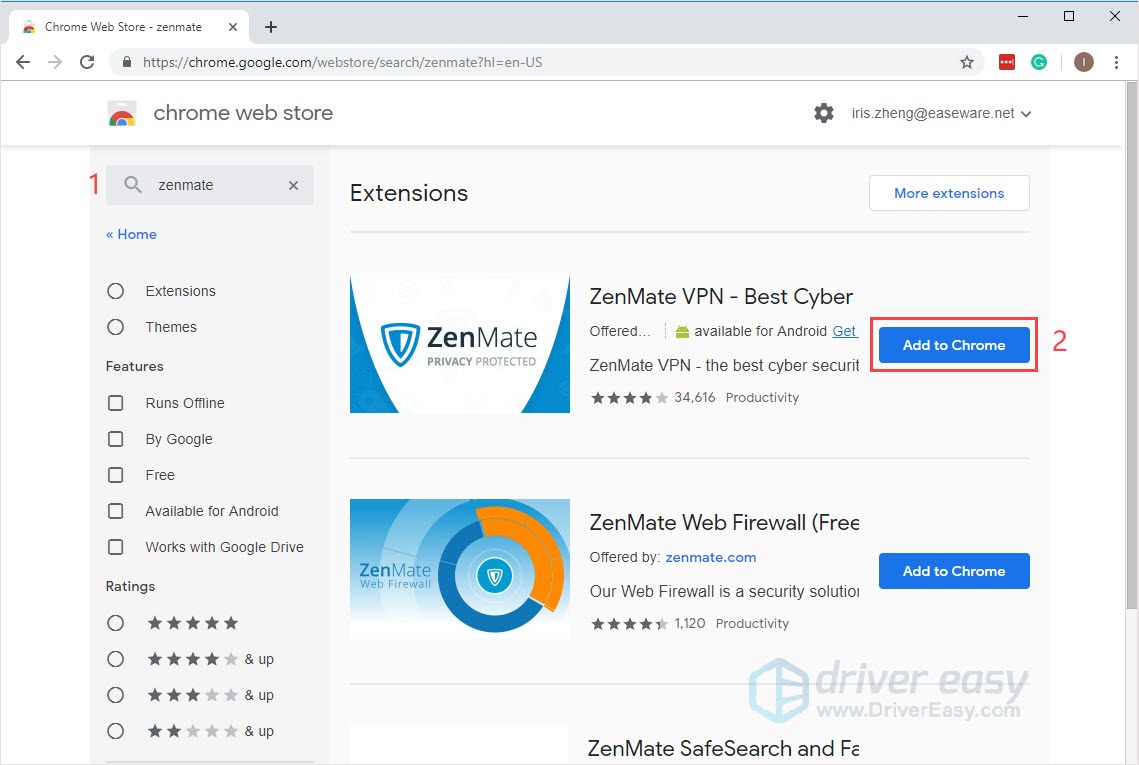
- Search for a VPN extension (e.g., Zenmate).
- Click “Add to Chrome.”
- Sign up and activate the extension.
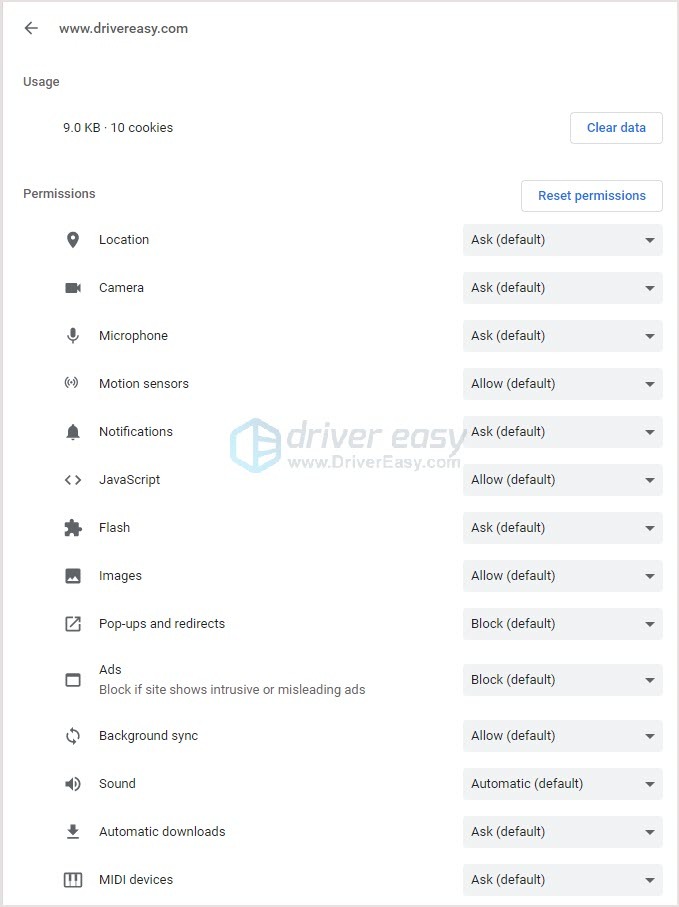
Quick Tip: Change Settings for a Specific Website
You can quickly change permissions for individual sites:
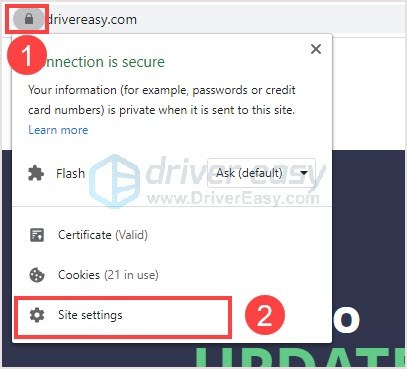
- Click the lock icon (or info icon) next to the site address.
- Choose Site settings.
- Adjust permissions as needed.
Key Takeaways for Bypassing Internet Censorship
- Start Simple: Always begin with the easiest methods—clearing cache, trying a different browser, or using a free proxy site. Over 60% of access issues are resolved by these basic steps .
- VPNs Are King for Security: For sensitive activities like banking or logging into personal accounts, a reputable paid VPN (like ExpressVPN or NordVPN) is essential to prevent data leaks and ensure encryption.
- Understand Your Block: The error message tells you everything. A “403 Forbidden” means your IP is blocked, while “This site can’t be reached” usually points to DNS issues. Knowing this helps you pick the right tool.
- Mobile Devices Have Built-in Tools: On iOS, Screen Time content restrictions are a common blocker. On Android, checking the Private DNS setting can sometimes resolve blocks without any extra apps .
- Respect Network Policies: While these techniques work, always be mindful of your workplace or school’s acceptable use policy to avoid professional or academic consequences.
FAQ: Frequently Asked Questions
How do I access a website that’s blocked?
Access methods depend on how the site is blocked. Options include VPNs, proxy servers, browser extensions, changing DNS settings, or using the site’s IP address instead of its URL.
What’s the difference between HTTP and HTTPS?
HTTPS is a secure, encrypted version of HTTP. Sometimes, if HTTP is blocked, HTTPS may still work because it uses a different port and encryption.
What are system administrators?
System administrators (sys-admins) manage and maintain computer networks and systems. They often implement restrictions to ensure network security and productivity.
What software do administrators use to block websites?
They use network firewalls, content filtering software, DNS filtering, proxy servers, and built-in Windows features like Internet Options restricted sites.
What if I get caught bypassing blocks?
Consequences vary by workplace and country. They can range from warnings to job loss or even legal action. Always understand your workplace policies before attempting to bypass restrictions.
How do I get around installation restrictions?
Use portable versions of applications on a USB drive, or extract installer files using tools like Universal Extractor to run applications without installation.
How do I find my computer’s IP address?
Type “what is my IP address” into Google, or use command prompt (ipconfig on Windows, ifconfig on Mac/Linux).
What’s the best VPN for Chrome?
Popular options include NordVPN, ExpressVPN, and free extensions like Hola VPN or Touch VPN. Paid VPNs generally offer better security and speed.
How do I access blocked sites on my phone?
Install a VPN app from your device’s app store, or use proxy websites in your mobile browser. Both Android and iOS have numerous free VPN options.
FAQ
How can I unblock a website if the administrator has blocked all VPN websites?
If the network blocks VPN and proxy sites, you need to use obfuscated protocols. Look for VPNs that offer “stealth” or “camouflage” modes (like NordVPN’s obfuscated servers or Windscribe’s AmneziaWG protocol). Alternatively, use a smart DNS service or a browser extension like “Hide My IP” which may not be detected by standard URL filters .
Can my school or employer see that I am using a VPN or proxy to unblock sites?
Yes, they can often see that you are using a VPN (encrypted traffic) or proxy, even if they can’t see the specific sites you are visiting. Some advanced firewalls use Deep Packet Inspection (DPI) to detect and block VPN traffic. To avoid detection, use obfuscated servers or the Tor browser .
Why are some websites blocked even when I use a VPN?
This usually happens for two reasons. First, the VPN server’s IP address itself may be blacklisted by the website. Try connecting to a different server. Second, the network firewall might be blocking the VPN protocol (like OpenVPN) entirely. Try switching to WireGuard or a stealth protocol within your VPN app .
Is it legal to unblock websites blocked by an administrator?
The legality depends on your location and the context. At home, it is generally legal. At school or work, bypassing network restrictions often violates the organization’s Acceptable Use Policy (AUP), which can lead to disciplinary action. In countries with strict censorship laws, using VPNs may be illegal. Always check local laws and organizational policies .
Summary
Navigating internet restrictions requires a clear understanding of the available tools and their trade-offs. This guide has walked you through over a dozen methods, from simple browser tricks and proxy sites to robust VPNs and advanced tools like Tor and AmneziaWG. The most effective approach often combines a reliable paid VPN for daily security and privacy with a set of bookmarked proxy websites for quick, no-installation access. Remember, the goal is not just to bypass a block, but to do so safely, preserving your privacy and respecting the rules of your environment. By starting with the easiest fixes and escalating only as needed, you can regain access to the information you need without compromising your security.
Final Thoughts
We’ve explored numerous methods for unblocking websites blocked by administrators—from simple Chrome settings changes and browser extensions to advanced techniques like using Tor, changing DNS, and accessing sites via IP addresses. Each method has its own advantages and trade-offs in terms of ease, security, and reliability.
Remember that while these techniques can help you access restricted content, they should be used responsibly and in accordance with your organization’s policies. In many cases, simply requesting access for legitimate work or educational purposes may be the simplest solution.
For most users, a combination of a reliable VPN service and a few bookmarked proxy websites will cover virtually all unblocking needs. VPNs offer the best balance of security, privacy, and ease of use, while proxy sites provide quick, no-installation solutions when you’re in a pinch.
Pro Tip: Create Your Own Personal VPN
For the ultimate in control and privacy, consider setting up your own VPN server using a cheap VPS (Virtual Private Server) service. This gives you a personal, dedicated VPN that no administrator can block, and it costs as little as a few dollars per month. Services like DigitalOcean or Linode make this surprisingly easy.
We hope this guide has been helpful. If you have any questions or discover other methods that work for you, please share them below. Stay safe, browse responsibly, and enjoy unrestricted access to the information you need.