
Facebook remains the undisputed dominant force in social media marketing, consistently outperforming emerging challengers with its massive user base and sophisticated features. With a promising three-year return on equity forecast of 38.82%, this versatile platform serves as your ultimate hub for social media engagement, digital networking, and content consumption. Whether you’re a casual user, business owner, or social media manager, mastering these Facebook optimization techniques can transform your online presence and engagement rates.
🔒 Privacy & Security Facebook Hacks
Check How Much Time You Spend on Facebook
If you’re concerned about social media addiction and digital wellbeing, Facebook’s built-in activity tracker provides comprehensive insights into your usage patterns. Instead of relying on third-party apps or waiting for your phone’s Digital Wellbeing features, you can use the Facebook app’s native time tracking functionality to monitor your engagement. Facebook displays a detailed bar graph of your weekly app usage along with your daily average time spent, helping you make informed decisions about your social media habits.
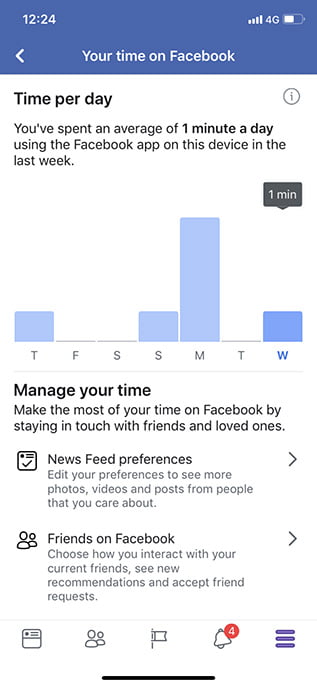
Pro Tip: Use this data to set realistic social media boundaries and improve your digital wellness.
Limit Your Facebook Usage Effectively
Discovering excessive Facebook usage through the previous trick might be surprising, but Facebook provides multiple solutions for effective social media time management. Implement these strategies to regain control over your digital life:
From the Facebook App:
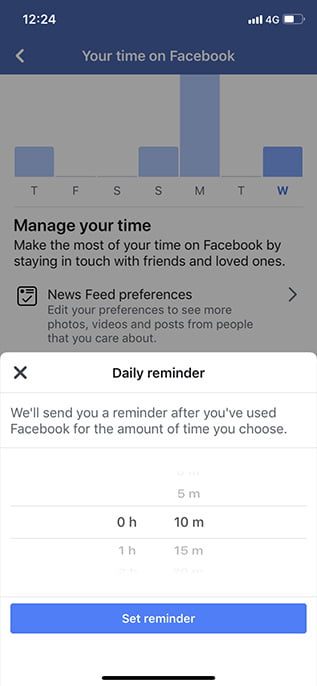
The time tracking section includes an option to set daily reminders that notify you when you’ve exceeded your predetermined limit. While this gentle nudge can be helpful for conscious social media consumption, dedicated users might need more robust solutions.
Use Device-Level Controls:
For stricter enforcement, utilize your device’s native features. iOS users can implement Screen Time restrictions, while Android Pie users can activate Digital Wellbeing app limits. These system-level controls provide more comprehensive Facebook usage management and help establish healthier digital habits.
Facebook Directory: Search Without an Account
The Facebook People Directory enables anonymous Facebook profile searching without requiring account login. This powerful tool allows you to search for people, groups, and pages, though results are limited to profiles with public discoverability settings enabled. Begin by visiting Facebook People Directory and completing the CAPTCHA verification.
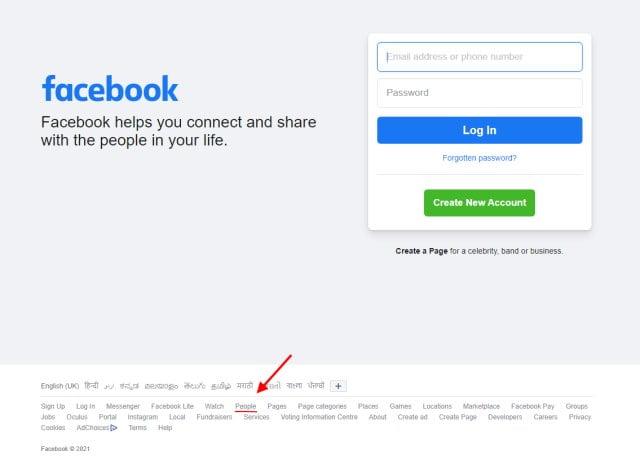
The directory organizes profiles alphabetically, displaying limited results initially. However, you can perform specific people searches on Facebook to locate individuals. The search functionality mirrors general Facebook search results, displaying publicly available content while respecting user privacy settings.
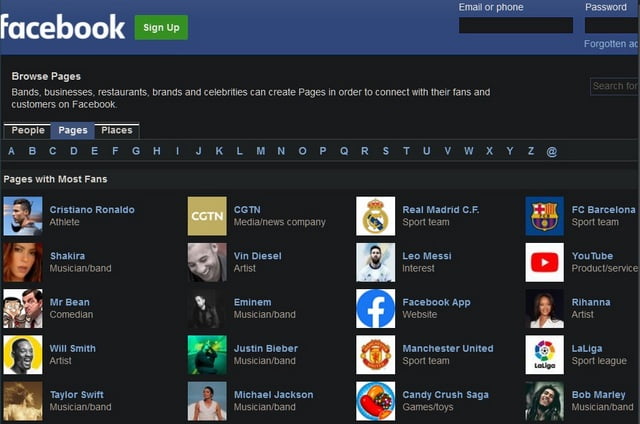
Privacy Note: This method respects user privacy settings while providing legitimate search capabilities.
Bulk Delete Third-Party Apps from Your Account
Many websites, online games platforms, and applications offer Facebook login integration. While convenient, these connections can compromise your Facebook account security and data privacy. Fortunately, Facebook enables bulk removal of third-party app permissions, eliminating the need for individual deletions.
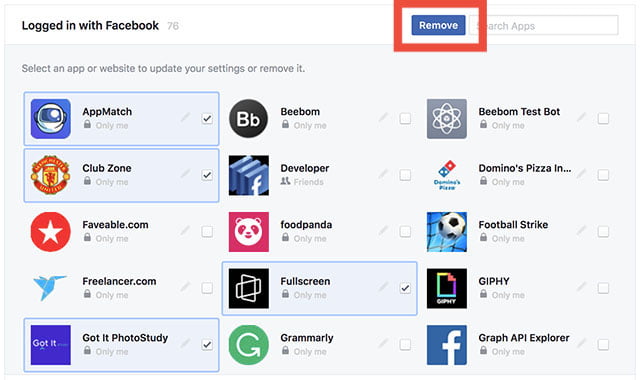
This essential Facebook security practice helps prevent data misuse and reduces your digital footprint across multiple platforms.
Advanced Notification Control (Android Only)
Android Oreo introduced notification categorization, allowing app developers to provide granular notification control. Facebook implemented this feature in August, enabling Android Oreo+ users to manage specific notification types and priorities for optimized Facebook notification management.
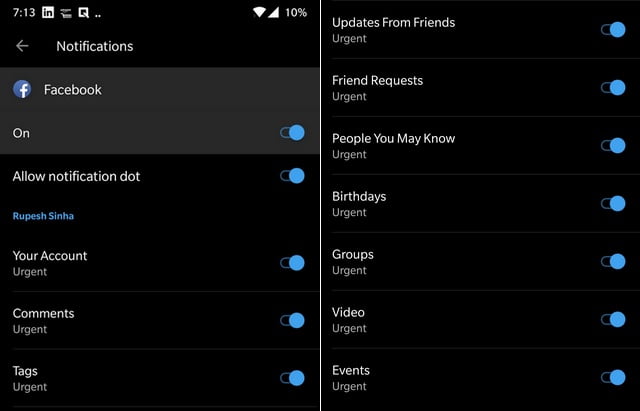
Categories include birthdays, “People You May Know” suggestions, group notifications, video alerts, and numerous other notification types for personalized Facebook experience.
⏰ Time Management Facebook Tricks
Enable Dark Mode for Reduced Eye Strain
Facebook has implemented dark mode functionality across all platforms, offering visual comfort and reduced eye strain during extended usage sessions. While Android and iOS apps received this feature later, the web version currently provides seamless dark theme activation.
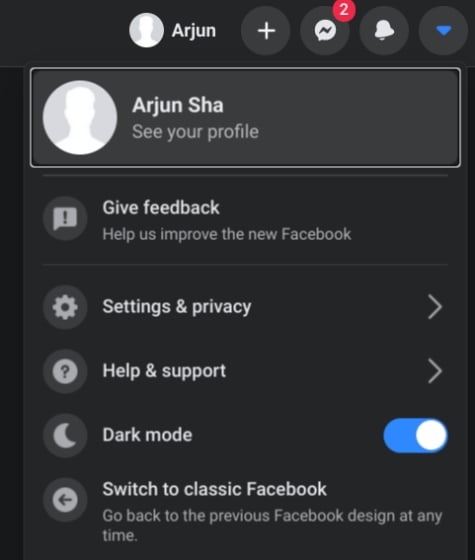
To activate Facebook dark theme optimization, click the arrow in the top-right corner and toggle the “Dark Mode” option. This simple adjustment significantly enhances nighttime browsing comfort and device battery conservation on OLED screens.
Clear Your Facebook History Completely
Facebook’s “Off-Facebook Activity” feature represents a significant Facebook privacy enhancement tool, allowing users to delete information collected from external websites and services. This comprehensive data management tool provides unprecedented control over your digital footprint.
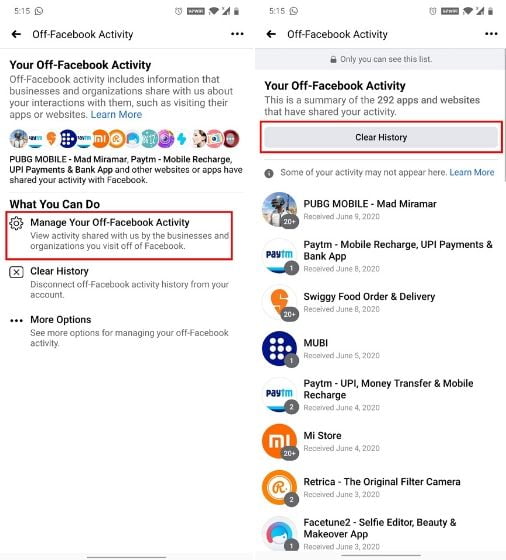
Access this feature through the hamburger menu → Settings → Off-Facebook Activity → Manage Your Off-Facebook Activity. Here you’ll discover all apps and services reporting your behavior to Facebook. The “Clear History” option erases this collected data, while the three-dot menu offers permanent personalization disabling options for enhanced Facebook privacy protection.
Important: Disabling personalization stops Facebook from using third-party data for ad targeting but doesn’t prevent data collection.
Bulk Delete Facebook Posts Efficiently
Facebook’s native bulk deletion feature enables mass Facebook post cleanup, perfect for digital spring cleaning or removing outdated content. This powerful tool offers filtering options by year, categories, people, and other parameters for precise content management.
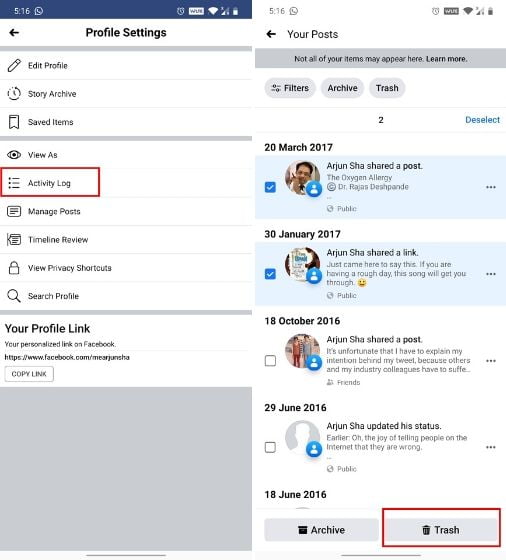
Navigate to your profile → three-dot menu → Edit Profile → Activity Log → Manage Activity → Your Posts. Select multiple posts simultaneously and move them to trash for efficient Facebook content management.
🚀 Productivity & Feature Enhancements
Transfer Photos to Google Photos Seamlessly
The Data Transfer Project collaboration between Facebook, Google, Apple, Twitter, and Microsoft enables cross-platform Facebook photo migration. This open-source framework facilitates seamless photo transfers from Facebook to Google Photos without compression or quality loss.
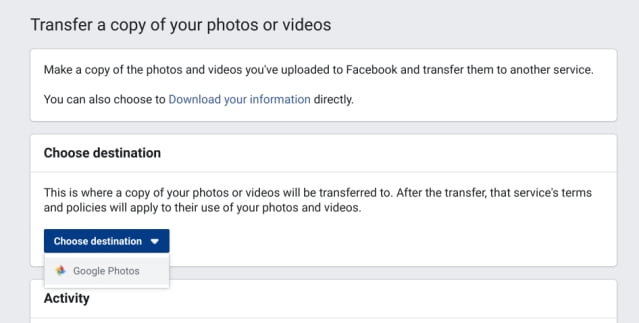
Visit facebook.com/dtp, select Google Photos from the dropdown, authorize your account, and initiate the transfer process for secure Facebook photo backup.
Migration Tip: This tool is perfect for creating redundant backups of precious memories.
Activate Quiet Mode for Focus
Facebook’s “Your Time on Facebook” feature addresses smartphone addiction and mental wellbeing with comprehensive usage tools. The Quiet Mode addition represents the next evolution in Facebook distraction management, currently available on iOS with Android support forthcoming.
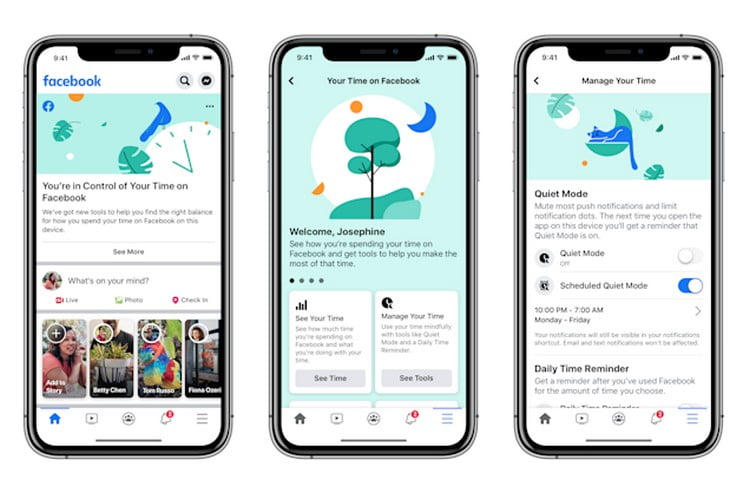
Quiet Mode mutes Facebook push notifications completely and supports scheduling for regular focus periods. Access this feature through the hamburger menu → “Your Time on Facebook” → Quiet Mode settings for enhanced productivity with Facebook.
Create Messenger Rooms for Large Groups
Messenger Rooms revolutionizes Facebook video conferencing capabilities, expanding group calls from 8 to 50 participants completely free. This feature positions Facebook as a serious business communication platform competitor while maintaining social connectivity.
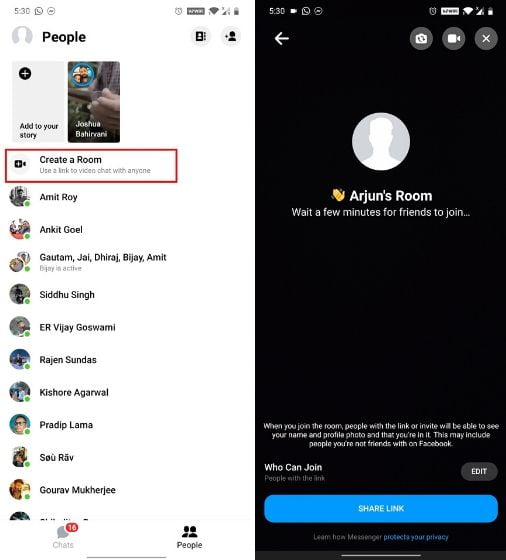
Access Messenger Rooms through the Messenger app → People tab → “Create a Room.” Select participants or share joining links for large-scale Facebook video meetings perfect for family gatherings, virtual events, or business conferences.
Enable 2-Factor Authentication Security
Two-factor authentication represents the essential Facebook security layer protecting against account hijacking and unauthorized access. This security measure adds verification beyond passwords, requiring 6-digit codes from your mobile device or authentication app.
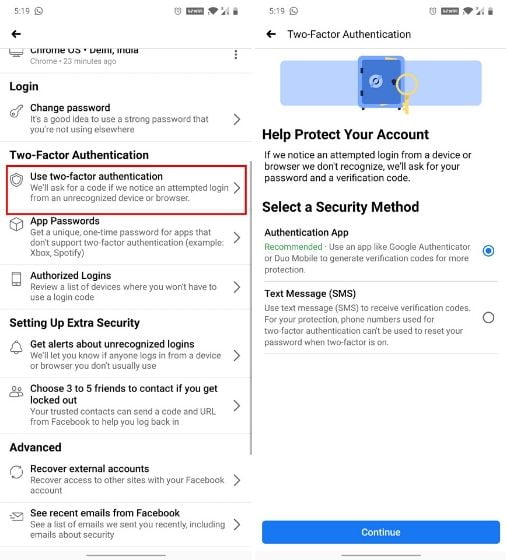
Configure 2FA through hamburger menu → Settings → Security and login → Use two-factor authentication. Add your phone number or authentication app for maximum Facebook account protection against sophisticated attacks.
🎨 Fun & Customization Facebook Tips
Find All Photos Liked by You and Friends
This little-known Facebook search trick reveals photo interaction history for any user. Simply type “Photos liked by” followed by “me” or a friend’s name in the search bar for instant access to their liked photo collection.
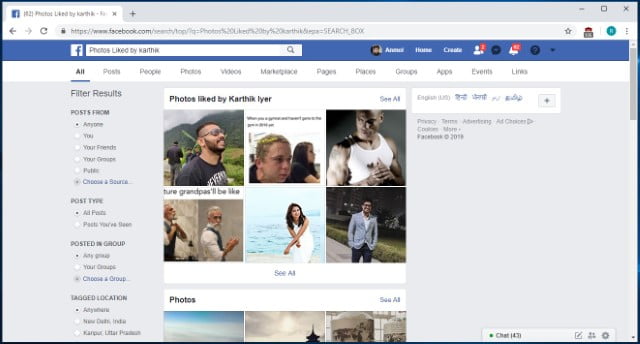
This feature provides fascinating insights into friends’ interests and serves as a Facebook nostalgia tool for rediscovering past interactions.
Re-watch Accidentally Refreshed Content
Accidental Facebook feed refreshes no longer mean lost content. The “/seen” URL trick provides access to previously viewed Facebook content that Facebook marks as consumed after refresh actions.
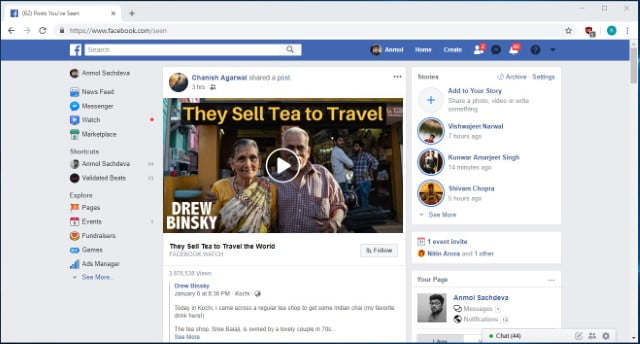
Simply visit www.facebook.com/seen to recover lost Facebook posts and updates from recent browsing sessions.
Recovery Hack: Bookmark this URL for instant access to accidentally lost content.
Download Your Complete Facebook Data Archive
Facebook’s data download feature provides comprehensive Facebook data export capabilities, including photos, videos, messages, posts, and connection history. This tool supports GDPR compliance and personal archiving needs.
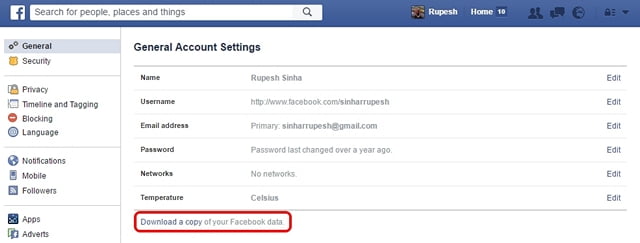
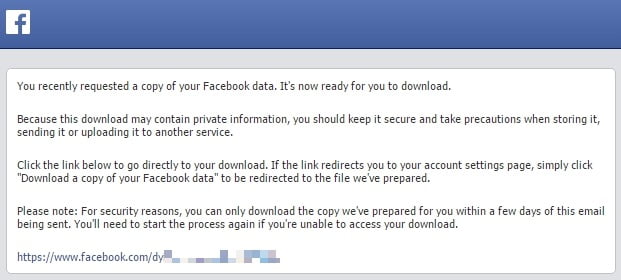
Navigate to Facebook Settings → General tab → “Download a copy of your Facebook data” → “Start My Archive.” Facebook compiles your data and emails download links for complete Facebook data backup.
💼 Business & Marketing Facebook Strategies
Watch Facebook Videos With Friends Simultaneously
Facebook Watch Party enables collaborative video viewing experiences, allowing group watching of public videos in real-time. This social media engagement tool creates shared entertainment experiences for distant friends and communities.
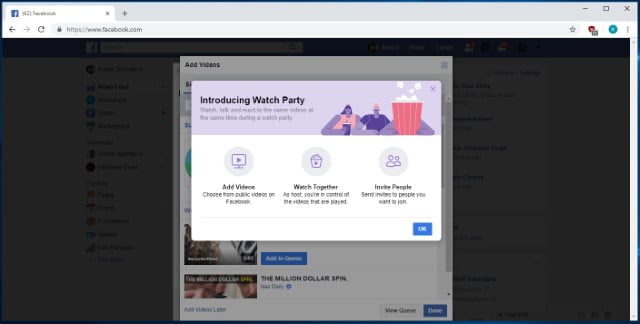
Create Watch Parties from your homepage → “create a post” → three-dot menu → “Watch Party.” Follow prompts to invite participants for interactive Facebook video sessions perfect for content creators and community managers.
Search for Local Job Opportunities
Facebook’s Jobs feature transforms the platform into a comprehensive employment marketplace, connecting job seekers with local opportunities. This expansion beyond traditional social media platform functionality demonstrates Facebook’s evolving utility.
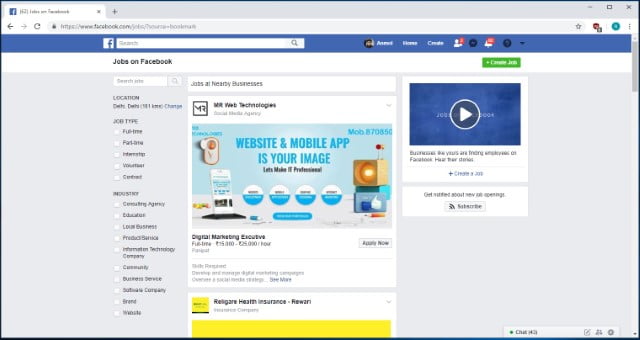
Access the Jobs page through the Explore section (click “See More” if not visible) or visit facebook.com/jobs for local job discovery on Facebook with increasing quality and employer participation.
Job Search Tip: Many local businesses post exclusively on Facebook before traditional job boards.
Create Fundraising Programs Easily
Facebook’s fundraising tools enable social media philanthropy and community support initiatives. This feature facilitates cause-based campaigns and charitable donations directly through the platform.
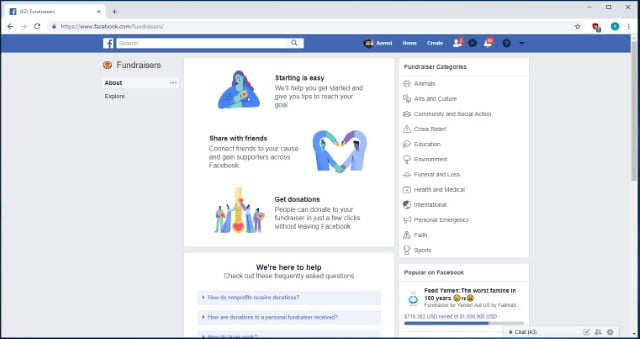
Find fundraising options in the Explore section as “Fundraisers.” The interface provides step-by-step campaign creation guidance and existing program discovery for effective Facebook fundraising management.
Unsend Messages in Facebook Messenger
Facebook’s message unsend feature provides 10-minute message recall windows for correction and privacy. This long-requested functionality balances communication flexibility with conversation integrity.
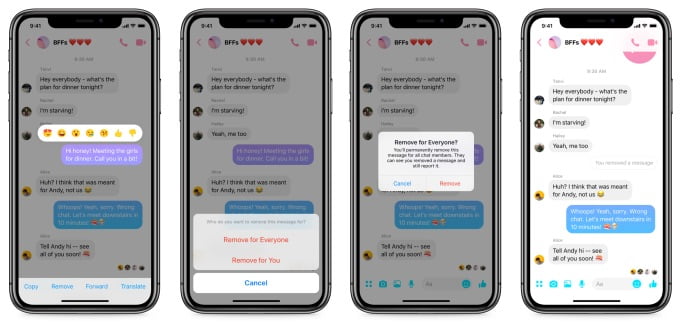
Press and hold sent messages → “Remove” → “Remove for everyone” to retract Facebook Messenger messages within the time limit. This feature rolls out gradually across user accounts.
⚡ Advanced Facebook Techniques
Zoom Images Without Clicking (Browser Extension)
The Photo Zoom browser extension enhances Facebook image viewing efficiency by enabling hover-based enlargement. This quality-of-life improvement eliminates constant clicking for image inspection.
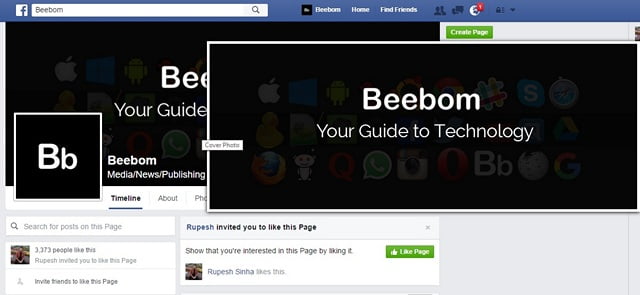
Install the Photo Zoom extension for Chrome or Firefox, then hover over Facebook images for instant Facebook image previews without disrupting browsing flow.
Extension Recommendation: This tool significantly improves Facebook browsing efficiency.
📈 Facebook Mastery: Beyond Basic Tips
👑 Expert Facebook User Pro-Tips
Facebook Marketplace Optimization
Transform your Facebook Marketplace selling experience with these professional strategies:
Professional Photography
Use natural light and clean backgrounds for 30% faster sales
Keyword-Rich Descriptions
Include location and relevant terms for better search visibility
Price Psychology
Use $X99 pricing and include “OBO” (or best offer) for flexibility
Quick Response System
Respond within 15 minutes for 70% higher conversion rates
Facebook Groups Mastery
Build and manage high-engagement Facebook communities with these proven techniques:
- Content Calendar Planning: Schedule daily discussion topics and weekly themes
- Member Onboarding Systems: Create welcome posts and new member rituals
- Engagement Boosting Tactics: Use polls, questions, and challenges regularly
- Moderation Best Practices: Establish clear rules and consistent enforcement
- Value-Added Content: Share exclusive resources and expert insights
🎯 Hack Your Way to a Better Facebook Experience
Facebook continuously evolves with new features and hidden capabilities, from early Easter eggs like Pirate English to modern Text Delights. Mastering these 40+ tips represents just the beginning of advanced Facebook platform optimization. Regular exploration of new features, combined with strategic implementation of these proven techniques, will transform your Facebook experience from basic usage to master-level proficiency.
Key Implementation Takeaways:
- Prioritize privacy and security configurations before exploring advanced features
- Implement time management tools to maintain healthy social media habits
- Experiment with productivity enhancements to streamline daily Facebook usage
- Explore business and marketing features for professional advantage
- Regularly review new Facebook updates and features for continuous optimization
Whether you prefer Facebook for personal connections, professional networking, or business marketing, applying these techniques will significantly enhance your platform experience. Remember that consistent practice and exploration yield the greatest results in social media mastery.
📚 Additional Facebook Resources
Facebook Official Guides
Recommended Tools
Learning Platforms
Ready to Master Facebook?
Implement these tips today and transform your Facebook experience from ordinary to extraordinary. Share your favorite tricks in the comments below!






Thank you for helping people get the information they need. Great stuff as usual.