

How to Defer JavaScript in WordPress (Plugin & Code Methods)
Learn how to defer JavaScript in WordPress and clear the render‑blocking warning in Google PageSpeed Insights. PageSpeed Insights groups render‑blocking JavaScript and CSS under “Eliminate render‑blocking resources” (newer reports may label it “Render‑blocking requests”). This guide explains what deferring JavaScript means, how it differs from async, how to find the scripts that block rendering, and how to defer them in WordPress with a plugin or with code, including the built‑in defer support added in WordPress 6.3. Last reviewed October 2026.
Key Takeaways: What You’ll Learn
- Deferring JavaScript = faster perceived load time: It lets critical content render first while non‑essential scripts load later.
- Async vs. Defer: Async downloads scripts during HTML parsing and runs them as soon as they arrive; defer also downloads during parsing but runs scripts, in order, only after parsing is complete.
- PageSpeed is a ranking factor: Google uses site speed and Core Web Vitals as part of its page experience signals on both desktop and mobile.
- Multiple implementation methods: Manual script insertion, WordPress plugins (WP Rocket, Async JavaScript, etc.), WordPress’s built‑in defer option, or code snippets in functions.php.
- Always test before and after: Use tools like GTmetrix, Pingdom, and Google PageSpeed Insights to measure impact.
defer or async attribute to script tags so they don’t block the initial rendering of your page. In WordPress 6.3 and later you can set this natively when you enqueue a script. Otherwise, use a plugin like WP Rocket, Async JavaScript, or Autoptimize, or add a code snippet to functions.php. Don’t defer jQuery or scripts needed for above‑the‑fold content without testing, and always check PageSpeed Insights before and after.What is Defer Parsing of JavaScript?
A web page consists of different components: HTML, CSS/Stylesheets, JavaScript, and visual elements like images and icons. These components are stacked in the code. When a user types your URL and presses enter, the browser connects to your server and begins rendering the page sequentially—from top to bottom. The browser halts rendering when it encounters a JavaScript file, fetches and runs it, and then resumes. This halt happens every time the browser meets a blocking script, which delays the critical rendering path.
To address this, Google recommends deferring non‑critical JavaScript. Defer parsing of JavaScript means using the defer or async attribute to avoid blocking initial rendering. These attributes tell the browser to download scripts in parallel with HTML parsing. Async scripts run as soon as they finish downloading, while deferred scripts run only after HTML parsing is complete, in the order they appear. This way, visitors see meaningful content faster.

Difference Between Defer and Async
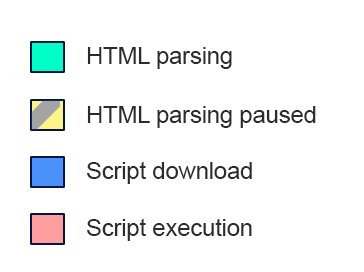
Both async and defer attributes allow scripts to download without blocking HTML parsing, but they execute at different times. Understanding this difference is key to proper implementation.
| Attribute | Download Behavior | Execution Timing | Best For |
|---|---|---|---|
| <script src=”script.js”> (no attribute) | Download blocks HTML parsing | Immediately after download | Not recommended for most scripts |
| <script src=”script.js” async> | Downloaded during HTML parsing | Executes as soon as downloaded, potentially before parsing finishes | Independent scripts (e.g., analytics) that don’t depend on the DOM or on other scripts |
| <script src=”script.js” defer> | Downloaded during HTML parsing | Executes only after HTML parsing is complete, in document order | Scripts that need the full DOM or must run in a set order (e.g., most site functionality) |


Why You Should Defer Parsing of JavaScript
⚡ JavaScript Execution is Heavy
A normal script tag pauses HTML parsing while the browser downloads and runs the file. Large scripts also keep the main thread busy, which can delay how quickly the page responds to taps and clicks (INP). Deferring non‑critical scripts lets the critical rendering path proceed smoothly.
📈 PageSpeed is a Ranking Factor
Google announced site speed as a ranking signal for desktop searches in 2010 and extended it to mobile searches in 2018. Today speed is measured through Core Web Vitals (LCP, INP and CLS) as part of page experience. It won’t outweigh relevant content, but it is a core part of technical SEO and worth fixing.
😊 User Experience Drives Success
Slow‑loading pages frustrate visitors, and many leave before the page finishes loading. By deferring JavaScript, you improve perceived performance, which can reduce bounce rates and help conversions.
How to Find Render‑blocking JavaScripts
JavaScript files that hold up the display of meaningful content are called render‑blocking scripts, and they are the ones to defer. Use these trusted tools to identify them, or run the Lighthouse tab in Chrome DevTools:
Google PageSpeed Insights
Google’s official tool provides detailed warnings and lists specific scripts to defer.
GTmetrix
Analyzes your site and highlights render‑blocking resources.
Pingdom Tools
Shows JavaScript requests and their impact on load time.
Test Results: Before Deferring JavaScript
Here’s a baseline test of one website before implementing deferred JavaScript. We’ll compare it with the results after the changes. Note your own scores first so you can measure your own improvement.


How to Defer Parsing of JavaScript [Step by Step]
Manual Script Method (Universal)
Place the following code just before the </body> tag in your HTML file. Replace script_to_be_deferred.js with the actual script URL. Note that this method injects the script with JavaScript after the page’s load event, so it runs later than a script with the defer attribute. Use it when you can’t edit the script tag itself.
<script type="text/javascript">
function parseJSAtOnload() {
var element = document.createElement("script");
element.src = "script_to_be_deferred.js";
document.body.appendChild(element);
}

if (window.addEventListener)
window.addEventListener("load", parseJSAtOnload, false);
else if (window.attachEvent)
window.attachEvent("onload", parseJSAtOnload);
else
window.onload = parseJSAtOnload;
</script>
Defer Multiple JavaScripts at Once
Use this modified script to defer several scripts. Replace defer1.js, defer2.js, etc., with the actual script URLs. Scripts loaded this way don’t keep a guaranteed order, so don’t use it for scripts that depend on each other.
<script type="text/javascript">
function parseJSAtOnload() {
var links = ["defer1.js", "defer2.js", "defer3.js"],
headElement = document.getElementsByTagName("head")[0],
linkElement, i;

for (i = 0; i < links.length; i++) {
linkElement = document.createElement("script");
linkElement.src = links[i];
headElement.appendChild(linkElement);
}
}

if (window.addEventListener)
window.addEventListener("load", parseJSAtOnload, false);
else if (window.attachEvent)
window.attachEvent("onload", parseJSAtOnload);
else
window.onload = parseJSAtOnload;
</script>
How to Defer Parsing of JavaScript in WordPress
Method 1: Using WordPress Plugins (Easiest)
1
Async JavaScript Plugin
Go to Plugins → Add New, search for “Async JavaScript,” install and activate. Then navigate to Settings → Async JavaScript, enable the plugin, and save. You can fine‑tune which scripts to async or defer, exclude specific scripts, and manage jQuery. Check the plugin’s last‑updated date and WordPress compatibility before you install it.

2
After installing WP Rocket, go to Settings → WP Rocket → File Optimization. Enable “Load JavaScript deferred” and save. WP Rocket also has a separate “Delay JavaScript execution” option, so test each one on its own, because delaying scripts can break menus, sliders and forms. It is one of the most popular caching and performance plugins.

Read our full WP Rocket review.
3
W3 Total Cache
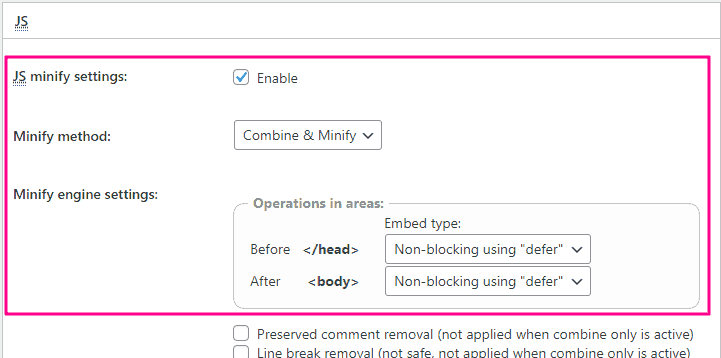
Go to Performance → Minify → JS minify settings. Adjust settings as shown in the image and save. This requires careful configuration but is very powerful.
4
LiteSpeed Cache
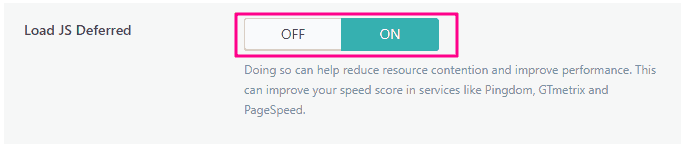
Navigate to LiteSpeed Cache → Page Optimization → JS Settings. Turn on “Load JS Deferred” and save. This works best on LiteSpeed servers.
5
Swift Performance Lite
Go to Tools → Swift Performance → Settings → Optimization → Scripts. Enable “Merge Scripts,” then add scripts to defer under “Deferred Scripts.” Save changes.

6
Speed Booster Pack
Go to Speed Booster → Assets. Under “Optimize JavaScript,” choose “Defer” and save. Confirm the plugin is still maintained before you rely on it.

7
Autoptimize
Go to Settings → Autoptimize → JS, CSS & HTML. Enable “Optimize JavaScript Code,” then enable “Do not aggregate but defer” and save. Clear any cache.

Method 2: Defer JavaScript via functions.php (Code Snippet)
Important: Always use a child theme and backup your site before editing functions.php.
Add the following code to your child theme’s functions.php file. It defers JavaScript files for visitors, skips logged‑in users, and excludes jquery.js.
// Defer Parsing of JavaScript in WordPress
// Learn more at https://technumero.com/defer-parsing-of-javascript/
function defer_parsing_js($url) {
    // Add files to exclude from defer (jQuery by default)
    $exclude_files = array('jquery.js');

    // Bypass JS defer for logged-in users
    if (!is_user_logged_in()) {
        if (false === strpos($url, '.js')) {
            return $url;
        }
        foreach ($exclude_files as $file) {
            if (strpos($url, $file)) {
                return $url;
            }
        }
    } else {
        return $url;
    }

    return "$url' defer='defer";
}
add_filter('clean_url', 'defer_parsing_js', 11, 1);
After adding the code, click “Update File.” Test your site to confirm defer is working. Note that the snippet only skips files whose URL contains jquery.js, so files such as jquery.min.js or jquery‑migrate will still be deferred. If they cause errors, add their file names to the exclude list. On WordPress 6.3 and later, a cleaner option is to pass the strategy argument when you register or enqueue a script, by setting ‘strategy’ => ‘defer’ in the script’s args array.
Method 3: Manual Script Insertion in WordPress (Without Plugin)
You can insert the manual script (from the universal method) into your theme’s footer.php file just before </body>, or use a “hook content” feature if your theme provides one. Edit footer.php only in a child theme, or a theme update will overwrite your change. Alternatively, use a plugin like WPCode (formerly Insert Headers and Footers) to safely add the code.
Pro Tip: Critical vs. Non‑Critical JavaScript
Identify which scripts are essential for above‑the‑fold rendering. Inline critical JavaScript directly in the HTML, and defer everything else. Start by deferring scripts that aren’t needed on first view, such as chat widgets, analytics and social buttons, and leave scripts for menus and the top banner alone until you’ve tested. Tools like PageSpeed Insights often highlight exactly which scripts are blocking rendering.
Warning: Test Thoroughly After Changes
Deferring the wrong scripts—especially jQuery or essential plugins—can break site functionality. Always test your site thoroughly after implementing any defer method. Keep a backup and be ready to revert if needed.
Test Results: After Defer Parsing of JavaScript
Here is the same website tested after implementing deferred JavaScript. Compare the render‑blocking warning and the scores with the baseline above. Results vary with your theme, plugins and hosting, so your numbers will differ.


Keep Reading: Master WordPress Speed Optimization
Deferring JavaScript is just one piece of the speed puzzle. Explore these related guides:
Increase WordPress Website Speed
Complete guide to faster WordPress sites.
Advanced Speed Optimization Tips
Go beyond deferring JS with advanced techniques.
Professional Speed Optimization Service
Let experts handle your site speed.
Frequently Asked Questions
Wrapping It Up
Deferring parsing of JavaScript is one of the simplest speed optimizations you can perform. Whether you choose a plugin for convenience or a manual code method for fine control, the result is faster perceived load times, a better user experience, and the speed signals that support your SEO rankings. Remember to always test before and after, and exclude any scripts critical to your site’s initial functionality.
If you have questions or run into issues implementing these methods, leave a comment below—we’re happy to help!
Ready to Supercharge Your Site Speed?
Start by checking your site with our free SEO tools, then work through the speed guides above.






Learn how to improve your page speed score by deferring the parsing of JavaScript
Excellent, you really nailed it
It will help everyone who uses it, including myself. Keep doing what you’re doing
Thanks for the comments, be sure to bookmark and share
This is one of the best posts I’ve read on this forum. The information in the article helped me understand more about a new topic that I had never known.
This is the first time I’ve been to this place. I found a lot of interesting things on your blog, especially the comments
Thanks for the comments, be sure to bookmark and share
I was just on your website and found a lot of useful information, especially on this blog page. A lot of people have said things about your articles
Thanks for the comments, be sure to bookmark and share
This article is very nice and helpful, I like it very much, thanks for sharing this.
I really happy found this website eventually. Really informative and inoperative, Thanks for the post and effort! Please keep sharing more such blog.
Thanks for the comments, be sure to bookmark and share
Your efforts to maintain an optimistic outlook and encourage my professional development have been very helpful to me.
Thanks for the comments, be sure to bookmark and share
I enjoyed reading your article and the efforts you put into creating this article, it was awesome thank you so much.
Thanks for the comments, be sure to bookmark and share
I want you to be aware of the significant influence that you have had on my professional life; you have been a consistent source of inspiration and motivation for me.
I blog quite often and I really thank you for your content.
This great article has truly peaked my interest.
I will bookmark your site and keep checking for
new details about once a week. I opted in for your Feed too.
Thanks keep reading and sharing
Great guide! Deferring JavaScript really makes a big difference in site speed and SEO—especially helpful with all the WordPress plugin options explained clearly.
Thanks keep reading and sharing
Your ability to articulate your ideas with precision and clarity is remarkable. We sincerely appreciate your thoughtful provision of this essential paper.
Thanks keep reading and sharing
This guide on deferring JavaScript parsing is incredibly helpful! It clearly outlines the importance of improving page speed and user experience. Do you have any tips for testing these changes effectively?
Thank you for reading! Keep exploring and sharing — knowledge grows when it’s shared.
Great insights on deferring JavaScript parsing! It’s fascinating how these techniques can significantly enhance site speed and user experience. Have you noticed any specific improvements after implementing these changes?
Thank you for reading! Keep exploring and sharing — knowledge grows when it’s shared.
This is a really helpful and comprehensive guide on deferring JavaScript! I especially appreciate the clear explanations of defer vs. async and the step-by-step instructions for WordPress. It’s great to see different methods, from plugins to manual code implementation.
Thank you for reading! Keep exploring and sharing — knowledge grows when it’s shared.
A great blog, it has a lot of useful information to me.
This was an excellent read. I really liked how the topic was explained in a simple and practical way. Looking forward to reading more articles like this.
this is exactly the kind of technical guide i’ve been looking for! i’ve been struggling with page speed issues on my wordpress site for months, and i knew javascript was part of the problem but didn’t understand the difference between deferring and async loading until now. the explanation about render-blocking resources finally clicked for me.
i especially appreciated the step-by-step breakdown – as someone who’s not a developer, i found the wordpress-specific section really helpful. i was able to implement the changes using one of the recommended plugins, and my gtmetrix score actually improved by about 15 points!
one question though – after deferring javascript, should i be concerned about any functionality breaking on my site? i’ve heard stories about deferred scripts causing issues with analytics tracking or interactive elements. would love to hear your thoughts on what to watch out for after making these changes.
thanks for keeping this updated for 2025 too – it’s clear you put a lot of work into making this comprehensive. bookmarked for future reference!
I’m so glad this guide helped clarify things for you! 🎉 It’s great to hear your GTmetrix score improved after implementing the plugin changes.
You’re right to be cautious—deferring JavaScript can sometimes affect functionality, especially for analytics scripts, sliders, pop-ups, or other interactive elements that rely on JS loading immediately. A few things to watch for:
Test key interactive features on your site after enabling defer/async.
Check that tracking scripts (like Google Analytics or Tag Manager) are still firing correctly.
If certain elements break, most plugins let you exclude specific scripts from being deferred.
Taking it step by step and monitoring your site is usually enough to avoid major issues. Sounds like you’re already on top of it, so you should be fine!
great guide! i’ve been struggling with my pagespeed score and this explains the defer parsing concept perfectly. thanks for the helpful tips!
Thank you for your kind words! I’m glad you found the list useful. Looking forward……
Wow, this guide is super helpful! I’m curious, have you seen any significant speed improvements after deferring JavaScript parsing? Also, how does this compare with using caching plugins? Thanks for the insight!
Thanks! Yes, deferring JavaScript can noticeably improve load times and Core Web Vitals, especially on script-heavy sites. It works best together with caching plugins since both optimize performance in different ways.
Your writing skills are exceptional. I have perused all your postings; they were truly captivating.
Great tips for improving site speed! I’ve also found that using a caching plugin like FunBoxie can make a significant difference.
I used the plugin method you outlined to defer JS on my site.
My PageSpeed Insights score jumped from 65 to 90 on mobile.
Thanks for clarifying the difference between defer and async.
Great insights on deferring JavaScript! I tried this for my blog, and it sped things up significantly. For anyone looking to improve load times, consider checking out slope run too; their tips on performance are a game changer!
Excellent guide! The explanation of defer vs async and the plugin-based solutions make it much easier for WordPress users to improve PageSpeed scores. Testing changes before and after implementation is definitely the key to avoiding broken functionality while optimizing performance.
Excellent guide! I tried this for my blog, and it sped things up significantly. Thanks for clarifying the difference between defer and async.
Interesting read! I’ve tried deferring JavaScript on my WordPress site before, and while it did improve load times, figuring out which scripts were critical was tricky.
Great tutorial. It would be even better if you added a short troubleshooting section for common errors.
Site speed optimization always feels like a never-ending chore, but getting rid of those render-blocking scripts really makes a huge difference in UX. I recently had to troubleshoot similar performance bottlenecks while working on and realized how easy it is to break things if you aren’t careful. Definitely a solid checklist to keep handy for any future tweaks!
Thanks so much for reading the post and taking the time to leave a comment! I really appreciate your thoughts and feedback.
Deferring JavaScript parsing can significantly improve page load times, as explained in this comprehensive guide. It’s a great way to optimize WordPress sites for better performance and user experience.
Thanks so much for reading the post and taking the time to leave a comment! I really appreciate your thoughts and feedback.
This guide sounds super helpful! Page load times are such a pain, especially with all the scripts WordPress sites tend to run. I’ve been looking for ways to speed things up, and anything that can prevent a block blast of JavaScript from slowing things down on initial load would be fantastic. I’ll definitely be giving these tips a try.
Thanks so much for reading the post and taking the time to leave a comment! I really appreciate your thoughts and feedback.
This is such a thorough guide! The point about writing for humans first, not just search engines, really resonated with me. Saving this for reference.
Thanks so much for reading the post and taking the time to leave a comment!
Thanks for this super helpful guide! I really appreciate the clarity on deferring JavaScript parsing—it’s such a game-changer for site speed. It made me think about how small tweaks can significantly impact user experience. Plus, it’s crucial for keeping visitors engaged!