
- #1 Blocked by robots.txt – Googlebot can’t access your pages
- #2 “Noindex” meta tag – Page explicitly tells Google to stay away
- #3 Orphaned pages – No internal links, so crawlers never find them
Finding (and maintaining) sites indexed by Google can be a challenge for new sites and sites with technical SEO or content quality issues. This article is intended to explain potential reasons why Google might be having trouble indexing your site. Sometimes the problem is solved quickly, but sometimes you have to dig deeper to find the real reason why Google doesn’t index every web page.
How to Check Google’s Index of Your Site
In order to first determine that your page (or entire site) is not indexed within Google, follow these steps:
Use the “site: domain.com” query, as in the following example. site: getsocialguide.com. This will show you most (but not all) URLs that Google has indexed on your domain’s search engine. Google may not display all indexed pages on your site with this query, as it can query in all other Google datacenters that are indexed. A little other item. Using this term on a particular date allows you to have more or less indexed URLs for your site. Tip: If you’re using the basic “www” subdomain version of your site, add “www” before the domain name. This will only show URLs indexed for that subdomain.
Google Search Console Page Indexing Statuses Explained
For exact diagnostics beyond a site: search, open Indexing > Pages (formerly the Coverage report) or paste any URL into the URL Inspection bar inside Google Search Console:
| Search Console Status | What It Means | Primary Action to Take |
|---|---|---|
| Discovered – currently not indexed | Google knows the URL exists (via sitemap or link) but has not crawled it yet | Improve internal linking, trim low-value parameter URLs, and boost server speed |
| Crawled – currently not indexed | Googlebot fetched the page, evaluated it, and chose not to add it to the index | Expand thin content, differentiate near-duplicates, and strengthen E-E-A-T depth |
| Excluded by ‘noindex’ tag | A meta robots tag or X-Robots-Tag header blocks indexation |
Remove the noindex directive in your SEO plugin or server config if the page should rank |
| Blocked by robots.txt | A rule in /robots.txt prevents Googlebot from crawling the URL |
Update or remove the matching Disallow rule and retest in URL Inspection |
| Alternate page with proper canonical tag | Google recognizes this URL as a duplicate pointing to a canonical master URL | Normal for parameter/AMP variants; fix the canonical tag only if it points to the wrong page |
How Google Search finds your web page
When you’re looking for something on the internet, you typically perform a search, often using Google. However, the process behind a Google search involves three key stages that play a crucial role in presenting the search results:
- Crawling: Google employs automated programs, known as crawlers, to collect text, images, and videos from various web pages. These crawlers explore the internet, discovering new and updated pages. The process involves “URL discovery” and following links. Google’s algorithmic program, Googlebot, fetches data from web pages, ensuring it doesn’t overwhelm the sites it visits.
- Indexing: The collected textual, visual, and video content undergoes analysis and is stored in Google’s extensive database, creating an index. This index serves as a repository of information, allowing Google to quickly retrieve relevant data when responding to user queries.
- Serving Search Results: When users enter search queries, Google uses its index to provide them with relevant information. Various factors, such as the user’s location and language, impact the accuracy and specificity of the search results. The goal is to present users with the most relevant and useful content based on their search queries.
This process ensures that Google Search delivers accurate and up-to-date information to users, making it a valuable tool for navigating the vast landscape of the internet. If you’re interested, Google has provided a video that simplifies the explanation of how indexing works.
Common Reasons Why Google is Not Indexing Your Site
1. Response Codes Other than 200 (OK)
Needless to say, if your page doesn’t generate a 200 (OK) server response code, don’t expect search engines to index (or index at the same time) them. The URL may be redirected incorrectly and you may get a 400 or 500 error based on a CMS issue, a server issue, or a user error. Quickly check if the URL of the page loads correctly. It will be charged and everything will be fine. However, you can check it by running the URL via HTTPStatus.io.
2. Blocked via Robots.txt
The site’s /robots.txt file gives crawl commands. If a page is absent from the Google index, check robots.txt. If Google has ever used robots.txt to block indexing, you might see a “Description of results not available” message. See our article on how to create a Robots.txt file.
yourdomain.com/robots.txt. Look for Disallow: /folder/ or Disallow: /page-url. Remove or modify the disallow rule for the affected pages.3. “Noindex” Meta Robots Tag
Another common reason: pages may contain a “noindex” meta robots tag. If Google finds this tag, it clearly indicates the page should not be indexed. Google always respects this directive. Variations include:
- noindex,follow
- noindex,nofollow
- noindex,follow,noodp
- noindex,nofollow,noodp
- noindex
4. “Noindex” X-Robots Tag
Similar to a meta robots tag, an X-robots tag controls indexation via HTTP header. It’s often used on non‑HTML files like PDFs. It’s unlikely a “noindex” X-robots tag has been accidentally applied, but you can check using the SEO Site Tools extension for Chrome.

curl -I URL to inspect headers. Look for X-Robots-Tag: noindex. Remove or modify via server config (e.g., .htaccess).5. Internal Duplicates
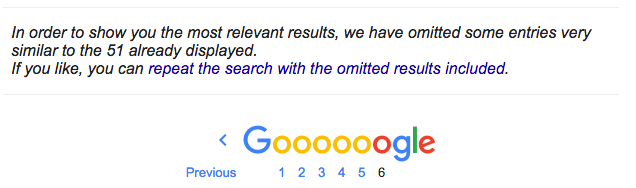
Internal content duplication is a danger to SEO. Large ratios of internal duplicate content may keep pages out of Google’s index or prevent them from ranking well. Use Siteliner to crawl your site. It reports all pages with internal duplicated content.

Google clearly states here that websites should minimize similar content. Pages with exactly the same content may be omitted from search results under a notice like:
6. External Duplicates
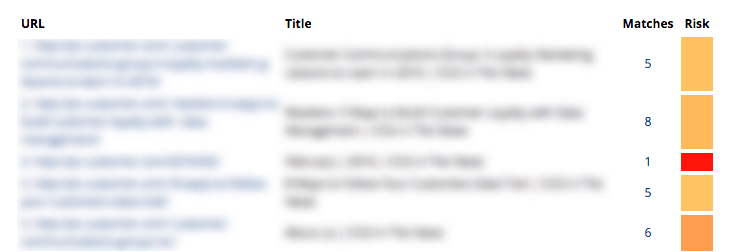
External duplicate content – content duplicated with other websites – is a sign of low quality. Large ratios of duplicate content should be avoided. Use Copyscape to check. Note: high‑authority sites may still rank despite duplicates, but newer sites won’t.
7. Overall Lack of Value to Google’s Index
If your site or page provides little value – e.g., thin affiliate sites with only ads – Google may avoid indexing or ranking it. Focus on unique, helpful content.
8. Your Website is Still New & Unproven
New websites don’t get magically indexed quickly. It takes links and other signals for Google to index and rank visibly. Link building is essential for new sites.
9. Page Load Time
Slow pages may drop rankings over time and could even fall out of the index. Check with Google PageSpeed Insights or GTMetrix.

10. Orphaned Pages
Orphaned pages have no internal links. Google can’t discover them. Use Screaming Frog to crawl your site and identify pages with no incoming internal links.
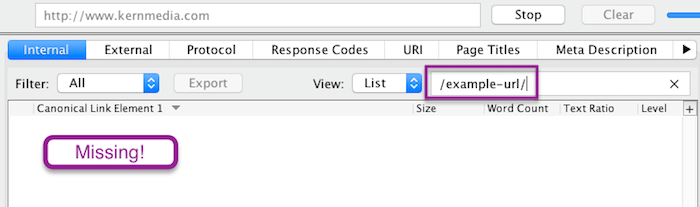
🔧 Fix: Add internal links from relevant pages. Update your sitemap and submit to Google Search Console.
When in Doubt, Ask for Help
For some folks, these things is just too technical and it’s best to hunt session from an web optimization specialist…like me ? If you’re caught, you must decide how invaluable your time is. Spending late nights making an attempt to handle Google indexation and rating will get tiresome. Remember that indexation doesn’t equate to optimum rating. Once Google has listed your web site, your content material high quality, hyperlink profile and different web site and model indicators will decide how well your web site ranks. But, indexation is step one in your web optimization journey.
Different Ways to Get Your Page to Show on Search
After hours of coding, writing, designing, and optimizing, lastly you might be able to live your new web web page. But hey, why is my weblog post not exhibiting on Google?
What have I completed incorrect? Why does Google hate me?

Now, now, we’ve all been there and I’ve discovered to present it no less than a day or two earlier than making an attempt to seek for my new weblog post on Google. Because I’ve long accepted that that’s how long Google wants to really embody newborns, I imply new weblog post on Google Search. Sometimes it takes even longer for brand spanking new web sites. While the method of getting a brand new web page or web site on Google Search is a long and windy one, nevertheless it’s one value studying about.
Let’s begin with the fundamentals.
What is Search? How does it work?
There’s nobody to higher clarify this than Google themselves. So right here’s a video from Google with Matt Cutts explaining about how search works. Have you watched it? If sure, let’s recap and summarize.
For content material to indicate up on Google Search, it has to undergo spiders. No, not actual spiders, however a program known as spider. The spider will begin with a hyperlink, which it’s going to then crawl by way of the content material. If they see one other hyperlink embedded within the content material, they’ll crawl it too, and the method repeats. Crawled contents, or web pages, are then saved in Google’s index.
When a person made a question, solutions are pulled from the index.
So to ensure that your content material to indicate on Google Search, you must first be sure that your web site is crawlable by Google’s crawler known as Googlebot. Then you must be sure that it’s listed appropriately by the indexer which known as Caffeine. Then only will you see your content material or web site showing on Google Search. Here’s the factor, how do you verify from Google for precisely whether or not or not they’ve listed your content material?
Well, you can’t. Like all issues in web optimization, the subsequent best technique you are able to do is analyze and provides it your best guess. Try typing into the Google search bar web site:insertyourdomainhere.com and enter, Google Search gives you a list of all listed web pages out of your area. Or higher but, search your URL straight on Google. But, as Matt Cutts mentioned, web pages that aren’t crawled CAN seem on Google Search as well. Well, that’s one other subject for one more day. Still ? The video is only 4 minutes long. Do have a look to grasp extra. Anyways, let’s get again to the subject. So when do you begin asking:
Why does my web site not present up in Google search?
For me, I’ll give it no less than a few days, at most per week, till I begin freaking out on why my content material remains to be not showing on Google Search. If it has been greater than per week, or perhaps a month and your web site remains to be not there.
Here is a list you must begin checking to see what’s stopping Google from indexing your content material or web site:
Have you checked your robots?
Sometimes a little-overlooked element can have an enormous impact. Robots.txt is the primary place that Googlebot visits on an internet site with a purpose to know which web pages are nofollow or no-index and such. Do you could have this in your HTML head part?

The robots noindex tag is helpful to ensure that a sure web page is not going to be listed, subsequently not listed on Google Search. Commonly used when a web page remains to be under building, the tag should be eliminated when the web web page is able to go live.
However, due to its page-specific nature, it comes as no shock that the tag could also be eliminated in a single web page, however not one other. With the tag nonetheless applies, your web page is not going to be listed, subsequently not showing within the search consequence. Similarly, an X-Robots-Tag HTTP header may be programmed into the HTTP response.
This can then be used as a site-wide particular various for the robots meta tag.

Again, with the tag utilized, your web page is not going to present up in Search. Make positive to repair them. Read extra about meta tags right here:
2. Are you pointing the Googlebot to a redirect chain?
Googlebot is mostly a affected person bot, they might undergo each hyperlink they will come throughout and do their best to learn the HTML then cross it to caffeine for indexing.  However, if you happen to arrange a long winding redirection, or the web page is simply unreachable, Googlebot would cease trying. They will actually cease crawling thus sabotaging any probability of your web page being listed. Not being listed means not being listed on Google Search. I’m completely conscious that 30x is beneficial and essential to be applied.
However, when applied incorrectly, that may break not only your web optimization but in addition the person expertise. Another factor is to not combine 301 and 302.
Is it moved completely or moved briefly? A confused Googlebot shouldn’t be an environment friendly Googlebot. Hear it from Google themselves. So ensure that your whole pages are wholesome and reachable. Fix any inefficient redirect chains to verify they’re accessible by each crawlers and customers alike.