
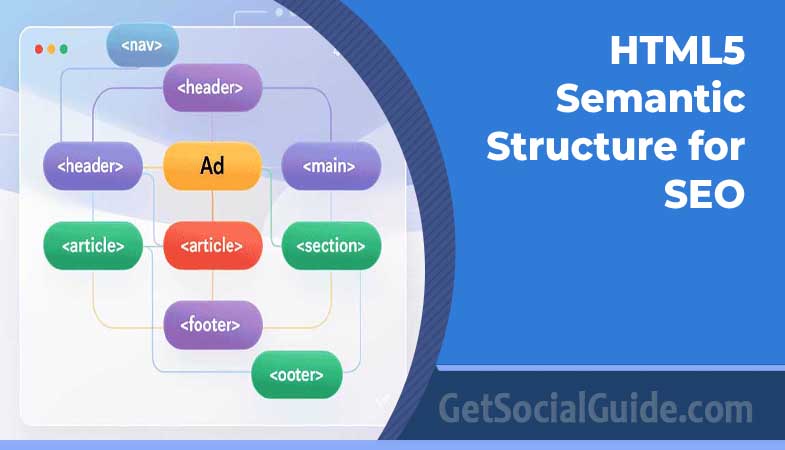
HTML5 semantic structure SEO is the practice of using HTML5’s meaning-carrying elements — <header>, <nav>, <main>, <article>, <section>, <aside>, and <footer> — to tell search engines what each part of your page is, instead of wrapping everything in generic <div> tags. When your markup says what content means, not just how it should look, search engines can find your main content faster, understand your topic more clearly, and show your pages to the right people.
Semantic HTML will not magically put a page at the top of Google. It is not a ranking factor on its own. What it does is remove friction: it makes your pages easier to crawl, easier to understand, and easier to use — for search engines, screen readers, and the developers who maintain your site. In a search landscape where AI-powered results pull answers straight from well-structured pages, that clarity matters more than ever.
This guide explains what semantic HTML is, why it helps SEO, which HTML5 semantic elements to use and where, and how to check your own markup. You will find copy-paste code examples, a complete page template, and a checklist you can run on any site.
What Is HTML5 Semantic Structure SEO?
Semantic HTML uses tags that describe the purpose of the content they contain. A <header> is a page or section header. A <nav> holds navigation links. An <article> is a self-contained piece of content, such as a blog post. A <div>, by contrast, says nothing at all — it is a generic container with no meaning.
HTML5 semantic structure SEO means building your pages with those meaningful tags on purpose, so that the structure of your HTML mirrors the structure of your content. The result is a page that a search engine crawler can read like an outline: this is the header, this is the navigation, this is the main article, these are the sidebars, and this is the footer.
Semantic SEO is a related idea, and it is worth keeping the two apart. Semantic SEO is about covering a topic thoroughly — using related terms, entities, and synonyms so search engines understand what your page is about. HTML5 semantic structure is the code-level foundation that supports it: clear markup helps search engines connect your words to your topic.
Compare the same page built two ways. Both look identical in a browser. Only one of them tells a search engine what anything is.
Non-semantic: everything is a div
<div class="header">
  <div class="logo">GetSocialGuide</div>
  <div class="menu">
    <a href="/">Home</a>
    <a href="/blog/">Blog</a>
  </div>
</div>
<div class="content">
  <div class="post">
    <div class="title">HTML5 Semantic Structure for SEO</div>
    <div class="body">Your article text...</div>
  </div>
</div>
<div class="footer">Copyright 2026</div>
Semantic: the tags describe the content
<header>
  <p class="logo">GetSocialGuide</p>
  <nav aria-label="Main navigation">
    <a href="/">Home</a>
    <a href="/blog/">Blog</a>
  </nav>
</header>
<main>
  <article>
    <h1>HTML5 Semantic Structure for SEO</h1>
    <p>Your article text...</p>
  </article>
</main>
<footer>
  <p>Copyright 2026</p>
</footer>
The semantic version uses fewer classes, reads more clearly, and gives every crawler and screen reader a map of the page. The div version can only be understood by a human reading the class names — and class names mean nothing to a search engine.
How Search Engines Read Semantic Markup
Google’s quality guidelines separate a page into three kinds of content: main content, supplementary content, and advertising. Main content is the reason the page exists — the article, the product description, the guide. Supplementary content supports it: navigation, sidebars, related posts. Advertising is everything else.
Semantic tags draw those lines for you. <main> and <article> point to the main content. <aside> marks supplementary content. <nav> marks navigation. When the main content is easy to identify, search engines can judge the quality and relevance of the page more accurately — and that judgment is what rankings are built on.
This is also why semantic HTML matters for AI search. Features such as AI Overviews and AI-powered answers extract and summarize content from pages. A page whose main content is clearly marked in <article> and organized with logical headings is easier for those systems to read, quote, and cite.
Why Semantic HTML Matters for SEO
Semantic HTML helps SEO in four practical ways. None of them is a shortcut, and all of them compound over time.
It Helps Search Engines Find Your Main Content
Crawlers have a limited budget for every site. Semantic markup lets them skip the boilerplate — headers, footers, navigation, sidebars — and reach the content that should rank. Clear <main> and <article> boundaries mean your best content is found and understood on the first crawl, not buried under layout code.
It Supports Accessibility and a Better User Experience
Screen readers use semantic landmarks to let users jump straight to the main content, skip navigation, or move between headings. A page that is easy for assistive technology to navigate is also easier for every visitor to use — and search engines increasingly reward pages that people can actually use. Accessibility and SEO point in the same direction here.
It Works With Structured Data for Rich Results
Semantic HTML and schema markup are partners, not alternatives. Semantic tags describe the structure of the page; schema markup (usually JSON-LD) describes the meaning of the content — that a page is an article, a product, or a recipe, who wrote it, and when it was published. Together, they make your pages eligible for rich results such as article carousels and FAQ snippets. Semantic HTML alone does not create rich results, but it makes the structured data around it more reliable.
It Keeps Your Code Cleaner and Faster
Semantic tags replace layers of nested divs and the class names that go with them. The result is a smaller HTML file, less code for the browser to parse, and a page that is easier for your team to read and maintain six months from now. Cleaner code is not a ranking factor by itself, but leaner pages load faster — and page speed and a good user experience do support SEO.
Pro tip: Think of semantic HTML as labeling boxes before a move. A box marked “kitchen” is easy to find and unpack. A box marked “stuff” is not. Search engines feel the same way about your markup.
The Complete HTML5 Semantic Elements Reference
HTML5 gives you around 100 semantic elements. In practice, a small set does most of the work. Use this reference when you are deciding which tag a piece of content deserves.
Page structure elements — the skeleton of every page:
<header>— introductory content: a logo, a site title, a search form, or a section heading.<nav>— a block of navigation links, such as the main menu or a table of contents.<main>— the main content of the page. Use it only once per page.<article>— self-contained content that could stand alone: a blog post, a news article, a product card, a comment.<section>— a thematic grouping of content, usually with its own heading.<aside>— content that is related to, but separate from, the main content: sidebars, pull quotes, related links.<footer>— closing content: copyright, author details, contact information, related links.<address>— contact information for the author or owner of a page or article.
Text-level elements — meaning inside your paragraphs:
<h1>to<h6>— headings that build the outline of your page.<p>— a paragraph of text.<a>— a link to another page or resource.<ul>,<ol>,<li>— unordered and ordered lists and their items.<em>and<strong>— emphasis and strong importance. Use them for meaning, not just bold or italic styling.<blockquote>and<q>— quoted content from another source.<mark>— text highlighted for reference, such as a search term in results.
Other useful semantic elements:
<figure>and<figcaption>— an image, chart, or code sample with its caption.<time>— a date or time, with a machine-readabledatetimeattribute.<details>and<summary>— a disclosure widget, such as a collapsible FAQ answer.<button>and<form>— interactive controls, which screen readers and search engines recognize as actions.
How to Use Each Semantic Element for SEO
Knowing the tags is not enough — you need to use each one in the right place. Here is how the main elements work, with a code example and the rules that matter for SEO.
The <header> Element
The <header> holds introductory content. A page can have more than one: a site header at the top of the page, and a header inside each <article> or <section> for its title and byline.
<header>
  <a href="/">GetSocialGuide</a>
  <p>Practical guides for SEO, blogging, and online growth.</p>
  <form role="search" action="/search/">
    <label for="site-search">Search the site</label>
    <input type="search" id="site-search" name="s">
    <button type="submit">Search</button>
  </form>
</header>- Keep the site header consistent across pages so crawlers learn your layout.
- Put the page title or logo in the header, not in a generic div.
- Do not use
<header>as a generic wrapper for a banner image.
The <nav> element marks blocks of navigation links — your main menu, a footer menu, or a table of contents. Search engines use it to understand your site structure and to find important pages.
<nav aria-label="Main navigation">
  <ul>
    <li><a href="/">Home</a></li>
    <li><a href="/category/seo/">SEO</a></li>
    <li><a href="/category/tutorials-tips/">Tutorials & Tips</a></li>
    <li><a href="/about/">About</a></li>
  </ul>
</nav>- You can use more than one
<nav>on a page. Give each one a cleararia-labelso screen readers can tell them apart. - Reserve
<nav>for major navigation. Not every group of links needs it. - Use real links with descriptive anchor text — never a div styled to look like a link.
The <main> Element
The <main> element wraps the main content of the document — the content that is unique to that page. It is one of the most important tags for SEO because it tells search engines exactly where the ranking content starts and ends.
<main>
  <article>
    <h1>HTML5 Semantic Structure for SEO</h1>
    <p>The main content of the page goes here.</p>
  </article>
</main>- Use
<main>only once per page. - Do not nest
<main>inside<header>,<nav>,<article>,<aside>, or<footer>. - Keep repeated content — site navigation, sidebars, footers — outside
<main>.
The <article> Element
The <article> element represents self-contained, independently distributable content: a blog post, a news article, a forum post, a product card, or a user comment. Content in an <article> should still make sense if it were syndicated or shown on its own.
<article>
  <header>
    <h1>HTML5 Semantic Structure for SEO</h1>
    <p>By Eileen Valdez · <time datetime="2026-11-16">November 16, 2026</time></p>
  </header>
  <p>The article body goes here.</p>
  <footer>
    <p>Filed under: <a href="/category/tutorials-tips/">Tutorials & Tips</a></p>
  </footer>
</article>- Use
<article>for each blog post on a listing page, not one wrapper for the whole list. - Put the post title, author, and publish date in the article’s
<header>. - Use
<time datetime="...">for publish and update dates so search engines can read them.
The <section> Element
A <section> groups related content under a theme. Each section should normally have its own heading, and a section should contain more than one element — if it only wraps a single heading or paragraph, a plain <div> or a different tag is probably the right choice.
<section aria-labelledby="benefits-heading">
  <h2 id="benefits-heading">Why Semantic HTML Matters for SEO</h2>
  <p>Semantic HTML helps search engines understand your pages...</p>
</section>- Give every
<section>a heading. A section without a heading is usually a sign you meant to use a<div>. - Do not use
<section>purely as a styling hook. - Use sections to split long articles into themed parts — it also makes your headings more meaningful.
The <aside> Element
The <aside> element marks content that is related to the main content but separate from it: sidebars, related posts, pull quotes, and author boxes. It tells search engines that this content is supplementary — it supports the page but is not the reason the page should rank.
<aside aria-label="Related posts">
  <h2>Related Posts</h2>
  <ul>
    <li><a href="/6-seo-tips-for-web-designers/">6 SEO Tips for Web Designers</a></li>
    <li><a href="/how-to-rank-images-on-google-top-factors/">How To Rank Images on Google</a></li>
  </ul>
</aside>- Keep sidebars and related content in
<aside>so they do not dilute your main content. - Do not put your article’s key content in an
<aside>— search engines treat it as secondary.
The <footer> holds closing content for a page or a section: copyright notices, author information, contact details, and links to privacy and terms pages. Like <header>, it can appear once per page and once per article or section.
<footer>
  <p>© 2026 GetSocialGuide. All rights reserved.</p>
  <address>
    Contact the author: <a href="mailto:hello@getsocialguide.com">hello@getsocialguide.com</a>
  </address>
  <nav aria-label="Footer navigation">
    <a href="/privacy-policy/">Privacy Policy</a>
    <a href="/contact/">Contact</a>
  </nav>
</footer>- Use
<address>for contact information inside the footer — it is the correct semantic tag for it. - Keep footer links useful and limited. A wall of footer links helps nobody.
The <figure> and <figcaption> Elements
The <figure> element wraps self-contained media — an image, a chart, a diagram, or a code sample — and <figcaption> gives it a caption. For SEO, this pairing matters: the caption is real, indexable text that describes the image, which helps both image search and accessibility.
<figure>
  <img src="html5-semantic-structure-seo.jpg" alt="Diagram of HTML5 semantic structure for SEO showing header, nav, main, article, section, aside, and footer elements" width="1200" height="630">
  <figcaption>The HTML5 semantic elements that make up a well-structured page.</figcaption>
</figure>- Always write a descriptive
altattribute for the image itself, and use<figcaption>for the visible caption. - Keep the image file name descriptive too — it is another small signal about what the image shows.
- For a deeper look at image optimization, read our guide on how to rank images on Google, which covers the top factors Google uses to rank images.
A Complete HTML5 Semantic Structure Template
Here is a full page template that puts everything in this guide together. Use it as a starting point for a blog post or article page, and adapt the headings and content to your own topic.
<!DOCTYPE html>
<html lang="en-US">
<head>
  <meta charset="UTF-8">
  <meta name="viewport" content="width=device-width, initial-scale=1.0">
  <title>HTML5 Semantic Structure SEO: The Complete Guide for Better Rankings</title>
  <meta name="description" content="Learn HTML5 semantic structure SEO: semantic elements, code examples, and best practices to help search engines understand, crawl, and rank your pages.">
</head>
<body>
  <header>
    <a href="https://getsocialguide.com/">GetSocialGuide</a>
    <nav aria-label="Main navigation">
      <ul>
        <li><a href="/">Home</a></li>
        <li><a href="/category/seo/">SEO</a></li>
        <li><a href="/category/tutorials-tips/">Tutorials & Tips</a></li>
      </ul>
    </nav>
  </header>
  <main>
    <article>
      <header>
        <h1>HTML5 Semantic Structure SEO: The Complete Guide for Better Rankings</h1>
        <p>By Eileen Valdez · <time datetime="2026-11-16">November 16, 2026</time></p>
      </header>
      <section aria-labelledby="what-is">
        <h2 id="what-is">What Is HTML5 Semantic Structure SEO?</h2>
        <p>Your introduction goes here.</p>
      </section>
      <section aria-labelledby="elements">
        <h2 id="elements">The HTML5 Semantic Elements</h2>
        <p>Your element guide goes here.</p>
      </section>
      <footer>
        <p>Filed under: <a href="/category/tutorials-tips/">Tutorials & Tips</a></p>
      </footer>
    </article>
    <aside aria-label="Related posts">
      <h2>Related Posts</h2>
      <ul>
        <li><a href="/6-seo-tips-for-web-designers/">6 SEO Tips for Web Designers</a></li>
      </ul>
    </aside>
  </main>
  <footer>
    <p>© 2026 GetSocialGuide. All rights reserved.</p>
  </footer>
</body>
</html>
Pro tip: Notice how the template uses one <main>, one <h1>, and a <section> for each themed part of the article. That is the pattern to copy for every new page.
Heading Hierarchy: H1 to H6 Done Right
Headings are part of semantic structure. They create the outline of your page, and search engines use that outline to understand how your content is organized. A page with a clear heading hierarchy is easier to crawl, easier to skim, and more likely to win featured snippets and jump links in search results.
The Rules of Heading Hierarchy
- One H1 per page. The H1 is the main topic — usually the post title. Never use two H1s on one page.
- Do not skip levels. Go from H2 to H3, not from H2 straight to H4. Each level should nest inside the one above it.
- Keep headings descriptive. A heading should tell the reader — and Google — what the section is about. Include your main keywords where they fit naturally.
- Use headings for structure, not styling. Never pick a heading level because you like how big the text looks. Style headings with CSS instead.
- Put keywords in headings naturally. Your H1 and at least one H2 should contain your primary keyword. Forcing it into every heading is keyword stuffing, and it reads badly.
A good heading outline for this article looks like this:
H1: HTML5 Semantic Structure SEO: The Complete Guide for Better Rankings
  H2: What Is HTML5 Semantic Structure SEO?
    H3: HTML5 Semantic Structure SEO in Action: Divs vs. Semantic Tags
    H3: How Search Engines Read Semantic Markup
  H2: Why Semantic HTML Matters for SEO
    H3: It Helps Search Engines Find Your Main Content
    H3: It Supports Accessibility and a Better User Experience
  H2: How to Use Each Semantic Element for SEO
    H3: The <header> Element
    H3: The <nav> Element
    H3: The <main> Element
Semantic HTML and Structured Data
Semantic HTML tells search engines how your page is structured. Structured data tells them what the content is. The two work best together. Adding JSON-LD schema markup to a semantically structured page makes the page eligible for rich results, such as article carousels in search and FAQ snippets.
Here is a BlogPosting schema example for this article. Add it to the <head> of the page, with your own values:
{
  "@context": "https://schema.org",
  "@type": "BlogPosting",
  "headline": "HTML5 Semantic Structure SEO: The Complete Guide for Better Rankings",
  "description": "Learn HTML5 semantic structure SEO: semantic elements, code examples, and best practices to help search engines understand, crawl, and rank your pages.",
  "author": {
    "@type": "Person",
    "name": "Eileen Valdez"
  },
  "publisher": {
    "@type": "Organization",
    "name": "GetSocialGuide",
    "url": "https://getsocialguide.com/"
  },
  "datePublished": "2026-11-16",
  "mainEntityOfPage": "https://getsocialguide.com/html5-semantic-structure-seo/"
}
After adding schema, test it with Google’s Rich Results Test to confirm Google can read it. Schema does not guarantee rich results, but without valid schema your pages cannot get them at all.
Common Semantic HTML Mistakes to Avoid
Most semantic HTML problems come from using the right tags in the wrong places. Run through this list before you publish:
- Using
<div>for everything — the single most common problem, and the easiest to fix. - Using more than one
<main>element on a page. - Nesting
<main>inside<header>,<nav>, or<footer>. - Using
<section>as a generic wrapper with no heading. - Using
<article>for content that cannot stand alone, such as a single paragraph of a larger article. - Skipping heading levels — jumping from H2 to H4, or from H1 to H3.
- Using more than one H1 on a page.
- Choosing a semantic tag because of how it looks by default, instead of styling it with CSS.
- Putting key content in an
<aside>or a footer, where search engines treat it as secondary. - Leaving images without descriptive
alttext, or without a<figcaption>where one would help.
Warning: Do not use semantic tags only to chase rankings. Semantic HTML supports SEO; it does not replace good content, good keywords, or good links. A thin article in perfect semantic markup will still rank poorly.
How to Test and Validate Your Semantic HTML
You do not have to guess whether your markup is correct. These free tools check it for you:
- W3C Markup Validation Service — paste your page URL or upload your HTML to find invalid markup, unclosed tags, and nesting errors.
- Google Rich Results Test — checks whether Google can read your structured data and whether the page is eligible for rich results.
- Google Search Console — shows how Google crawls and indexes your pages, and flags HTML and mobile usability issues.
- MDN HTML elements reference — the authoritative reference for what each HTML element means and how to use it.
- Your browser’s developer tools — open the accessibility panel in Chrome DevTools to see the landmark structure of your page the way a screen reader sees it.
- A screen reader — test with NVDA on Windows or VoiceOver on Mac to hear how your page is announced. If navigation is confusing by ear, your semantic structure needs work.
Make validation part of your publishing routine. Check new pages before they go live, and re-check older pages when you redesign a template — a theme change can break semantic structure across a whole site at once.
Frequently Asked Questions
What is semantic HTML in SEO?
Semantic HTML in SEO means using HTML5 tags that describe the purpose of the content they contain — such as <header>, <nav>, <main>, <article>, <section>, <aside>, and <footer> — so search engines can identify the main content of a page, understand how it is organized, and rank it more accurately. It is the code-level side of semantic SEO, which is about covering a topic thoroughly with related terms and concepts.
Is semantic HTML a direct ranking factor?
No. Semantic HTML is not a direct ranking factor. Google has not confirmed it as a signal that directly moves rankings up or down. What it does is help search engines crawl, understand, and evaluate your content — and that understanding supports rankings indirectly, alongside content quality, links, and user experience.
What are the HTML5 semantic elements?
The main HTML5 semantic elements are <header>, <nav>, <main>, <article>, <section>, <aside>, <footer>, <figure>, <figcaption>, <address>, and <time>. Text-level semantic elements include headings (<h1> to <h6>), <p>, <a>, <em>, <strong>, <blockquote>, and <mark>. There are around 100 semantic elements in total, but the structural ones above cover most pages.
What is an example of semantic HTML in a web page?
A blog post is a good example. The site header goes in <header>, the menu in <nav>, the post itself in <article> inside a single <main>, the post’s sections in <section> elements with H2 headings, related posts in <aside>, and the copyright notice in <footer>. The same page built entirely from <div> tags would look identical in a browser, but a search engine would have no idea which part was the article and which part was the sidebar.
Yes. You can use multiple <nav> elements — for example, one for the main menu and one for the footer menu. Give each one a descriptive aria-label, such as “Main navigation” or “Footer navigation”, so screen reader users can tell them apart. What you should not do is wrap every group of links on the page in <nav>; reserve it for major navigation blocks.
How do I check whether my semantic HTML is correct?
Run the page through the W3C Markup Validation Service to catch invalid markup and nesting errors, then test it with Google’s Rich Results Test to confirm your structured data is readable. For accessibility, open the page in Chrome DevTools and inspect the accessibility tree, or test it with a screen reader such as NVDA or VoiceOver to hear how the landmarks are announced.
Key Takeaways
- Semantic HTML uses meaningful tags —
<header>,<nav>,<main>,<article>,<section>,<aside>, and<footer>— instead of generic<div>containers. - It is not a direct ranking factor, but it helps search engines find your main content, understand your topic, and judge your page quality.
- Use one
<main>and one H1 per page, and never skip heading levels. - Keep supplementary content in
<aside>and navigation in<nav>so your main content stands out. - Pair semantic HTML with JSON-LD structured data for the best chance of rich results.
- Validate every page with the W3C validator and the Rich Results Test before you publish.
HTML5 semantic structure SEO is a foundation skill, not a trick. Build it into every template and every new page, and your site becomes easier for search engines to read, easier for people to use, and easier for your team to maintain. If you are a designer, our 6 SEO tips for web designers cover clean, semantic code as part of a wider SEO checklist — a good next step after this guide.