
7 Things You Should Never Do When Optimizing Your WordPress Website
In a world of three-letter acronyms that dictate the digital world, CMS probably rules the roost. A Content Management System, or CMS, is an online tool that makes creating, hosting, editing, and managing your content online completely accessible. The single biggest advantage of using CMS is that it requires no programming experience. Anyone with enough knowledge about basic website interfaces, content placement, and general software knowledge can create and manage a website on various CMS platforms.
However, when it comes to CMS, WordPress is the best place to go. A study revealed that over 40% of websites on the web are powered by WordPress. Chances are, out of the 10 tabs you have opened on your browser, 4 of them are created using WordPress. Now that you’ve created your website/blog page on WordPress, what next? The answer is optimization. Optimizing your WordPress site increases loading speed, and improves user experience (no user would wait forever for your website to load!) However, there are a few very common mistakes that website developers, editors, and creators often make. Ignoring these mistakes can lead to a faulty website, low engagement, and even lower search rankings, not to mention a below-average user experience.
| Mistake | Consequence | Severity | Fix Difficulty |
|---|---|---|---|
| Wrong Theme | Poor user experience, high bounce rates | High | Medium |
| Unoptimized Media | Slow loading, poor performance | High | Low |
| No SEO Audits | Low search rankings, poor visibility | Critical | Medium |
| No Analytics | No performance tracking, blind decisions | High | Low |
| Overpaying | Unnecessary costs, reduced ROI | Medium | Low |
| Ignoring Updates | Security vulnerabilities, missing features | Critical | Low |
| No Contact Form | Lost leads, poor customer service | Medium | Low |
1. Going for the Wrong Theme
Have you ever come across websites that wish to display some information, but the theme of the website is ghastly? (Think of neon green text on a yellow and purple background) You haven’t exited a website faster than that, have you? While creating a basic outline for your website, you must choose the right theme. There are hundreds of pre-made templates available in the WordPress library, and if you wish to create your theme from scratch, WordPress has tools for that as well! Trying out different themes and making sure that they work well for your website and its content is a must.

Theme Selection Checklist:
- Responsive Design: Works on all devices (mobile, tablet, desktop)
- Loading Speed: Lightweight and optimized for performance
- SEO-Friendly: Clean code structure and proper heading hierarchy
- Customization Options: Easy to modify without coding
- Regular Updates: Active developer support and security patches
- Plugin Compatibility: Works with essential WordPress plugins
2. Having Unoptimized Media
Every content expert will swear by the importance of optimizing all the media on your WordPress website. This includes videos, images, GIFs, and other multimedia. The goal of optimizing your WordPress site is to make the site load faster. Heavy file sizes, long videos, and hard-to-load image formats do nothing but slow your website down. There are various software and sites that help you reduce file size, and guide you on how to optimize your media. Your goal should be that your site loads speedily for people across different devices, networks, and locations.
Media Optimization Best Practices:
- Image Compression: Reduce file sizes by 60-80% without visible quality loss
- Proper Formats: Use WebP for images, MP4 for videos
- Lazy Loading: Implement lazy loading for images below the fold
- CDN Usage: Use Content Delivery Networks for faster media delivery
- Dimensions: Resize images to exact display dimensions needed
3. Not Conducting SEO Audits
SEO is the new way to get noticed. Terms like organic search, rankings, keywords, and backlinking are the talk of the town. Creating a WordPress site and not incorporating SEO into it is the biggest mistake you can make. Not paying attention to the technical aspects of SEO and search engine visibility through an SEO Audit can greatly harm your site’s visibility and your brand’s growth. As per definition, an SEO Audit “looks at the technical infrastructure of your website”. Regular SEO audits can help you optimize content, backlinks, and other aspects of your website to boost visibility and relevance.

Essential SEO Audit Areas:
- Technical SEO: Site speed, mobile-friendliness, crawlability
- On-Page SEO: Title tags, meta descriptions, header structure
- Content Quality: Relevance, depth, keyword optimization
- Backlink Profile: Quality and quantity of incoming links
- User Experience: Navigation, readability, engagement metrics
4. Not Integrating Analytics
Google Analytics is a powerful tool that helps you track website performance, outreach, and audience metrics. This information can be used to create better strategies, modify content, and target audience segments in favorable locations and demographics. Not integrating analytics can help you identify traffic sources and sales conversions through your website. Many simple guides help you integrate Google Analytics on your WordPress site and track audience metrics (with and without a plugin).
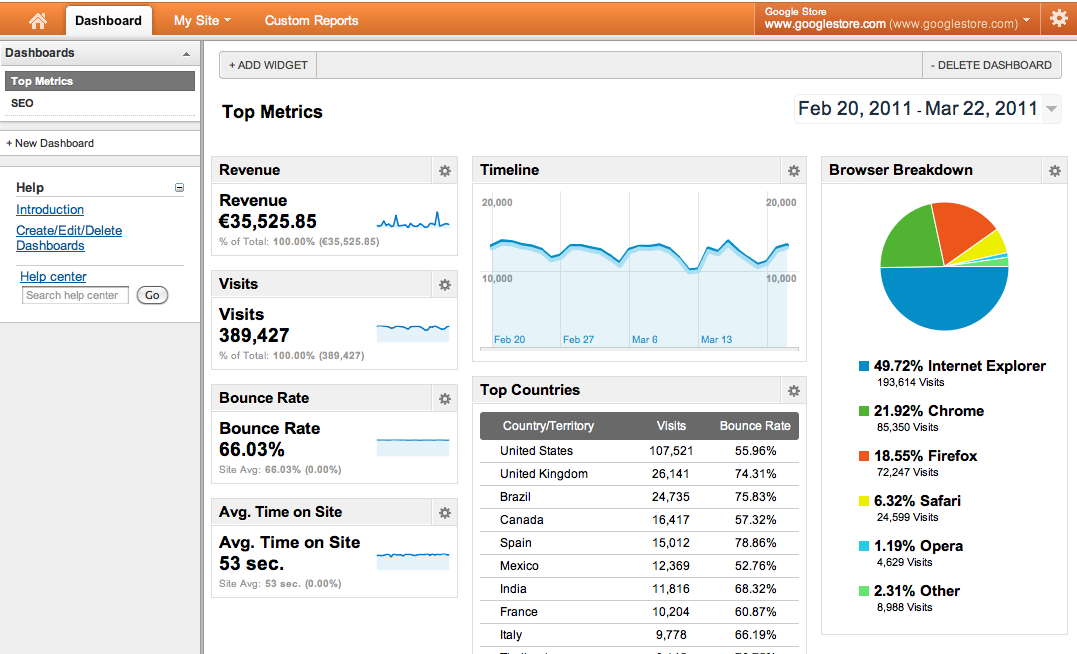
Key Analytics Metrics to Track:
| Metric Category | What to Track | Why It Matters |
|---|---|---|
| Audience | Demographics, location, device usage | Understand who visits your site and how |
| Acquisition | Traffic sources, channels, campaigns | Identify what drives visitors to your site |
| Behavior | Page views, session duration, bounce rate | Measure engagement and content effectiveness |
| Conversions | Goals, e-commerce, form submissions | Track business objectives and ROI |
5. Paying More Than Needed
To launch your website, you need to purchase a domain name and a web hosting service. Various domain registrars often create a sense of urgency and disproportionately compel you into buying a domain plan for more than what is needed. For example, various add-ons come with different domain plans. At the start, you might feel the need to pay for all of these add-ons, but this is simply clever marketing. It is very important to list exactly what you’ll need to launch your site (as well as in the next few months), and sticking to this list will help you save quite a lot of money. Plans on WordPress come at different prices, with different features, but keep in mind exactly what your site needs.

Cost-Saving Strategies for WordPress:
- Annual Billing: Usually 15-30% cheaper than monthly payments
- Bundle Services: Look for domain + hosting packages
- Avoid Unnecessary Add-ons: Private registration, premium DNS often unnecessary
- Use Free Alternatives: Many free plugins match premium features
- Black Friday/Cyber Monday: Best time for hosting deals
6. Ignoring Updates
The good part? WordPress keeps reminding you of the latest updates and features. The bad part? You probably ignore them all. Ignoring updates can badly affect the performance of your site, and you’ll miss out on the latest tools and features on WordPress as well! Enable notifications that remind you every time there’s an update – these updates only take a few minutes each time, and come with bug fixes as well!
Update Management Best Practices:
- Staging First: Test updates on a staging site before production
- Regular Schedule: Set a weekly or bi-weekly update routine
- Plugin Audit: Remove unused plugins to reduce update workload
- Update Order: Update plugins first, then themes, then WordPress core
- Monitor After Updates: Check site functionality post-update
7. Not Having a Contact Form
A big mistake, but a common one. A contact form enables users and potential customers to reach out to you! You can address any issues, questions, or ever collaboration opportunities through a contact form! This form doesn’t need to belong and elaborate and heavily designed, just a few basic information fields (name, number, email, a space for doubts/feedback) would work just fine.
WordPress Optimization Checklist Summary
| Area | Action Required | Frequency | Tools/Plugins |
|---|---|---|---|
| Theme Optimization | Choose responsive, lightweight theme | Initial setup, annual review | Theme checkers, speed tests |
| Media Optimization | Compress images, use proper formats | Every upload, monthly audit | Smush, ShortPixel, Imagify |
| SEO Management | Regular audits, keyword optimization | Monthly mini-audits, quarterly full | Yoast SEO, Rank Math, Ahrefs |
| Analytics | Install and monitor key metrics | Weekly review, monthly reports | Google Analytics, MonsterInsights |
| Cost Management | Review subscriptions, eliminate waste | Quarterly review | Budget trackers, alternative research |
| Update Management | Regular updates with backups | Weekly/bi-weekly | UpdraftPlus, ManageWP |
| Contact Management | Maintain functional contact form | Continuous | Contact Form 7, WPForms |
Conclusion: Building a Robust WordPress Foundation
To sum up, “Nothing can go wrong with my WordPress site” is a lie. These mistakes are common ones, but keeping in mind all these points and working on your WordPress site from time to time is sure to show great results. Various online communities interact and share lots of useful information on building the right WordPress sites, so make sure to check them out!
Next Steps for WordPress Optimization:
- Immediate Action: Perform a security and performance audit today
- Weekly Routine: Check for updates, review analytics, backup site
- Monthly Tasks: SEO audit, plugin cleanup, performance testing
- Quarterly Review: Full site audit, cost review, strategy adjustment


I have read your blog.it is super amazing. we have a sane website as you are suggesting to people
Thanks keep reading and sharing