

What is a Sitemap.xml File? The Complete 2026 Guide to XML Sitemaps
Think of an XML sitemap as the official blueprint of your website for search engines. It lists every important page, video, or image file you want Google, Bing, or other search engines to find and index. Without it, you’re relying entirely on search engines to discover your content organically—which can take time and often leads to newer or deeper pages being missed.
Key Takeaways: What You’ll Learn
- An XML sitemap is not optional for large sites: Google explicitly recommends it for websites with more than 500 pages, rich media content, or new sites with few external links.
- It speeds up indexing: A sitemap tells search engines exactly what’s new or updated, so your fresh content gets discovered faster.
- It helps prioritize content: You can signal which pages are most important, helping crawlers focus their “crawl budget” effectively.
- Creation is easy: With WordPress plugins like RankMath or Google XML Sitemaps, it’s completely automated.
- Submission is mandatory: Creating the file is only half the battle; you must submit it to Google Search Console to reap the benefits.
Quick Answer / TL;DR: An XML sitemap is a machine-readable list of all important URLs on your website. It helps search engines like Google crawl and index your content more intelligently. If you use WordPress, install a plugin like RankMath to generate and update it automatically. Then, submit the sitemap URL (e.g., yoursite.com/sitemap.xml) to Google Search Console. This is one of the fastest, highest-ROI SEO tasks you can do.
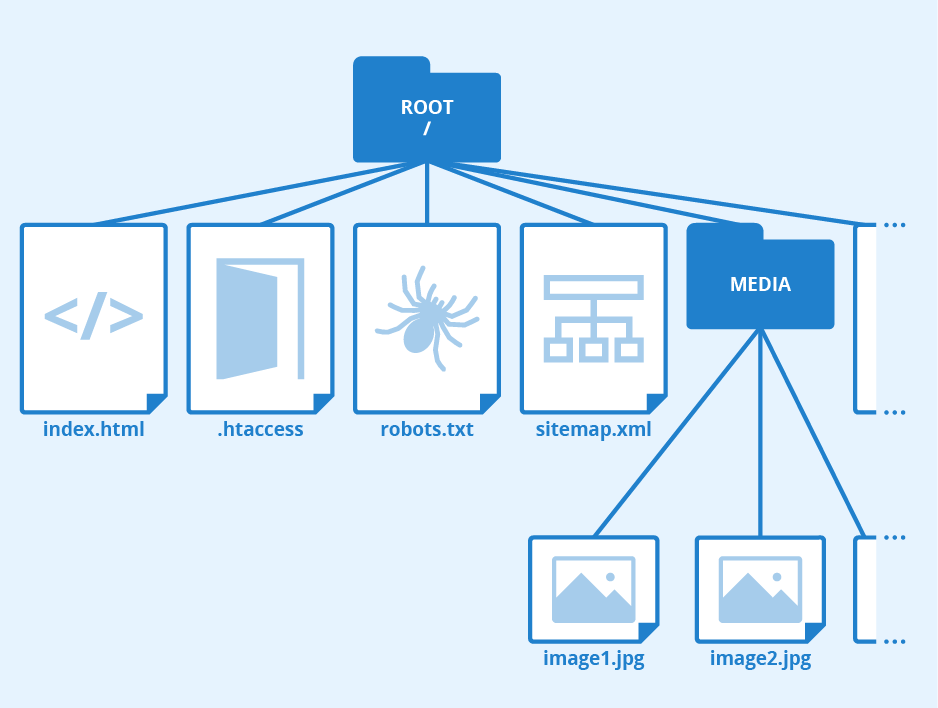
What is an XML Sitemap? (Deep Dive)
An XML sitemap is essential because it acts as a structured list of all the content stored within your web pages. By inserting this file into your site, you create a structured database of all web material that enables search engines to crawl and index your site efficiently. This descriptive file gives search engines the necessary data to interpret page categories, leading to higher visibility in search results and improved ranking potential.
Beyond just listing URLs, a well-formed sitemap can include metadata for each entry, such as:
- Last modification date: When the page was last updated, so crawlers know what’s fresh.
- Change frequency: How often the page is likely to change (e.g., daily, weekly, yearly).
- Priority: A relative priority signal (0.0 to 1.0) indicating which pages you consider most important.
Here’s what a typical entry in an XML sitemap looks like:
<url>
  <loc>https://getsocialguide.com/importance-of-sitemap-xml/</loc>
  <lastmod>2026-03-17</lastmod>
  <changefreq>monthly</changefreq>
  <priority>0.8</priority>
</url>
The XML sitemap improves site navigation for search engine spiders and ensures important content isn’t lost during indexing. This leads to better SEO and increased prospects of audience discovery. It must be updated and maintained regularly to reflect changes in your site.
Is It Essential to Have an XML Sitemap on Your Website?
One drawback many site owners face is not knowing how to create the XML sitemap. While it is a core SEO technique, search engines also have their own preferred methods for site discovery. Having an XML Sitemap allows Google to understand your website’s internal structure, reducing the time needed to index your content.
According to Google Search Central, a sitemap is especially essential in these situations:
- Large or complex websites: If you have more than 500 pages, crawlers may miss some new or updated content.
- New websites with few external links: Without backlinks, Google’s bots may not find you quickly. A sitemap helps jumpstart discovery.
- Sites with rich media: If you have a significant amount of images, video, or news content, dedicated sitemaps help these assets appear in specialized search results (like Google Images or Google News).
Even if you don’t fall into these categories, creating an XML Sitemap is always a good practice. It helps structure your site and makes it tidier for search engines, even for smaller sites.
Sitemap vs. Robots.txt: Understanding the Difference
| Feature | Robots.txt | XML Sitemap |
|---|---|---|
| Primary Function | Instructions for crawlers on what not to access | List of all important URLs for crawlers to discover |
| Analogy | The “Gatekeeper” – tells crawlers where they cannot go | The “Map” – shows crawlers everything that exists |
| Format | Plain text file | XML structured file |
| Location | Root directory (e.g., yoursite.com/robots.txt) | Root directory (e.g., yoursite.com/sitemap.xml) |
| SEO Impact | Prevents indexing of duplicate or private pages | Ensures all important pages are discovered and indexed |
Your sitemap should be referenced in your robots.txt file. Simply add a line like: Sitemap: https://www.yoursite.com/sitemap.xml. This gives any crawler that reads your robots.txt an immediate path to your sitemap, even if you haven’t submitted it manually to a specific search engine.
Key Benefits of XML Sitemaps
🚀 Faster Indexing
An XML sitemap communicates directly with search engines. Submitting your sitemap to Google Search Console enables bots to find and index your pages much faster, which helps you rank sooner in SERPs.
🔔 Auto-Update Notifications
The more frequently you update your site, the better it performs. Without a sitemap, Google may take time to find new content. With one, automatic pings are sent to Google whenever you add or update information—critical for time-sensitive news or articles.
🗂️ Content Categorization
If your site lacks a sitemap and has poor navigation, search engines must guess which pages are most significant. A sitemap lets you explicitly tell Google which pages fall into which categories, reducing guesswork.
🏗️ Improves Crawling of Large Sites
For eCommerce stores, media sites, or enterprise-level systems with thousands of pages and complex linking, sitemaps ensure crawlers find high-value content without getting lost in filters, archives, or loops. This directly impacts crawl budget optimization and helps prevent indexing issues.
How to Create an XML Sitemap
Creating an XML sitemap is a straightforward process. If you use WordPress, there are excellent plugins that handle this automatically.
1
RankMath SEO (Recommended)
The primary plugin we recommend is RankMath. It’s rated 4.8+ and is completely free. To get your sitemap in the proper format, simply install and activate the plugin. RankMath automatically creates a sitemap for you and provides advanced options to include/exclude specific post types or taxonomies. You can find your sitemap at yoursite.com/sitemap.xml or yoursite.com/sitemap_index.xml.
2
Google XML Sitemaps
Another excellent, time-tested plugin is Google XML Sitemaps. This plugin generates a sitemap automatically and notifies Google, Bing, Yahoo, and Ask.com every time you create new content. It’s simple, reliable, and used by millions of sites.
3
For Non-WordPress Sites
Don’t worry if you don’t have a WordPress site. You can use free online tools like xmlsitemapgenerator.org. These tools allow you to enter your URL, and they’ll crawl your site and generate a sitemap.xml file for download. You then upload it to your server’s root directory.
If you generate your sitemap manually, set up a cron job to regenerate it weekly or after each content publication. Many hosting control panels (cPanel, Plesk) offer cron job interfaces. For advanced users, using a static site generator like Hugo or Jekyll, you can script sitemap generation during your build process.
How to Submit Your XML Sitemap to Google
Once you have your sitemap, you must submit it to Google Search Console. Here are the simple steps:
- 1
Log in to Google Search Console and select your website property.
- 2
Click on “Sitemaps” in the left navigation menu (under the Index section).
- 3
In the “Add a new sitemap” field, paste your sitemap URL (e.g.,
sitemap.xmlorsitemap_index.xml) and click Submit.
Google will then fetch and process your sitemap, showing you any errors or the number of submitted/indexed URLs. It may take a few days for the data to fully populate.
Pro Tip: Use a Sitemap Index File for Large Sites
If you have more than 50,000 URLs or want to organize different content types, create a sitemap index file. This file lists multiple individual sitemaps (e.g., one for posts, one for pages, one for products). RankMath and Yoast SEO do this automatically. Submit the index file (e.g., sitemap_index.xml) to Google, and it will read all the child sitemaps.
Different Types of Sitemaps (And When to Use Them)
There are several sitemap formats depending on your content. Here’s a breakdown:
| Sitemap Type | Purpose | Best For |
|---|---|---|
| XML Sitemap | The standard format for search engines. Contains URLs and optional metadata (lastmod, priority, changefreq). Limited to 50,000 URLs and 50MB (uncompressed). | All websites. This is the primary sitemap you need. |
| HTML Sitemap | Designed for human users, not search engines. It’s a clickable, often simple page listing all site sections to help visitors navigate. | Large sites with complex navigation; improves user experience. |
| News Sitemap | Helps your articles appear in Google News. Contains article-specific data like publication date, title, and keywords. | News sites, blogs with timely articles. For instant indexing, consider using Google’s Indexing API instead of waiting for scheduled crawls. |
| Image Sitemap | Provides details about images on your site (subject matter, license, etc.), helping them rank in Google Image Search. | Sites heavily reliant on visual content (photography, eCommerce, real estate). |
| Video Sitemap | Lists video content with metadata like duration, category, and family-friendly status, helping videos appear in video search results. | Sites with embedded or hosted video content. |
2026 Update: Google Indexing API and Modern Indexing
While sitemaps remain the standard for most websites, Google’s Indexing API has become increasingly important for certain content types. The Indexing API allows for instant notification of new or updated pages, bypassing the standard crawl queue. This is particularly valuable for:
- Job posting sites: Where timeliness is critical
- Live streaming events: Where pages are created moments before they’re needed
- News publishers: Breaking news that needs immediate visibility
For most websites, however, a well-maintained XML sitemap combined with regular pinging is more than sufficient. The key is consistency and accuracy.
Warning: Don’t Neglect Technical SEO Fundamentals
A sitemap is just one piece of technical SEO. If your site has poor internal linking, slow page speed, or indexing issues, even the best sitemap won’t guarantee rankings. Use your sitemap as a diagnostic tool—check Google Search Console regularly for errors reported against your submitted URLs.
Advanced Sitemap Strategies for 2026
Beyond basic submission, consider these advanced tactics used by top SEO professionals to squeeze every drop of value from their sitemaps.
Dynamic Sitemap Generation for JavaScript-Heavy Sites
If your website relies heavily on JavaScript frameworks like React, Vue, or Angular, standard sitemap generators may miss content that is rendered client-side. Use headless CMS or server-side rendering (SSR) with tools like Next.js or Gatsby that offer built-in sitemap generation during build time. For dynamic single-page applications (SPAs), consider using a service like Prerender.io to pre-render content and then generate sitemaps from the pre-rendered snapshots.
Prioritizing Crawl Budget with Sitemap Segmentation
Large sites (1M+ URLs) should segment sitemaps not just by content type but also by priority tier. For example, create a high-value-sitemap.xml containing your money pages (product pages, cornerstone articles) and submit that separately from a low-priority-sitemap.xml containing tag archives, paginated pages, or thin content. This tells Google where to focus its crawl budget first.
Using Sitemap Pings for Faster Discovery
You can automatically notify search engines about sitemap changes by pinging their endpoints. For Google, send a GET request to: https://www.google.com/ping?sitemap=YOUR_SITEMAP_URL. For Bing: https://www.bing.com/ping?sitemap=YOUR_SITEMAP_URL. Many SEO plugins do this automatically, but if you have a custom site, implement this ping on every content publish.
Use free validators like XML Sitemap Validator or Google’s own Search Console “Test Sitemap” feature to catch errors like invalid URLs, unsupported characters, or incorrect XML formatting. A broken sitemap can waste crawl budget and confuse search engines.
Common Sitemap Errors and How to Fix Them
Even with automated plugins, errors can occur. Here are the most frequent issues reported in Google Search Console and how to resolve them:
- “Couldn’t fetch” error: Google cannot access your sitemap URL. Ensure the file is publicly accessible and not blocked by robots.txt or .htaccess rules. Also check that your server isn’t returning a 4xx or 5xx status code for the sitemap.
- “URLs not accessible” error: Some URLs listed in your sitemap return 404 or 500 errors. Audit those URLs and either remove them from the sitemap or fix the underlying page issues.
- “Sitemap contains no URLs” warning: The sitemap file exists but is empty. Regenerate your sitemap and ensure your CMS or plugin is configured to include at least one valid URL.
- “URLs excluded by noindex” warning: Pages with a meta robots “noindex” tag are still included in the sitemap. Remove those URLs from the sitemap to avoid confusing Google.
- “Invalid date format” error: The
<lastmod>tag must follow ISO 8601 (YYYY-MM-DD). Many custom scripts output wrong formats. Use PHP’sdate('c')or JavaScript’stoISOString()to generate correct timestamps.
Keep Reading: Master Your Website’s Foundation
An XML sitemap is just one piece of a well-optimized site. Explore these related guides to build a stronger technical SEO foundation:
WordPress SEO 2026: AI & Speed Guide
Learn how modern SEO, AI, and site speed intersect—critical knowledge for 2026 and beyond.
Technical SEO Checklist
A comprehensive checklist covering crawlability, indexability, and site architecture fundamentals.
How site speed affects your social traffic and conversions.
Fixing Indexing Issues in Google Search Console
Step-by-step guide to diagnosing and resolving common indexing problems.
Summary
An XML sitemap is a foundational element of modern SEO that directly influences how search engines discover, crawl, and index your content. While not strictly required for very small, well-linked sites, it is strongly recommended by Google and provides significant benefits: faster indexing of new content, better prioritization of important pages, and improved visibility for rich media assets. Creating a sitemap is straightforward using WordPress plugins like RankMath or online generators for non-CMS sites. The key steps are: generate the sitemap, place it in your root directory, reference it in robots.txt, and submit it to Google Search Console. Regularly monitor your sitemap’s performance, fix errors, and consider advanced tactics like sitemap segmentation, dynamic generation for JavaScript sites, and using the Indexing API for time-sensitive content. By mastering XML sitemaps, you take control of your site’s interaction with search engines and lay the groundwork for higher rankings and more organic traffic.
Frequently Asked Questions About XML Sitemaps
A: Technically, no. If your site is small (under 500 pages) and well-linked internally, search engines will likely find everything. However, a sitemap is a strong recommendation from Google and can only help, never hurt, your SEO.
A: Log into Google Search Console, navigate to the ‘Sitemaps’ menu, enter your sitemap URL (usually sitemap_index.xml or sitemap.xml), and click submit. Google will then fetch and process it.
A: It should be placed in the root directory of your website (e.g., public_html/ or www/). This is the default location search engines check. WordPress plugins handle this automatically.
A: Yes, and for large sites it’s encouraged. You can create separate sitemaps for posts, pages, products, images, and videos, then list them all in a sitemap index file.
A: Ideally, your sitemap should update automatically whenever you add or change content. Most WordPress plugins do this dynamically. If you’re manually generating a sitemap, regenerate it after any major content update.
A: No, it’s a signal, not a command. Google may still choose not to index a page if it’s low quality, a duplicate, or blocked by robots.txt. But it greatly increases the chances of discovery.
A: Each XML sitemap can contain up to 50,000 URLs and be no larger than 50MB uncompressed. If you exceed either limit, split your URLs into multiple sitemaps and create a sitemap index file.
A: Yes, you can serve a gzipped sitemap (e.g., sitemap.xml.gz). Google accepts compressed sitemaps as long as you uncompress them on the fly using server settings. Many plugins do this automatically to reduce bandwidth.
A: Generally, no. Paginated pages (e.g., /page/2/, /page/3/) are often thin or duplicate content. Include only the first page of a paginated series and use rel=”prev/next” for proper handling.
A: Use a dynamic sitemap generator that splits URLs across multiple sitemap files automatically. Tools like Screaming Frog SEO Spider (for static crawling) or plugins like RankMath (for WordPress/WooCommerce) handle segmentation. For custom solutions, implement a script that queries your database and writes batches of 50,000 URLs per file.
Conclusion: Make the XML Sitemap a Priority
An XML sitemap is a fundamental component of technical SEO. It acts as your direct line of communication with search engines, telling them exactly what content you have and when it changes. Whether you run a small blog or a massive eCommerce store, installing a sitemap and submitting it to Google Search Console should be one of the first SEO tasks you complete.
Remember: creating the sitemap is easy, but maintaining it and monitoring its performance in Search Console is where the real value lies. Check your “Coverage” reports regularly to spot any indexing errors Google encounters while crawling your sitemapped URLs.
Ready to Optimize Your Site’s Foundation?
Start with a free technical SEO audit or explore our complete guide to WordPress performance.




Hi! This is my first visit to your blog! We are a collection of volunteers and starting
a new initiative in a community in the same niche.
Your blog provided us valuable information to work
on. You have done a marvellous job!
thanks for nice comments, keep reading and sharing