External Links: The Complete Guide to Outbound Linking for SEO in 2026
Using external links means creating hyperlinks that direct users from one page to a different webpage on another site. They are not the same as internal links that connect pages within the same domain. A proper linking strategy is essential for both Search Engine Optimization (SEO) and user experience. The role of outbound or external links is paramount in creating a strong link web that includes your entire site. Even if many firms are still reluctant to redirect their customers away, adding these links to your content lets your site enjoy numerous benefits.
Nevertheless, this is what Google prefers. The search leader wants you to provide top‑quality content and to share any possible info… even if it lives on someone else’s server. In this post, we will explore the concept of external links, their merits, and the strategies for incorporating them effectively into your site.
Key Takeaways: What You’ll Learn
- External links build trust: Linking to reputable sources makes your content more credible and valuable to readers.
- They improve SEO indirectly: Quality outbound links help search engines understand your content’s context and relevance.
- Not all external links are equal: Dofollow links pass “link juice”; nofollow links don’t—but both serve important purposes.
- Strategy matters: Link to authoritative, relevant sites, use descriptive anchor text, and avoid linking to direct competitors.
- Audit regularly: Broken or spammy outbound links can harm your SEO and reputation.
target="_blank"), and avoid linking to direct competitors or low‑quality pages. Regularly audit your outbound links to maintain quality.Google’s algorithms now use advanced contextual analysis, including passage-based indexing, to understand the relationship between your content and the pages you link to. A single outbound link to a highly authoritative source on a specific subtopic can significantly boost your E‑E‑A‑T (Experience, Expertise, Authoritativeness, Trustworthiness) scores. This is particularly true for YMYL (Your Money Your Life) topics like health, finance, and legal advice.
What is an External Link?
Unlike internal linking, which consists of links leading users to another page in your domain, external links are links that you incorporate into the content of your site to guide users to additional resources related to the topic. They redirect to a completely different domain and carry your audience away from your site.
To illustrate, if you are curious to learn more about what external links are, read this article from Moz. The practice of incorporating external links into your content in the right places can turn out to be a powerful means of getting backlinks. Backlinks are links from other websites that return users to your website. When you place external links, you are making your content more credible; thus, other websites are more inclined to link to your website for a specific topic. The accumulation of backlinks results in the increase of your website’s authority.
A Real‑World Example
Imagine you are the owner of a bookstore, and a customer enters asking for a particular book which you do not carry. You have two choices. One is to tell them that you don’t have the book, and the other is to give them directions to another bookstore you are aware of that does have it. While guiding them to the other store means no sale for your store, you have still provided the customer with valuable information—which makes them more likely to come back to your bookstore with any other book‑related inquiries.
The same goes for your site. If a visitor accesses your site in search of information you don’t have, and you guide them correctly, they’ll be more inclined to remember you the next time they need relevant information.
What are the Benefits of External Linking?
While some businesses hesitate to send customers away, external links offer significant advantages. For example, linking to reputable sources builds credibility and trust. It also improves SEO, as search engines favor sites that provide valuable resources and context, ultimately boosting visibility.
Many site owners fear that outbound links will cause users to leave forever. Data from multiple analytics studies shows that users are more likely to trust and return to sites that provide comprehensive resources, even if those resources are external. A 2025 study by Nielsen Norman Group found that users who encountered well‑curated external links spent 23% more time on the original site overall because they perceived it as more authoritative.
📈 You Add Relevancy
The primary advantage of incorporating outbound links is relevance. Although Google primarily considers incoming backlinks as an indicator of relevance, they also take into account the links leaving your site. For instance, if a lawyer had a page dedicated to divorce procedures and referenced a government page covering the same topic, the two would be connected by relevance. This semantic connection helps Google’s Knowledge Graph understand your content’s place in the broader information ecosystem .
External linking and internal linking are similar in that both can be utilized to link out to more information within your content. If a page is about ‘paint ideas for the bedroom’, it can link externally to ‘types of paint’ to help a user make a decision, and also help Google understand your content. External links are also frequently employed to back up statistics and survey results with the source that conducted them. This practice is essential for data-driven journalism and research-based content .
⭐ Develop Credibility
Linking your web page to high‑quality external sites makes your own site more trustworthy. Creating great content and then linking out to other great content makes your site more credible to both the user and the search engine. The quality of the external link may actually help your site through the passing of “link equity.” This is a two‑way street: when you link to a reputable site, some of that site’s trustworthiness reflects back on you .
🤝 Build Connections
External links provide backlinks to other websites, which is fantastic for building connections and enhancing your reputation. You might be able to get some good backlinks for yourself in the process, helping increase your domain authority—a good measure of how well your site will rank compared to competitors. When you link to someone’s content and notify them (via social media or email), it often initiates a relationship that can lead to future collaborations and guest posting opportunities .
Internal Linking vs External Linking
Internal links are basically links that connect web pages within the same domain. Their main goal is to let both users and search engines navigate your site more easily. On the other hand, external links are outbound links that go from your site to another site. They not only add value to your content by providing supporting information but also create a positive trust signal. External linking, like internal linking and backlinks, participates in your SEO link strategy. In this case, external links from your site and internal links among your pages can be seen as on‑page SEO, while link building is considered off‑page SEO.
Types of External Links
The main types of external links include:
- Follow Links (Dofollow): These tell Google to pass “link juice” (ranking credit) to the linked site. They are the default type of link. They signal endorsement and are the primary way the web’s link graph is built.
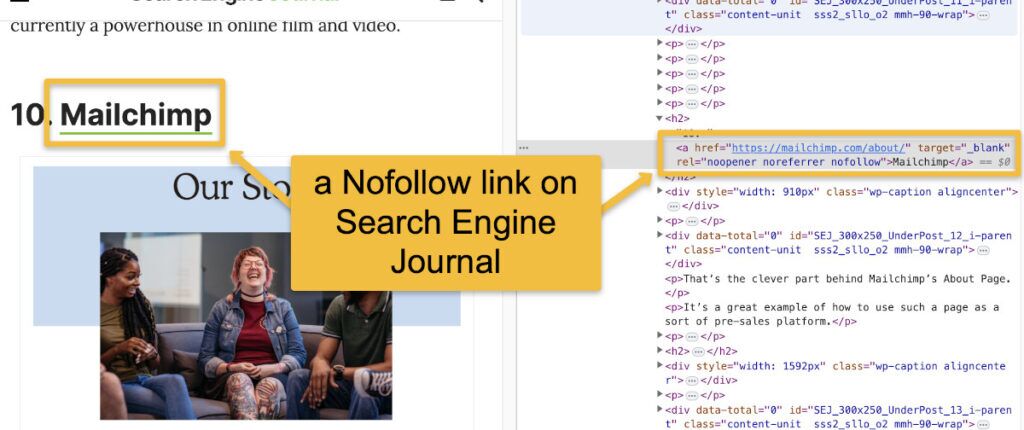
- Nofollow Links: These include the
rel="nofollow"attribute, which tells search engines not to pass ranking signals to the linked URL. Use them when you don’t fully endorse the linked site or for paid links, comments, or user‑generated content. - Sponsored Links: The
rel="sponsored"attribute is used specifically for paid or sponsored links, as per Google’s guidelines introduced in 2019 . - UGC Links: The
rel="ugc"attribute is intended for user-generated content, such as forum posts and comment sections .
To put it simply, a nofollow link means, “Hey Google, don’t count this link as a vote for my site; I don’t fully trust it.” It signals that the user experience of that external link is more important to you than passing SEO benefits. Add a nofollow attribute like this: <a href="https://example.com" rel="nofollow">example</a>.
Why is External Linking Important?
External linking is good for SEO and user experience as it gives users hints of the context in which they are reading and can also drive them to other sources, while you can also get some SEO juice by linking to strong pages.
There are three main advantages of using external links:
- Offer Additional Information
- Gain Credibility
- Connect With Other Websites
In addition to these, external links contribute to the semantic web. By linking to authoritative sources on specific entities (people, places, concepts), you help search engines build a richer profile of your content’s subject matter. This aligns with the principles of entity-based SEO, which is becoming increasingly important in 2026 .
How to Use External Links for SEO: Best Practices
1
Link to Relevant & Reputable Websites
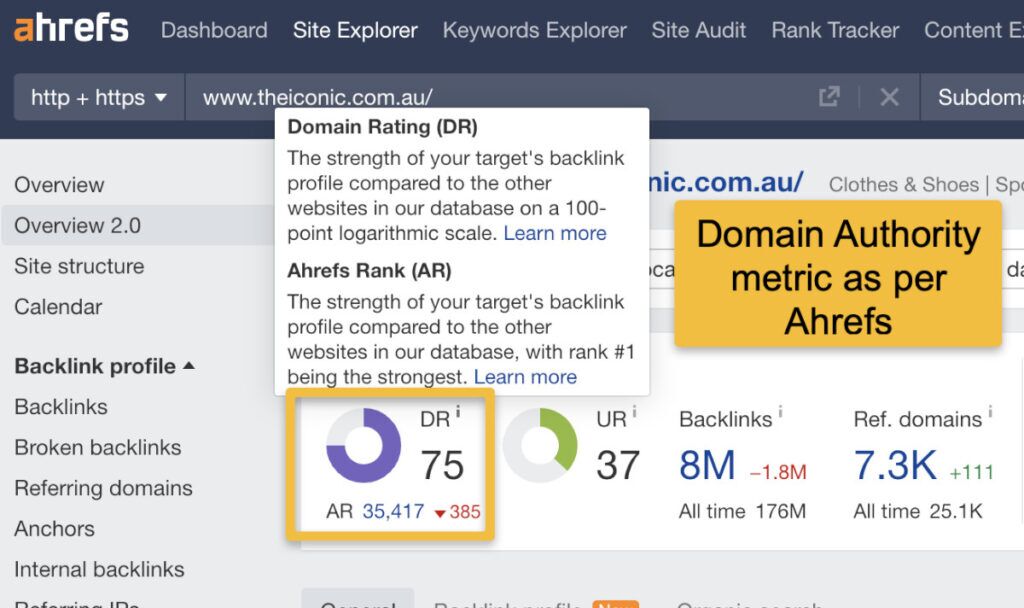
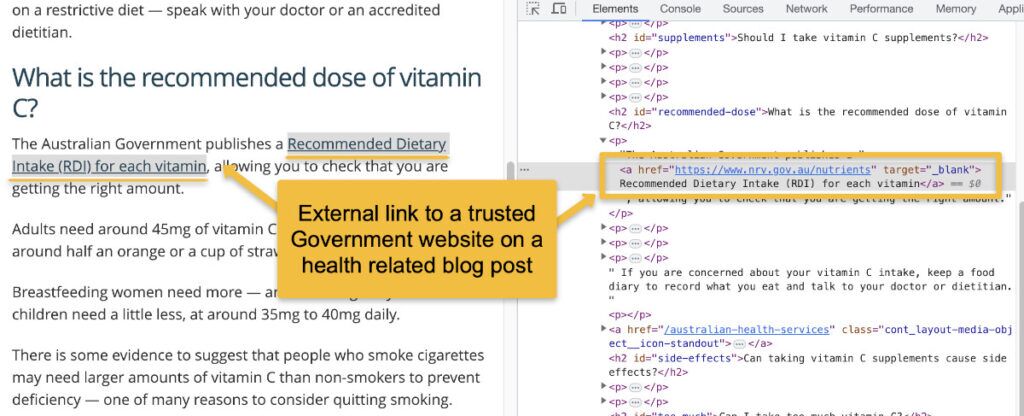
Since sites use external links to offer related information or sources for their visitors, you want to make sure that any website links you include are relevant to your content and not just included for the sake of adding an external link. The same goes for search engines. Google looks at your external links to help it understand what your content is about, so make sure you’re linking to high‑authority sites. Use metrics like Domain Authority (DA) or Domain Rating (DR) to assess a site’s trustworthiness.
2
Use Descriptive Anchor Text
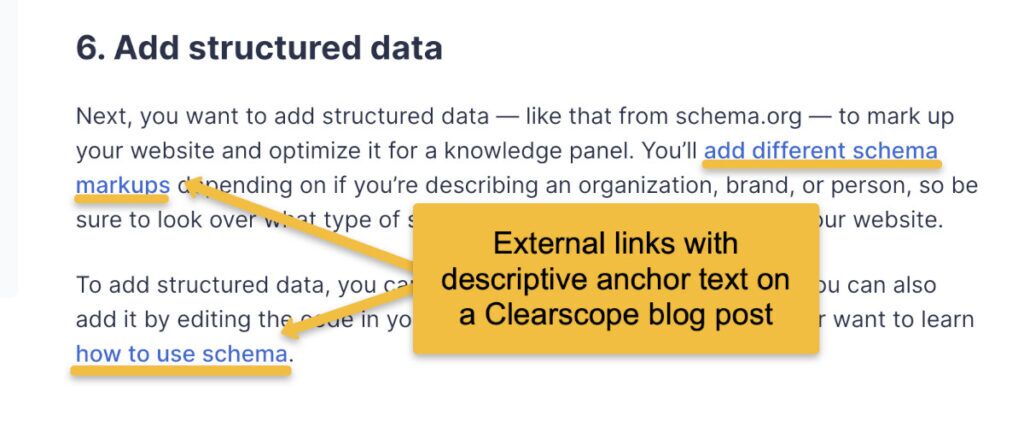
External links are mostly contextual or ‘in-text links’, so ensure they come with optimized anchor text that naturally fits your content. This involves using text that explains what the link is for, rather than non‑descriptive text such as ‘click here’. Keep it short and sweet so you don’t end up looking like spam with massive hyperlinked sentences. The anchor text should give users and search engines a clear idea of what to expect on the linked page.
3
Avoid Linking to Direct Competitors
When you want to link to websites from your industry, you might be tempted to link to your competitors’ sites, particularly when they have content that supports your own. Unless the link points to a well‑established piece of research or study, treat this as a no‑go. You are sending your target customers to competing sites when they click your external links. Stick to sites from the industry, but not those that sell exactly what you sell. If you’re a paper store, for instance, link to related content from a printing company’s site instead of a direct competitor. If you must link to a competitor (for a comparison article, for example), consider using rel="nofollow" .
4
Skip the Money Pages
Your money pages are the pages where you expect your conversions to come from—for an online store, this could be product pages and categories. Since these are typically the last step of a customer’s journey, you want to hold users on the page until they convert. Including external links here could risk your readers’ attention and potentially lead you to lose conversions. Instead, limit external links to blog posts and other content‑heavy pages where the links can help and won’t take revenue out of your sales coffers. For product pages, focus on internal links to reviews, tutorials, and related products .
5
Open External Links in a New Tab
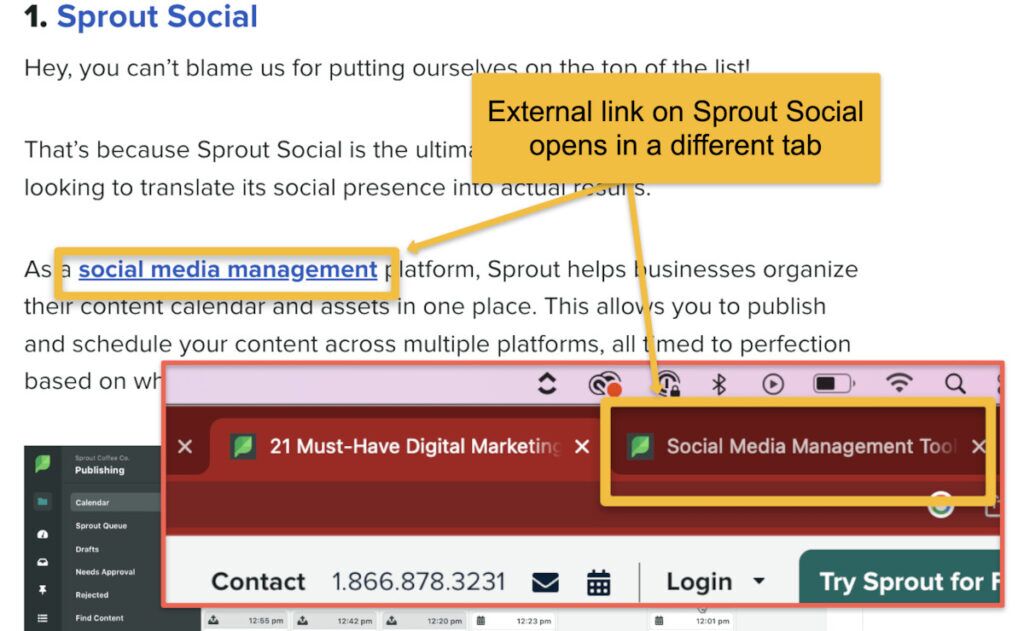
If you want visitors to linger on your site, but also have them click on external links within your site, the best method is to have those external links open in a new window, not the same one. This way, even if the user goes to a different website, they still have your site opened as the first tab and can go back without hassle. Add target="_blank" to your link code. This is a simple user experience win that can reduce bounce rates.
6
Limit the Number of Links
You need the right balance of outbound links. Don’t feel compelled to bolt an outbound link onto every other sentence; limit links to ideas that really need one or sources that truly need to be quoted. When you spam your content with external links, you cause a bad user experience and dilute the link equity passed to each link, which impacts SEO. Follow best practice and limit each web page to a handful of quality links. A good rule of thumb is 2-5 external links per 1,000 words, depending on the content type .
7
Steer Clear of Link Building Schemes
Link building can sometimes fall victim to link schemes—artificially created attempts to boost search rankings with links. Most link schemes violate Google’s spam policies and can lead to a penalty that drops your rankings. These include:
- Buying and selling links
- Excessive link exchanges with a select few pages
- Using automated tools to generate links
- Adding links from questionable, low‑quality directory sites
Google’s manual action team actively penalizes sites engaged in these practices, so always prioritize organic, editorially-given links.
8
Audit Your External Links Regularly
If you already have external links on your site, consider running a site audit to analyze your current links. An audit can help you:
- Identify links that should be nofollow vs. dofollow.
- Detect non‑descriptive or missing anchor text.
- Check for broken links and replace or remove them.
- Use tools like Ahrefs, SEMrush, or Screaming Frog for a comprehensive external link check.
Pro Tip: Use Nofollow for Untrusted or Paid Links
If you must link to a site that you don’t fully trust—or if the link is sponsored or part of an affiliate partnership—always add rel="nofollow" (or rel="sponsored"). This protects your site from being associated with low‑quality neighborhoods in the eyes of Google. For affiliate links, using rel="sponsored" is now considered the industry standard and complies with Google’s guidelines .
Warning: The Risk of Broken Links
Broken external links (links that lead to 404 pages) create a poor user experience and can harm your credibility. Search engines may see them as a sign of neglect. Run a regular audit using tools like Ahrefs, SEMrush, or even free browser extensions to find and fix broken outbound links. Aim to check your most important content at least once a quarter .
Frequently Asked Questions About External Links
| Question | Answer |
|---|---|
| What does “external linking” mean? | External linking means adding hyperlinks from your site to another website. For example, linking to https://getsocialguide.com is an external link. It helps readers explore related topics and adds credibility to your content. |
| Why are external links important for SEO? | They show search engines that your content is well‑researched and connected to trustworthy sources. Quality external links can improve your site’s reputation and boost SEO indirectly. |
| Should I only link to high‑authority websites? | Yes, always link to reliable, reputable websites. Linking to low‑quality or spammy sites can harm your credibility and SEO. |
| How many external links should I use in one post? | Use them naturally. There’s no strict limit—include links only when they add real value or support your points. A general guideline is 2-5 per 1,000 words . |
| Do external links pass SEO value to other websites? | Yes, regular (dofollow) links pass SEO value, also called “link juice.” If you want to avoid that, use rel="nofollow" in your link tag. |
| What’s the difference between “dofollow” and “nofollow” links? | Dofollow: Passes SEO credit to the linked page. Nofollow: Doesn’t pass SEO value but can still drive referral traffic. |
| Should I open external links in a new tab? | Yes. It’s better for user experience. Add target="_blank" to open links in a new browser tab. |
| Can external links hurt my SEO? | They can if they go to irrelevant, broken, or spammy sites. Always check your external links to ensure they’re useful and trustworthy. |
| Do I need permission to link to another website? | No, as long as the content is public and you’re not copying or misusing it. Linking is allowed and often encouraged. |
| How can I track clicks on external links? | Use tools like Google Analytics or Tag Manager to monitor how many people click your outbound links. This helps you understand audience behavior. |
What is rel="sponsored" used for? |
It’s a specific attribute introduced by Google to mark paid or sponsored links, providing more clarity than the generic nofollow . |
| Does linking out affect PageRank? | Yes, each dofollow link passes a portion of your page’s PageRank. However, the loss is negligible compared to the trust and context you gain. |
Keep Reading: Master Your SEO Link Strategy
External links are just one piece of the puzzle. Explore these related guides to build a complete linking and SEO foundation:
Keyword Research Guide
Learn how to find the right terms to target in your content and anchor text.
How to Score a Good Spot on SERPs
Comprehensive guide to ranking higher in search results.
High‑DA Blog Comment Lists
Build backlinks ethically with this curated list of high‑authority sites.
FAQ
What is the difference between an external link and a backlink?
An external link is a link from your site to another site. A backlink is a link from another site to your site. Both are crucial for a healthy SEO ecosystem, but they operate in opposite directions.
Should I use nofollow on all external links?
No, you should only use nofollow (or sponsored/ugc) for links you don’t want to endorse or that are paid. Default dofollow links are beneficial for building the web’s link graph and establishing context.
How often should I audit my external links?
A comprehensive audit every 3-6 months is recommended for active sites. For large sites with thousands of pages, more frequent checks using automated tools are advisable.
Do external links affect site speed?
The links themselves don’t affect speed, but the DNS lookups for external domains can add a very small overhead. This is negligible and should not be a concern for user experience.
Can I link to Wikipedia?
Absolutely. Wikipedia is a high-authority domain and linking to well-sourced Wikipedia articles can add significant credibility to your content.
Summary: External Links Are Your Friends
How you organize internal and external links is a fundamental part of successful SEO. It’s not only vital for on‑page SEO but also necessary for a positive user experience. A clear, quality external link strategy signals to search engines that your content is valuable, well‑researched, and connected to the wider web.
Remember: external links build trust, provide additional value to your readers, and help establish your site as an authority. By following the best practices outlined above—linking to reputable sources, using descriptive anchor text, avoiding competitors, and auditing regularly—you’ll turn outbound links into a powerful SEO asset.
For a customized external link strategy, consider consulting a professional SEO agency to get the rankings and traffic you want.
Ready to Optimize Your Link Strategy?
Start with a free site audit or explore our complete guide to SEO fundamentals.