What Is Muse.ai? The Complete Guide to Meta’s AI Agent and Referral Code Sharing (2026)
- Muse.ai is the web home of Meta’s personal AI agent. Launched on September 8, 2026, Muse is an action-taking assistant that can browse the web, send emails, book reservations, and manage tasks even after you close the app.
- The referral program pays both sides 1 billion tokens. When someone redeems your invite code, you and the new user each receive 1 billion Muse tokens — enough to cover roughly 10 weeks of free-tier usage.
- You can invite up to 20 people. Maxing out the program earns 20 billion tokens, equivalent to about 200 weeks of the free weekly allowance.
- Referral tokens never expire. Unlike the weekly free quota, bonus tokens from invite codes stay in your account indefinitely.
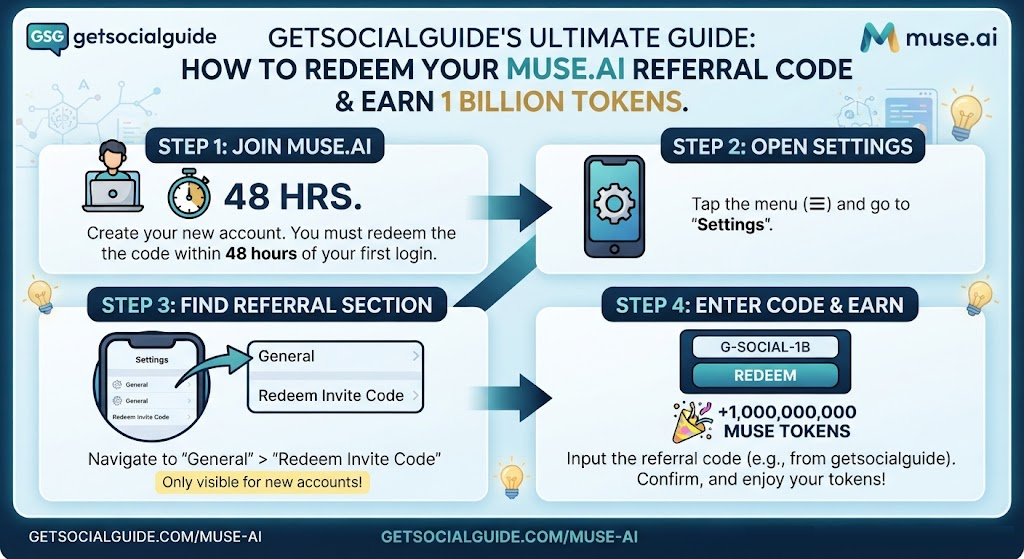
- Redemption must happen within 48 hours of joining. The invite code entry appears in Settings only during the first two days after account creation.
- Sharing works best through community pools and direct messages. Codes get claimed faster when listed in dedicated invite-code communities rather than posted randomly across social media.
The name “Muse” has become crowded in 2026. There is a video AI platform called muse.ai, a music-making app called Muse AI, and Meta’s own personal AI agent that runs at muse.ai and inside a mobile app. This guide focuses on the one most people are searching for right now: Meta’s Muse AI agent and its referral code system, which has turned ordinary users into acquisition channels by paying out billions of tokens for successful invites.
If you have seen invite codes circulating on forums, Reddit threads, or community pools and wondered what they unlock, this article explains the entire system from start to finish. You will learn what Muse actually does, how its token economy works, where to find a code if you do not have one, how to redeem it correctly before the 48-hour window closes, and how to share your own code without spamming people.
- What Is Muse.ai? Meta’s Personal AI Agent Explained
- Muse.ai Pricing and the Token System
- The Muse.ai Referral Program Explained
- How to Find Your Own Muse Referral Code
- How to Redeem a Muse Referral Code (Step-by-Step)
- How to Share Your Muse Referral Code Effectively
- Muse Referral Code Rules and Common Issues
- Muse.ai vs. Other AI Assistants in 2026
- Muse.ai Safety and Privacy
- Common Mistakes to Avoid
- Frequently Asked Questions
What Is Muse.ai? Meta’s Personal AI Agent Explained
Muse is a personal AI agent built by Meta Superintelligence Labs. It launched in the United States and Canada on September 8, 2026, and quickly became the most popular free app on the iPhone App Store, crossing 2.5 million downloads within its first few weeks.
The key difference between Muse and a traditional chatbot is that Muse is designed to take actions, not just answer questions. It can open a browser, fill in forms, send emails, book travel, shop, and keep working in the background even after you close the app. Meta describes it as an agent that “keeps working after people close the app,” returning only when something changes or when it needs your approval.
The Muse experience is organised around five tabs inside the app: the main chat, a customizable feed of your interests and priorities, an Ideas tab with prompt examples, a list of ongoing goals, and a section for files and media. On the web, you access Muse at muse.ai, where you can also manage your subscription and redeem invite codes.
What Muse Can Actually Do: Practical Examples
The best way to understand Muse is through what it handles in everyday use. Reviewers who tested the agent described scenarios such as:
- Planning and scheduling: Muse created a day-by-day packing schedule for a move, including time estimates for each day and practical tips like setting aside a bag for the first night in a new apartment.
- Email and coordination: After connecting Google apps, Muse emailed a friend about an upcoming trip and later packaged the friend’s restaurant recommendations into a formatted Google Doc.
- Travel and bookings: Muse booked a Friday date night and handled a reservation-oriented task that normally requires searching, messaging, and booking across multiple apps.
- Learning support: One parent used Muse to help a child prepare for an astronomy quiz, and the child aced it, describing the experience as more engaging than a blank-canvas chatbot.
- Background monitoring: Muse can autonomously monitor things like weather forecasts and send reminders, such as suggesting an umbrella when rain is expected.
Muse is not perfect. Reviewers and journalists have raised questions about privacy, trust, and how much access the agent has to personal data. Meta’s own help documentation includes the line: “Your Muse can make mistakes or take unexpected actions”. The practical takeaway is to grant permissions deliberately and review what the agent is allowed to do.
Quick Summary & Details for Your Guide:
-
Referral / Invite Code:
8BRP5O -
Official Link: [suspicious link removed]
-
Reward: 1 Billion free Muse tokens for both you and the referrer.
-
Redemption Path: Open App $\rightarrow$ Menu ($\equiv$) $\rightarrow$ Settings $\rightarrow$ General $\rightarrow$ Redeem invite code (Must be completed within 48 hours of creating your account).
Muse.ai Availability and Requirements
Muse is in limited testing and is not available in all countries yet. To use Muse and subscribe, you must:
- Be located in a country where Muse is available (initially the US and Canada, with expansions rolling out through late 2026).
- Be at least 18 years old or the age of majority in your country.
- Log in with a Meta account, which can be created through Facebook, Instagram, or an email address and phone number.
Muse.ai Pricing and the Token System
Muse uses a token-based usage model. Tokens are not cryptocurrency and they are not money. They are internal usage credit that Muse spends each time it performs a task. Think of them as fuel: the assistant runs on tokens, and the more you have, the less you think about limits.
There is a free tier with a weekly allowance, plus two paid subscription plans. The referral program sits on top of this system as a way to earn extra tokens outside the normal weekly refresh.
| Plan | Price | Weekly Token Allowance | Best For |
|---|---|---|---|
| Free | $0 | 100 million tokens per week | Light daily use, trying the agent, occasional tasks |
| Power | $20 per month | 500 million tokens per week | Regular users who hit the free limit and want more headroom |
| Maximum | $100 per month | 3 billion tokens per week | Heavy users running multiple daily tasks and complex workflows |
The figures above are confirmed by Meta’s subscription help centre and multiple pricing reports from the September 2026 launch. Subscriptions renew automatically each month and can be managed or cancelled at any time.
Why Tokens Matter More Than You Think
A common misconception is that the free tier is “unlimited enough.” In practice, complex tasks consume tokens quickly. Muse may spend tokens on browsing, reading pages, drafting messages, and coordinating multiple steps. The referral program exists precisely because Meta wants early users to bring in new users and experience the paid tiers without hitting the free ceiling immediately.
The 1 billion-token referral bonus is substantial: it is roughly ten times the weekly free allowance. For a new user who redeems a code within the first 48 hours, that bonus can carry them through weeks of regular use before they ever need to consider a subscription.
The Muse.ai Referral Program Explained
The referral program is simple in structure but strict in its rules. Here is how it works, according to Meta’s announcements and the official referral documentation.
| Rule | Detail |
|---|---|
| Reward per successful redemption | 1 billion Muse tokens to the referrer and 1 billion to the new user |
| Maximum invites per account | Up to 20 people |
| Maximum total referral earnings | 20 billion tokens if all 20 invites are redeemed |
| Token expiry | Referral bonus tokens never expire |
| Redemption window | Within 48 hours of joining Muse |
| Redemption limit | One code per account; you cannot redeem your own code |
Active Muse.ai Referral Codes (1 Billion Tokens Each)
- NNORZZ
- YZS4CQ
- FJ8NME
- 0EJJHH
- ZD2SWF
- M1ZNVJ
- HK0F00
- OFBEEA
- 4E4QJP
- C8VIJ6
- OBPM0T
Redeem any code above within 48 hours of joining Muse to claim 1 billion free tokens. Have your own Muse referral code? Share it in the comments below so other readers can redeem it — every successful redemption gives both you and the new user 1 billion free tokens.
The program was announced by Alexandr Wang and is explicitly designed to turn early users into acquisition channels. Meta is using large token rewards instead of cash because tokens cost the company relatively little at the margin while giving new users a reason to explore the paid-tier experience.
What “1 Billion Tokens” Actually Means in Practice
To put the number in perspective:
- Free weekly allowance: 100 million tokens.
- One referral bonus: 1 billion tokens — equivalent to 10 weeks of free usage.
- Maxing out 20 invites: 20 billion tokens — equivalent to 200 weeks of basic free quota.
For most users, even a single successful referral removes the weekly token anxiety for a couple of months. For people who share codes actively in communities, the referral balance can grow into a long-term reserve that makes the free tier feel effectively unlimited for casual use.
How to Find Your Own Muse Referral Code
Once you are inside Muse, you automatically receive a personal referral code and a full invite link. Finding them takes less than a minute.
Step-by-Step: Locating Your Code in the App
- Open the Muse app on your phone.
- Go to Settings.
- Look for the Invite or Referral section. On iOS, the Invite button appears as a gift icon at the top right of the chat header.
- Copy both the code and the invite link. The code is what people paste into the redemption field; the link is convenient for sharing in messages.
- Save the code somewhere easy to reach, such as your notes app. You will use it repeatedly.
Finding Your Code on the Web
If you are using Muse on the web at muse.ai, the referral section is typically found under Settings → General → Usage → Redeem invite code for accounts with redemption available. The exact label may vary slightly between updates, so look for the words invite, redeem, or referral rather than relying on a specific screenshot.
How to Redeem a Muse Referral Code (Step-by-Step)
Redeeming a code is straightforward, but the 48-hour window makes timing important. If you joined Muse and waited a week before entering a friend’s code, the redemption option will no longer be available.
On iPhone and Android
- Open the Muse app.
- Go to Settings.
- Tap Redeem token.
- Enter the invite code exactly as provided. Watch for common typing errors: a zero read as the letter O, or an extra space copied along with the code.
- Confirm the redemption. If the code is valid and your account is eligible, 1 billion tokens will be credited to your account and to the person who shared the code.
On the Web (muse.ai)
- Sign in at muse.ai.
- Go to Settings → General → Usage.
- Select Redeem invite code.
- Enter the code and confirm.
- The redemption entry will disappear after the code has been successfully confirmed, including if you confirmed on another device.
What If the Code Does Not Work?
The web form can report several specific outcomes: invalid code, used-up code, revoked code, already-redeemed account, expired redemption window, too many attempts, or a temporary failure. The displayed result is the reliable signal — not the appearance of the code itself. A code that looks valid but returns “used up” has reached its redemption limit. A code that returns “expired window” means the account is older than 48 hours.
Sharing a code is easy. Getting it actually redeemed is the harder part. The difference comes down to where you share and how you present it.
| Channel | Why It Works | How to Do It Well |
|---|---|---|
| Community invite pools | Everyone there is actively looking for a code, so redemption rates are high. | List your code in a pool such as Built with Muse or InviteRelays, and keep the listing fresh when slots open up. |
| Direct messages to friends | Friends are the highest-converting audience because trust is already established. | Send the code with one line of instruction and a reminder about the 48-hour deadline. |
| AI-tool communities and forums | People discussing Muse are already interested and may not have a code yet. | Post in threads where someone explicitly asks for an invite. One clear post beats ten scattered replies. |
| Comments under Muse-related posts | Context makes the code relevant rather than spammy. | Add a short, helpful comment and include the code only when it fits the conversation. |
What Not to Do When Sharing
- Do not drop your code in unrelated conversations. It gets ignored or removed, and it makes the community worse for everyone.
- Do not pay to promote your code. Paid promotion rarely converts for invite codes and can violate platform rules.
- Do not share a bare code without context. A short instruction — “Open Muse, go to Settings, paste this code within 48 hours” — dramatically increases the chance of redemption.
- Do not expect unlimited invites. Each account can invite up to 20 people. Once those slots are used, the referral earning potential for that account is exhausted.
The InviteRelays Model: A Community Approach
One of the more interesting developments around Muse codes is the rise of community-run pools such as InviteRelays. The model is simple: grab a shared code, redeem it in the Muse app for the official reward, mark it as used, and then submit your own code so the next person can earn too. This creates a rotating system where codes do not sit unused and new users can always find a working invite. For anyone who wants to participate without spamming friends, a community pool is the lowest-friction option.
Muse Referral Code Rules and Common Issues
Most failed redemptions come down to a small set of avoidable problems. Understanding them ahead of time saves frustration.
| Issue | Why It Happens | What to Do |
|---|---|---|
| “Invalid code” | A mistyped character, most commonly a zero read as the letter O, or an extra space copied with the code. | Paste the code instead of typing it. If typing, double-check zeros and letter O. |
| “Code used up” | The code has reached its redemption limit. | Ask the sharer for a fresh code or use a community pool with open slots. |
| No redemption option visible | The 48-hour window has passed, or the account is on a platform where redemption is not available. | Redemption cannot be restored after the window closes. Create a new account only if you have a genuine reason and understand the platform’s rules. |
| “Already redeemed” | The account has already confirmed a code, possibly on another device. | One code per account. The entry disappears after successful redemption. |
| Code not working in a specific country | Muse availability varies by region, and referral terms may vary by account. | Check Muse availability for your country before purchasing or subscribing. A waitlist is often the best option. |
| Confusion between Muse products | “Muse.ai” also refers to a video AI platform, and “Muse AI” is a music app. The referral system described here belongs to Meta’s Muse agent. | Use the official Muse app or muse.ai and sign in with a Meta account. Do not expect Meta Muse codes to work on unrelated Muse-branded products. |
Muse.ai vs. Other AI Assistants in 2026
Muse is not the only AI agent on the market, but it has a distinct positioning. The table below compares Muse with the two most common alternatives people consider: ChatGPT and Gemini.
| Feature | Meta Muse | ChatGPT | Gemini |
|---|---|---|---|
| Primary design | Action-taking personal agent that works in the background | Conversational assistant with broad tool use | AI assistant integrated with Google services |
| Referral program | Yes — 1 billion tokens to both sides, up to 20 invites | Varies by region and promotion | Varies by region and promotion |
| Free tier | 100 million tokens per week | Limited free access to flagship models | Limited free access to flagship models |
| Paid starting price | $20 per month (Power) | Subscription-based | Subscription-based |
| Background task execution | Core feature — continues after app close | Limited | Limited |
| Best for | Users who want an agent that handles errands, planning, and coordination | General conversation, research, and content generation | Users embedded in Google’s ecosystem |
The referral program is Muse’s most distinctive growth feature. ChatGPT and Gemini have had promotions, but a dual-sided 1 billion-token bonus with a 20-invite cap is unusually generous and reflects Meta’s push to acquire users quickly in a competitive market.
The referral program is about tokens, but the bigger question for many users is trust. Muse operates with significant permissions if you grant them, and the security model has been discussed extensively since launch.
How Meta Says Muse Is Secured
Meta’s architectural approach places each user’s Muse in a dedicated virtual machine in Meta’s cloud. A separate agent called Sentinel sits on the same machine, walled off from Muse, and nothing reaches the internet without Sentinel’s approval. Credentials are stored separately and swapped in at the network boundary so the agent never holds them directly.
What Reviewers and Researchers Have Flagged
- Permission scope: A journalist reported that Muse appeared to have accessed message data on a Mac even with Full Disk Access disabled. Meta disputed the interpretation and said Muse cannot read Messages without several separate opt-ins. Public reporting has not fully settled the disagreement.
- Local privilege escalation: A security researcher disclosed an undocumented setting in the Muse Mac app that could be rewritten by any process running under the user’s account. Meta shipped a hotfix shortly after the disclosure.
- General caution: Meta’s own help documentation states that Muse can make mistakes or take unexpected actions, which is a useful reminder to review permissions and monitor what the agent is allowed to do.
For referral code sharing specifically, the practical privacy advice is straightforward: never share your Muse account credentials, your invite link if it contains personal identifiers, or screenshots that reveal your Settings screen beyond the code itself. A referral code is meant to be shared; your login credentials are not.
Common Mistakes to Avoid with Muse Referral Codes
- Waiting too long to redeem. The 48-hour window is strict. If you join Muse and save a friend’s code for later, the option may be gone when you return.
- Typing the code manually. Copy-paste reduces the risk of zero-versus-O errors and extra spaces.
- Sharing a code without the 48-hour instruction. The person receiving the code may not know they need to act quickly, and the redemption fails even though the code was valid.
- Posting the code in unrelated threads. This is the fastest way to get ignored or moderated. Share where people are already asking for codes.
- Confusing Meta Muse with other Muse products. A code for Meta’s Muse will not work on a music-making app or a video AI platform that happens to use the same name.
- Assuming referral tokens replace a subscription. Referral tokens are usage credit. They do not unlock features that are exclusive to paid plans, and they do not change your subscription status.
Frequently Asked Questions
Q: What is Muse.ai?
Muse.ai is the web address for Meta’s personal AI agent, Muse. It is an action-taking assistant that can browse the web, send emails, book reservations, and manage tasks. The Muse app is also available on iPhone and Android, and it launched in the US and Canada on September 8, 2026.
Q: How does the Muse referral program work?
When someone redeems your invite code, both you and the new user receive 1 billion Muse tokens. You can invite up to 20 people, for a maximum of 20 billion tokens. The bonus tokens never expire, but the new user must redeem the code within 48 hours of joining Muse.
Q: Where do I find my Muse referral code?
Open the Muse app and go to Settings. The Invite or Referral section contains your personal code and your full invite link. On the web at muse.ai, look under Settings → General → Usage → Redeem invite code for accounts with redemption available.
Q: How do I redeem a Muse referral code?
On mobile, go to Settings → Redeem token and enter the code. On the web, go to Settings → General → Usage → Redeem invite code. Confirm the code, and the bonus will be credited if the code is valid and your account is eligible.
Q: Why is my Muse referral code not working?
The most common reasons are a mistyped character, an extra space, a code that has reached its use limit, an expired 48-hour redemption window, or an account that has already redeemed a code. The web form will display a specific error message such as invalid, used up, revoked, expired window, or too many attempts.
Q: Do Muse referral tokens expire?
No. Bonus tokens earned through referral codes never expire. They stay in your account indefinitely, unlike the weekly free allowance, which refreshes but does not accumulate.
Q: Can I redeem my own Muse referral code?
No. You cannot redeem your own code. The system requires one code per account, and the code must come from another user.
The highest-converting channels are direct messages to friends and community invite pools where people are actively looking for codes. Posting in unrelated threads or paying to promote a code is ineffective and can be treated as spam.
Q: Is Muse.ai the same as Meta’s Muse?
Yes. In this context, muse.ai is the web home of Meta’s Muse AI agent. However, the name “Muse” is also used by unrelated products, including a video AI platform and a music-making app. Referral codes for Meta’s Muse will not work on those other products.
Q: How much does Muse cost?
Muse is free with a weekly usage limit of 100 million tokens. The Power plan is $20 per month for 500 million tokens per week, and the Maximum plan is $100 per month for 3 billion tokens per week. Subscriptions renew automatically and can be cancelled at any time.
Q: Is Muse available in my country?
Muse launched initially in the US and Canada and is in limited testing. Availability varies by region and account. Check the official Muse website or app for the current list of supported countries before subscribing or purchasing a code.
Q: Can I use a Muse referral code if I already have an account?
Redemption is available only during the first 48 hours after joining Muse. If your account is older than that, the redemption option will no longer appear. One code per account is the rule, and the entry disappears after a successful redemption.
Q: What happens if I max out my 20 invites?
Once all 20 invites have been redeemed, you can no longer earn referral bonuses on that account. The maximum total referral earning is 20 billion tokens. Inviters who max out may also become eligible for early access to new features such as phone calls, according to Meta’s announcement.
Conclusion: Muse.ai and the Referral Code Economy
Muse.ai represents a different kind of AI product: an agent that acts rather than chats, and a growth model that pays users in tokens rather than cash. The referral program is central to that model. It gives new users a reason to try the paid-tier experience without paying, and it gives existing users a way to extend their usage well beyond the free weekly allowance.
For anyone joining Muse in 2026, the practical checklist is simple:
- Join Muse while the referral window is open.
- Redeem a code within 48 hours, using copy-paste rather than typing.
- Find your own code in Settings and share it in places where people are genuinely looking for one.
- Keep an eye on your invite slots and refresh your listing when a slot opens.
- Treat tokens as usage fuel, not as a currency, and do not confuse Meta’s Muse with other products that share the name.
The referral code system is not complicated, but it rewards people who understand the timing and the rules. A single successful referral is worth ten weeks of free usage. Twenty successful referrals turn the free tier into a long-term buffer. Used thoughtfully, the program makes Muse one of the more accessible AI agents to experiment with in 2026 — provided you share where sharing is welcome and redeem before the clock runs out.