Unleashing the Power of Linktree: Drive Traffic & Conversions
Influencers are a powerful force in the world of social media. They encapsulate the entrepreneurial spirit by mixing creativity with digital savvy. Using Linktree, they can drive traffic to their websites, YouTube channels, and other platforms. It allows them to monetize their content and reach more people online. Moreover, they can track key analytics to see how their call-to-actions are performing. In 2026, the “link in bio” has evolved from a simple tool into a critical component of social media marketing strategy.
With social media platforms limiting bio links to just one clickable URL, tools like Linktree have become essential for creators, brands, and businesses. They serve as a central hub where your audience can find everything you want them to see—your latest YouTube video, your podcast episode, your blog post, your affiliate products, and more. But simply having a Linktree isn’t enough. To truly drive traffic and conversions, you need to understand how to optimize it, when to use alternatives, and how to integrate it with your overall marketing funnel.
This comprehensive guide will walk you through everything you need to know about Linktree and similar tools in 2026, including pro tips for maximizing conversions, SEO considerations, and how to choose between free and paid options. Whether you’re an influencer, small business owner, or marketer, you’ll learn how to turn your bio link into a conversion machine.
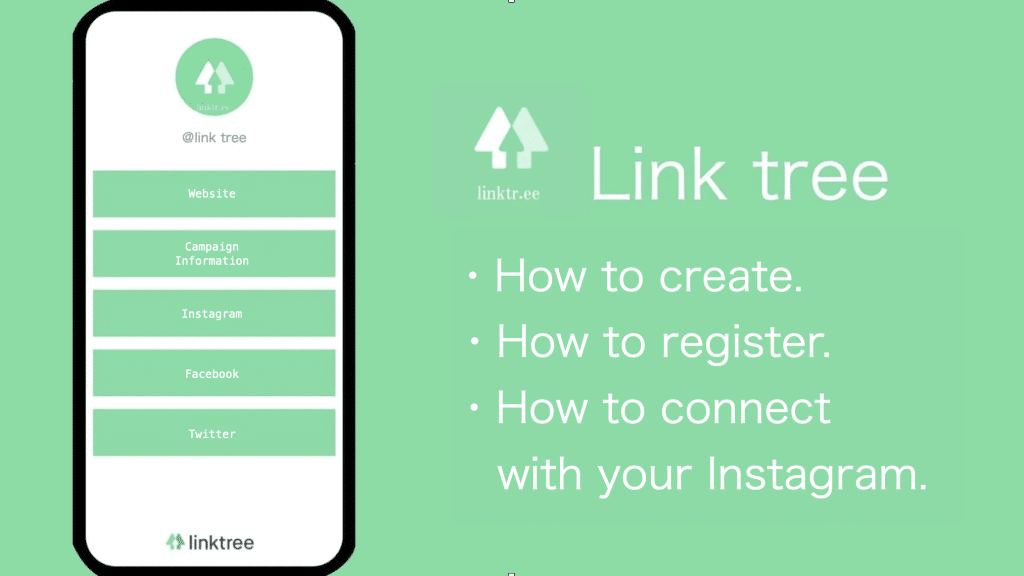
Create a Unique Linktree
Compared to regular links, which can be challenging to remember and tend to make people feel overwhelmed with too many choices, Linktree lets you centralize your most important links and share them all at once in one click. It simplifies social media marketing and makes it easier to track performance.
Give your users the power to make their links more personalized by enabling them to craft custom titles and descriptions. This feature is handy for brands looking to improve their SEO and want to add a personal touch to their links. Those with a pro subscription can customize their page to highlight priority links, schedule new links to go live, and access analytics. Linktree is free, but upgrading to the premium version is a good idea to monetize your links and get four-hour priority tech support. There are several plans, but the simplest is a free forever account with unlimited links and basic analytics. It’s a tremendous option for small businesses, entrepreneurs, and creators who need an effective way to promote their content.
In 2026, the customization options for Linktree and similar tools have expanded significantly. You can now add video backgrounds, custom fonts, animated buttons, and even countdown timers for product launches. The key is to make your page reflect your brand identity while keeping the user experience simple and intuitive. According to Social Media Examiner, branded landing pages consistently outperform generic ones in click-through rates.
Pro Tip: Use Thumbnails and Images
Text-only links get overlooked. Most modern link-in-bio tools allow you to add thumbnails or images next to each link. Use this feature! A picture of your YouTube thumbnail, podcast cover art, or product image can increase click-through rates by up to 40%. Test different image styles to see what resonates with your audience. Tools like Canva make it easy to create consistent, branded thumbnails for all your links.
Make Your Links SEO-Friendly
Linktree is a great way to create a one-stop solution for your content, offering your audience easy access to your latest videos, podcast episodes, blogs, and more. It can be a great way to build brand recognition, increase your followers, and drive more conversions.
However, the main downside to using a Linktree is that it takes away traffic from your website. It can be a problem if your goal is to boost SEO page rank for your website, as more traffic on your site can help improve rankings.
To avoid this issue, consider creating a separate landing page on your website that houses your Linktree. Or use this link in bio tool to host your Linktree page on your own branded domain. It will give you the same functionality as a Linktree but will allow you to track and optimize your pages with the help of Google Analytics. Plus, it will ensure that your business isn’t relying on a third-party platform that could disappear anytime. By taking more ownership of the design and functionality of your landing page, you will be able to exercise greater control and achieve better results.
The Linktree SEO Dilemma
When you send traffic to a Linktree page instead of your own website, you’re essentially handing over valuable visitor data and potential SEO equity to a third party. Google sees traffic to Linktree as traffic to Linktree’s domain, not yours. This means that even if thousands of people click your links, your website’s domain authority doesn’t directly benefit.
Solutions to this dilemma include:
- Custom Domains: Many premium link-in-bio tools now allow you to use your own domain (e.g., link.yourbrand.com). This keeps the traffic within your brand ecosystem and can positively impact your site’s SEO through backlinks and branded search signals.
- Self-Hosted Solutions: WordPress plugins like Meow Lightbox or dedicated landing page builders can create the same functionality on your own site.
- Deep Linking: Instead of linking to your Linktree, link directly to specific landing pages on your site that are optimized for conversions.
According to Moz, branded traffic and backlinks remain strong ranking signals. If you’re serious about SEO, investing in a custom domain for your link-in-bio page is a smart long-term strategy.
Warning: Linktree Link Rot
If you ever delete your Linktree account or stop paying for a premium subscription, all those links you’ve shared across your social media profiles will break. This can result in lost traffic and a poor user experience. If you use your own domain, you maintain control and can redirect links if needed. Always consider the long-term implications of relying on third-party platforms for critical marketing infrastructure.
A social media landing page is an independent web page where your audience can learn more about your goods or services and be persuaded to become leads or customers. A well-designed social media landing page should match the messaging and branding of your original post and be easy for users to navigate.
For example, a social media landing page uses benefit-driven copywriting and excellent product imagery to teach customers about product features. This way, they can help potential customers make an informed decision about whether to purchase the product.
It’s essential to find different variations of your landing page to find the one that will maximize conversions. It means testing additional images, headlines, and colors to see what works best for your audience. In addition, feel free not to do A/B testing to see how small changes can impact the number of clicks and conversions. It will provide you with valuable insights to improve your future campaigns.
Landing Page Best Practices for 2026
- Mobile-First Design: Over 80% of social media traffic comes from mobile devices. Your landing page must load quickly and look perfect on small screens. Google’s PageSpeed Insights can help you check mobile performance.
- Clear Value Proposition: Within seconds, visitors should know exactly what you’re offering and why it matters to them. Use benefit-driven headlines and subheadings.
- Single Call-to-Action (CTA): A landing page should have one primary goal. Whether it’s signing up for a newsletter, buying a product, or watching a video, make that CTA prominent and unambiguous.
- Social Proof: Include testimonials, user reviews, or trust badges to build credibility. According to Nielsen Norman Group, social proof is one of the most powerful persuasion principles in web design.
- Fast Load Times: Every second of delay can reduce conversions by up to 7%. Optimize images, minimize code, and use a content delivery network (CDN) like Cloudflare to ensure your page loads instantly.
Invest in a Link Management Tool
A Linktree can merge your social media followers and website traffic into one bite-sized landing page. However, the problem with this is that you’re sending your audience to a third party instead of guiding them directly from your social media post or YouTube video to your website or sales page.
Linktrees also have a lot of different links to choose from and can be overwhelming for audiences. It often results in decision paralysis, and they may not click any of the links at all.
Investing in a Link Management Tool can help you avoid these problems. You can create a Linktree tailored to your business and its specific needs, and it will display only the most critical links to your audience. You can even brand your Linktree, upload a custom tile thumbnail, and gate your links for specific audiences. You can also access detailed analytics on your Linktrees to learn how your audience interacts with them.
Top Link Management Tools for 2026
While Linktree remains popular, several alternatives offer unique features that might better suit your needs:
ToolBest FeaturePricingCustom Domain
| Linktree | Ease of use, large user base | Free / $6/month Pro | ✅ (Pro) |
| LinkLab | Custom domain hosting, deep analytics | Starting at $9/month | ✅ |
| Flowcode | QR code integration, video backgrounds | Free / $5/month Pro | ✅ (Pro) |
| Milkshake | App-like mobile site builder | Free | ❌ |
| Campsite | Beautiful design, community features | Free / $9/month Pro | ✅ (Pro) |
| Tap.bio | Mobile app-like interface | Free / $4.99/month | ❌ |
When choosing a tool, consider your specific needs: Do you need e-commerce integration? Email capture? Advanced analytics? Schedule link changes in advance? The right tool for an influencer might be different than for a SaaS company or a local business.
Pro Tip: Use UTM Parameters
Whether you use Linktree or another tool, always add UTM parameters to your links. This allows you to track in Google Analytics exactly which social media posts, campaigns, and links are driving traffic and conversions. Without UTMs, you’re flying blind. Tools like Google’s Campaign URL Builder make it easy to create trackable links. This data is invaluable for optimizing your social media strategy and proving ROI.
Linktree vs. Website Landing Page: Which is Better?
This is a common debate among marketers. Here’s a balanced view:
When to Use Linktree (or Similar Tools):
- You’re just starting: If you have a small following and minimal content, Linktree is quick, free, and easy.
- You need speed: You can set up a Linktree in minutes without any technical skills.
- You’re testing ideas: Linktree is great for A/B testing different offers or links without touching code.
- You have limited content: If you only have 3-5 links to share, a simple tool works fine.
When to Use a Custom Landing Page on Your Website:
- SEO is a priority: You want traffic to contribute to your site’s domain authority.
- You need advanced customization: Full control over design, layout, and user experience.
- You’re capturing leads: Integrate with your email marketing tool, CRM, or e-commerce platform.
- You have a large audience: When you’re driving significant traffic, owning the destination becomes more important.
- You want to retarget: Custom landing pages allow you to install tracking pixels for Facebook, Google, and other ad platforms to retarget visitors later.
Many successful brands use a hybrid approach: a simple link-in-bio tool for everyday use, and custom landing pages for major campaigns or product launches.
Analytics: Measuring Your Link-in-Bio Performance
You can’t improve what you don’t measure. All link management tools provide basic analytics, but understanding what to look for is key:
- Clicks per link: Which links are most popular? This tells you what content resonates with your audience.
- Click-through rate (CTR): The percentage of visitors who click a specific link. Low CTR might indicate poor link placement, weak copy, or lack of relevance.
- Total page views: How many people visit your Linktree page. This helps you understand the traffic you’re sending from social media.
- Referral data: Which social platforms are driving the most traffic? Instagram vs. TikTok vs. YouTube may have different audiences.
- Conversion tracking: If you’re linking to a product, can you track actual sales? This requires integrating with e-commerce platforms or using UTM parameters.
For deeper insights, connect your link tool with Google Analytics. Many premium tools offer this integration, allowing you to see how link-in-bio traffic behaves once it reaches your website—bounce rates, time on site, pages per session, and conversions.
Monetizing Your Linktree: Strategies for Creators
For influencers and content creators, the link in bio is often a primary income source. Here are proven monetization strategies:
- Affiliate Links: Promote products you genuinely recommend and earn commissions. Use tracking links from affiliate networks like ShareASale or AvantLink.
- Digital Products: Link directly to your ebooks, courses, presets, or printables. Digital products have high margins and can be sold repeatedly.
- Paid Partnerships: Some creators rent out “slots” on their Linktree to brands for sponsored links.
- Email List Building: Use a link that leads to a newsletter sign-up page. Building an email list reduces dependence on social media algorithms.
- Tiered Content: Link to your Patreon, Substack, or OnlyFans for exclusive content.
The key to monetization is relevance. Your audience follows you for a reason—promote products and services that align with your niche and their interests. Authenticity drives conversions far more than aggressive selling.
The Future of Link-in-Bio Tools
As we move through 2026, link-in-bio tools are evolving rapidly. Expect to see:
- AI-Powered Optimization: Tools that automatically rearrange links based on visitor behavior and preferences.
- Shoppable Feeds: Direct integration with e-commerce platforms, allowing visitors to browse and buy products without leaving the link page.
- Video-First Interfaces: Short-form video previews replacing static thumbnails, similar to TikTok’s interface.
- Community Features: Comments, likes, and user-generated content within the link page itself.
- Blockchain Verification: For creators in Web3, verified ownership and token-gated content access.
Staying ahead of these trends can give you a competitive edge. Subscribe to industry newsletters like Social Media Today to keep up with the latest developments.
Case Study: How One Creator Increased Conversions by 300%
Let’s look at a real-world example of optimizing a link-in-bio strategy. Sarah, a food blogger with 50,000 Instagram followers, was using a basic free Linktree with links to her blog posts, recipe videos, and affiliate kitchen tools. Her click-through rate was around 2%.
After analyzing her analytics, she made these changes:
- Upgraded to Pro: She could now customize the look to match her brand and prioritize links.
- Added thumbnails: Each link featured an appetizing photo of the recipe or product.
- Used a custom domain: links.sarahscooking.com looked more professional and kept traffic within her brand.
- Rotated links: She scheduled links to change based on seasons and holidays.
- Promoted one main link: Instead of linking to everything, she featured her latest recipe and grouped others under a “More Recipes” section.
Result: Her CTR increased to 8%, and affiliate revenue tripled within three months. This demonstrates that thoughtful optimization can dramatically improve results, even with the same tool.
Frequently Asked Questions (FAQ)
Key Takeaways: Linktree Optimization Checklist
- Use a custom domain to keep traffic within your brand and improve SEO.
- Add thumbnails and images to each link to boost click-through rates by up to 40%.
- Prioritize your most important links—limit to 3-5 primary options to avoid decision paralysis.
- Always add UTM parameters to track performance in Google Analytics.
- Test and iterate—try different link orders, copy, and visuals to find what resonates.
- Consider your goals: For SEO and long-term control, a self-hosted landing page may be better; for simplicity and speed, Linktree wins.
- Monitor analytics regularly to identify top-performing content and optimize accordingly.
Conclusion
Your social media bio link is prime digital real estate. Whether you choose Linktree, a competitor, or a custom landing page, the key is to treat it as an integral part of your marketing funnel—not an afterthought. Optimize for clarity, track performance relentlessly, and always prioritize the user experience.
In 2026, the tools available are more powerful than ever, but they’re still just tools. Strategy, creativity, and data-driven decisions are what truly unleash their power. Start by defining your goals: Are you driving traffic, building an email list, selling products, or growing your audience on another platform? Once you know your destination, you can build the right bridge to get there.
Remember, the link in your bio is often the first click in a potential customer’s journey. Make it count.
- Essential Tools for SEO – Boost Your Website Ranking
- How to Add a Button in WordPress (No Coding)
- Best IPTV Service Providers Review (2026)
- Top Social Media Tools That Beat Hootsuite
- Free Social Media Scheduling Tools for 2026