
The Complete Guide to WordPress Updates: Why Regular Maintenance is Non-Negotiable for Security & Performance
Introduction: Understanding the Critical Role of WordPress in the Modern Web
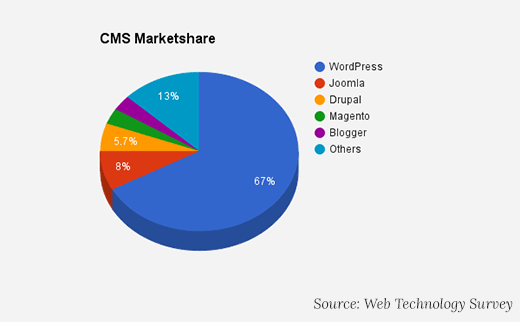
WordPress powers over 43% of all websites on the internet, solidifying its position as the world’s most dominant Content Management System (CMS). Originally launched in 2003 as a blogging platform by Matt Mullenweg and Mike Little, it has evolved into a versatile engine driving everything from personal blogs to major enterprise, government, and e-commerce sites. This massive adoption makes it a prime target for malicious actors, underscoring the critical importance of Proactive maintenance. The philosophy of “if it works, don’t touch it” is a dangerous approach in the digital world. This guide details the essential reasons to keep your WordPress core, themes, and plugins updated and provides a safe, actionable framework for doing so.
Beyond simple functionality, a non-updated site is a ticking time bomb. Digital decay is real; as server technologies (like PHP and MySQL) evolve, older WordPress versions become obsolete and incompatible. This guide not only covers the “why” but delves into the “how,” providing you with the technical confidence to manage your site’s health without relying entirely on expensive developers.
1. Security: The Most Critical Reason to Update
WordPress’s popularity makes it a lucrative target for hackers. As an open-source platform, its code—and the code of its plugins and themes—is publicly accessible. While this transparency fosters incredible innovation, it also means security vulnerabilities are quickly found by both good and bad actors. Developers constantly release security patches to close these vulnerabilities. Failing to update is like leaving your front door unlocked in a busy neighborhood.
Specifically, outdated plugins are the entry point for over 50% of known WordPress hacks. Common attacks include SQL Injection (where attackers force your database to reveal data) and Cross-Site Scripting (XSS) (where malicious scripts are injected into your pages). When a vulnerability is discovered in a popular plugin like WooCommerce or Elementor, bots can scan millions of sites in hours to find those running the old version. Updates often contain “silent” security hardening that prevents these specific exploits.
Update release notes publicly detail fixed vulnerabilities. Hackers use these notes to *reverse-engineer attacks* against websites running the old, vulnerable version. Your site is at its most vulnerable in the window between an update’s release and your installation of it. This period is known as the “hacker’s window of opportunity.”
2. Performance and Speed Enhancements
With every major release, WordPress core and quality plugins introduce code optimizations that make your website faster. These include more efficient database queries, improved script loading, and leaner code. Site speed is a direct ranking factor for SEO and is crucial for user experience; a one-second delay can reduce conversions by 7%. Regular updates ensure you benefit from these cumulative performance gains.
Furthermore, updating WordPress often enables compatibility with newer, faster versions of PHP. For example, PHP 8.1 and 8.2 can handle significantly more requests per second than PHP 7.4. If your WordPress core or plugins are outdated, they may crash on these newer PHP versions, forcing you to use slower, obsolete server technology.
Updating improves speed (a ranking factor) and security. Google may flag or lower rankings for insecure sites. Thus, updates protect your site and your search engine visibility.
3. New Features and Improved Functionality
Updates are not just about fixes; they are about evolution. The WordPress core and premium themes/plugins continuously add new features, improve the user interface (like the Block Editor), and enhance backend workflows for administrators. Staying updated allows you to leverage these tools to create better content, improve site management, and offer a more modern experience to your visitors.
Recent updates have revolutionized the editing experience through Full Site Editing (FSE), allowing users to design headers, footers, and templates without coding. Plugin updates also frequently integrate with new third-party services (like updated payment gateways or social media APIs). If you ignore updates, you miss out on tools that could automate your workflow or increase your revenue.
4. Bug Fixes and Stability
All complex software has bugs. Updates address these errors, which can range from minor visual glitches to major issues that break functionality or cause data corruption. Regular updates ensure your site operates smoothly and predictably for all users.
Bugs often manifest in subtle ways that hurt credibility, such as broken contact forms, images not loading on mobile devices, or checkout errors. By reading the “Changelog” of an update, you can often see lists of specific bug fixes. If you have been struggling with a persistent issue on your site, an update is often the cure.
5. Compatibility: Keeping the Ecosystem in Sync
The WordPress ecosystem is an interconnected web of core software, themes, and plugins. Developers update their products to ensure compatibility with the latest WordPress version. Running outdated core software can lead to conflicts with newer themes or plugins, causing errors, broken features, or site crashes.
An outdated theme may not be compatible with a new WordPress core update, and an outdated plugin may break a theme’s functionality. This chain of dependency makes updating all components essential for stability. For example, the jQuery library included in WordPress was recently updated; sites that didn’t update their themes to match experienced broken sliders and dropdown menus.
The High Cost of Neglect: What Happens If You Don’t Update?
Postponing updates creates significant risk. The table below contrasts the outcomes of a maintained vs. a neglected website.
| Maintained Website (Regular Updates) | Neglected Website (No Updates) |
|---|---|
| ✅ Strong security posture, low hack risk. | ❌ Extremely vulnerable to malware, brute-force attacks, and data breaches. |
| ✅ Optimal speed and performance. | ❌ Slower loading times, hurting UX and SEO. |
| ✅ Access to latest features and tools. | ❌ Stuck with outdated, potentially unsupported functionality. |
| ✅ High stability with minimal bugs. | ❌ Increased errors, broken features, and potential site crashes. |
| ✅ Full compatibility with modern themes/plugins. | ❌ Incompatibility issues when adding new tools. |
| ✅ Maintains brand reputation and user trust. | ❌ Risk of being blacklisted by browsers (e.g., “Deceptive Site Ahead” warnings) or search engines. |
Your Safe WordPress Update Checklist: A Step-by-Step Guide
Follow this professional workflow to update without fear. Never update a live site without a backup.
Updating plugins first ensures they are ready for the latest core. After a core update, re-check for any new plugin updates that may have been released for compatibility. Always clear your browser cache and server cache after updating to ensure you are seeing the latest version of the site.
Managing Updates: Manual, Notified, or Automatic?
Choose the right strategy based on your site’s complexity and your availability.
Manual Updates (For Maximum Control)
Ideal for developers or sites with high customization. You manually initiate updates via the WordPress Dashboard after completing the safety checklist above. This allows you to visually verify the site after every single plugin update, making troubleshooting much easier if something breaks.
Update Notifications (The Balanced Approach)
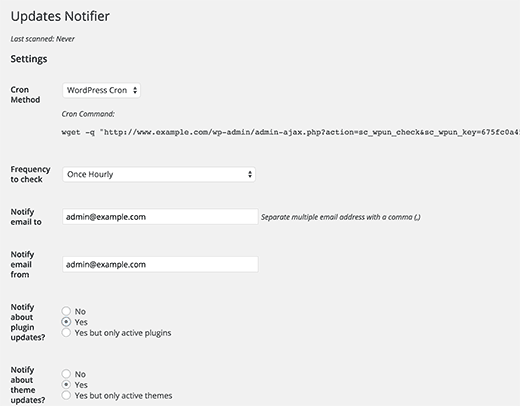
Use a plugin like WP Updates Notifier to receive email alerts when updates are available. This gives you control while ensuring you never miss a critical security patch. You can set the frequency of checks (e.g., hourly or twice daily) to stay on top of zero-day vulnerabilities.
Automatic Updates (For Convenience & Critical Security)
You can configure WordPress to auto-update. This is highly recommended for minor core releases (e.g., 6.4.1 to 6.4.2), as they are almost exclusively security and maintenance fixes.
- For Core: Many managed WordPress hosts handle this. You can enable it via a plugin like Easy Updates Manager or by adding the following code to your
wp-config.phpfile:define('WP_AUTO_UPDATE_CORE', true); // Enables all core updates // OR define('WP_AUTO_UPDATE_CORE', 'minor'); // Enables only minor security updates (Recommended) - For Themes/Plugins: Enable via the Easy Updates Manager plugin or with code filters in your theme’s
functions.phpfile (or a site-specific plugin):add_filter( 'auto_update_plugin', '__return_true' ); // Auto-update all plugins add_filter( 'auto_update_theme', '__return_true' ); // Auto-update all themes
Fully automatic updates for major core releases, themes, and all plugins can be risky. A bad update can break your site without warning. If you use automation, you must have robust, automatic daily backups and a host that offers immediate restore options.
Troubleshooting: What to Do If an Update Breaks Your Site
Even with precautions, updates can occasionally cause issues. If you encounter the “White Screen of Death” or a broken layout, follow these steps:
- Don’t Panic: Most update errors are reversible.
- Enable Debugging: Access your site via FTP, open
wp-config.php, and changedefine( 'WP_DEBUG', false );totrue. This will display the specific error message, often pointing to the problematic plugin. - Deactivate Plugins: If you can’t access the dashboard, rename the
wp-content/pluginsfolder toplugins_oldvia FTP. This deactivates all plugins and usually restores access to the admin area. - Use WP Rollback: If you can access the dashboard, install the WP Rollback plugin. It allows you to revert any theme or plugin to a previous version with one click while you wait for a fix from the developer.
- Restore Backup: If all else fails, use your backup to restore the site to its pre-update state.
Final Checklist Before Every Update
✅ Backup is confirmed successful and restorable (downloaded to computer/cloud).
✅ Release notes reviewed for breaking changes (especially for major WP versions).
✅ Staging environment tested (if available).
✅ High-traffic times are avoided (check Google Analytics for lull periods).
✅ Known compatible versions of critical plugins/themes are noted.
✅ Maintenance Mode plugin is active (to prevent users from seeing errors).
✅ Time is allocated for post-update testing (don't update 5 mins before a meeting).
Conclusion: Updates Are Essential Maintenance
Regularly updating WordPress is not optional technical housekeeping; it is fundamental to your website’s security, performance, and longevity. By adopting a disciplined, backup-first update strategy—whether manual, notified, or carefully automated—you protect your investment, your data, and your visitors’ trust. The minor time invested in applying updates pales in comparison to the time, cost, and reputation damage of recovering from a hacked or broken site. Make updates a non-negotiable part of your workflow.



Heya i am for the first time here. I came across this board and I to find It really useful & it helped me out a lot.
I hope to present one thing back and help others like you aided me.
thanks for sharing nice comments
Wonderful article! This is the type of info that should be shared across the
web. Shame on the seek engines for not positioning this submit higher!
Come on over and visit my web site . Thank you =)
thanks and keep sharing
I was wondering if anyone knows what happened to Dimepiece Los Angeles celebrity streetwear brand? I seem to be unable to check out on Dimepiecela site. I have read in Vogue that they were acquired by a UK-based hedge fund for $50 m. I have just bought the Dimepiece Fire & Desire Unisex Heavy Blend™ Crewneck Sweatshirt from Ebay and absolutely love it xox
keep reading and sharing
Plugins are now extremely important for SEO.
Chris
thanks