
Chrome Extensions Every SEO Marketer Should Have (2025-2026 Updated Guide)
Google Chrome remains the dominant browser of choice for digital professionals, and for good reason. Its speed, stability, and, most importantly, its vast ecosystem of extensions transform it from a simple browsing tool into a powerful productivity and analysis workstation. For SEO marketers, the right set of Chrome extensions can mean the difference between spending hours on manual research and getting actionable insights in seconds.
In the fast-paced world of 2025-2026, where algorithm updates are constant and competition is fierce, having a well-curated toolkit is essential. The extensions you choose can help you conduct on-the-fly competitor analysis, audit on-page elements, research keywords, find email addresses for outreach, and even improve your content’s grammar—all without leaving your browser.
This comprehensive guide presents the 14+ essential Chrome extensions that every SEO marketer should have installed in 2025. We’ve categorized them by function, provided detailed explanations of their features, and included direct download links to help you build the ultimate SEO toolkit. Whether you’re a seasoned professional or just starting your SEO journey, these tools will give you a significant edge.
💡 Pro Tip: Installing too many extensions can slow down your browser and even cause conflicts. We recommend auditing your extensions regularly and only keeping those you use weekly. Use Chrome’s built-in task manager (Shift + Esc) to see which extensions are consuming the most resources.
📍 Local SEO Extensions
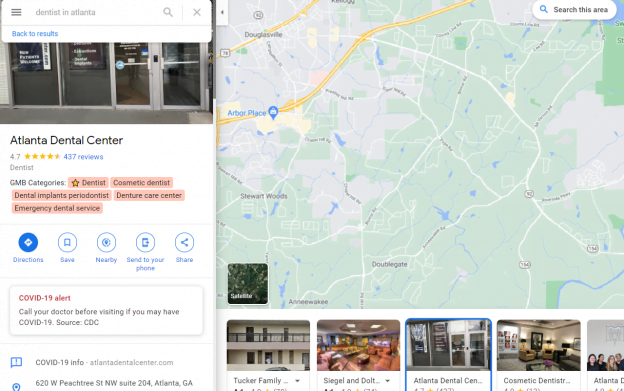
When it comes to Local SEO, GMB Everywhere is arguably the most powerful free Chrome extension available. It’s designed specifically for professionals who need to audit and analyze Google Business Profiles (formerly Google My Business) directly on Google Maps. This tool is indispensable for understanding how your competitors are structuring their profiles and gaining an edge in local search results.
🌟 Standout Features:
- Instant GMB Category View: When you search for a business on Google Maps, GMB Everywhere instantly displays the primary and additional categories assigned to that profile. This is crucial intel because categories are a primary ranking factor for local packs.
- On-Map Profile Auditing: You can perform a quick, on-the-spot audit of any GMB listing, checking for completeness, accuracy, and optimization opportunities.
- Competitor Research: By analyzing the categories of top-ranking competitors, you can identify category opportunities you may have missed for your own clients or business.
- Review Analysis: Some versions offer insights into review patterns, helping you understand the sentiment around competing businesses.
Best of all, GMB Everywhere is completely free, making it a no-brainer for anyone serious about local search. It takes the guesswork out of local competitor analysis and provides actionable data in seconds.
💡 Pro Tip for Local SEOs: Use GMB Everywhere to analyze the top 3-5 competitors in your target city. Note down all the categories they use that are relevant to your business. Often, competitors will have secondary categories you haven’t considered, which can open up new avenues for local visibility.
🔑 Keyword Research Extensions
Keyword Surfer is a fantastic free extension that brings keyword data directly into your Google search results. As you type a query, it displays the monthly search volume for that keyword right in the search bar. Scroll down, and it provides a table of hundreds of related keywords, their search volumes, and even the estimated traffic for the top-ranking pages. This makes it an incredibly efficient tool for initial keyword discovery and content planning.
- Key Benefits: Free, instant search volume data, related keyword ideas, and word count estimates for top-ranking pages.
#3
Whatsmyserp
Whatsmyserp is another excellent tool for speeding up keyword research. It integrates directly into your Google search results, providing a sidebar with a wealth of information, including related keywords, “People Also Ask” questions, and even the search volume and CPC (cost-per-click) data for the keywords you’re researching. This helps you quickly build out comprehensive keyword lists and understand user intent.
- Key Benefits: Related keywords, “People Also Ask” extraction, search volume and CPC data, and SERP feature analysis.
🕵️ Competitive Analysis Extensions
#4
MozBar
MozBar is a veteran in the SEO space and remains one of the most popular extensions for a reason. It provides instant metrics for any page or domain you visit, directly in your browser. You can see Domain Authority (DA), Page Authority (PA), link metrics, and keyword analysis with a single click. It also allows you to highlight different types of links (nofollow, follow, external) on a page, which is incredibly useful for link prospecting.
- Key Benefits: Instant DA/PA metrics, link analysis highlighting, keyword analysis, and SERP comparison features.
SimilarWeb provides a high-level overview of any website’s traffic and engagement. With its free Chrome extension, you can instantly see estimated monthly visits, visit duration, bounce rate, and the top traffic sources (direct, referral, search, social) for the site you’re currently on. This is invaluable for understanding a competitor’s online presence and where they’re getting their audience from.
- Key Benefits: Estimated traffic stats, traffic source breakdown, audience geography, and top referring sites.
#6
BuzzSumo
While BuzzSumo is a comprehensive platform, its Chrome extension is a handy tool for on-the-fly content research. When you visit a webpage, the BuzzSumo extension shows you the total number of social media shares for that page across platforms like Facebook, LinkedIn, and Pinterest. This gives you a quick gauge of content performance and popularity, helping you identify topics and formats that resonate with audiences.
- Key Benefits: Social share counts for any page, identification of high-performing content, and influencer discovery.
#7
SEOquake
SEOquake is a feature-packed free extension that provides a comprehensive SEO audit for any page. It offers a parameter-based toolbar that displays key metrics like Google Index, SEMrush Rank, Alexa Rank (though now defunct, its alternatives are used), and backlink counts from various sources. It also includes a powerful “SEO Showdown” tool that allows you to compare multiple domains side-by-side, which is fantastic for competitor analysis.
- Key Benefits: On-page SEO audit, keyword density analysis, internal/external link report, and domain comparison tool.
The Serpstat Website SEO Checker extension provides a quick but comprehensive overview of a page’s SEO health. It analyzes on-page elements like title, description, headers, and images, and provides a clear, color-coded report on what’s optimized and what needs improvement. It’s a great tool for a quick technical check on any page you’re visiting.
- Key Benefits: On-page SEO analysis, identification of technical issues, keyword usage insights, and page popularity metrics.
#9
SEO Peek
SEO Peek is a brilliantly simple extension that reveals the key on-page SEO factors of any webpage with a single click. It displays the page title, meta description, meta keywords (though less important now), headers (H1, H2, etc.), and a list of all links on the page. It’s perfect for a quick, clean look at how a competitor has structured their page’s fundamental SEO elements.
- Key Benefits: Clean, easy-to-read on-page analysis, displays title, description, headers, and link lists.
✍️ Content Optimization Extensions
Install CoSchedule Headline Studio
Your headline is the first, and sometimes only, impression you make on a potential reader. CoSchedule Headline Studio helps you craft headlines that are optimized for clicks and SEO. As you type, it provides a headline score based on factors like word balance, length, and emotional impact. It offers suggestions for improvement and analyzes the headline’s potential performance. A well-crafted headline can dramatically increase your click-through rate from search results and social media.
- Key Benefits: Headline scoring, actionable recommendations, analysis of word balance and type, and historical data on your best headlines.
#11
Grammarly
Grammarly is arguably the most essential extension for anyone who writes online. It goes far beyond a simple spell-checker, catching complex grammar errors, punctuation mistakes, and even offering style and tone suggestions. For SEO content marketers, publishing error-free, clear, and engaging content is non-negotiable. Grammarly works across almost every website, including WordPress, Gmail, and social media platforms, ensuring your communication is always polished and professional.
- Key Benefits: Advanced grammar and spell check, punctuation correction, style and tone suggestions, plagiarism detection (premium).
📧 Outreach & Productivity Extensions
Outreach is a critical part of many SEO strategies, whether for link building, guest posting, or influencer marketing. The Snov.io Email Finder extension makes finding contact information incredibly easy. When you visit a website or a LinkedIn profile, it automatically searches for email addresses associated with that domain or person. It provides a list of verified emails, saving you hours of manual searching.
- Key Benefits: Find email addresses from websites and LinkedIn, email verification, and integration with Snov.io’s drip campaigns.
#13
ContactOut
ContactOut is another powerful email finder extension, particularly effective for finding email addresses from LinkedIn profiles. It’s an invaluable tool for reaching out to potential link partners, journalists, or influencers. With a single click on a LinkedIn profile, ContactOut searches its database and displays personal and professional email addresses, along with phone numbers in many cases. Its high accuracy rate makes it a favorite among link builders and PR professionals.
- Key Benefits: Find emails and phone numbers from LinkedIn, high accuracy rates, integration with recruiting and sales tools.
#14
LastPass
As an SEO marketer, you likely have dozens of accounts: Google Search Console, Google Analytics, Ahrefs, Semrush, Moz, and countless client dashboards. Remembering all those passwords is impossible. LastPass is a password manager that securely stores all your login credentials and automatically fills them in when you visit a site. You only need to remember one master password. It also generates strong, unique passwords for every account, significantly improving your security.
- Key Benefits: Secure password storage, auto-fill login forms, password generation, multi-device sync.
🔧 Technical SEO Extensions
Detailed is a powerful, all-in-one SEO extension that provides a wealth of information for any page with a single click. It displays meta data, headers, structured data (schema), links (internal and external), and social media tags. It also includes a handy redirect checker and a nofollow/nofollow link highlighter. For a quick, deep dive into a page’s technical setup, Detailed is an excellent choice.
- Key Benefits: Comprehensive on-page data, structured data validation, link analysis, and redirect checking.
#16
Check My Links
Check My Links is a simple but incredibly useful extension for link builders and content editors. When you activate it on a page, it scans all the links and color-codes them: green for valid links and red for broken links. This is perfect for quickly auditing a page you want to get a link from, or for checking your own content for broken outbound links before publishing.
- Key Benefits: Instantly identifies broken links on any webpage, color-coded results, exportable list of links.
Redirect Path is an essential tool for technical SEO audits. It highlights 301, 302, 404, and 500 redirects or errors directly in your browser, along with the full redirect chain. This allows you to quickly identify broken redirects, unnecessary redirect chains that slow down page speed, and other HTTP issues that can harm SEO.
- Key Benefits: Detects and displays client-side and server-side redirects, shows HTTP status codes, helps identify broken links and redirect loops.
Here is the updated comparison table with clickable links to each extension. The extension names are now hyperlinked to their respective Chrome Web Store pages or official sites for easy installation.
📊 Quick Reference: Top 17 SEO Chrome Extensions
| # | Extension | Primary Function | Pricing |
|---|---|---|---|
| 1 | GMB Everywhere | Local SEO / GMB Audits | Free |
| 2 | Keyword Surfer | Keyword Research | Free |
| 3 | Whatsmyserp | Keyword Research | Free / Paid |
| 4 | MozBar | Competitive Analysis | Free / Paid |
| 5 | SimilarWeb | Competitive Analysis | Free / Paid |
| 6 | BuzzSumo | Content Research | Free / Paid |
| 7 | SEOquake | Competitive Analysis | Free |
| 8 | Serpstat Checker | On-Page SEO | Free / Paid |
| 9 | SEO Peek | On-Page SEO | Free |
| 10 | CoSchedule Headline Studio | Content Optimization | Free / Paid |
| 11 | Grammarly | Content Optimization | Free / Paid |
| 12 | Snov.io Email Finder | Outreach / Lead Gen | Free / Paid |
| 13 | ContactOut | Outreach / Lead Gen | Free / Paid |
| 14 | LastPass | Productivity / Security | Free / Paid |
| 15 | Detailed SEO Extension | Technical SEO | Free |
| 16 | Check My Links | Technical SEO / Link Audit | Free |
| 17 | Redirect Path | Technical SEO | Free |
⚠️ Important Note on Permissions: Before installing any Chrome extension, always review the permissions it requests. Some extensions require access to “all websites” or your browsing history to function. Be wary of extensions that request more permissions than they reasonably need. Stick to well-known, reputable tools from trusted developers.
Frequently Asked Questions
Are all these Chrome extensions free?
Many of the extensions listed offer robust free versions that are sufficient for most users. Tools like GMB Everywhere, Keyword Surfer, SEOquake, SEO Peek, Check My Links, and Redirect Path are completely free. Others, like MozBar, BuzzSumo, and Grammarly, offer premium tiers with advanced features, but their free versions are still highly valuable.
Can too many extensions slow down Chrome?
Yes, absolutely. Every extension you install runs in the background and consumes memory (RAM). Having dozens of extensions active can significantly slow down your browser and even cause crashes. We recommend installing only the extensions you use regularly and disabling or removing the rest. Use Chrome’s Task Manager (Shift + Esc) to see which extensions are resource hogs.
Do these extensions work on all websites?
Most SEO extensions are designed to work on any public webpage. However, they may not function on browser-specific pages like the Chrome Web Store itself or on pages with strict security policies (like online banking portals). Their functionality is also dependent on the website’s code structure.
Which extension is best for finding backlink opportunities?
For finding potential backlink sources, a combination of tools is best. Use MozBar or SEOquake to quickly assess the authority of a page. Use Check My Links to find broken links on resource pages that you could replace. And use ContactOut or Snov.io to find the email address of the site owner or editor to pitch your link.
How do I update my Chrome extensions?
Chrome usually updates extensions automatically. However, you can manually check for updates by clicking the three-dot menu in Chrome, going to Extensions > Manage Extensions, and then toggling on “Developer mode” in the top-right corner. You’ll see an “Update” button appear.
Are there any privacy concerns with these extensions?
You should always be mindful of privacy. Only install extensions from official sources (the Chrome Web Store) and review the permissions they ask for. Extensions like email finders need more access to function, but if you’re uncomfortable, use them only when needed and disable them otherwise. For password managers like LastPass, they use high-level encryption to keep your data secure.
Summary: Build Your Perfect SEO Toolkit
The right Chrome extensions can transform your browser into a command center for SEO research, analysis, and optimization. From uncovering competitor strategies with GMB Everywhere and MozBar to streamlining content creation with Grammarly and CoSchedule Headline Studio, these tools are essential for modern digital marketers.
Start by identifying the areas where you spend the most time. If local SEO is your focus, install GMB Everywhere first. If you’re a content marketer, prioritize Grammarly and CoSchedule Headline Studio. Gradually build your toolkit, adding extensions as you discover new needs. Remember, a lean, well-curated set of tools is far more effective than a bloated collection of rarely-used extensions.
We hope this guide helps you assemble the perfect SEO toolkit for 2025-2026. If you have a favorite extension that we missed, please let us know in the comments below!
Ready to Supercharge Your SEO Workflow?
Start by installing the extensions most relevant to your daily tasks. Download our free SEO Extension Checklist to help you track which tools you have installed and which ones you still need.






I use the Grammarly extension for more than a year, I’m planning to upgrade there are any alternatives for Grammarly that are for free, or shall I upgrade it?
The post is excellent. Thanks for sharing this helpful post with us.
Thanks keep reading and sharing