

AI Tools for Freelance Content Writing: Save Time and Increase Efficiency
Regularly creating new content is a great way to make your blog more visible to people who are searching for topics related to your blog. However, coming up with new content can be quite challenging, especially if you happen to be a business owner with a lot on your plate. In such a case, you might want to consider the option of an AI content writer.
As a tech freelancer, maximizing productivity is vital in order to be able to meet project deadlines, provide quality work, and at the same time sustain a successful freelance career. Advanced artificial intelligence (AI) technologies have paved the way for a multitude of tools that can assist tech freelancers in streamlining their workflow, boosting their productivity, and becoming more efficient overall. While a lot has been said about how AI tools will take over the roles that humans currently perform, thereby resulting in job losses, the reality is that these products present great opportunities for existing roles to be augmented and productivity to be increased instead of being replaced.
Artificial intelligence (AI)-powered tools can significantly enhance, simplify, and accelerate the process of content creation. Although these tools may increase the speed of content creation, they also have several drawbacks which make them less preferable than human writers. In this post, we will explain what an AI content writer is. Let’s get started!
What is an AI Content Writer?
An AI (artificial intelligence) content writer is a software program that is capable of creating texts, translating languages, creating various types of creative content, and answering your questions in a helpful manner. AI (artificial intelligence) is the main component behind AI content writers, which are trained on vast amounts of text and code data. Thus, they can generate content that is not only relevant, engaging, and informative but also of a quality that a human can do.
Key Features to Consider When Choosing AI Tools for Freelancers
What keeps freelancers striving for knowledge to bring in more income is the phenomenal growth of freelancing in 2025. And AI tools have always been a game changer to such processes. Still, the problem that trickles down is; How to identify the right tool for your creative business amongst all these options. A freelancer using AI as a tool has to understand these notions summed up in a guide below:
WORK RELEVANCE OF AI
One should not consumer AI tools blindly and regularly without giving some thought to the question of how such technology might intertwine with one’s work. For instance, writers may utilize the AI writing assistants to their benefit while graphic designers may give the edge to the AI-powered image editors in their case. Likewise, programmers might be the main beneficiaries of AI models that generate code snippets or debug the existing ones. The value that a tool brings, to the large extent, depends on whether it supports you the right way.
TIME-SAVING THROUGH AUTOMATION
Besides reducing effort, automation has as its major benefit the aspect of time saved in the repetitions of the task. The automation scripts could be well positioned in the scenarios like email writing, schedule, and summary management so on. This freed time could be spent on innovative tasks and also building a stronger relationship with clients.
CUSTOMIZATION AND FLEXIBILITY
No one wants to lose his/her identity, and therefore, the output one should always reflect his/her unique style and know-how. To produce texts under the requested conditions, the AI tools for writing have to come with edit tone, polishing, and style features apart from other operations. The ones that undergo your production stages are more if you use them often.
COLLABORATION WITH CLIENTS
If one is a freelancer, he needs to keep a close relationship with his/her clients. AI tools which provide collaborative editing, client portals, chat integrations, or even real-time feedback features greatly assist in the approval process that communications get enhanced as well.
INTEGRATION WITH YOUR EXISTING WORKFLOW
Google Workspace, Slack, Trello, Notion are some of the platforms most freelancers are using every day. With the tools picked, one has to be certain that the platforms supporting his/her productivity will still be in line with them after that.
COST-EFFECTIVENESS AND SCALABILITY
On the other hand, a freelancer is constrained by small purse. It is best to determine the tools that have pricing which can be easily adjusted to your need, are of true worth to you, and allow you to test without commitment via free trials or freemium options.
AI Benefits Every Freelancer Should Know
AI is changing the freelancing world by making tasks quicker, more intelligent, and more creative. These are the main advantages:
Boosted Productivity
Use automation to handle the routine parts of your job so that you have more time for the core work. This could be managing client communications, organizing projects, or generating content.
Enhanced Creativity
Run into a creative block? AI tools are able to give you prompt, suggestion, or even a whole draft of a project. Writers, designers, and marketers can brainstorm faster and get inspiration in minutes.
Time Efficiency
In a very short time you may process large data sets, create reports, or give short versions of documents. AI is the tool that can make freelancers very powerful in time management.
Cost Savings
Automation is cutting the need for new staff, and it is allowing freelancers to increase their work volume, or to finish an already ongoing job more quickly, thus making them more profitable.
Improved Client Communication
By means of AI, client updates can be made in an efficient manner, responses created rapidly, follow-ups automated, and project progress summarized — thus, ensuring a flow of interaction that is easy, professional, and client-centered.
Data-Driven Decisions
Deploy AI analytics to get clear insights into what clients want, what is trending in the market, or how well a project is doing. Use data to make your decisions instead of hunches and thus deliver better results.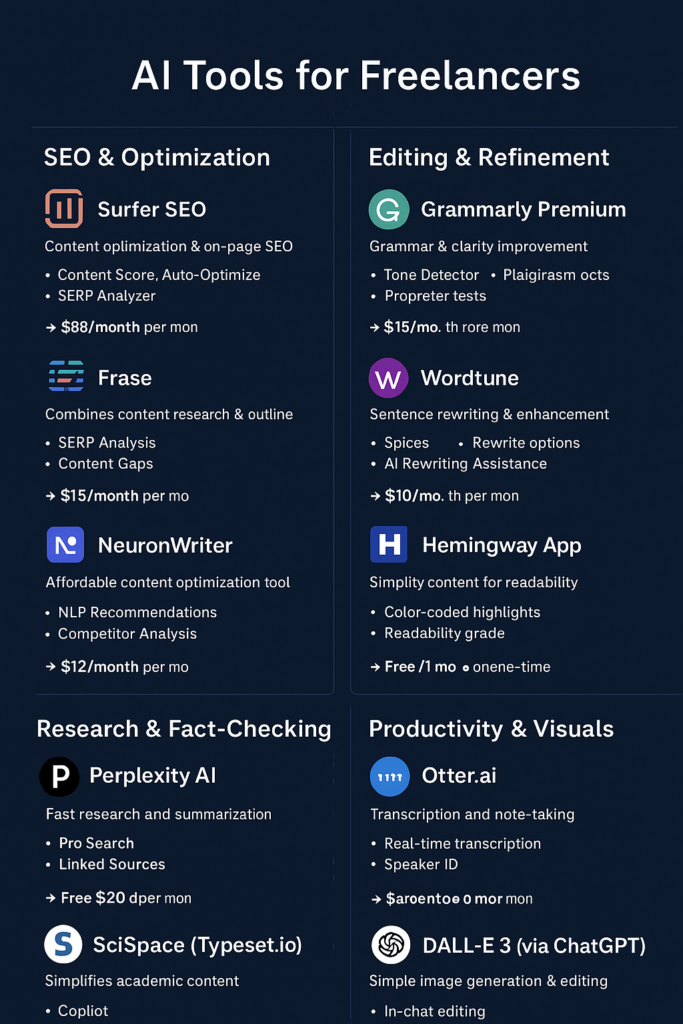
Summary Comparison of Different AI Tools
| Category | Tool | Purpose | Key Features | Pricing | Ideal For |
|---|---|---|---|---|---|
| SEO & Optimization | Surfer SEO | Content optimization & on-page SEO | Content Score, Auto-Optimize, SERP Analyzer | ~$89/mo | SEO writers, agencies |
| SEO & Optimization | Frase | Content research + outline generation | SERP Analysis, Content Gaps, AI Summaries | ~$15/mo | Freelancers, content strategists |
| SEO & Optimization | NeuronWriter | Affordable content optimization | NLP Recommendations, Competitor Analysis, Content Scoring | ~$19/mo | Freelancers, small agencies |
| Editing & Refinement | Grammarly Premium | Grammar & clarity improvement | Tone Detector, Plagiarism Checker, Advanced Suggestions | ~$12/mo | Writers needing final polish |
| Editing & Refinement | Wordtune | Sentence rewriting & enhancement | Spices, Rewrite Options, AI Assistance | ~$10/mo | Non-native writers, sentence variety |
| Editing & Refinement | Hemingway App | Simplifying content for readability | Color-coded highlights, Readability grade | Free / $20 one-time | Bloggers, copywriters |
| Research & Fact-Checking | Perplexity AI | Fast research & summarization | Pro Search, Linked Sources | Free / $20 Pro | Writers needing stats & citations |
| Research & Fact-Checking | SciSpace (Typeset.io) | Academic content simplification | Copilot, Literature Review | Free / $8 Pro | Technical writers, B2B content |
| Productivity & Visuals | Otter.ai | Transcription & note-taking | Real-time transcription, Speaker ID | Free / $10 Pro | Interview-based writing |
| Productivity & Visuals | MidJourney | AI image generation | Style Reference | $10/mo | Blog headers, illustrations |
| Productivity & Visuals | DALL-E 3 (via ChatGPT) | Simple image generation & editing | In-chat editing | Included in ChatGPT Plus $20/mo | Diagrams, conceptual visuals |
AI Tools for Freelance Content Writing: Save Time and Increase Efficiency
AI writing tools provide the versatility of one single unit to handle various types of tasks. They can be very effective in the production of lengthy articles, blog posts, or even creative stories. Besides that, these kinds of tools can come up with eye-catching headlines that attract people’s attention, and at the same time, they are very accurate in checking the writing for mistakes and thus giving the user a final copy that is polished and of professional quality.
SEO & Optimization
1. Surfer SEO
Why it wins: Surfer SEO is widely recognized as a top content optimization tool, with strong on‑page SEO data and scoring that helps match your content to what ranks best in Google’s search results.
Key Features:
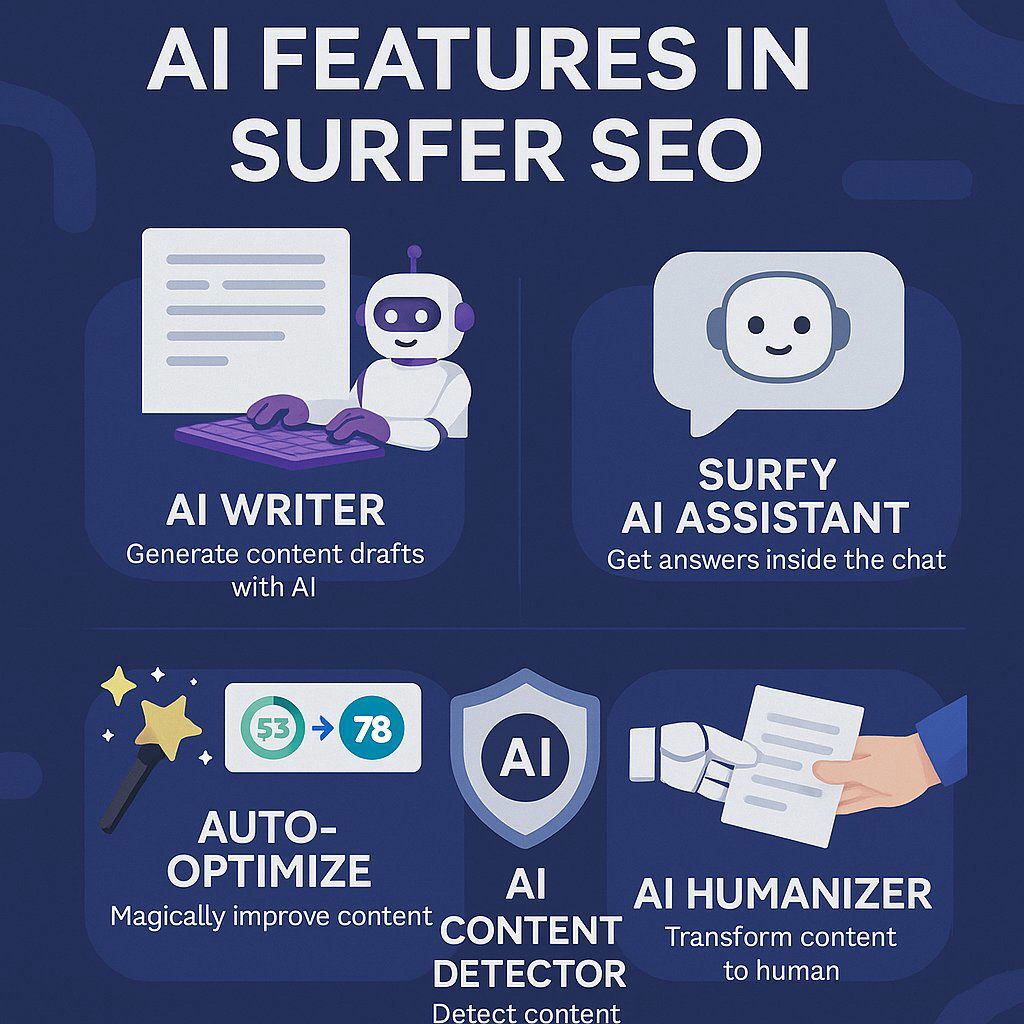
- Content Score: Evaluates your article on a scale of 0–100 using keyword usage, structure, and word count against the top ranking pages.
- Auto-Optimize: Adds recommended internal links and missing keywords automatically to save time.
- Search Engine Results Page (SERP) Analyzer: Breaks down competitors’ ranking pages with detailed metrics like word count and headings to guide your optimization strategy.
Pricing: The Essential package starts at around $89 per month approximately.
Ideal for: SEO writers, content managers, and agencies needing measurable proof that content is optimized.
💡 Pro Tip: Don’t chase a perfect score of 100/100 — many skilled SEOs aim for the “Green Zone” (70+), since over‑optimization can make writing feel unnatural and rigid.
2. Frase
Why it wins: Frase stands out by combining research and optimization in one platform. It helps you build outlines based on what’s already ranking well, saving hours of manual planning.
Key Features:
- SERP Analysis: Reveals what main headings (H2s/H3s) top competitors use so you can integrate them into your outline.
- Content Gaps: Shows questions and topics your competitors cover that you might be missing.
- AI Summaries: Helps draft outlines and section summaries to speed up writing workflows.
Pricing: Solo plan available around $15 per month, making it an affordable option for freelancers.
Ideal for: Freelancers, content strategists, or marketers who need to pitch data‑driven outlines or create structured content.
💡 Pro Tip: Use Frase’s “Questions” tab to find relevant Google “People Also Ask” queries. Adding these as H2 or H3 headings can help capture Featured Snippets.
3. NeuronWriter
Why it wins: NeuronWriter offers a strong balance of features and affordability, often seen as the best cost‑effective alternative to Surfer SEO.
Key Features:
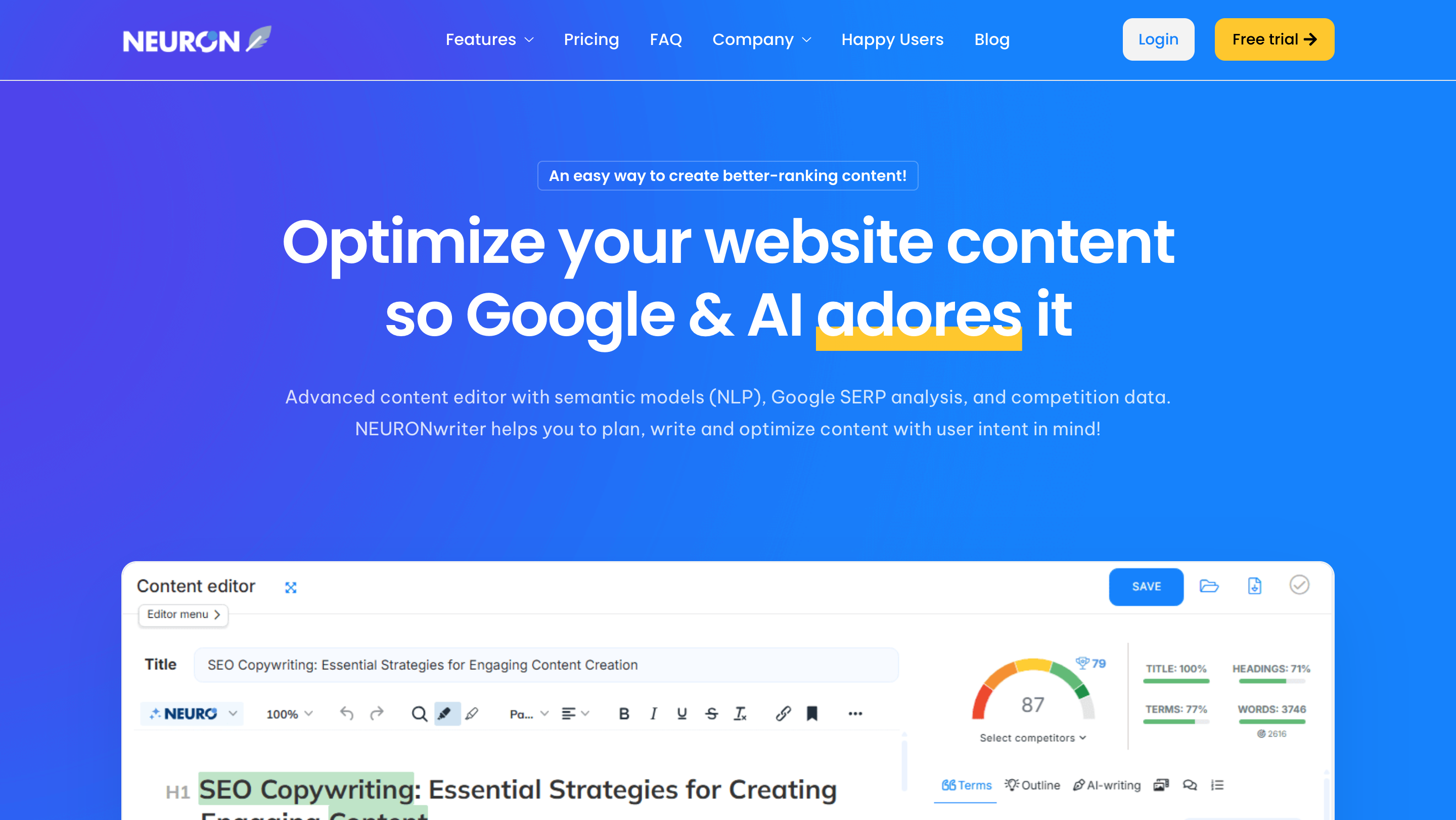
- NLP Recommendations: Uses natural language processing to suggest terms and concepts that build topical authority rather than simple keyword counts.
- Competitor Analysis: Visually breaks down competitor content so you see what works in your niche.
- Content Scoring: Gives real‑time feedback on relevance, readability, and structure.
Pricing: Standard plans start around $19 per month, with occasional lifetime deals on sites like AppSumo.
Ideal for: Budget‑conscious freelancers, solopreneurs, and small agencies who want robust SEO data without a high price tag.
💡 Pro Tip: Focus on covering topics thoroughly and naturally instead of cramming every keyword suggestion — this builds authority and improves readability.
Drafting & Content Generation AI Tools for Freelancers
One of the biggest challenges for freelance writers and content marketers is to create high-quality content consistently. AI-powered writing tools are basically writing assistants that can do a lot of the heavy lifting for you. They can automate idea generation, drafting, and formatting and thereby save you hours of work. Below, you will find a list of top AI tools for content generation in 2025, their core features, pricing, and best use cases.
1. Claude (by Anthropic)
Why it wins: Claude, in particular, the Sonnet 3.5, and Opus versions, is frequently referred to as the most “literate” AI that is available. It sticks very closely to the style guides, gives fewer hallucinations than other models, and it is suitable for authors who require the exact, human-like tone reproduction.
Key Features:
- Project Management: Create a single Project by uploading numerous files (PDFs, brand guidelines, previous articles). With this information, Claude generates content that matches the client’s unique voice.
- Large Context Window: It takes only a few seconds to deal with lengthy documents – such as whitepapers, ebooks, or detailed reports – which makes it a good choice for writing with heavy research.
Price: There is a free tier, and a Pro subscription that costs about $20 per month.
Perfect For: Long-form articles, thought leadership pieces, and imitating specific human tones for brands.
💡 Pro Tip: Add your client’s “About Us” page and the best-performing articles to a Project. Request Claude to “analyze tone, sentence structure, and vocabulary complexity” so that it can produce a reusable style guide for all future content. This guarantees that the style will be consistent in blogs, newsletters, and social media posts.
SEO Optimization Tip: Employ Claude to create blog posts with keyword-rich H2s and H3s. Ask Claude to insert primary and secondary keywords in a natural way for better search visibility.
2. ChatGPT(OpenAI)
Why it wins: The most versatile of ChatGPT features is probably the Canvas. With Canvas, the system is no longer a mere chatbot but a collaborative writing and editing tool. This versatility is what sets ChatGPT most apart from others.
Key Features:
- Canvas Interface: It enables very specific changes to a text by targeting only the selected parts of a document. For example, you can say “shorten this paragraph” or “make this friendlier” and not have to change the entire text.
- Advanced Data Analysis: You can provide keyword lists, content audits, or SEO research in the form of Excel sheets to ChatGPT for analysis and creation of content strategies that are optimized.
Price: There is a free version, a Plus plan at $20 per month, and a Team plan that costs $25/user/month.

Great Use For: Drafting outlines, coming up with headlines, repurposing content, and quick ideation.
💡 Pro Tip: You can quickly generate outlines for SEO-friendly blog posts complete with H2s, H3s, and meta descriptions by transforming YouTube transcripts or interview notes. This is an effective way to repurpose multimedia content and boost organic traffic.
SEO Optimization Tip: Employ ChatGPT to generate content that includes semantic keywords and their variants, thus becoming more relevant for search engines while still being understandable and attractive to humans.
3. Jasper
Why it wins: Jasper is a marketing-first AI platform, designed for high-converting content. Unlike general-purpose tools, Jasper specializes in ad copy, product descriptions, and brand-specific blog writing.
Key Features:
- Brand Voice Training: You may use Jasper on many different brands and train their voices, thus the content from each client will appear as different.
- Pre-Built Templates: More than 50 templates are available for tasks such as Amazon product descriptions, Facebook ad headlines, SEO blog posts, and email campaigns.
Price: $39–$49/month depending on the plan.
Great For: Copywriters, marketing agencies, and freelancers who manage multiple brands.
💡 A Tip from the Pros: Jasper’s “One-Shot Blog Post” template can be used to rapidly produce a rough draft in a matter of minutes. Then, you can turn your attention to editing the hook and the call-to-action (CTA) to get the highest possible engagement and conversions.
SEO Optimization Tip: Jasper is capable of producing keyword-rich drafts, meta descriptions, and structured content that is designed to rank higher in Google search. To fine-tune your content for search engines, you can combine it with an SEO plugin such as SurferSEO or RankMath.
Essential Points for Freelancers:
- AI writing software is time-saving and that helps in keeping consistency when there are multiple clients and projects.
- Generation of long-form content, adherence to style, and reproduction of brand voice are core factors for outputs of professional quality.
- By combining AI tools with SEO best practices such as keyword integration, structured headings, and meta descriptions, you make your content not only user-friendly but also search engine friendly.
Editing & Refinement
Why it wins: Grammarly Premium is the definite fail-safe every freelance writer should have. Along with correcting spelling and grammar, it also improves sentence structure, clarity, and general readability.
Key Features:
- Tone Detector: Emoji visual feedback displays whether your text sounds “Confident,” “Joyful,” or “Aggressive.”
- Plagiarism Checker: Keeps your content unique, which is a great tool for freelancers submitting work to clients (plagiarism check: it doesn’t detect AI-generated text very well).
- Advanced Grammar Suggestions: Repairs complicated grammar mistakes in sentences and offers style changes.
Pricing: There is a free basic version; Premium costs around $12 per month (billed annually).
Ideal For: Providing your content with an extra shine before submission or publication.
💡 Pro Tip: Make your dictionary work for your industry. If you are writing technology-related articles regularly, putting client-specific acronyms into the dictionary will stop Grammarly from marking them as errors.
2. Wordtune
Why it wins: Wordtune is not just a grammar correction tool—it is a rewriting instrument that aims at unlocking writers’ creativity and improving the smoothness of their text.
Key Features:
- Spices: Offer such enhancements as “Give an example,” “Explain simply,” or “Add a statistic.”
- Rewrite Options: Select any sentence in your text, and decide whether you want it to be “Casual,” “Formal,” “Shorten,” or “Expand” your writing.
- AI Rewriting Assistance: Assists in changing sentence structure, which is especially helpful for people whose first language is not English.
Pricing: There is a free plan that allows ten rewrites per day; Plus subscription is approximately $10 per month.
Ideal For: Writers who are finding it hard to vary their sentence structures or those who want to diversify their writing style.
3. Hemingway App
Why it wins: Hemingway compels one to be clear and brief in writing thus “punchy” works that attract and keep the reader’s attention are produced.
Key Features:
- Color-Coded Highlights: Yellow = hard to read; Red = very hard to read; Purple = complex words; Blue = adverbs.
- Readability Grade: Indicates the reading level necessary for the text (Web content should be around Grade 6-8).
Pricing: There is a free version of the web-based app; The desktop app is a one-time payment of approximately $20.
Ideal For: Bloggers and copywriters who want to maintain the readability of their writing and hold their readers’ attention.
Research & Fact-Checking
4. Perplexity AI
Why it wins: It can be seen as a more efficient and intelligent alternative to the traditional way of Googling. So, rather than presenting a list of links, it delivers concise answers with straightforward citations.
Key Features:
- Pro Search: To get more precise and detailed answers, it narrows down the results by asking the user clarifying questions.
- Sources: Every sentence is linked to the original source of the website ([1], [2], etc.), thus making it very convenient for one to check the facts.
Pricing: The free version is quite feature-rich; to get a Pro subscription one has to pay $20/month.
Ideal For: Collecting statistics, citations, and references quickly for articles or reports.
💡 Pro Tip: “Focus” mode is great if you want to limit your search to certain sources such as Academic Papers, YouTube, or Reddit to get more specific and targeted results.
5. SciSpace (Typeset.io)
Why it wins: SciSpace makes academic papers easier to understand and thus helps users get through the research quicker.
Key Features:
- Copilot: When you highlight the difficult part of your PDF, the AI helps by explaining the text in simple language.
- Literature Review: You ask the question and it goes through millions of papers to get you an answer that is not only concise but backed up by references.
Pricing: Starts with a free basic tier; Pro plan price is from $8/month.
Ideal For: B2B writers, technical writers, or content creators engaging in research-heavy topics.
Productivity & Visuals
6. Otter.ai
Why it wins: Accurate transcription of interviews and meetings is what this tool is perfect for.
Key Features:
- Real-time Transcription: Can record live and hence automatically transcribe a Zoom, or Google Meet conversation.
- Speaker ID: Identifies different speakers, e.g., “Client” vs. “You.”
Pricing: A free plan is limited to 300 minutes per month; the Pro plan is priced at $10 per month.
💡 Pro Tip: Try to speak your article ideas when you are out for a walk. It helps to get over the writer’s block if you then transcribe them with Otter.
7. MidJourney
Why it wins: The tool is capable of producing great, artistic images that still don’t have that ‘stock photo’ look.
Key Features:
- Style Reference: Give an image to MidJourney along with an instruction to use that image style for the creation.
Pricing: Starting with a $10/month plan.
Ideal For: Making unique header images, blog graphics that are visually appealing, and illustrations.
8. DALL-E 3 (via ChatGPT)
Why it wins: Creating and editing images by means of simple English instructions is doable.
Key Features:
- In-Chat Editing: If you want to change an existing image, just give a command like “Make the blue car red,” and don’t bother generating a new image.
Pricing: Comes as a Plus ChatGPT subscription ($20/month) inclusion.
Ideal For: Small, quick diagrams, straightforward illustrations, or easy conceptual visuals.
FAQs
Q1: Are the AI tools listed here required to be used by me altogether?
A: Not at all. Just keep in mind to use SEO tools like Surfer or Frase for content optimization, Grammarly/Wordtune for editing, Perplexity or SciSpace for research, and Otter/MidJourney/DALL-E for productivity or visuals. Selecting a tool should be the result of your workflow needs.
Q2: Are these AI tools safe to be used in client works?
A: Yes, the majority of tools can be used professionally without any risks. But it is still advisable to check for plagiarism and AI-generated content rules in client policies.
Q3: Would free versions of these tools still be of any service?
A: Certainly. Free plans are available for Grammarly, Wordtune, Hemingway, Otter, and Perplexity which offer basic functionality. Paid plans open the door to advanced features such as plagiarism checking, unlimited rewrites, and AI suggestions.
Q4: Are there replacements for human writers in these tools?
A: No, they are merely helpers that can speed up the workflow, enhance the content’s quality, and take over the repetitive tasks. The human creativity, understanding of context, and decision-making are still indispensable.
Q5: How can I pick the right AI tool to be used in SEO?
A: Surfer SEO is a perfect solution for agencies, Frase is an optimal choice for freelancers focusing on outlines, and NeuronWriter can work as a budget-friendly alternative for the small projects.
Conclusion
The trend of the most successful freelance writers has been to go beyond the basic writing skills and become strategic editors of AI-enhanced workflows.
One can achieve this transformation by using powerful AI tools like Claude and ChatGPT for generating ideas, employing SEO tools like Surfer and Frase for getting ranked, and finishing the work with language tools like Grammarly and Hemingway. This way, you shift from being a volume-based writer to a content strategist of high value.
Wherein, the greatest strength of such a system is not in the complete substitution of human creativity, but rather in the use of these devices to perform those parts of the work that are structurally demanding—research, outlining, and optimization—which then gives the writer the liberty to focus on voice, nuance, and the unique insights that not only attract readers but also enable the writer to charge premium rates.






nice post
I am visiting this website daily, this web site is really fastidious and the viewers are genuinely
sharing nice thoughts.