Active View Tracking in WordPress
If you run ads on a WordPress website, you probably know how many times an ad was served. What you may not know is how often visitors actually had the chance to see it.
That difference matters because an ad can load on a page without ever appearing in the visitor’s viewport. A banner placed below a long article, for example, may be counted as an impression as soon as its container loads, even if the visitor leaves the page before scrolling that far.
Active View Tracking gives publishers a better way to measure this.
What Active View Tracking measures
Active View is a viewability metric. Instead of simply counting whether an ad was loaded, it checks whether the ad was visible in the browser according to defined viewability conditions.
For standard display ads, the commonly used MRC and IAB threshold is at least 50% of the ad’s pixels being visible in the viewport for at least one continuous second. But this does not mean that someone definitely noticed or read the ad. It only means the ad met the technical conditions to be considered viewable.
That distinction is useful when you compare different ad placements. If one placement generates thousands of impressions but very few viewable impressions, while another has a much higher viewability rate, the raw impression count alone does not tell the whole story.
Why WordPress ad statistics are not enough
Many WordPress ad plugins can tell you how often an ad was displayed or clicked. Those numbers are useful, but they do not necessarily tell you where the ad was when the visitor saw it.
Consider an ad placed near the bottom of a 2,000-word article. The page loads, the ad container initializes, and the impression may be counted. The visitor then reads the first few paragraphs and leaves.
From the impression report, that looks like a successful ad delivery. From a viewability perspective, it may have been an ad the visitor never had a chance to see.
Active View Tracking adds another layer to the data. You can compare impressions with viewable impressions and see which ads and placements are getting real exposure.
Google can measure Active View, but only for its own ads
Google AdSense and Google Ad Manager provide Active View metrics for ads served through their systems. That works well if all your advertising runs through Google.
WordPress publishers often use a broader mix. A website might run AdSense alongside affiliate banners, direct campaigns, sponsorships, house ads, or ads from other networks.
Google’s Active View reporting does not cover those ads.
This is where direct WordPress tracking becomes useful. Instead of checking separate systems, publishers can measure viewability for the ads they manage through their WordPress ad setup.
Why building your own tracking is complicated
Technically, you can build your own solution with browser APIs such as IntersectionObserver and send the results to an analytics platform. For a publisher, the difficult part is everything around it.
The tracking needs to know which WordPress ad was shown, which ad group it belongs to, and which placement delivered it. You then need somewhere to store the events and a way to turn them into reports that are useful for your advertising decisions.
This becomes particularly inconvenient when you manage many ads and placements. A custom solution also needs maintenance when your website, tracking setup, or ad management system changes.
Active View Tracking directly in WordPress
AdPresso Pro brings Active View Tracking into the WordPress backend. It can track the viewability of ads managed through AdPresso, regardless of whether they are AdSense ads, affiliate banners, direct campaigns, or other ad types.
In the AdPresso settings, you can enable Local Tracking and Active View Tracking. The collected data then appears in the WordPress statistics dashboard.
The important part is that the data stays connected to your WordPress ad setup. You can view individual ads, ad groups, and placements instead of using a separate tracking system and trying to match the results afterward.
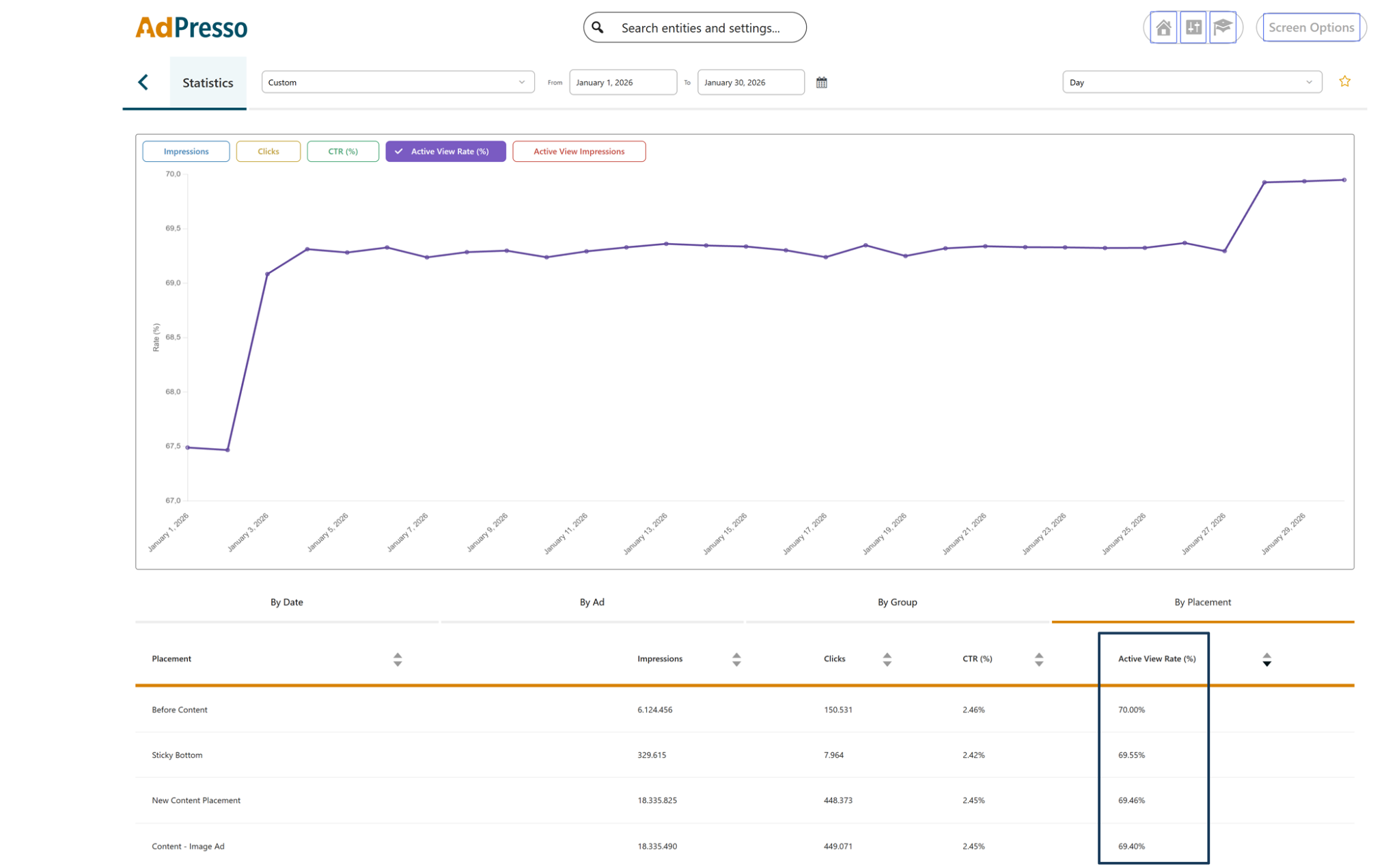
Screenshot from the AdPresso statistics (source: https://drive.google.com/file/d/1J9NSBAAMDyInWRjAWT8qI2b3ipcFNG4n/view?usp=sharing)
What publishers can learn from the data?
Active View data can help answer practical questions about your advertising setup.
| Which ad placements are actually seen? | Viewability by placement |
|---|---|
| Are impressions translating into visibility? | Viewable impressions compared with total impressions |
| Which ads perform well | Viewability for individual ads |
| Is a particular position worth keeping? | Viewability differences between placements |
| Do different ad groups behave differently? | Viewability by ad group |
This can also change how you evaluate your WordPress ad positions. A placement with a high number of impressions is not automatically a good placement if most visitors never scroll far enough to see it.
AdPresso is currently the only WordPress ad plugin that provides native Active View Tracking for ads across your WordPress advertising setup. That makes the feature relevant beyond publishers who rely exclusively on AdSense. If you use several monetization methods on the same site, having viewability data in the same system where you manage your ads can make the numbers much easier to work with.