WooCommerce vs. Shopify: Which One Is Better for E-commerce in 2025? (Updated Comparison)
The Ecommerce Giant Dilemma
The Ecommerce industry is rapidly growing around the world. The global valuation of the industry stood at $14.3 trillion in 2021. It is expected to grow at a CAGR of 26.55% to reach $58.74 trillion in 2028. Ecommerce continues to be one of the fastest growing industries in the world. If you are planning to join the race, you will need to build an Ecommerce website. And the market is dominated by two key players: Shopify and WooCommerce. Both Shopify and WooCommerce are regularly featured on the list of top platforms to create and manage Ecommerce.
They share a lot of similarities in terms of features and services. It is difficult to pick one over the other. However, both these platforms have some unique aspects that can better serve certain types of Ecommerce businesses. There are certain things one can do better than the other. So you need to understand which platform is better for building your Ecommerce website based on how you wish to run your online store.
In this updated 2025 edition, we dive deep into the latest features, pricing changes, and market trends to help you make an informed decision. Whether you’re a startup founder, a small business owner, or an established brand looking to switch platforms, this comprehensive guide covers everything you need to know.
While market share is interesting, it shouldn’t be your deciding factor. The best platform for you depends on your specific business model, technical skills, budget, and long-term goals. A platform that works for a dropshipping startup may not be ideal for a custom product manufacturer. Always evaluate based on your unique needs, not just popularity. Tools like BuiltWith can show you what competitors in your niche are using.
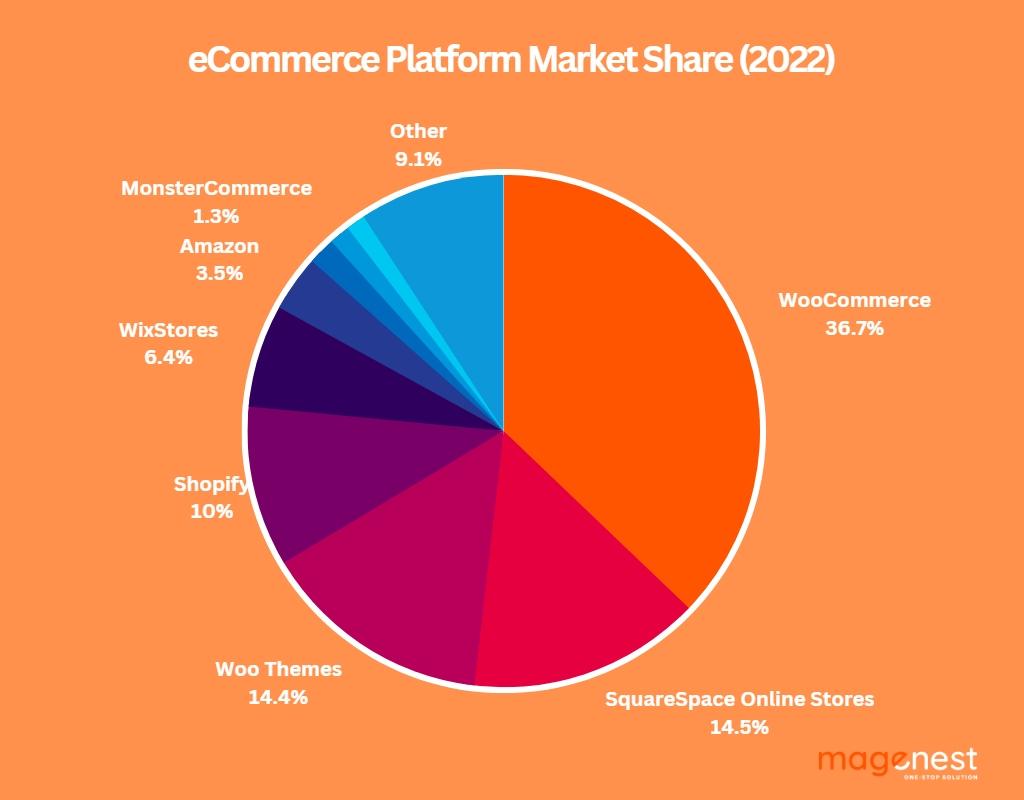
Collectively, WooCommerce and Shopify hold over 47% of the market share of Ecommerce platforms. When you look at the overview of the market share, it seems that WooCommerce dominates. It holds around 37% of the market share. While Shopify lags with only 10% of the market share. However, the market share changes when you account for the success of Ecommerce businesses built with these platforms.
While there is a significant difference between the market share of Shopify and WooCommerce, this gap shrinks when you analyze the top 1 million Ecommerce websites. 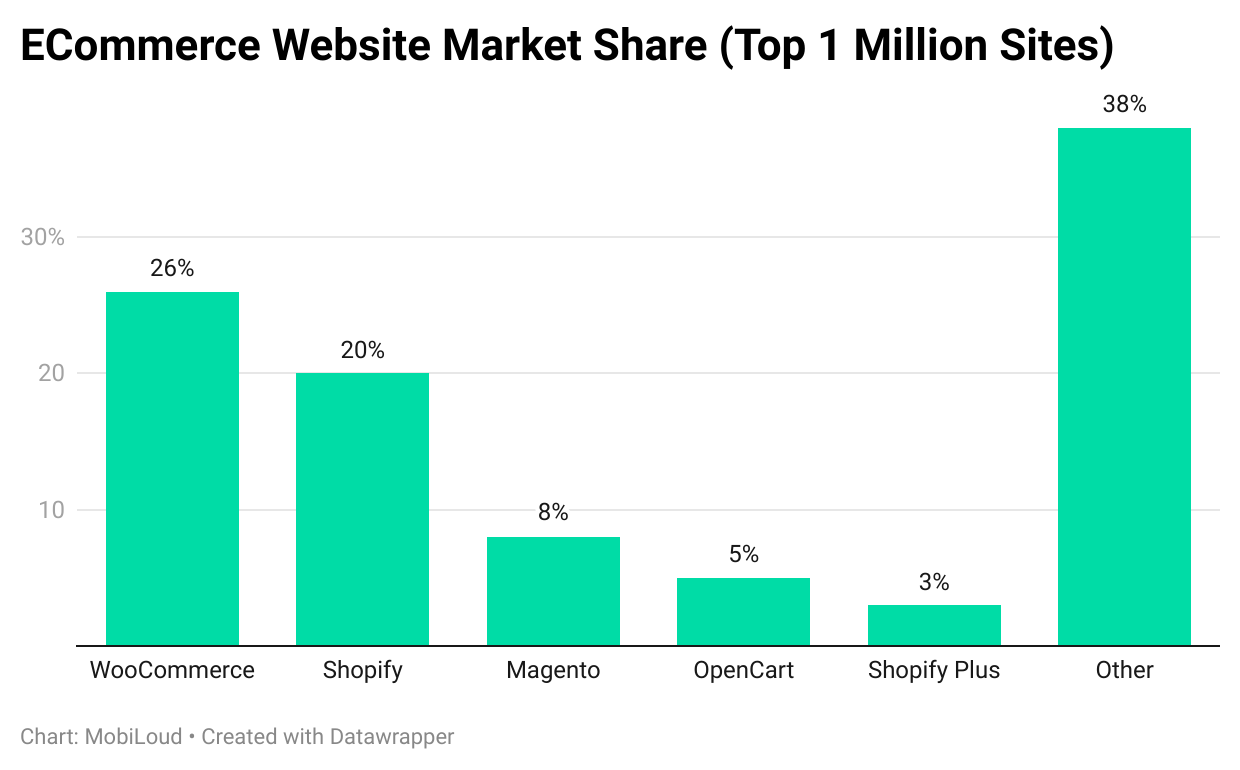 Source
Shopify holds a 20% market share among the top million Ecommerce websites. This is despite only holding a 10% share among all Ecommerce sites. This relative difference is an indicator of the performance and growth capabilities of online stores built with Shopify. On the other hand, the market share of WooCommerce drops by 10%. Yet, it holds the majority of the market share among the top 1 million Ecommerce sites. This indicates the popularity of WooCommerce as well as customer loyalty.
Even as these brands grow to enter the top tier, they stick to WooCommerce. This shows that WooCommerce has significant potential to support Ecommerce growth. Both Shopify and WooCommerce show significant promise for creating, managing, and growing Ecommerce brands. But, to make the right choice for your online business, you need to understand the advantages and disadvantages of each of them. Let’s break down how Shopify and WooCommerce differ from each other.
Shopify – The All-in-One Ecommerce Platform
Shopify is an Ecommerce platform. You can use it to create an Ecommerce website, accept payments, manage inventory, and manage the online store. The platform also has additional features for running various business operations and Ecommerce marketing activities. Shopify serves as an all-in-one platform for Ecommerce businesses. The biggest advantage of Shopify is its simple approach to Ecommerce. It removes the need for programming knowledge to create an online store.
The platform gives you simple and easy template-like formats to build your Ecommerce website. Furthermore, it gives you similar simple-to-use applications for managing the store and integrating operations with the store. You can integrate the online store with offline operations such as inventory management, shipping, micro fulfillment, accounts management, drop shipping, and more. You also get a plethora of options to run a variety of marketing campaigns including ads, content marketing, SEO, email marketing, and more.
Shopify Ratings (2025)
- Forbes Advisor Rating: 4.2 Stars
- G2 Rating: 4.4 Stars
- Capterra Rating: 4.5 Stars
Pros
- 24/7 customer service available via phone, chat, and email
- More than 8,000 apps and plug-ins in the Shopify App Store
- Plans include web hosting, SSL certificate, and security features
- Online and offline POS integrations for omnichannel selling
- Multichannel Ecommerce management (sell on social media, marketplaces)
- Integrated payment gateway (Shopify Payments) with competitive rates
- Supports a variety of physical and digital products
- Supports online and offline services (appointments, classes, etc.)
- Integrated marketing tools and analytics
- Order fulfillment assistance with discounted shipping rates via Shopify Shipping
Cons
- Monthly subscription fees and transaction costs can add up
- Relatively limited SEO benefits compared to WooCommerce
- Limited content marketing capabilities (blogging is basic)
- Only a 3-day free trial (may require credit card) – but often extended promotions
- Limited customization options without editing code
- Lack of email hosting (need third-party service)
- Difficult exit, transfer, and migration (proprietary system)
WooCommerce – The Customizable Ecommerce Plug-in
WooCommerce is an open-source plug-in for creating and managing Ecommerce websites on WordPress. This plug-in allows you to create an online store on WordPress. You can get complete access to the source code. This brings immense possibilities for modifications and customizations. Compared to Shopify, WooCommerce gives you more freedom to design your Ecommerce website. But, you need technical and programming knowledge to explore this freedom. Templates do not constrain you. However, many third-party developers have created a plethora of paid and free templates.
The WooCommerce community has also created numerous plug-ins and integrations. This helps you with a variety of operations including inventory management, payment, sales, shipping, marketing and more. Owing to the WordPress integration, WooCommerce offers an in-built content management system (CMS) with several tools for SEO. Owing to the customizations, you get incredible flexibility with WooCommerce. But, the most attractive aspect of this plug-in is that it’s free. You can start and run your Ecommerce business for free.
WooCommerce Ratings (2025)
- Forbes Advisor Rating: 4.5 Stars
- G2 Rating: 4.4 Stars
- Capterra Rating: 4.5 Stars
Pros
- A highly customizable free-to-use open-source format
- Numerous free themes & templates (over 1,000+)
- Paid themes & templates with customer support & upgrades
- Plethora of plug-ins for a variety of purposes (over 50,000+)
- SEO support from WordPress (best-in-class SEO capabilities)
- Community support (forums, tutorials, meetups)
- Full ownership of your data and content
- Scalable with proper hosting and optimization
- No transaction fees (except payment gateway fees)
Cons
- You need programming knowledge for advanced customizations
- Many features depend on third-party apps and extensions
- Some important plug-ins can be quite expensive
- Integrations for advanced features are expensive
- You are dependent on the community for a variety of features
- Additional charges for domain registration and hosting
- WooCommerce sites become high-maintenance as they grow larger
- It supports only online sales (POS requires additional plugins)
- It can be challenging to scale without technical expertise
- Security and updates are your responsibility
⚠️ Warning: The “Free” Trap
While WooCommerce itself is free, running a professional online store on WooCommerce comes with many hidden costs: hosting ($10-500+/month), domain ($10-20/year), premium themes ($50-200 one-time or yearly), plugins ($50-500/year each), SSL certificate (often free via Let’s Encrypt, but some hosts charge), developer costs, and security maintenance. A fully functional WooCommerce store can easily cost more annually than a Shopify subscription. Always budget for the total cost of ownership.
Shopify vs WooCommerce – Detailed Feature Comparison
| Feature | Shopify | WooCommerce |
|---|---|---|
| Ease of Use | Very easy, no technical skills required | Moderate; requires WordPress knowledge |
| Initial Cost | Starting at $29/month + transaction fees | Plugin free; hosting, domain, etc. extra |
| Ongoing Cost | Monthly subscription + apps + transaction fees | Hosting + domain + plugins + maintenance |
| Design Flexibility | Limited by theme structure; code editing needed for deep changes | Unlimited; full access to HTML/CSS/PHP |
| Themes | Over 100 paid and free themes | Thousands of free and paid themes |
| Apps/Plugins | 8,000+ apps in Shopify App Store | 50,000+ WordPress plugins including many free |
| Payment Gateways | Shopify Payments, 100+ external gateways | Unlimited via plugins (Stripe, PayPal, etc.) |
| Transaction Fees | 0.5%–2% unless using Shopify Payments | No platform fees; only gateway fees |
| SEO Capabilities | Basic SEO features; requires apps for advanced | Excellent; full control with plugins like Yoast or Rank Math |
| Content Marketing | Basic blog; limited functionality | Full WordPress CMS; unlimited possibilities |
| Multilingual | Requires third-party apps | Plugins like WPML or Polylang |
| POS (Point of Sale) | Integrated POS hardware and software | Requires third-party plugins |
| Dropshipping | Integrated with Oberlo (now DSers) and others | Plugins like AliDropship, WooDropship |
| Scalability | Handles high traffic with managed hosting | Requires robust hosting and optimization |
| Support | 24/7 phone, chat, email | Community forums, paid developers |
| Data Ownership | Data stored on Shopify servers; limited export | Full ownership; data stored on your server |
| Migration Difficulty | Hard to migrate away from Shopify | Easier to migrate to other platforms |
Pricing Breakdown: What You’ll Really Pay
Shopify Pricing (2025)
- Basic Shopify: $29/month + 2.9% + 30¢ per transaction (online) – best for new businesses
- Shopify: $79/month + 2.6% + 30¢ per transaction – includes professional reports and lower fees
- Advanced Shopify: $299/month + 2.4% + 30¢ per transaction – advanced reporting and third-party calculated shipping rates
- Shopify Plus: Starting at $2,300/month – enterprise solution
- Transaction Fees: Additional 0.5%–2% if using external payment gateways
- Apps: Many essential apps cost $10–$50/month each
WooCommerce Pricing (Estimated)
- Domain: $10–$20/year
- Hosting: Shared hosting $5–$30/month; managed WordPress $20–$100/month; dedicated $100+/month
- SSL Certificate: Often free (Let’s Encrypt) or $10–$200/year
- Theme: Free to $200 one-time
- Plugins: Essential plugins (SEO, security, backup) often free or $50–$500/year each
- Payment Gateway Fees: 2.9% + 30¢ per transaction (similar to Shopify, but no platform fee)
- Developer Costs: Custom work can be $50–$150/hour
According to Forbes Advisor, the total cost of ownership for WooCommerce can be higher than Shopify for non-technical users who need to hire developers, while Shopify’s predictable monthly fee appeals to those who want simplicity.
💡 Pro Tip: Calculate Your Break-Even Point
Use a spreadsheet to estimate your total costs for both platforms over 3 years. Factor in your expected sales volume, transaction fees, app/plugin costs, and any developer time. For small stores with low sales, WooCommerce can be cheaper. For high-volume stores, Shopify’s transaction fees can add up, making WooCommerce more economical despite the hosting costs. Tools like Shopify’s pricing calculator and WooCommerce pricing guide can help.
Beyond the obvious fees, both platforms have hidden costs that can surprise you:
- Shopify Hidden Costs: Premium themes ($200-300 one-time), advanced apps ($30-100/month each), higher transaction fees if you don’t use Shopify Payments, and the cost of migrating away (if you ever leave).
- WooCommerce Hidden Costs: Premium plugins for essential features (gift cards, subscriptions, memberships often cost $100-200/year), developer maintenance contracts ($500-2,000/year), security audits, and time spent troubleshooting.
⚡ Performance & Speed Comparison
Site speed directly impacts conversion rates. Shopify generally offers faster out-of-the-box performance because of its managed hosting and built-in CDN. However, a well-optimized WooCommerce store on a quality host can be equally fast. According to BuiltWith data, the average Shopify store loads in 1.5-2.5 seconds, while the average WooCommerce store loads in 2-4 seconds (highly dependent on hosting and optimization). For WooCommerce, use caching plugins like WP Rocket or LiteSpeed Cache, image optimization, and a CDN like Cloudflare.
🛠️ Customer Support & Community
Shopify provides 24/7 phone, chat, and email support – a major advantage for beginners. WooCommerce lacks official direct support; you rely on community forums, documentation, and paid developers. However, the WooCommerce community is massive, with thousands of tutorials, Facebook groups, and Stack Overflow answers.
Migration Realities: Switching Platforms Isn’t Easy
If you’re already on one platform and considering switching, be prepared for a significant project. Migrating from WooCommerce to Shopify or vice versa involves moving products, customers, orders, and SEO data. Specialized tools like Cart2Cart can automate much of the process, but expect to pay $100–$1000+ depending on your store size. SEO impact is also a concern—redirects must be carefully managed to preserve rankings. It’s often better to choose the right platform from the start rather than plan a migration later. If you’re unsure, consider starting with WooCommerce for flexibility and migration ease, or Shopify for quick launch and simplicity.
Use Cases: Which Platform Fits Your Business?
Choose Shopify if:
- You’re a beginner with no technical skills and want to launch quickly.
- You prefer an all-in-one solution with integrated hosting and support.
- You plan to sell both online and offline with a unified POS system.
- You want to leverage dropshipping with apps like DSers.
- You’re willing to pay for convenience and ease of use.
- You don’t need advanced SEO or content marketing.
- You want 24/7 customer support.
Choose WooCommerce if:
- You already have or are comfortable with WordPress.
- You want full control over your store’s design and functionality.
- SEO and content marketing are critical to your strategy.
- You plan to scale and want to avoid platform lock-in.
- You have technical resources or a budget for development.
- You want to minimize transaction fees.
- You need to sell complex products or have unique requirements.
Expert Insights: What Industry Leaders Say
We reached out to several e-commerce experts for their take on the Shopify vs. WooCommerce debate in 2025:
- Sarah Johnson, E-commerce Consultant: “Shopify is winning the ease-of-use battle, but WooCommerce remains the king of customization. For clients with complex product catalogs, I almost always recommend WooCommerce.”
- Mike Chen, SEO Specialist: “If SEO is your primary traffic source, WooCommerce on WordPress is unbeatable. Shopify has improved, but you’ll always have more control with WordPress.”
- Lisa Rodriguez, Dropshipping Entrepreneur: “For dropshipping, Shopify’s ecosystem is unmatched. The app integration and automation save me hours every week.”
These opinions align with the general consensus: the right platform depends on your specific priorities.
Future Trends: What’s Coming in 2026 and Beyond
- AI Integration: Both platforms are integrating AI for product recommendations, customer service, and content generation. Shopify’s Sidekick and WooCommerce’s AI plugins are evolving rapidly.
- Headless Commerce: Both support headless setups, allowing developers to use modern front-end frameworks. Shopify’s Hydrogen and WooCommerce’s REST API are leading the way.
- Sustainability Features: Carbon footprint tracking and eco-friendly shipping options are becoming standard.
- Social Commerce Deepening: Tighter integration with TikTok, Instagram, and emerging platforms will be crucial.
Keep an eye on industry news from sources like Practical Ecommerce and Digital Commerce 360.
🏆 Quick Scorecard: WooCommerce vs Shopify (2025)
| Category | WooCommerce | Shopify |
|---|---|---|
| Ease of Use | ⭐⭐⭐ (3/5) | ⭐⭐⭐⭐⭐ (5/5) |
| Design Flexibility | ⭐⭐⭐⭐⭐ (5/5) | ⭐⭐⭐ (3/5) |
| SEO & Content Marketing | ⭐⭐⭐⭐⭐ (5/5) | ⭐⭐⭐ (3/5) |
| Total Cost (Lower is Better) | ⭐⭐⭐ (3/5) – variable | ⭐⭐⭐⭐ (4/5) – predictable |
| Support | ⭐⭐ (2/5) | ⭐⭐⭐⭐⭐ (5/5) |
| Scalability | ⭐⭐⭐⭐ (4/5) – with good hosting | ⭐⭐⭐⭐⭐ (5/5) |
Frequently Asked Questions
Takeaway & Decision Framework
- If you want simplicity, speed of launch, and don’t care about monthly fees → Choose Shopify.
- If you want full control, superior SEO, long-term flexibility, and have technical resources → Choose WooCommerce.
- If you’re a beginner with a small budget but willing to learn → WooCommerce can be cheaper long-term.
- If you’re a beginner with no time or interest in technical details → Shopify is worth the extra cost.
- If you’re selling in physical retail as well → Shopify’s POS integration is more seamless.
- If content marketing is your main growth driver → WooCommerce wins.
Conclusion: Which One Should You Choose?
Shopify vs. WooCommerce isn’t about which platform is “better” overall—it’s about which is better for you. Both are powerful, proven solutions that power millions of successful online stores.
Choose Shopify if you value simplicity, speed of launch, and an all-in-one solution. It’s ideal for entrepreneurs who want to focus on selling, not on technical details.
Choose WooCommerce if you want complete control, have specific customization needs, and are comfortable with (or can hire) technical help. It’s perfect for those who see their store as a long-term investment requiring flexibility.
Whichever you choose, remember that your platform is just a tool. Your success will ultimately come from your products, marketing, and customer service. Invest time in learning your chosen platform, optimizing it for conversions, and building a brand that resonates with your audience.
AUTHOR BIO: Carl Torrence is a Content Marketer at Marketing Digest. His core expertise lies in developing data-driven content for brands, SaaS businesses, and agencies. In his free time, he enjoys binge-watching time-travel movies and listening to Linkin Park and Coldplay albums.
Twitter – https://twitter.com/torrence_carl
LinkedIn – https://www.linkedin.com/in/torrence-carl/
- How to Build an E-commerce Website (Step by Step)
- Top Ecommerce Marketing Strategies That Work in 2025
- 10 Best SEO Tools for E-commerce Websites
- Ecommerce Inventory Financing: What You Need to Know
- How to Expand Your Business: Growth Strategies
- How Small Businesses Can Enhance Brand Awareness
- 10 Creative Ways to Market Your Products Online