
Why You Need WordPress Plugins? 10+ Plugins That Will Actually Work For You (2026 Guide)
It won’t be wrong to say that the Plugins have become an integral part of the WordPress system. These plugins help in advancing the features and extending the functionality of the website. There are many enhanced features that WordPress plugins help you with, and some of them are mentioned here,

- Promoting your business
- Improving your SEO by optimizing your content
- Driving more traffic to your website
- Improving your website performance
- Backing up your website data
WordPress plugins provide its users with a wide range of advantages; these plugins help the users in making their profile unique and inviting. So, before diving into the details of different useful and enticing plugins we would suggest you WooCommerce plugin. WooCommerce bundled products plugin has proved to be one of the most effective and appealing plugin features.
What is the function of WooCommerce plugin?
Product bundling technique is used by various marketing companies; it means to create kits or personalized boxes of different or same kind of assembled products and selling them to customers. Once the bundled products are designed, brands put them on sale, and that’s what makes it eye-catching for the customers.
5 Plugins That Will Help You Make Your Website/Blog Stand Out
While there are over more than 55,000 WordPress plugins, it could be confusing for you to decide which plugin will suit your website the best, but no need to get confused because we are here with some of the top WordPress plugins that will help you in expanding developing your WordPress website.
1. UpdraftPlus

The amazing thing about this plugin is that it has 96% ratings. It is one of the most used backup plugins and has more than 3 million installs up till now. It is not restricted to only a few files; instead, it performs a complete backup of all the WordPress files and restores the files directly from the control panel.
Features
- It backups your files to the cloud in an instant.
- It allows you to set up the automatic backup and restoration schedules.
- Its premium version provides you with database encryption and advanced reporting.
- It shows you no advertisements and let you work peacefully.
- For customer’s convenience, it has both free and premium versions.
2. WP Rocket

WP Rocket plugin helps you by speeding up your loading times, as its motto says it makes your WordPress load and function in just a few clicks. It has been installed over more than a million times and helps in improving Search Engine Optimization by driving more traffic to the website.
Features
- It ensures the fast loading of your website and increases conversions.
- It is only available in premium mode starting from the amount of $49.
- WP Rocket makes caching foolproof to manage the WordPress website easily and also improves user-end browser caching.
- The interesting fact here is that the WP Rocket plugin increases the page loading time by 63%.
- It is the only plugin that enhances 80% web performance at its best.
3. Yoast SEO

It has a 98% rating and is one of the most installed plugins of WordPress. It has aided millions of websites by increasing their ranks in search engines. This plugin offers title and meta description for improvised branding. It also tunes the size of your website engine for you, so you may face no hurdle while working.
Features
- It makes your content unique by automatically setting canonical URLs to avoid duplicate content.
- Its most distinguishable feature is its SEO analysis.
- Its premium mode helps you in optimizing your article according to related key phrases.
- Its bulk editor features help you edit your content conveniently.
- The readability analysis features ensure that you’re writing engaging content.
4. Revive Old Post

We all know how important social media has become for digitalizing business in these times, so this plugin helps in social media auto-posting and scheduling. It has a total of 80% ratings and is installed by over 40,000 users.
Features
- It increases the reach of your website via social media.
- It shares your posts to social media applications automatically.
- Helps you in setting up a beneficial schedule for your social media publications.
- It has both premium and free modes.
- It helps you stay active on social media to engage more people through your posts.
5. WPForms
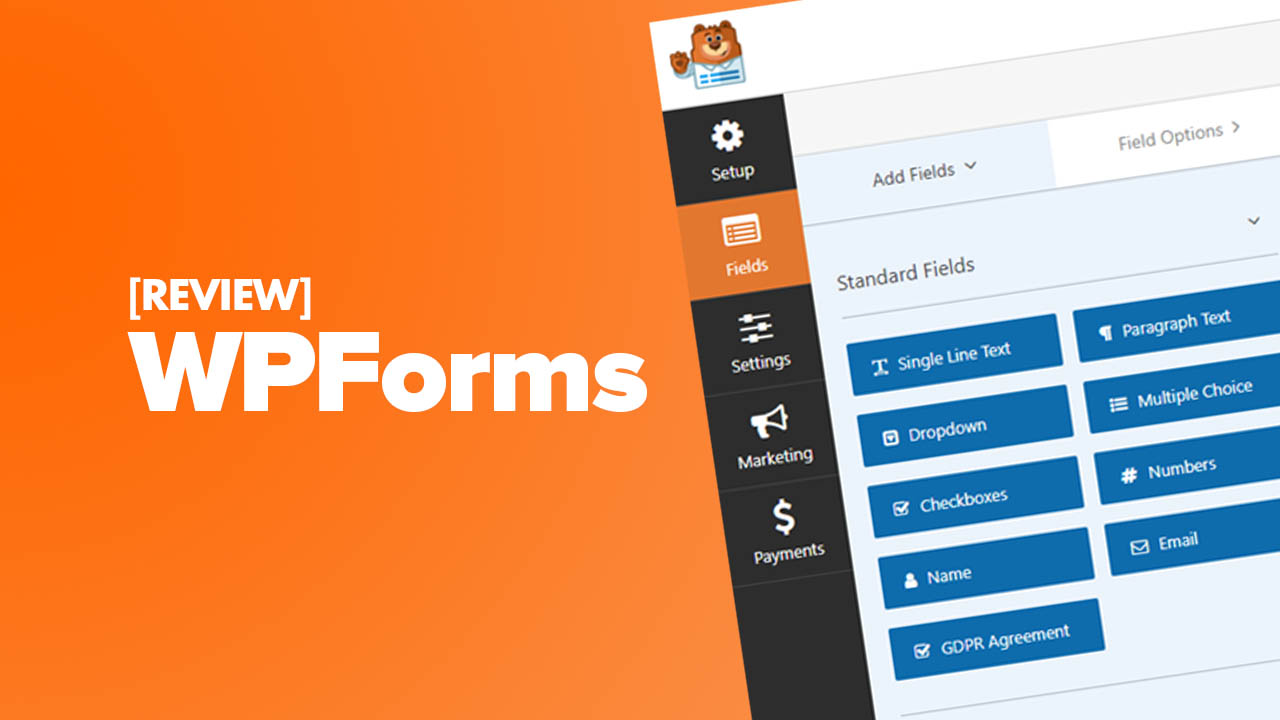
Well, this plugin is one of the most installed WordPress form plugins by having 3,000,000 plus installations. It has a 98% rating and is very user friendly. Its drag and drop online building mode is what makes it more interesting.
Features
- It makes it easy for you to create contact and email subscription forms.
- It helps you in form templates.
- It streamlines your workflow by viewing leads in one place.
- It can split your long forms into multi-page forms.
- Its users can also upload files with form submissions.
Comparison Table: Top 5 Essential WordPress Plugins
| UpdraftPlus | Backup & Restore | Free / Premium | 3+ million | 96% |
| WP Rocket | Caching & Performance | $49/year | 1+ million | 4.9/5 |
| Yoast SEO | Search Engine Optimization | Free / Premium | 5+ million | 98% |
| Revive Old Post | Social Media Auto‑sharing | Free / Premium | 40,000+ | 80% |
| WPForms | Form Builder | Free / Premium | 3+ million | 98% |
Why Can’t I Add or Install Plugins in WordPress?
One of the widespread questions we’re requested by WordPress beginners is: “Why can’t I add plugins in WordPress?”. It often follows up with how the user is seeing an upgrade message or that their admin area doesn’t have the plugins menu. If you’re encountering this issue, you are in the right place. On this article, we’ll explain why you can’t add or install plugins in WordPress.
1. You’re On WordPress.com
WordPress.com is a blog hosting service that offers a limited version of the popular self-hosted WordPress software. See our guide on the difference between WordPress.com vs WordPress.org for more details. WordPress.com users cannot install plugins unless they upgrade to the business plan which costs about $299 per year. If you’re on a free, personal, or premium plan, then you cannot install third-party plugins.
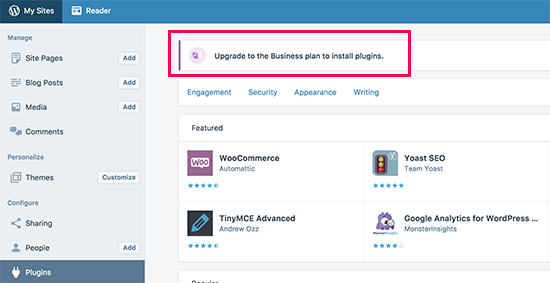
If you don’t wish to pay the $299 per year, then you can move your blog from WordPress.com to WordPress.org. If you need help in doing that, then use our free WordPress blog setup service (just make a note that you want us to transfer your site, and we’ll do it for free).
2. You’re Facing Memory Limit Problem
The second most common situation is that you can see and access the plugins menu but unable to install plugins. The failure notice is often caused by the PHP memory limit. There are settings in your WordPress hosting and inside your WordPress core that define the amount of memory a PHP script can use. When a process reaches this limit, it either gets terminated or it gives an error like this: Fatal error: Allowed memory size of 67108864 bytes exhausted.
The quick fix to this problem is increasing your PHP memory limit. You can do that by adding this line to your wp-config.php file:
define('WP_MEMORY_LIMIT', '256M');For more detailed instructions, see our guide on how to fix WordPress memory exhausted error.
3. User Role Restrictions
WordPress comes with a built-in user role management system. Sometimes web developers don’t give administrator access to their clients. Instead, they create an editor account for them.
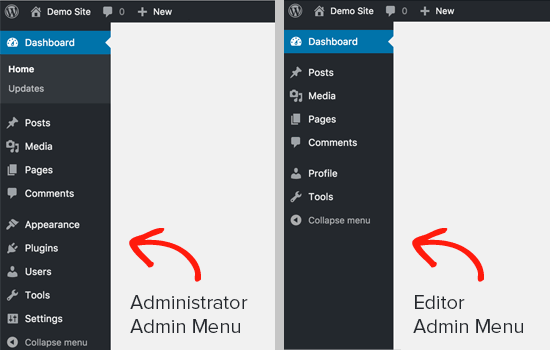
Only administrators can install and activate plugins on a WordPress website. If you are the owner of the website, then you need to ask your developer to make sure you have administrator permissions.
4. You’re on a Multi‑Site Network
Another potential reason why you can’t see the plugins menu in WordPress could be that your site is part of a WordPress multisite network, and the network admin has disabled the plugins menu item on network sites.

It’s pretty much the same situation as WordPress.com. The network admins need to consider server stability, WordPress security, and load balancing issues. To resolve this problem, you can ask your network administrator to install plugins for you.
Frequently Asked Questions (FAQ)
Key Takeaways
- Plugins extend functionality – from SEO and backups to forms and performance.
- Choose wisely – look for high ratings, regular updates, and active install counts.
- Don’t overinstall – too many plugins can slow down your site and create security vulnerabilities.
- Understand your platform – WordPress.com limits plugins; self‑hosted WordPress.org gives you full control.
- Test before committing – use staging sites to test new plugins for conflicts.
- Keep everything updated – outdated plugins are a common entry point for hackers.
Conclusion
WordPress is being used for several different purposes these days, it is helping its users in creating their websites, in the custom web application development field, and many other contrasting fields. On the positive side, plugins have helped WordPress to grow and expand its horizons on a larger scale, so if you want your WordPress website to work out the best then try these plugins and give us feedback.
Remember, the right plugins can transform your site from basic to powerful. Start with the essentials—backup, SEO, caching, forms—and expand as your needs grow. Always prioritize quality over quantity, and your WordPress site will reward you with better performance, security, and user experience.



Hi K,
All great points buddy. I used a few more plugins since I last stopped by your blog. We need a few plugins at least to increase functionality, to enhance the UX and to also make life easier on ourselves. All point to clear reasons why using plugins is essential for any dot org blogger.
Ryn
Superb blog! Do you have any hints for aspiring writers? I’m hoping to start my own blog soon but I’m a little lost on everything.
keep reading and sharing
Thanks a lot for sharing this with all of us you actually know what you’re talking about! Bookmarked.
thanks keep reading and sharing
Spot on with this write-up, I really suppose this website needs rather more consideration. I抣l most likely be once more to read much more, thanks for that info.
thanks and keep reading
Hello there, just became aware of your blog through Google, and found that it is truly informative. I抦 going to watch out for brussels. I will appreciate if you continue this in future. Many people will be benefited from your writing. Cheers!
thanks keep reading and sharing
Nice blog and thanks for the above article and also sites it helps us to get good backlinks
Thnaks for sharing the amzaing Word Press Plugins. very informative blog. Keep sharing !
Thanks keep reading and sharing
This is a very helpful and informative blog. WordPress plugins are surely very important, as most websites nowadays are created on WordPress.
Wonderful article these details are truly beneficial for everyone.
This post is really amazing thanks and keep sharing informative posts
I love the way you’ve explained this topic! It really helped me understand a complex concept in a simple way. Thanks for sharing your insights!
Thanks keep reading and sharing
Thank you so much for sharing this information. It is very useful information for Businesses.
Thanks keep reading and sharing