

15+ Best SEO Tools to Boost Your Google Ranking
In 2026, 75% of users never scroll past the first page of Google results. The right free SEO tools can be the difference between ranking #1 and being invisible.
As an SEO professional, your time is your most valuable asset. Whether it’s fetching all the meta tags from a domain within minutes or identifying all the crawling issues of a website without manually reviewing each and every URL, the right tools have always been your savior. This post presents some awesome free SEO tools that are perfect for any marketer looking to save precious time on routine tasks like setting up 301 redirects and checking Google PageSpeed Insights.
One of the most important aspects of any digital marketing strategy is SEO. A good SEO plan can help one find their target market, and have a better chance at achieving business goals more effectively than those without an elaborate search engine optimization (SEO) strategy in place. A successful online presence starts with well-thought-out keywords that are relevant to your company’s needs as you work on gaining visibility for your product or service within the internet marketplace.
A website needs to have the right SEO strategy in place, which includes optimizing content and using keywords. One of the most important aspects is making sure that a company’s site ranks higher on search engines like Google. By doing so, they will see an increase in both quality as well as quantity of traffic coming from potential customers looking for their services or products!
Internet use has become a trend, and businesses are realizing that they need SEO or Search Engine Optimization if they want their website to be seen when people look for it on Google, Yahoo!, Bing, etc. It’s no longer enough just having an appealing logo and catchy slogan; you have to make sure that anyone looking at your site will find what he/she needs easily by using keywords related specifically to whatever product or service you offer. Search Engine Optimization – SEO is the only way to get your business noticed in an online search.
The best free SEO tools can handle a significant portion of your daily workload. Opt for the paid version only when you see the need to use all features offered in these great tools. These top-rated and reviewed SEO apps will help take your digital marketing game up two notches, so that you can rank higher on search engines like Google, Bing, and Yahoo. We’ve put together an exhaustive list with options suited for every budget.
Key Takeaways
Quick Answer / TL;DR
Free SEO tools have never been more powerful. In 2026, you can perform comprehensive keyword research, technical audits, backlink analysis, and performance tracking without spending a dime. The essential toolkit includes: Google Search Console (indexing and search performance), Google Analytics 4 (user behavior and traffic sources), Screaming Frog SEO Spider (technical crawling up to 500 URLs), XML Sitemaps Generator (up to 500 pages), SEO Quake (browser-based SEO metrics), and AnswerThePublic (long-tail keyword discovery). For WordPress users, AIOSEO offers a free tier that handles on-page optimization, schema markup, and XML sitemaps. The key is to use these tools consistently and act on their insights—data alone doesn’t improve rankings.
1. Google PageSpeed Insights
Page loading speed is one of the most important elements to a website and can affect whether or not users stay on your site. In 2026, Google has fully integrated Core Web Vitals into its ranking algorithm, with INP (Interaction to Next Paint) replacing FID (First Input Delay) as a key metric. Google’s free tool, PageSpeed Insights, will check how fast your page loads and give you suggestions for improvement so that user satisfaction can increase as well.
How to Use This Tool
Enter your site or blog’s URL, click the “analyze” button, and the tool will automatically check the speed and overall user experience of your site and provide a score – for both desktop and mobile UX.
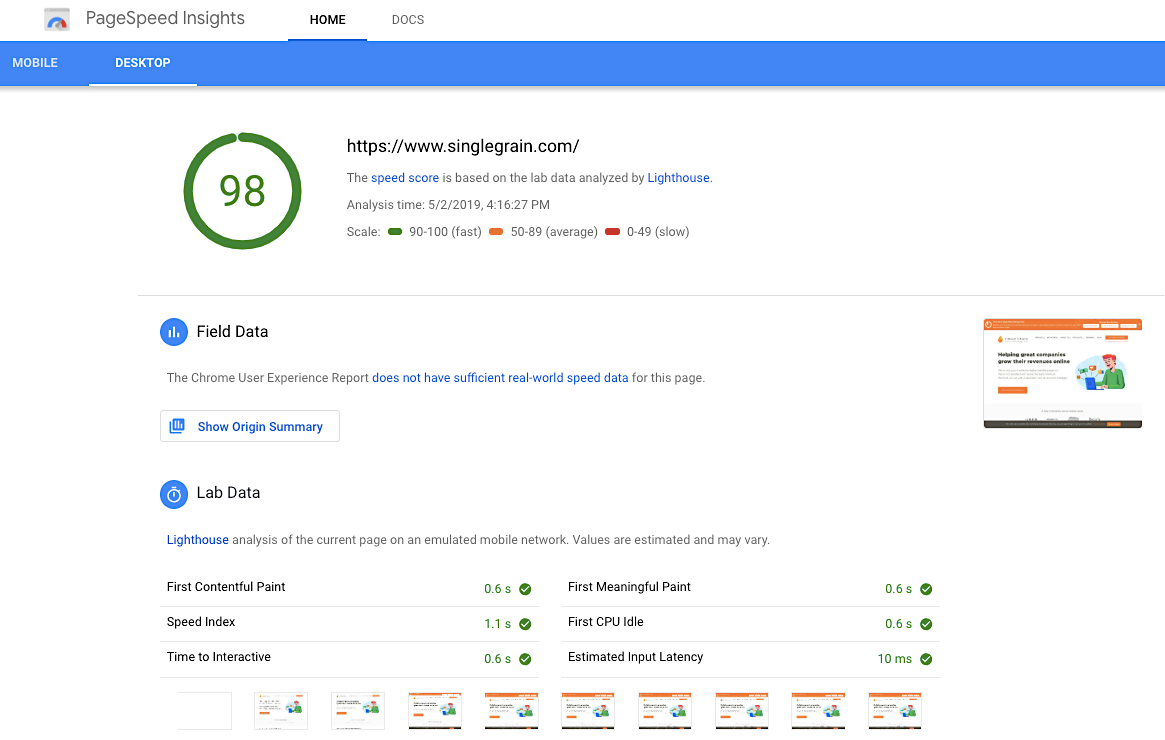
Here’s how the scores rank:
- A score of 90+ means that your site is FASTER than most other sites.
- A score between 50-90 is considered AVERAGE.
- A score below 50 means that your site is SLOW.
You need to opt for a score above 90 to offer your users a better site experience and to increase your chances of ranking higher in the search results.
| Metric | What It Measures | Good Threshold |
|---|---|---|
| First Contentful Paint (FCP) | Time to first content | ≤ 1.8 seconds |
| Largest Contentful Paint (LCP) | Loading performance | ≤ 2.5 seconds |
| Interaction to Next Paint (INP) | Responsiveness | ≤ 200 milliseconds |
| Cumulative Layout Shift (CLS) | Visual stability | ≤ 0.1 |
Top Features:
- The tool checks the speed of your website on both desktop and mobile.
- You can quickly classify your website as fast, average or slow.
- It also provides suggestions to improve your page’s performance metrics.
Why It’s Useful
In July of 2018, Google announced a major update to its mobile ranking factors: page speed became a top ranking factor for mobile searches. Since then, the importance of speed has only grown. In 2026, with the full integration of Core Web Vitals 2.0, Google PageSpeed Insights is more critical than ever because it helps you optimize your site for page speed which is important to avoid any penalties.
2. Mobile-Friendly Test
Speaking of mobile – search queries on mobile devices are increasing day by day and therefore it’s important to optimize your site for mobile devices. In 2026, mobile traffic accounts for over 62% of all web traffic globally. The Mobile-Friendly Test is a free tool that lets you check the responsiveness of your website on a mobile device.
How to Use This Tool
Enter the URL of the site that you wish to test and then click the “run test” button. In just a few seconds, you will know if your website is mobile-friendly or not.
Top Features:
- The tool quickly checks whether your website is mobile friendly or not.
- It suggests various ways to optimize your site for mobile devices. Some suggestions include using legible font sizes, sizing content to viewport, and sizing tap targets appropriately.
Why It’s Useful
Creating a responsive site that automatically adapts itself as per the mobile device used by the visitor is a great way to improve the user experience. Google’s Mobile-Friendly Test tool quickly checks whether your website is suited for mobile audiences or not. It also provides a list of suggestions that you can implement in order to make your website mobile friendly and avoid higher bounce rates from frustrated site visitors.
3. Schema Creator
As defined by XML.com, “A schema is a model for describing the structure of information.” In the context of SEO, schema markup (structured data) helps search engines understand your content and display rich results—star ratings, event details, recipe information, FAQs, and more. Schemas provide users with an enhanced experience in which they are presented with specific details about a particular company or organization on search engine results pages (SERPs).
With this tool, you can customize how your business looks in the SERPs, including your reviews, operating hours, events, etc.
How to Use This Tool
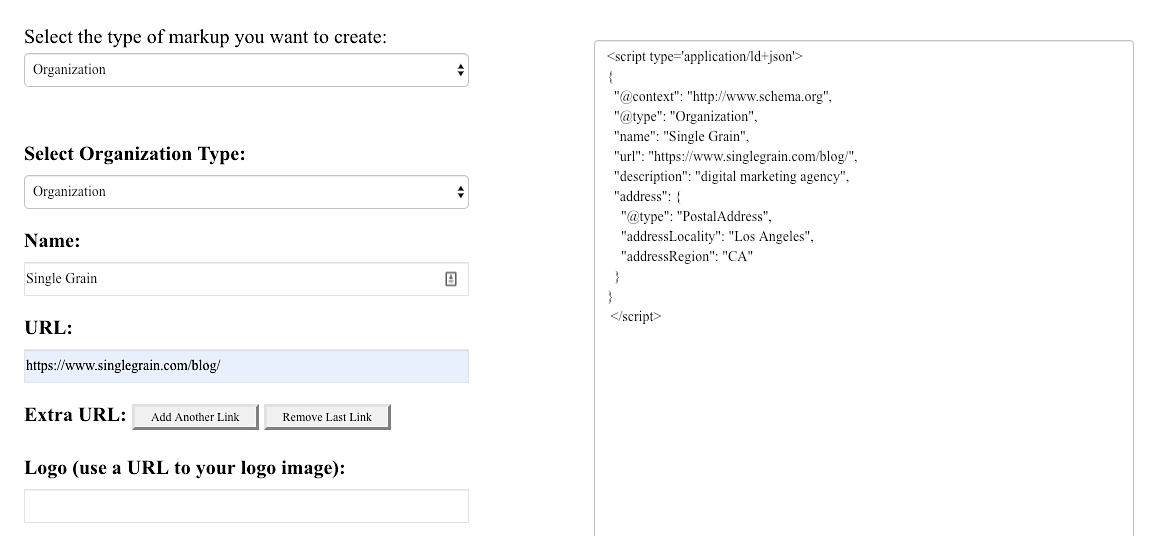
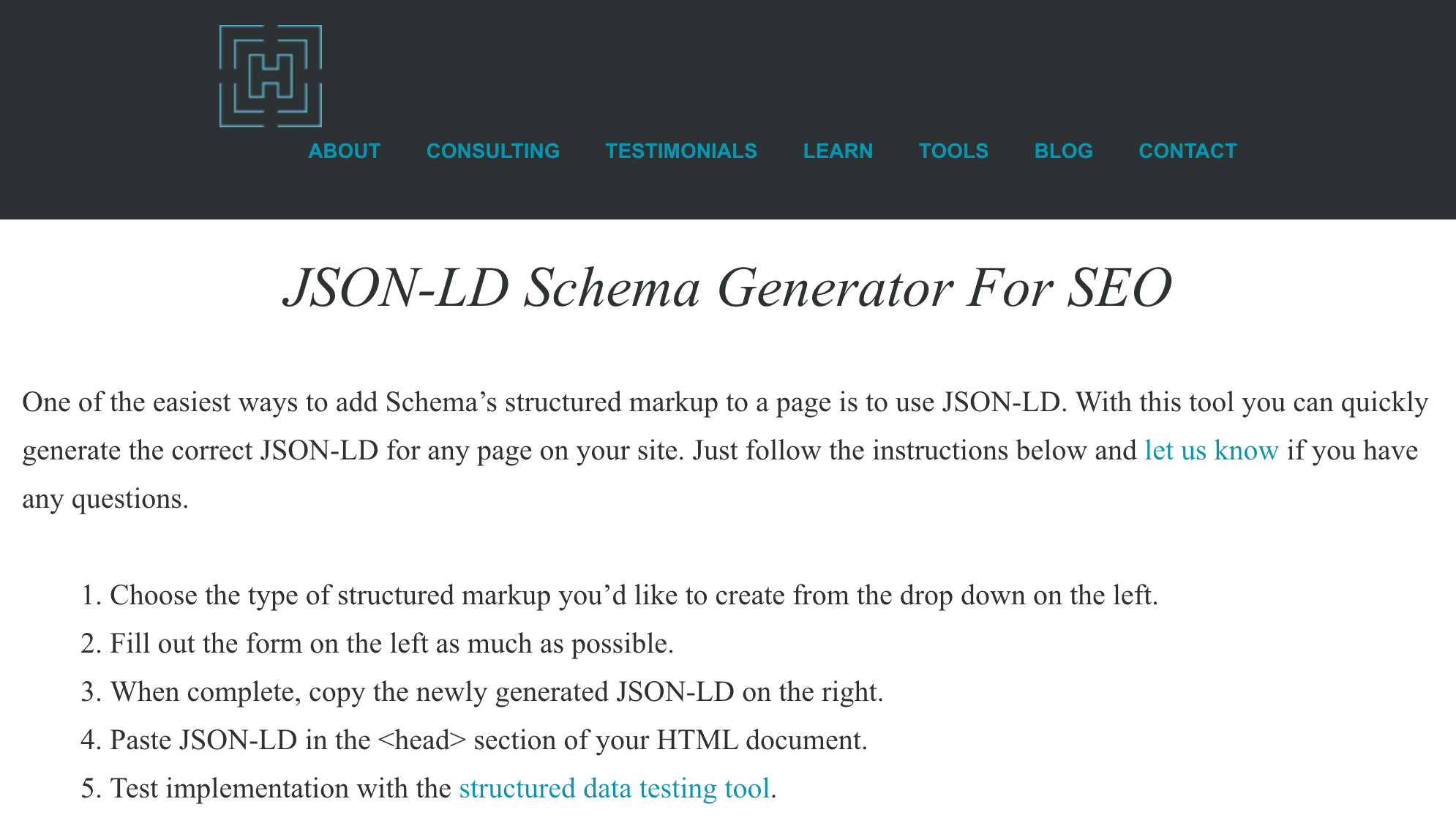
Select the type of markup you wish to create from the drop-down on the left side and enter the details related to your business. The tool will automatically generate a JSON-LD schema data on the right side of the page. You can copy the code and paste it in the <HEAD> section of your HTML document.
Top Features:
- You can integrate the schema code easily – it’s as simple as copying and pasting.
- The tool has a free WordPress plugin version.
- There’s also a Schema app which you can try for free for 14 days.
Why It’s Useful
Most businesses are still missing accurate schema data on their website. With the help of this tool, you can quickly generate the required schema data and add them to your important business pages. This will enable search engines to better understand the content in your web pages and will enable your pages to rank higher in the search results.
4. XML Sitemaps Generator
As defined by Google, “A sitemap is a file where you provide information about the pages, videos and other files on your site, and the relationships between them. Search engines like Google read this file to more intelligently crawl your site. A sitemap tells the crawler which files you think are important in your site, and also provides valuable information about these files.” Having a sitemap is another way to have a highly indexable website. This tool allows you to create a sitemap for your website with both XML and HTML variants.
How to Use This Tool
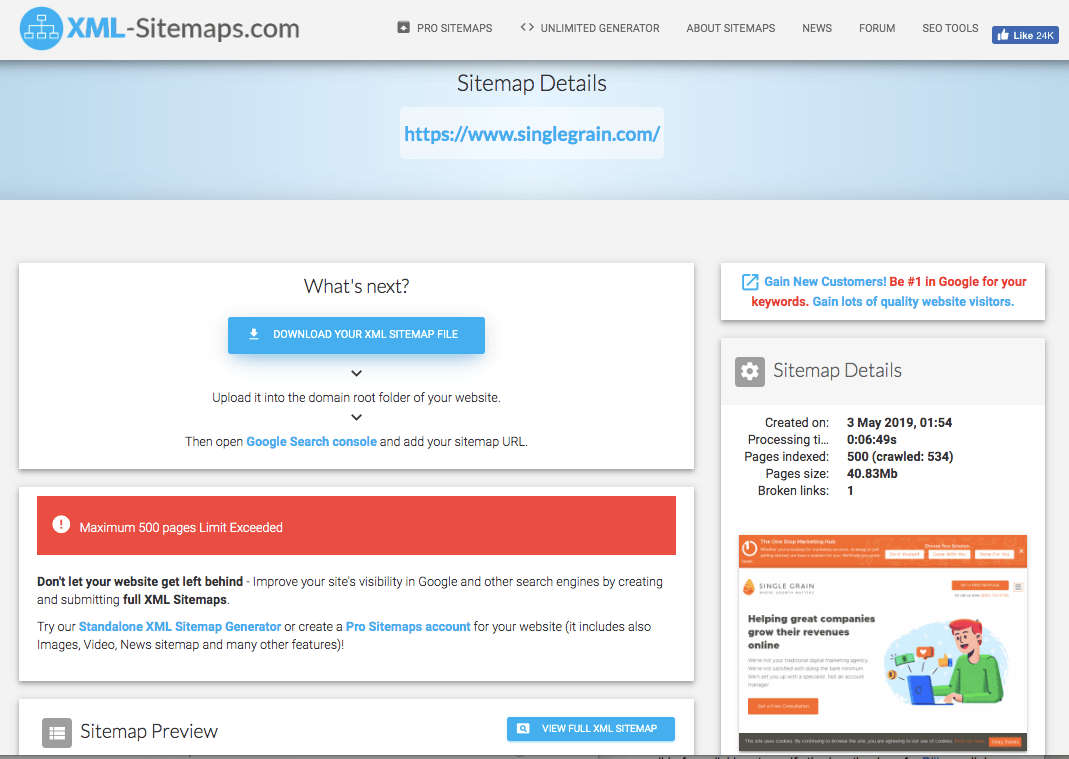
Just enter the full URL of your website and the tool will start generating the sitemap:
Top Features:
- You can get your sitemap ready quickly without the need for any registration.
- The tool emails you the generated sitemap so that you can put it on your site at a later time.
- The results include the number of pages, broken links, XML file content and the link to the sitemap file.
Why It’s Useful
Sitemaps help to improve the crawlability of a website. With the help of XML Sitemaps, you can create separate versions of HTML and XML sitemaps that is beneficial for both the user and the search engines.
You can create a sitemap for up to 500 pages in the free version. If you have a large site, then you need to purchase the premium version for $3.49 per month. This will let you create a sitemap for an unlimited number of pages.
5. SEO Book’s Robots.txt Generator
Robots.txt is a special file that tells search engines which pages to index from your website. The tool lets you generate the robots.txt file that commands the search engine crawlers which pages on your site should be crawled and which ones are to be left out.
How to Use This Tool
Choose the command (disallow or allow – by default every file is allowed) and enter the name of the file or directories. The code to be added in the robots.txt file will get displayed in the text right below the rules area.

Top Features:
- You can easily disallow crawling of directories and files and instruct the robots how to crawl your site.
- The tool is free to use and generates the required text file in seconds.
Why It’s Useful
You definitely don’t want search engine bots to access confidential information related to your customers and make them public. This is where robots.txt file comes handy. The Robots.txt generator from SEO Book helps you to generate the required code in seconds so that you can add it to your site.
6. SEOquake
SEOquake is one of the most popular SEO tools that is free to use. It’s an extension that displays an SEO overview of any given page through a toolbar or SERP overlay.
How to Use This Tool
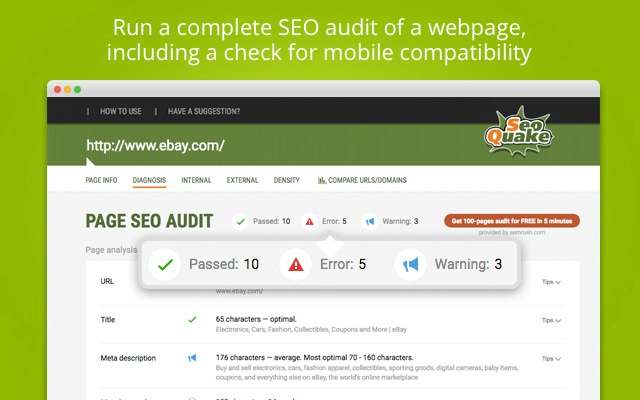
You need to install the SEOquake extension on your browser. Chrome, Mozilla, Safari and Opera are supported. Once the extension is installed, you will see a toolbar in your browser. You can quickly run a complete SEO audit of any website using this tool:
Top Features:
- It displays the total number of indexed pages, domain age, social shares and external links.
- This tool’s shining quality is its fluidity. Instead of individually checking sites through a standalone tool, you can view real-time stats as you browse.
- SEOquake also offers a free on-page audit tool so that you know if there are any errors on your site – and, of course, they offer tips on how to correct these errors.
Why It’s Useful
It’s pretty useful because you can conduct a complete SEO audit in a flash. This tool comes in handy when you are short on time and need to examine a lot of URLs fast.
7. SEO Site Checkup
SEO Site Checkup lets you instantly analyze SEO issues, understand your competitor’s SEO profile and generate reports that you can act upon.
How to Use This Tool
Simply enter the URL of your website and click on “Checkup!”. The tool will analyze the URL and provide a score out of 100. The greater the score, the better your website is in terms of SEO.
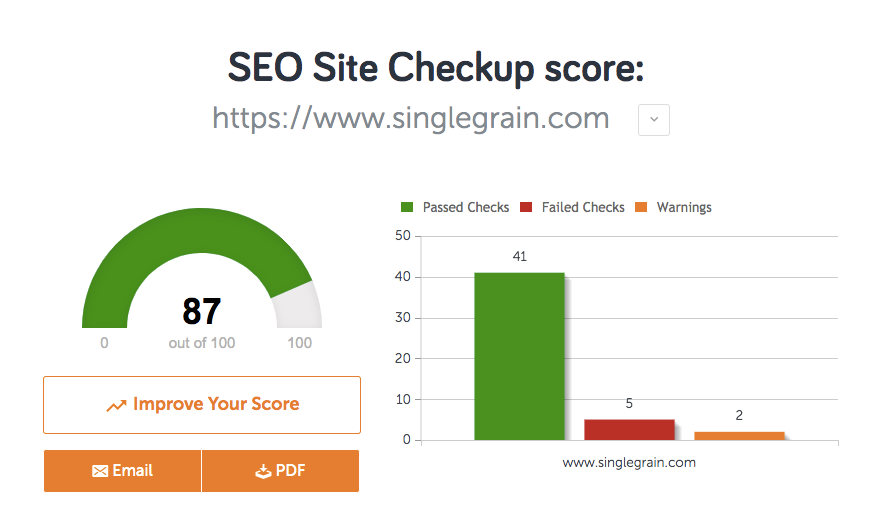
Top Features:
- The tool checks the on-page factors of the website, like meta tags and keyword usage.
- It checks the speed and security of your website.
- It conducts a mobile design check which helps to see whether the site is mobile friendly or not.
- It also conducts structured data test, 404 pages test and canonical tag test.
Why It’s Useful
Other than the SEO score of your site, this tool also relays information on how you can fix the analyzed issues pertaining to SEO, such as speed, security and mobile usability. You simply enter your URL to see how your website is currently performing.
The free version allows up to five check-ups in one day, though you must create a free account in order to check more than one website each day. If you need to generate more than 300 reports per month for more than three websites, you’ll need to purchase a paid plan starting at $24.95 a month.
8. SERPs Rank Checker
It’s essential that you know how each of your pages are performing based on their keywords – and this keyword rank checker can help. You can search for the keyword and domain or the keyword on both Google and Yahoo. You can also see the current ranking depending on the device used.
How to Use This Tool
Simply enter the keyword that you wish to track and the domain name. The tool will automatically check the rankings of the particular domain for the selected keyword.

Top Features:
- You can easily track the ranking of your website on selected locations without manually checking them on Google and without the use of VPN.
- SERPs also offers other free tools like Keyword Research Database and Google Location Changer.
- With the help of the Location Changer, you can track the position of your keywords on several locations.
Why It’s Useful
You can easily track the rankings of keywords without having to manually check them on Google.
With the free version, you can check just one keyword at a time, but for tracking up to 1,000 keywords, you need to purchase the Premium version for $99 a month.
9. Siteliner
Duplicate content is the bane to your SEO success, so you need to check your website to see if there are any duplicate pages. This is where Siteliner comes in handy.
How to Use This Tool
Simply input your URL and click “Go.” From there, you’ll see all the pages that have duplicate, common or unique content. This tool will also check for broken links on your site.
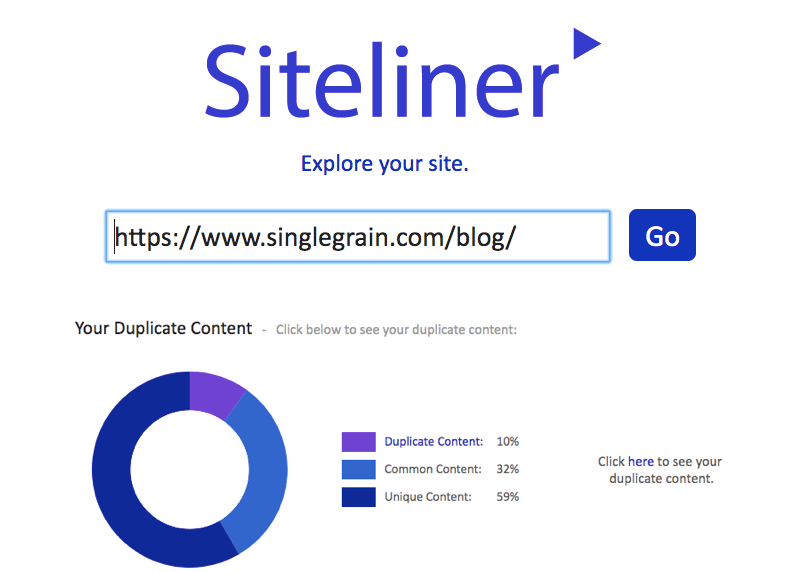
Top Features:
- The tool checks the total number of duplicate pages on your site.
- It also checks the number of broken links and skipped pages.
- You can download the report as a PDF file.
Signing up for the premium version is free and allows unlimited monthly checks on up to 25,000 pages. Above that, you need to pay for the tool. Cost is $0.01 for every page scanned.
10. Screaming Frog SEO Spider
Screaming Frog is a desktop program that can be installed locally on any PC. It works as a website crawler and log analyzer for conducting comprehensive technical audits of any website.
How to Use This Tool
You need to download the software by clicking on the download button. Once installed, click on the Screaming Frog icon on your desktop to open the tool. Enter the URL you wish to crawl and click on start. The tool will automatically crawl and fetch all the data related to the URLs for further review.

Top Features:
- This tool helps to evaluate onsite SEO factors, including server errors, broken links, duplicate pages and blocked URLs. It also crawls your website to analyze title and meta descriptions, determining required length and relevance.
- It can also outline whether there are any missing elements. For additional data, the tool integrates with Google Analytics where users are able to generate error reports.
Why It’s Useful
Screaming Frog is extremely useful in fetching a set of URLs and analyzing the important details like the meta tags or broken links. This tool saves a lot of time and helps to improve SEO.
With the free version, the tool has a crawl limit of 500 URLs. If you wish to analyze more than 500 URLs then you need to subscribe to the Premium version priced at £149 (~$195) per year.
11. Incognito Google Search
This is an option in Google Chrome that allows you to browse in private mode.
How to Use This Tool
Open Chrome and click on the File Menu. Now, choose New Incognito Window from the list. Continue to browse the Internet under the Incognito mode without the need to track cookies and browsing history.


Why It’s Useful
Incognito searching is a great way to see how popular your keywords are, as well as what the most popular search terms are within your niche. Because the autofill options are not affected by your previous searches and browser history, the keywords that you see, as well as the search results, are exactly in the order that Google would rank them. Use Incognito for preliminary research on where you rank or popular keywords you could rank for. But for an in-depth analysis (which you probably will need), you should definitely combine this method with other tools on this list.
12. Google Analytics
I am assuming that you are already using this, but for those who are very new to SEO, this is the tool you must definitely use on a weekly basis at least. Google Analytics should be the hammer in any SEO toolkit. This free and easy-to-use tool is what all your other tools should complement.
How to Use This Tool
You need to sign in to your Analytics account to start using this tool. First-time users can create a new account for free. Thereafter, you need to add your website in Google Analytics as a property. The instructions for adding a new property is provided here. Once you have added your website as a property, navigate to Tracking code under the property column and copy your tracking code. Paste this tracking code right after the <HEAD> tag on each page of your site.
Once this is done, you will be able to obtain valuable information related to your site when you login to Google Analytics. You can see the number of visits to your site, the channels that are sending you the maximum visitors, time on page, bounce rate and other important metrics.

Top Features:
- With Analytics, you can see how much traffic is coming into your site, and the ways in which people are getting there.
- With the help of Campaign Parameter tracking, you can easily find out which campaigns are generating the maximum traffic and conversions.
- With the help of Goal Tracking and Funnel Conversion Path, you can find out how many users are converting and which path they are using for conversion.
- With the help of the Audience Reports, you can better understand your audience, like their age and the device they are using to reach your site.
Why It’s Useful
The tool provides a lot of data that comes directly from Google. You can identify the total traffic to your site, the total conversions and the total revenue generated from your site. You can trust the data and take the required actions in order to further optimize your site.
13. Netpeak Spider
Netpeak Spider is an SEO crawler for regular SEO auditing, quick issues search, system analysis, and website parsing. It’s a desktop tool that can be installed on Windows OS.
How to Use This Tool
You need to create a free account with Netpeak software and install the Netpeak spider on your computer or laptop. Once it is installed, click on the Netpeak spider icon on your desktop in order to open the software.
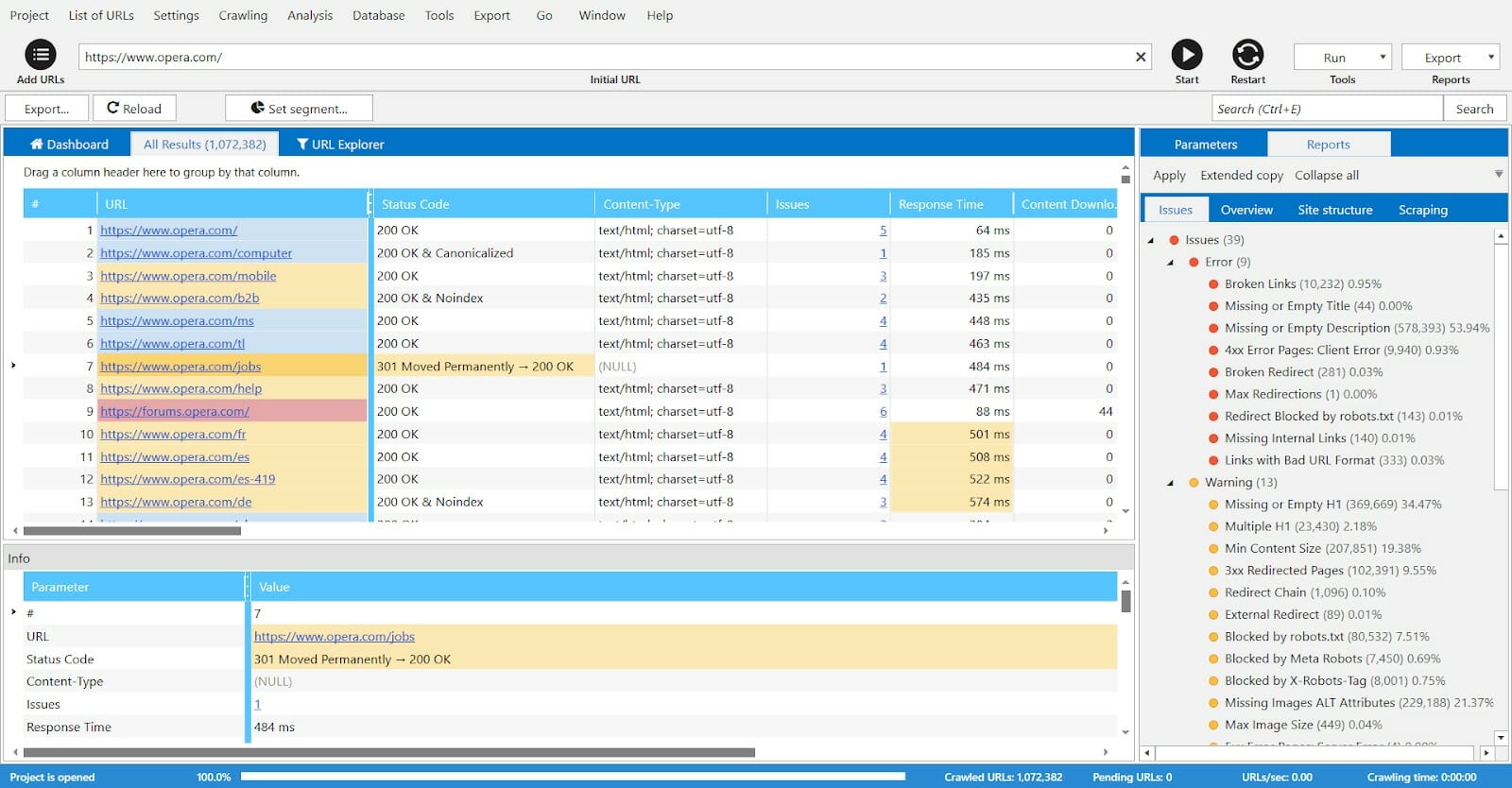
Once opened, you need to enter the URL to be analyzed in the “Add URL” bar. The crawler will start fetching the URLs and present the issues within minutes.
Top Features:
- Using this tool, you can analyze incoming and outgoing links, find broken links and redirects, consider indexation instructions, and identify duplicate content.
- You can quickly analyze titles, meta descriptions, H1 headers, full pages, etc.
- Another unique feature is the ‘Scraping’ function. It provides custom search and extraction of source code or text via four types of search: ‘Contains’, ‘RegExp’, ‘CSS selector’ or ‘XPath’.
Why It’s Useful
This tool works as a standalone desktop software and makes it easier for you to analyze URLs in a comprehensive manner. The tool checks 62 issues according to 52 parameters in the shortest possible time – a task that would be time consuming if performed manually. Netpeak Spider is available for free with no limitations in terms of use, number of analyzed URLs or settings customization.
14. JSON-LD Schema Generator For SEO
Customize how your web pages appear in the search results
Limitations: None
Try our full stack of brand building tools
We’ve built a full stack of social media tools to help modern brands grow their awareness, engagement, and sales. Start a free 14-day trial Create custom code so that your reviews, events, organizations, and people are displayed the way you want in Google’s search results. Once you’ve created your schema code, copy and paste into your website. Then, use the next tool to check if the implementation has been done correctly.
Alternatives: Merkle’s Schema Markup Generator
15. Classy Schema Structured Data Viewer
Check if your structured data was implemented correctly

Limitations: None
Always double check to make sure you’re implementing the technical aspects of SEO right. Use this tool to see if your structured data/schema markup was done correctly.
Alternatives: Google Structured Data Testing Tool (deprecating soon), Google’s Rich Results Test (currently does not test for all possible schema markups)
16. SimilarWeb
View site stats for any domain

Limitations: You’ll need a paid account to see every data point, but the free version is good enough to get a snapshot of your competitor’s activity
Use this tool to estimate how much traffic a website gets. See a breakdown of traffic sources, locations, and more. A helpful tool for competitor research.
17. SERP Robot
See your ranking position for up to five keywords

Limitations: None
Enter any website or web page and up to five keywords to see where you rank for each of them. Check your competitors’ rankings too.
18. XML Sitemaps
Create a sitemap

Limitations: Free up to 500 pages
Simply enter your site’s URL and some optional parameters, and XML Sitemaps will create a sitemap that you can upload to Google Search Console and Bing Webmaster Tools.
19. Robots.txt Generator
Generate a robots.txt for your site

Limitations: None
Robots.txt files let the web robots know what to do with a website’s pages. When a page is disallowed in robots.txt, that’s instructions telling the robots to completely skip over those web pages.
Alternatives: YellowPipe’s Robots.txt Generator
20. Copyscape
Check for duplicate content
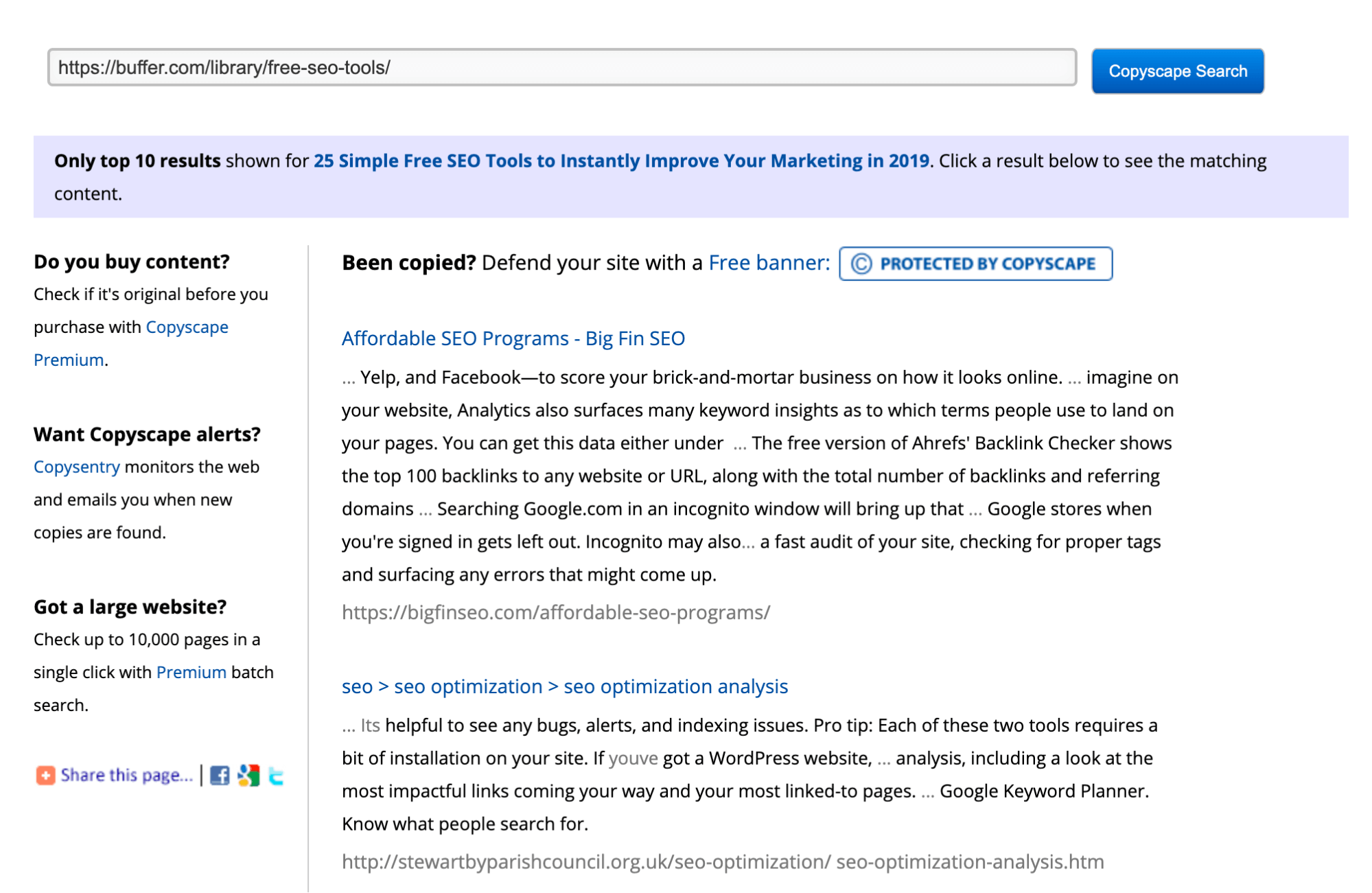
Limitations: Only the top 10 results are shown
Enter a URL for a blog post or website, and Copyscape can tell you where else that content exists online. You might find results that you’ll need to follow-up with to help get your SEO in order.
21. Google Alerts
Get alerted of any online mentions of your brand, product or company

Limitations: None
Enter your brand, company or product name and Google will send you an email if it finds any webpage mentioning those terms.
22. Screaming Frog SEO Log File Analyser
Upload and analyze your log files

Limitations: Up to 1,000 lines
If you’re interested to find out what Googlebot is doing on your site, you can look into your website’s log files. Screaming Frog’s Log File Analyser allows you to do that for free.
Alternatives: SEOlyzer
23. Exploding Topics
Discover the hottest trends
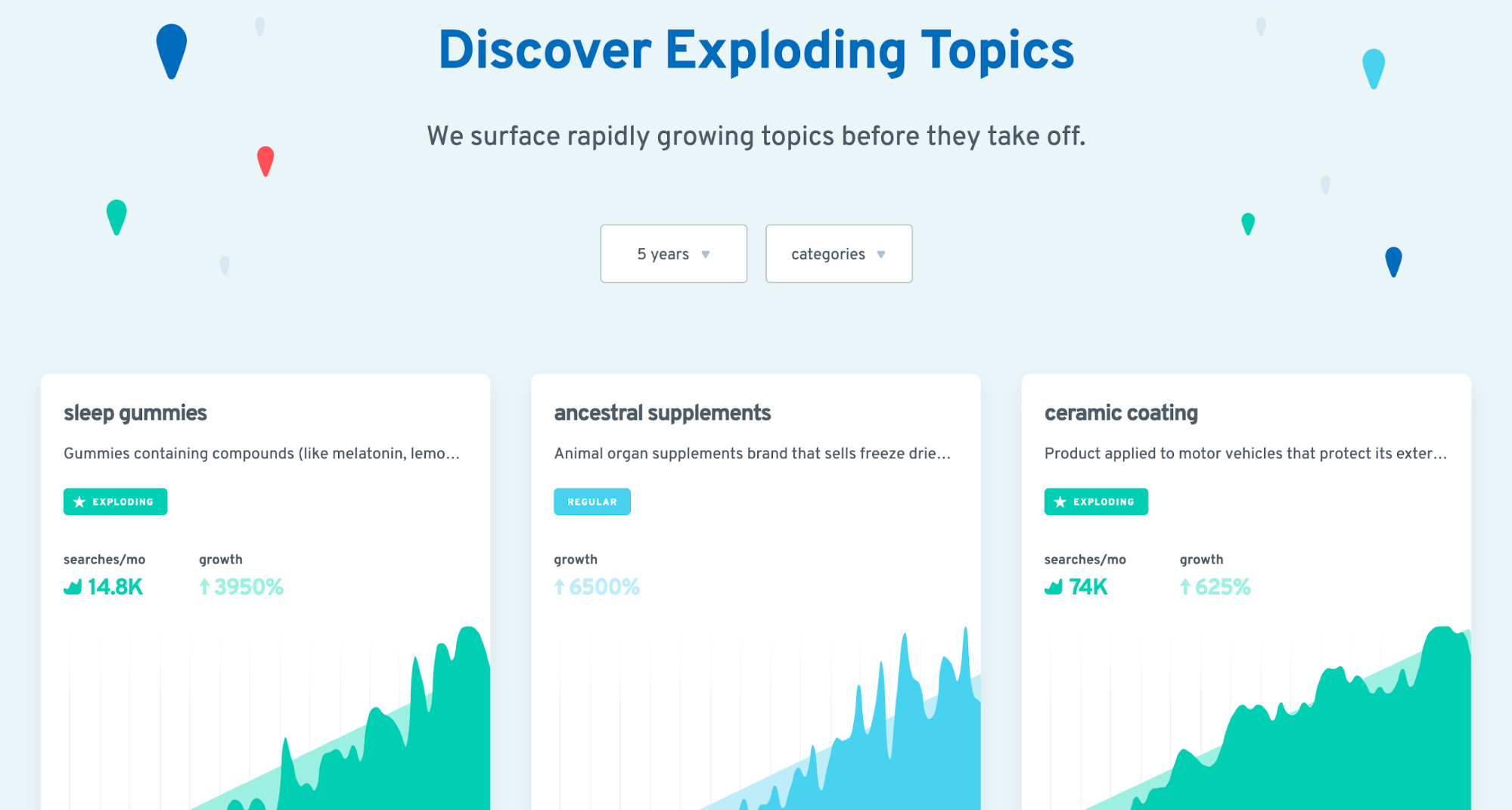
Limitations: None
SEOs often target topics with high search volume, but that means targeting topics that are already popular. What if you could find and target topics right before they hit the mainstream? Use this tool to do that.
Alternatives: Glimpse, Treendly
Generate hreflang tags for your multi-language/multi-country site

Limitations: None
If your site targets different countries or different languages, you’ll need to set up your hreflang tags properly. Unfortunately, it’s quite easy to mess up, which can cause issues for your site. Enter your site’s URL, the language and country of the URL and the tool will generate the necessary hreflang annotations for you.
25. Keyword Surfer
See search volumes and CPC data within the SERPs

Limitations: None
Install this free Chrome extension and you’ll be able to see search volumes and CPC data for any keyword you enter into Google. You’ll also see suggested keyword ideas that are related to your query.
Alternatives: WMS Everywhere
26. Google Mobile-Friendly Test
Check your site’s mobile-friendliness
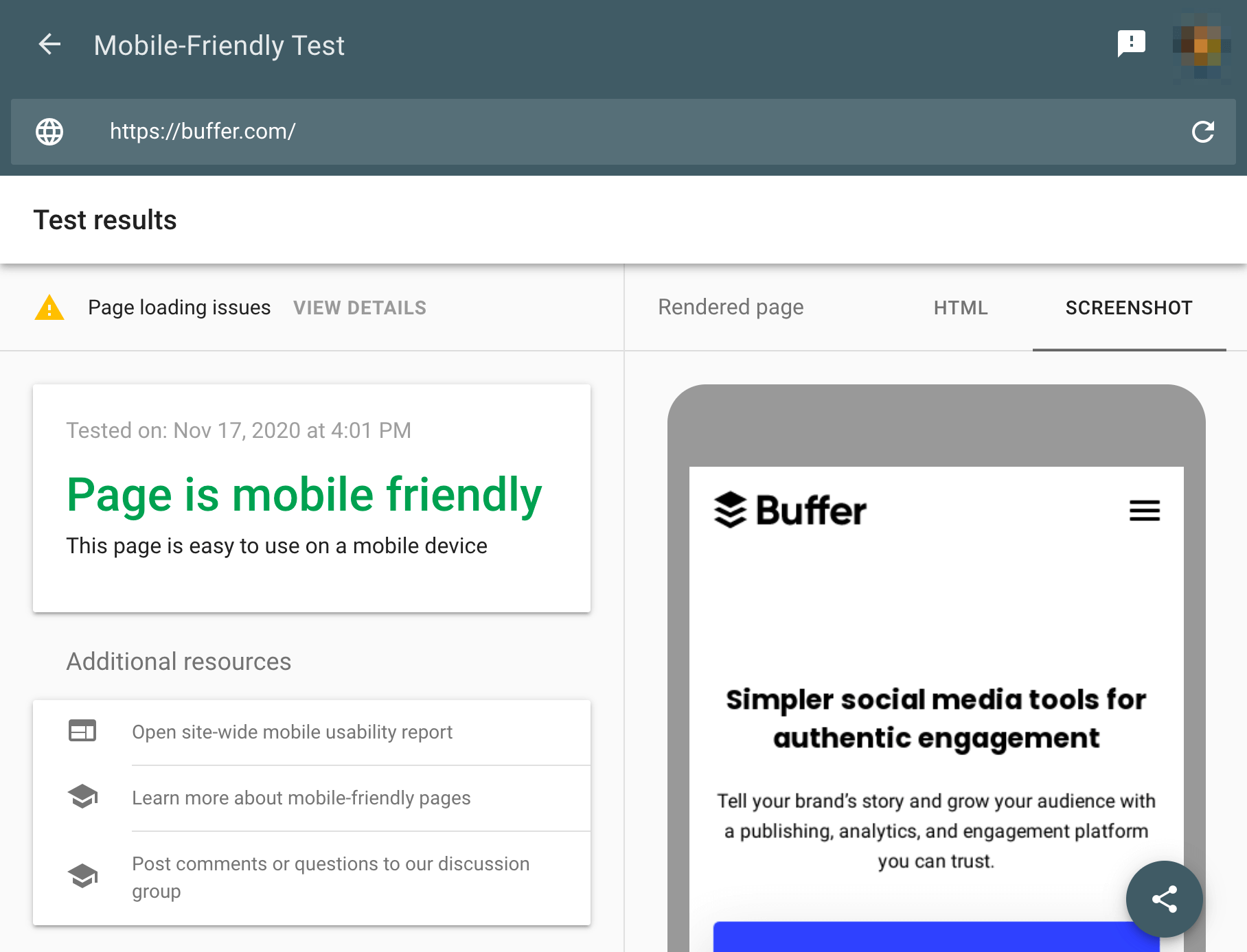
Limitations: None
Enter any URL and this tool will tell you if it’s mobile-friendly. It also tells you what went wrong and what you need to fix.
Check your website’s Domain Rating

Limitations: None
Enter your URL and see the Domain Rating (DR) of your website. Generally speaking, the higher the number, the more authoritative your website. A high DR has been shown to correlate positively with higher Google rankings. Learn more about Domain Authority from Moz.
28. GrowthBar
Best affordable SEO tool for companies keen on competitor analysis.
Purpose: Competitive research, keyword analysis, and keyword suggestions.

29. SEMrush
Purpose: All-in-one SEO, content marketing, and competitive research.
SEMrush is one of the most popular all-in-one SEO platforms available. While it’s primarily a paid tool, its free tier offers limited but useful functionality including site audit, position tracking for up to 10 keywords, and domain analytics.
Summary: How to Rank #1 on Google and Grow Your Website Traffic
Since we have been able to keep you engaged so far, it is safe to assume that you are eager to rank higher on the search engine. If you are looking for a tool that can help you identify technical SEO errors there’s Site Checker, Yoast SEO, and Seobility. If keyword research for content is your main concern our suggestions are Ahrefs, Ubersuggest, SEMrush. If you would like to know what your competitors are doing and replicate their strategy then Growth Bar, Advanced Web Ranking, and Serpstat are the ideal choices.
If you choose the right SEO software that suits your budget and also meets your SEO needs, you are surely going to see improvements in your rankings soon. You can start with the free versions of the freemium tools to determine if these are the right tools for your conversion goals, and if one or more work well for you, you always have the option to upgrade to a paid plan. You are sure to find a tool that fits your needs and budget, and once you find one that works well, stick with it. Whichever tool and plan you choose, make sure that you are maximizing all the value you can possibly get from it.
Implementation and experimentation are perhaps the most important aspects of search engine optimization – but all the results and recommendations in the world are useless if you don’t follow through and execute.
FAQ
A: For beginners, start with Google Search Console (indexing and performance data), Google Analytics 4 (traffic analysis), Ubersuggest (keyword research), and SEOquake (browser-based SEO metrics). These tools have intuitive interfaces and provide actionable insights without requiring advanced technical knowledge.
A: Free tools can handle 70-80% of daily SEO tasks, especially for smaller websites. However, paid tools offer more advanced features like bulk keyword tracking, deeper backlink analysis, and API access. Start with free tools, then upgrade as your needs grow.
A: Run a comprehensive technical audit monthly using tools like Screaming Frog or SEO Site Checkup. For ongoing monitoring, check Google Search Console weekly for indexing issues and performance changes. Use PageSpeed Insights after every major site update.
A: Ubersuggest offers limited free keyword suggestions with search volume data. AnswerThePublic is excellent for finding long-tail question-based keywords. For a Chrome extension, Keyword Surfer shows search volume directly in Google results.
A: Not necessarily. Tools like Google PageSpeed Insights and Mobile-Friendly Test provide plain-English recommendations. Others like SEOquake and SEO Site Checkup present data in visual dashboards. However, learning basic SEO concepts will help you interpret the data more effectively.
A: Yes. Many websites achieve first-page rankings using only free tools. The key is consistent action: use Google Search Console to identify underperforming pages, improve page speed with PageSpeed Insights, optimize content based on keyword research, and build quality backlinks. Free tools provide all the data you need.
A: Incognito mode in Google Chrome. Most SEOs overlook it, but it’s the only way to see unbiased, personalized-search-free results. Use it to check where your site actually ranks without your browsing history and location skewing the results.
A: Use the Classy Schema Structured Data Viewer or Google’s Rich Results Test. Both tools validate your schema implementation and show you exactly how Google interprets your structured data. Always test after adding or modifying schema markup.




Thanks for the superb article, this is one of the best information I am getting in article in a gist.
Useful for me. 🙂
Thanks for nice comments keep reading and sharing
Hi KAMI2K
It is a really good post.
What tools do you use to your traffic work?
Best regards
Thanks for comments we use ahref and moz mostly
I love this Article. Please write more article like this.
When someone writes an article he/she retains the idea
of a user in his/her brain that how a user can understand it.
Thus that’s why this piece of writing is outstdanding.
Thanks!
Thanks keep reading and sharing
Really Informative